

The API, AI, and Agents
This guide is for the reader who wants images created and managed without clicking through the app: the operations builder wiring a library into a workflow, and the developer who wants a script to upload, organize, and share. After it you will know how AI creates and edits images inside the product, how the whole Photos surface is drivable over the public REST API, and how that work stays governed by the same access checks a person passes. This is what makes Backbuild Photos a library you can automate, not just one you can browse.
AI as the In-Product Creation Seam
After this section you will hand image creation to AI. The AI image tools are the way an assistant makes and edits pictures for you: generate an image from a text prompt, fill a selection from a prompt, expand the canvas, and remove an object. They run server-side, land as new renditions in your library, and are non-destructive, so the original is never touched. The full walk-through is in AI Image Tools.
On your own AI keys or on usage credits. AI generation and prompt-based editing run on Backbuild's universal usage credits, or on your own AI provider key so the cost lands on your account. Either way the meter is visible. See Usage and Credits and the AI assistant for bringing your own keys.
The REST API
After this section you will know the library is fully scriptable. The entire Backbuild platform is drivable over the public REST API, and Backbuild Photos is no exception. From code you can manage images across all three scopes and drive the organization features around them:
- Images: upload, list, read, and delete images in the project, organization, and personal scopes.
- Albums: create, rename, and delete albums, and add, remove, and reorder their photos.
- Slideshows: build and manage slideshows and their settings.
- Sharing: grant, list, and revoke shares, and mint and revoke public links.
- Renditions and edits: read a rendered image and a thumbnail, and read and write the edit document that holds an image's layers and operations.
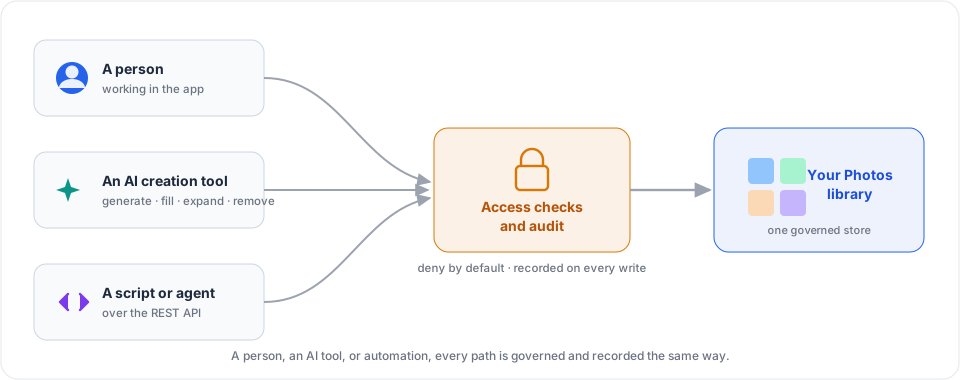
- Authenticated and organization-scoped: every call is authenticated and scoped to your organization, and gated by the same permissions as the app, so a script can never reach beyond what its identity is allowed.
- Recorded: every write is audit-logged with the acting identity and a before-and-after record, so automation keeps the same accountable trail as manual work.
For endpoints, request and response shapes, and authentication, see the REST API reference and API authentication.
Connecting an AI Agent
After this section an agent will be able to work with your images as part of a larger task. An AI agent connected to your workspace operates Backbuild Photos through the public REST API described above, under its own authenticated identity, scoped to your organization, and gated by the same access checks as the app. An agent is, in effect, a collaborator you have given specific permissions to: it can upload, organize, share, and generate images within exactly the access you grant it and nothing more, and every action it takes is recorded. How to connect an agent to your workspace is covered in MCP and Agent Integration.
Can a script upload and organize images for me? Yes. The whole library is drivable over the public REST API: upload images, build albums and slideshows, manage shares, and read renditions, all from code, under the same access checks and audit trail as the app.
Can an AI agent create and edit images? Yes. AI generation and editing (generate, fill, expand, remove) create renditions in your library non-destructively, and an agent connected to your workspace drives the library over the REST API with the permissions you grant it.
Is automation a security risk to my images? A script or an agent holds exactly the access its identity is granted and nothing more. Every call is authorized on the server and recorded, images stream through authorized URLs, and one organization's images are never reachable from another. Automation is governed like any other collaborator, not given a back door.
Where to Go Next
- AI Image Tools: the generation and editing the creation seam performs.
- Sharing, Access, and Governance: the access model automation is governed by.
- REST API Reference: the full endpoint documentation.
- MCP and Agent Integration: connect an AI agent to your workspace.