

Ticket Types, Workflows & SLAs
A ticket queue becomes a real service desk, or a real engineering tracker, when the tickets carry structure. Backbuild lets you define what a ticket is, how it moves, and what it must honor along the way, all yourself, with no consultant and no professional services engagement. You create ticket types, you draw your own workflow states and the paths between them, you attach response and resolution targets to each state, and you gate the sensitive moves behind an approval or a step-up. After this page you will be able to model an incident differently from a request, build a workflow your team will not revolt against, enforce SLAs, and connect tickets with hierarchy and relations.
Types, workflows, states, SLAs, fields, and labels are configured in Settings, then Administration, by staff with configuration access. See Administration, Routing and White-Label Support for the full setup surface.
Ticket Types: Model Different Work Differently
After this section you will be able to give different work its own shape. A ticket type defines a class of work with its own fields and its own workflow. You define the types your organization uses, for example Bug, Feature, Epic, Story, and Task for engineering, or a support type and separate types for an incident and a service request. Because each type has its own workflow and its own fields, an incident (something is broken, an unplanned disruption you need to restore) and a service request (a planned ask for something you fulfill) are genuinely different objects that move through different steps, not the same form with a dropdown.
Workflows: Your States, Your Transitions
After this section you will be able to build a lifecycle that fits your team. A workflow is a set of states and the transitions allowed between them. Every organization starts with a ready-made Support workflow so you can work tickets on day one:
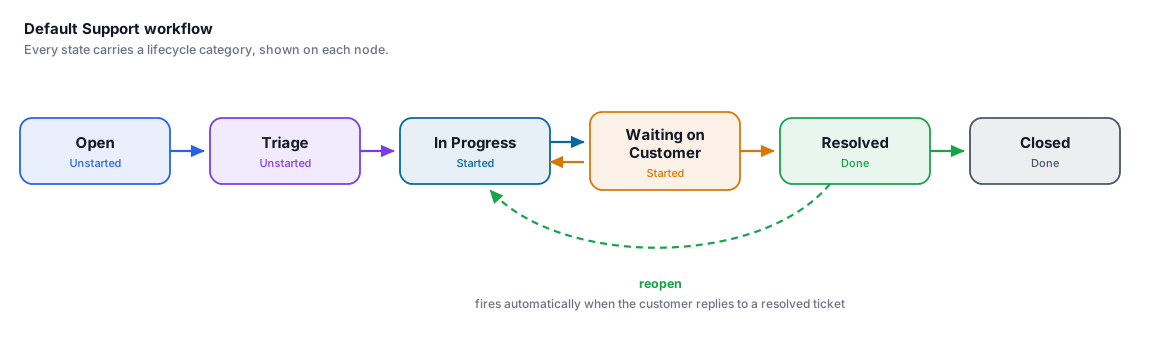
You are not stuck with it. Add, rename, and reorder states, and define exactly which transitions are legal, so you avoid the two failure modes teams complain about: a flat handful of states that cannot express your process, and a sprawling dozen nobody will follow. A support team can keep it simple; an engineering team can build a richer path, for example triage into root-cause analysis, development, test, and staged release, with the gates that path needs. Each workflow is versioned, and a ticket is pinned to the version it was created under, so changing a workflow never silently rewrites the history of tickets already moving through it.
SLAs: Response and Resolution Targets
After this section you will be able to hold the queue to a promise. Attach an SLA to a state so a ticket sitting there carries a response or resolution target. The countdown is visible on the ticket, so a breach, or an approaching breach, is something you see coming on the ticket and in a saved view, not a number you discover after the customer has already noticed. SLA anchors move with the work: the clock starts, pauses, and settles as a ticket crosses the started, done, and canceled boundaries of your workflow, and reopening a resolved ticket re-arms its timers so a reopened problem is measured honestly rather than counted as already solved.
Approvals and Step-Up on Sensitive Transitions
After this section you will be able to guard the moves that matter. A transition can require an approval before it is allowed, and a sensitive transition can additionally require a step-up re-verification from the person making it. This is how you govern a change that carries risk, for example approving a production deployment or fulfilling a privileged access request: the person must re-confirm who they are, and, where you require it, someone must approve, before the ticket can move. The gate is part of the workflow, so it applies every time, to everyone, not by convention.
Hierarchy, Relations, Labels, and Fields
After this section you will be able to connect tickets into a real object graph. Individual tickets are only half the picture; the connections are the other half.
- Hierarchy. Give a ticket a parent and children, so an Epic contains its Stories and a Story contains its Tasks. Point weights roll up the tree, so a parent reflects the total and the progress of everything under it.
- Relations. Link any two tickets as blocks, blocked by, relates to, or duplicate, so dependencies and duplicates are explicit across the whole graph.
- Labels. Tag tickets with your own labels for cross-cutting grouping and filtering.
- Custom fields. Add the structured fields your process needs, and set each field's visibility: a field can be customer-visible or internal-only, and you control who is allowed to edit it. An internal field never reaches the requester, so you can track sensitive detail on a ticket safely.
Because a customer support ticket and its engineering Bug or Epic live in the same graph, linked by relations and hierarchy, status flows between support and engineering automatically. That is the connection most teams lose when support and engineering sit in two separate tools.
What is the difference between an incident and a service request, and can I handle them differently? An incident is something broken, an unplanned disruption you restore; a service request is a planned ask you fulfill. Model each as its own ticket type with its own fields and its own workflow, so they move through genuinely different steps.
Can I customize states, fields, and SLAs myself, without a consultant? Yes. Types, workflows and their states, per-state SLAs and work-in-progress limits, custom fields, and labels are all configured in your own Administration settings, and a published change takes effect immediately.
Will I be stuck with too few states or drowning in too many? Neither. You define exactly the states and transitions your team uses, per workflow, so a support queue stays simple and an engineering process can be as detailed as it needs, without one forcing its shape on the other.
Can I restrict who sees and edits a field? Yes. Each custom field is customer-visible or internal-only, and you set who may edit it. Internal fields are never shown to requesters.
Can I require approval or a step-up on a risky transition? Yes. A transition can require an approval, and a sensitive one can also require the person to re-verify their identity, before the ticket moves. The gate is enforced by the workflow every time.
Is this real ITSM or just a support inbox? It is a configurable service desk: separate incident and request types, per-state SLAs, escalation through your states, approvals and step-up gates, hierarchy and relations, custom fields with internal visibility, and role-based access, with a complete audit trail underneath. See Security, Privacy and Governance.
Where to Next
- Administration, Routing and White-Label Support: where you create types, workflows, SLAs, fields, and labels, and route tickets in.
- The Tickets Console: the Board columns and lifecycle filters come from these states.
- AI Support with Virtual Workers: staff a workflow stage with a worker.
- Workflows and Automation: the platform workflow engine the help desk builds on.