

Tenants & Subscriptions
A tenant is one of your end customers. When you sell your product, each tenant you onboard gets their own isolated organization with completely separate data, so one tenant can never see another’s records. This page covers the full tenant lifecycle: provisioning a tenant, managing the subscription that ties them to one of your pricing plans, watching their usage, and overriding features for an individual tenant when you need to.
Pro Tenant management is part of the SaaS Builder, included with the Backbuild Pro build-and-ship platform. See pricing.
What a tenant is
Every tenant maps to its own organization, provisioned under the SaaS package they signed up for. That isolation is the whole point of multi-tenancy: each tenant’s users, projects, entities, and documents live in their own namespace, and access is always scoped to the tenant’s organization. From your side as the builder, you have a roster of tenant provisions and the subscriptions attached to them; from a tenant’s side, they simply have an account in your product.
A tenant also gets the multi-environment dimension your product offers
(development, staging, preprod,
production) so they can exercise configuration safely,
but the environment is an analytical and routing dimension within a
tenant, never a way to cross the tenant boundary.
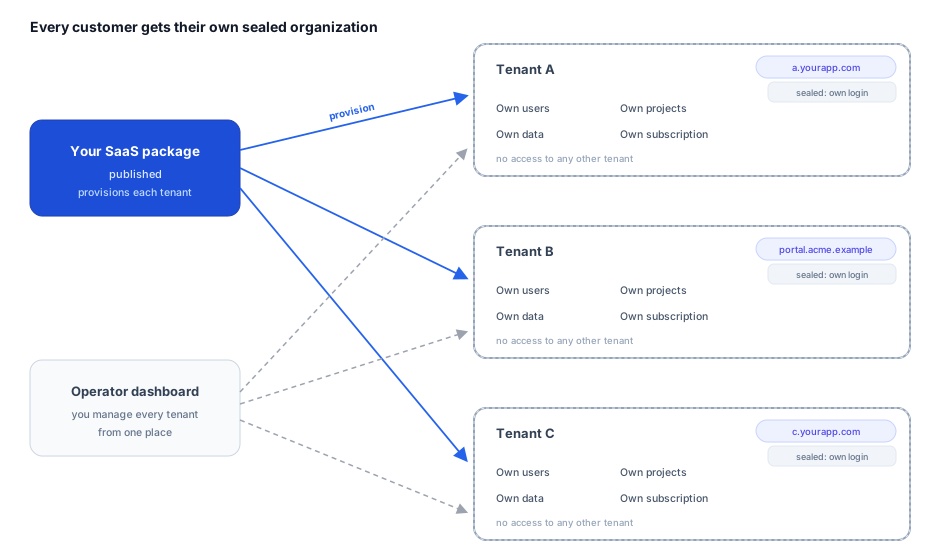
For agencies: one tenant per client, fast and isolated. Spinning up a new client is a single provisioning call, and it is idempotent on the slug, so re-running it never creates a duplicate. Each client lands in its own isolated organization (their data is separated and access-controlled, never visible to another client), and each can be served on its own subdomain or custom domain per environment. You manage the whole book from one operator view.
Onboarding a tenant
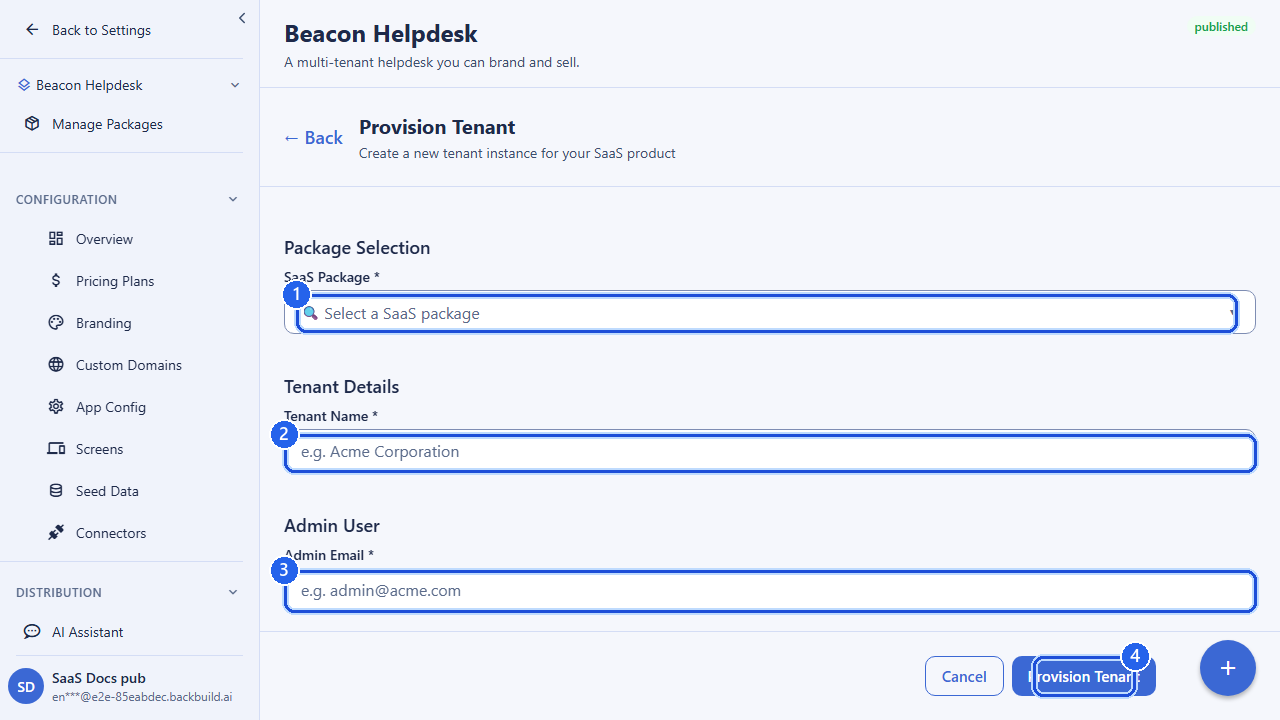
You provision a tenant by naming it, choosing a URL-safe slug, pointing it at one of your SaaS packages, and designating its first administrator. Backbuild creates the tenant organization and seeds the admin so they can log in.
POST /v1/saas-tenants
Authorization: Bearer <token>
Content-Type: application/json

{
  "saas_package_id": "019d3f6a-...-...",
  "tenant_name": "Acme Corporation",
  "tenant_slug": "acme",
  "admin_user_id": "019d4a11-...-...",
  "admin_email": "owner@acme.example",
  "admin_display_name": "Dana Operator",
  "tenant_settings": { "locale": "en-US" }
}

# Response (201)
{ "success": true, "data": { "...provision details..." } }| Field | Required | Notes |
|---|---|---|
saas_package_id | yes | The package this tenant subscribes to. Must be a package your org owns. |
tenant_name | yes | Display name, 1–255 characters. |
tenant_slug | yes | Lowercase letters, numbers, and hyphens. Used as a stable identifier; must be unique within the package. |
admin_user_id | yes | The user who becomes the tenant’s first administrator. |
admin_email | yes | Admin contact email. |
admin_display_name | no | Validated for unsafe characters (zero-width, bidi override, homoglyphs). |
tenant_settings | no | Free-form, bounded JSON for your own per-tenant configuration. |
Provisioning is idempotent on the slug: a second attempt to provision the same slug returns a conflict rather than creating a duplicate. If you supply a package your org does not own, the request is rejected as a client error, not a server fault.
Listing and inspecting tenants
Retrieve your tenant roster with GET /v1/saas-tenants, optionally
filtered by package and status and paginated, then drill into a single
provision by its ID.
GET /v1/saas-tenants?saas_package_id=019d3f6a-...&status=active&limit=50&offset=0

# Single provision
GET /v1/saas-tenants/<provisionId>
Deprovisioning
When a tenant leaves, deprovision the tenant to tear down access. You may record a reason for the audit trail. Deprovisioning is one-way and is rejected if the tenant is already deprovisioned.
POST /v1/saas-tenants/<provisionId>/deprovision
Content-Type: application/json

{ "reason": "Customer churned" }
Managing tenant subscriptions
A subscription ties a tenant (the subscriber organization) to one of your pricing plans on a package. The subscription record is what drives billing through the tenant’s payment method and unlocks the plan’s entitlements. Subscriptions live under the package they belong to.
Creating a subscription
POST /v1/saas-tenants/<packageId>/subscriptions
Content-Type: application/json

{
  "pricing_plan_id": "019d5c02-...-...",
  "subscriber_org_id": "019d4a90-...-...",
  "quantity": 5
}| Field | Required | Notes |
|---|---|---|
pricing_plan_id | yes | The plan the tenant subscribes to. |
subscriber_org_id | yes | The tenant organization being subscribed. |
stripe_subscription_id | no | Links to the Stripe subscription created during checkout, when applicable. |
quantity | no | Seat count, where the plan is seat-based. |
Upgrade, downgrade, and seat changes
Change a tenant’s plan or quantity by updating the subscription. Moving
the pricing_plan_id to a higher or lower tier is how you upgrade
or downgrade; the new plan’s entitlements and limits take effect for the
tenant, and billing adjusts to the new price.
PUT /v1/saas-tenants/<packageId>/subscriptions/<subscriptionId>
Content-Type: application/json

{
  "pricing_plan_id": "019d5c0f-...-...",
  "quantity": 10,
  "metadata": { "changed_by": "account_manager" }
}
Cancelling
Cancel a tenant’s subscription with the dedicated cancel endpoint. A second cancel on an already-cancelled subscription returns a conflict.
POST /v1/saas-tenants/<packageId>/subscriptions/<subscriptionId>/cancel
To list or inspect a tenant’s subscriptions, use
GET /v1/saas-tenants/:packageId/subscriptions (filter by
status or subscriber_org_id) and
GET /v1/saas-tenants/:packageId/subscriptions/:subscriptionId.
Usage monitoring
Track how much a tenant is consuming so you can spot growth, enforce limits, and reconcile metered billing. The plan a tenant is on defines their limits (projects, members, monthly credits); usage tells you where they stand against those limits. The billing usage rollup reports billable usage across all of an organization’s environments, or for a single environment, over a chosen window.
GET /v1/billing/usage?env_id=all&window=30d
Authorization: Bearer <token>
Use window values of 24h, 7d,
30d, 90d, or all, and pass a specific
env_id (or all) to scope or aggregate across
environments.
Per-tenant feature overrides
A tenant’s features come from the plan they subscribe to: each plan maps to a set of feature entitlements, and subscribing applies them. Sometimes you need to give a single tenant something their plan does not normally include (an early-access capability for a design partner, or a temporary restriction) without changing the plan for everyone. That is a per-tenant feature override: it grants or restricts a feature for one tenant on top of their plan entitlements, and it always wins over the plan default for that tenant.
Overrides are managed through the SaaS Builder feature-flag surface for your package, scoped to the individual tenant organization. See Feature Flags & Entitlements for how plan-level entitlements and tenant-level overrides combine to decide what a given tenant can do.
Permissions
Tenant operations are permission-gated within your organization. Provisioning,
deprovisioning, viewing, and the subscription create/update/cancel actions each
require the corresponding permission, and every state-changing call is recorded
in your audit trail with the acting user. A caller without the right permission
receives a 403; an unknown tenant or subscription returns a
404.
API reference: /v1/saas-tenants
All endpoints require authentication and are gated by the SaaS Builder entitlement.
| Method & path | Description |
|---|---|
POST /v1/saas-tenants | Provision a new tenant. Body: saas_package_id, tenant_name, tenant_slug, admin_user_id, admin_email, optional admin_display_name, tenant_settings. |
GET /v1/saas-tenants | List tenant provisions. Optional saas_package_id, status, limit, offset. |
GET /v1/saas-tenants/:provisionId | Get a single tenant provision. |
POST /v1/saas-tenants/:provisionId/deprovision | Deprovision a tenant. Optional reason. |
POST /v1/saas-tenants/:packageId/subscriptions | Create a customer subscription. Body: pricing_plan_id, subscriber_org_id, optional stripe_subscription_id, quantity. |
GET /v1/saas-tenants/:packageId/subscriptions | List customer subscriptions. Optional status, subscriber_org_id, limit, offset. |
GET /v1/saas-tenants/:packageId/subscriptions/:subscriptionId | Get one customer subscription. |
PUT /v1/saas-tenants/:packageId/subscriptions/:subscriptionId | Update a subscription (plan change / quantity / metadata). |
POST /v1/saas-tenants/:packageId/subscriptions/:subscriptionId/cancel | Cancel a customer subscription. |
Frequently asked questions
- How fast can I provision a new client, and is each isolated?
- A new tenant is a single provisioning call, idempotent on the slug so re-runs never duplicate. Each tenant is its own isolated organization with separate, access-controlled data that no other tenant can see.
- Can each client have its own subdomain or custom domain?
- Yes, one per environment. See Custom Domains.
- How do I upgrade, downgrade, or grandfather a tenant?
- Update the tenant’s subscription to a different plan to upgrade or downgrade; the new entitlements and price take effect. Existing subscribers stay on the plan they bought until you make that change, so grandfathering is the default. See Pricing Plans.
- Does the environment dimension let data leak between tenants?
- No. Environments (development, staging, preprod, production) are a routing and analytical dimension inside a single tenant, never a path across the tenant boundary.
- If I stop, can I take my whole client book with me?
- Yes. Your tenants are your organizations and your subscribers are on your own Stripe account. Both are yours to manage and export. See Owning Your Product & Data.
Related: Pricing Plans & Categories (the plans tenants subscribe to), Payments & Stripe Connect (how tenant payments settle to you), and Feature Flags & Entitlements (what each plan and override unlocks). Full request/response schemas are in the API Reference.