

Warnings, Caps, and Running Out
Limits only feel scary when their behavior is vague. This page removes the vagueness. After reading it you will know the exact sequence of events between "everything is fine" and "something is blocked," what a block does and does not stop for each usage class, why a runaway workload cannot drain your whole balance, and the fastest route back to unblocked for every situation.
The Warning Ladder
Nothing in Backbuild goes from green to blocked without warning. The sequence is always the same:
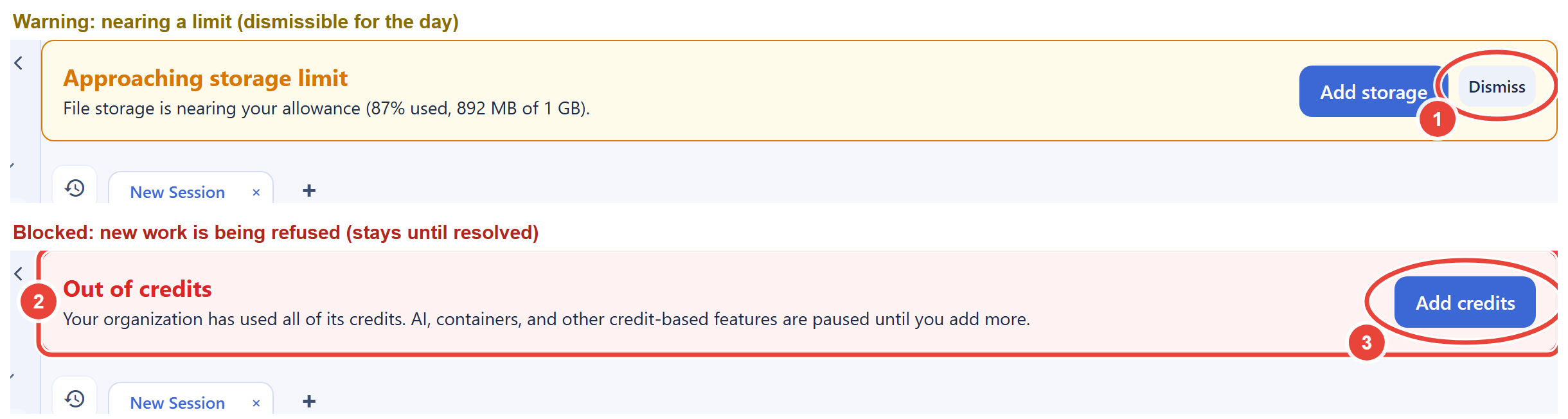
- Nearing. At 85% of a storage allowance, or when your credit balance runs low, a yellow informational banner appears on your organization's screens. It is dismissible for the day and returns only if the condition persists or worsens.
- Blocked. If a limit is actually crossed without credits to cover it, the banner turns red and stays until the condition is resolved. While new work is being refused, the banner cannot be dismissed, because hiding it would help nobody.
The banners are computed from the same live state as enforcement itself, so what a banner tells you always matches what the platform is actually doing.
What a Block Actually Stops
"Blocked" is precise, narrow, and per class. Here is the complete behavior for each metered class when it is exhausted with no credits to cover overage:
| Class | What stops | What continues |
|---|---|---|
| Real-Time Session Minutes | Opening new sync sessions | Every session already running; nothing is cut mid-stream |
| File storage | New uploads and file growth | Reading, downloading, exporting, deleting |
| Database storage | New content writes and in-place growth | Reading, searching, exporting, deleting, shrinking edits |
| Built-in AI, containers, Studio audio | The next credit-drawing action is refused at the moment you attempt it | Everything non-metered; work already in flight |
| Outbound email | Sends beyond the included allowance when credits are empty | Receiving email; sends within the allowance |
Two universal guarantees sit under that table. First, your data is always yours: reads, exports, and deletes work in every blocked state, so you can always retrieve everything or delete your way back under a limit. Second, in-flight work is never killed: exhaustion refuses the next new action rather than destroying the current one.
Per-Class Caps: Why One Runaway Cannot Drain Everything
The three deferred-settlement classes (Real-Time Session Minutes, file storage, and database storage) are each independently capped at half of your month's available credits: your banked balance plus the month's incoming credits, minus any outstanding deferred deductions. A storage surge can therefore commit at most half your pool before it is stopped, leaving the rest for AI, containers, email, and sessions.
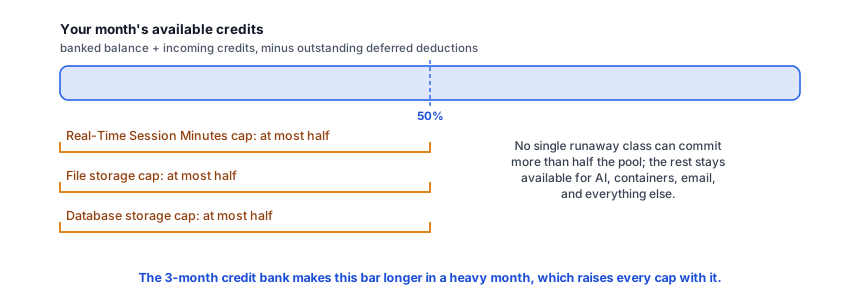
The caps work with the 3-month credit bank, not against it: banking credits in quiet months raises "available credits," which raises every cap, which is exactly what lets you burst far past a single month's allotment when you mean to.
Enforcement Timing
Usage state is re-evaluated on a regular cycle rather than on every keystroke, so a block can engage up to an hour after a line is crossed, and usage in that window meters normally. Recovery follows the same rhythm: buying credits raises your capacity immediately, pay-per-use actions that were being refused succeed as soon as you retry them, a session block clears on the next enforcement cycle, and a storage block clears once the next measurement confirms the freed space or the new capacity. The banner clears with the block.
Getting Unblocked: The Playbook
- Read the banner or error. It names the class that is limited, so you fix the right thing.
- Fastest universal fix: buy a credit package from Personal Organizations in your settings (see Universal Usage Credits). Your balance rises immediately, it works for every class, and the smallest package is $4.99 per month; refused actions succeed on retry, and blocked classes clear at their next re-evaluation.
- For storage, deleting works too. Remove data you no longer need and the meter drops from the next scheduled measurement, typically within a day. See freeing space.
- For a permanent pattern, resize. If the same class blocks repeatedly, your usage has outgrown the allowance: pick a larger credit package or a plan with bigger allowances, using the usage breakdown to size it from real numbers.
For Developers: Handling Limits Programmatically
Automation should expect limits and recover from them rather than treating them as failures. When the API refuses work for usage reasons it says so explicitly: session exhaustion returns a distinct usage-blocked error, and storage limits return errors that name the affected pool. Treat these as a signal to pause and alert, not retry-storm; the condition clears when credits are added or space is freed, not with time. Check your headroom on the Billing & Usage screen before starting a long job, and remember that in-flight work survives exhaustion, so a well-built job can finish its current unit, report the block, and resume after top-up.
Frequently Asked Questions
Will my automations die mid-run when credits hit zero?
No. Running work is never cut. The next new metered action is refused
instead, with a clear reason, and resumes once credits are available.
Do warnings really come before blocks?
Yes, always. The yellow "nearing" state precedes any block, and the red
state only appears once a limit is actually crossed without coverage.
Both are computed from the same state as enforcement itself.
Can one team member's heavy usage block the whole
organization?
Usage and credits are organization-wide, so yes, the pool is shared;
that is what makes budgeting one number instead of thirty. The
protections are the per-class caps, the warning ladder, and the
usage breakdown, which shows
which category is consuming, so an admin can act days before anyone is
blocked.
Why was I able to go slightly past a limit before the block
engaged?
Enforcement runs on a cycle, so there can be up to an hour between
crossing a line and the block engaging. That window meters normally and
settles like any other overage; it never becomes an invoice.
Is there any hidden ceiling I should know about?
The visible ones are all there are: allowances, your credit balance, and
the per-class half caps. Sends and similar actions are also subject to
ordinary fair-use burst limits that normal usage does not encounter.