

Custom Domains
Your product should live on your brand, not a Backbuild URL.
Custom domains let you serve the SaaS package you built from a domain you
own (for example app.acme.com), with a verified DNS
record proving you control it and automatic SSL once it goes live. You can
attach several domains to one package and point a distinct domain at each
environment.
Pro Custom domains are part of the SaaS Builder, included with the Backbuild Pro build-and-ship platform. See pricing.
How custom domains work
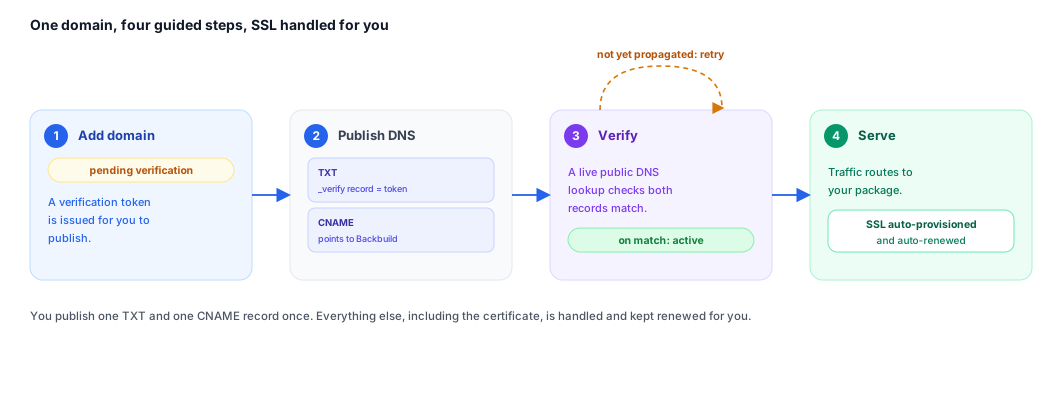
A custom domain is a hostname you register against one of your SaaS packages. Registering it does not make it live immediately. The flow is always the same:
- Add the domain. You register the hostname (e.g.
app.acme.com) against a package. The domain starts in thepending_verificationstate and Backbuild issues a unique verification token for it. - Publish DNS. You add a TXT record at
_backbuild-verify.<your-domain>containing the issued token, and point the hostname itself at Backbuild with a CNAME. - Verify. You trigger verification. Backbuild performs a
live public DNS lookup for the TXT record. If the published value matches
the issued token, the domain transitions to
active. - Serve. Once active, traffic to that hostname is routed to your package and SSL is provisioned automatically. Your tenants reach your product on your domain.
Verification is deliberately performed against a public resolver rather than on your word: the system relays only what the resolver actually returned, so a domain can never be marked verified unless the matching record is genuinely published. A lookup that fails, returns nothing, or has not yet propagated is treated as a failed verification, never as a success.
You never babysit certificates. The often-hidden cost of running customer domains is TLS: issuing certificates, renewing them before they expire, and firefighting when a renewal fails. On Backbuild that cost is zero for you. Once a domain is verified, its certificate is provisioned and renewed automatically for as long as the domain is active. Your only manual step, ever, is publishing the DNS records once.
Adding a domain
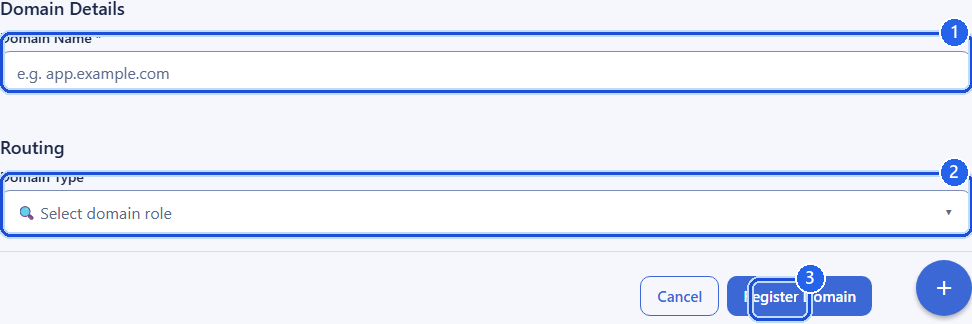
When you add a domain you choose its role on the package and, optionally, the environment and API endpoint it should use. The fields below are the ones you control.
| Field | Type | Description |
|---|---|---|
domain | string | The hostname to register, e.g. app.acme.com. Must be a valid domain name (up to 253 characters). Stored lowercase. Required. |
domain_type | string | The domain’s role: primary, alias, or subdomain. Defaults to alias. |
is_default | boolean | Whether this is the default domain for the package. Defaults to true when domain_type is primary. |
environment | string | Which environment the domain serves: development, staging, preprod, or production. Defaults to production. |
api_base_url | string | Optional. The HTTPS API endpoint the front-end served on this domain should call. Defaults to the Backbuild API base URL for the chosen environment. Must be an https:// URL. |
Adding a domain returns the full domain record, including the verification token you need to publish and the current status. The same hostname cannot be registered twice; attempting to do so returns a conflict.
Domain roles
| Role | Use it for |
|---|---|
primary | The canonical address of your product on this package. Typically also the default. |
alias | An additional hostname that resolves to the same product (e.g. a marketing alias or a legacy domain you are migrating from). |
subdomain | A scoped subdomain you serve under, such as app.acme.com beneath acme.com. |
DNS verification
To prove you control the domain, publish a TXT record at the verification
host. The host is the literal prefix _backbuild-verify. followed
by your domain, and the record value is the verification token from the
domain record.
# TXT record to publish
_backbuild-verify.app.acme.com.   TXT   "<dns_verification_token>"
After the record has propagated, trigger verification (see the API reference
below). Backbuild looks up _backbuild-verify.app.acme.com over
public DNS, finds the TXT record whose value equals the issued token, and, on
a match, moves the domain to active. If the record is missing,
still propagating, or does not match, verification fails and the domain stays
in pending_verification; you can simply retry once DNS has
caught up. DNS changes can take anywhere from a few minutes to several hours
to propagate depending on your provider’s TTL.
Routing & SSL
To route real traffic, point the hostname at Backbuild with a CNAME record in
addition to the verification TXT record. Once the domain is verified and
active, requests to that hostname are routed to your package and a TLS
certificate is provisioned and renewed automatically, so you do not manage
certificates yourself. The api_base_url you set (or the
environment default) is what the served front-end uses for its API calls, so
the same custom domain can front a development build talking to the
development API and, separately, a production build talking to the production
API.
Multiple domains and environments
A single package can carry several domains at once. A common setup is one
primary production domain plus one or more aliases, and a separate domain per
non-production environment so your team can preview staging or preprod on a
branded URL. Because each domain declares its own environment and
api_base_url, you control exactly which build and which API each
hostname serves.
Listing domains returns every domain registered to the package; you can filter by status to see only the ones still pending verification or only the active ones. Deleting a domain removes it from the package (soft delete) and stops it serving your product.
Domain status values
| Status | Meaning |
|---|---|
pending_verification | Registered, awaiting a successful DNS TXT verification. |
active | Verified and serving your product, with SSL provisioned. |
suspended | Temporarily not serving traffic. |
deleted | Removed from the package. |
Example: add and verify a domain
POST /v1/saas-packages/{packageId}/domains
Authorization: Bearer <token>
Content-Type: application/json

{
  "domain": "app.acme.com",
  "domain_type": "primary",
  "environment": "production"
}
The response includes the token to publish:
{
  "success": true,
  "data": {
    "id": "019d...",
    "domain": "app.acme.com",
    "domain_type": "primary",
    "status": "pending_verification",
    "dns_verification_token": "bb-verify-7f3c...",
    "environment": "production"
  }
}
Publish the TXT record, wait for propagation, then verify:
POST /v1/saas-packages/{packageId}/domains/{domainId}/verify
Authorization: Bearer <token>
On a successful lookup the returned record shows status: "active"
and your product begins serving on app.acme.com.
API reference
All endpoints require an authenticated session and the relevant custom-domain
permission (organization owners and admins hold these by default). The owning
organization is resolved from your session;
{packageId} is the SaaS package the domain belongs to and
{domainId} is the registered domain.
Package-scoped domains live under the package; an equivalent set of
/v1/org/domains endpoints exists for domains registered to the
organization rather than to a single package. The
/:packageId/custom-domains paths are accepted as aliases of the
/:packageId/domains paths for backward compatibility.
List domains
GET /v1/saas-packages/{packageId}/domainsQuery parameters
| Parameter | Type | Description |
|---|---|---|
status | string | Optional filter: pending_verification, active, suspended, or deleted. |
limit | integer | Page size (1–200). |
offset | integer | Number of domains to skip. |
Returns the domains registered to the package, with pagination metadata.
Add a domain
POST /v1/saas-packages/{packageId}/domains
Body fields are described in the “Adding a domain” section above.
domain is required; domain_type,
is_default, environment, and
api_base_url are optional. Returns the created domain record
(including dns_verification_token) with
201 Created. Registering an already-registered hostname returns
409 Conflict.
Get a domain
GET /v1/saas-packages/{packageId}/domains/{domainId}Returns the full domain record, including its status and verification token.
Verify a domain
POST /v1/saas-packages/{packageId}/domains/{domainId}/verify
Performs a live public DNS lookup for the TXT record at
_backbuild-verify.<domain> and, on a match with the issued
token, activates the domain. Returns the updated domain record. A
missing, mismatched, or not-yet-propagated record leaves the domain in
pending_verification; retry after DNS propagates. No
request body is required.
Delete a domain
DELETE /v1/saas-packages/{packageId}/domains/{domainId}Removes the domain from the package (soft delete) and stops it serving traffic.
Organization-level domains
The same operations are available for domains registered to the organization instead of a single package:
GET    /v1/org/domains
POST   /v1/org/domains
GET    /v1/org/domains/{domainId}
POST   /v1/org/domains/{domainId}/verify
DELETE /v1/org/domains/{domainId}
These accept the same fields and follow the identical add → publish DNS → verify → serve flow described above.
Frequently asked questions
- Is SSL automatic, or do I have to manage certificates?
- Automatic. Once a domain is verified, its TLS certificate is provisioned and renewed for you. There is nothing to install, rotate, or monitor.
- What do I actually have to do myself?
- One DNS step: publish the verification TXT record and point the hostname at Backbuild with a CNAME. After that, verify, and the domain goes live. No further manual work.
- Verification failed. Did I do something wrong?
- Usually not. A missing, mismatched, or not-yet-propagated record leaves the domain in pending, and you simply retry once DNS has caught up. Propagation can take from a few minutes to several hours depending on your provider’s TTL.
- Can my customers reach my product on my domain, not a Backbuild URL?
- Yes. Once active, traffic to your hostname is routed to your package and served under your brand. Backbuild’s URL does not appear.
- Can I use a different domain for staging and production?
- Yes. Each domain declares its own environment and API endpoint, so you can preview staging or preprod on a branded URL separate from your production domain.
Related
- Marketing Pages: build the landing pages your domain serves
- Branding & Themes: the brand your domain serves under
- SaaS Packages: the product a domain points at
- SaaS Builder overview