

Shared Mailboxes and Delegation
A team address like support@ or hello@ should be workable by several people at once, without duplicate replies and without buying a full seat for the address itself. This guide teaches you to share a mailbox with teammates, control what each of them can do, work the inbox together in real time, and provision mailboxes for members automatically. After this page your team will run a shared inbox cleanly, and you will know exactly who can do what.
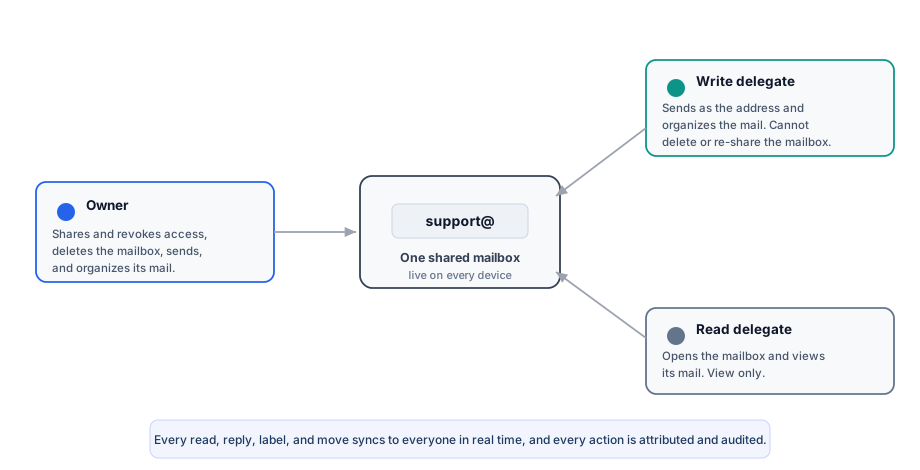
Share a Mailbox
After this section you will be able to give teammates access to a mailbox. A mailbox is owned by one person, and the owner can share it with other people in the organization. Sharing uses the same model you already use to share documents, so it is familiar: you grant a specific person a specific capability.
- Read access lets a teammate open the mailbox and see its mail.
- Write access lets a teammate act on the mailbox: send as the address, and organize its mail.
- No extra seat for the address. A shared address is a mailbox others are granted into, not a separately licensed user account, so you do not pay a per-seat charge just to let the team work support@.
Shared Mailbox, Alias, or Distribution Address
After this section you will know which tool fits which need. These three things are often confused.
- A shared mailbox is a real inbox that several people are granted into. Everyone works the same mail, sees the same state, and (with write access) can reply as the address. This is what you want for a team address like support@.
- An alias is an additional address that delivers into an existing mailbox. It is a routing convenience, not a separate workspace for a team.
- A distribution or catch-all address spreads or gathers mail across addresses. It is about where mail goes, not about several people collaborating on one inbox.
Can several people work one support@ inbox without paying a full seat each? Yes. Share the mailbox to the teammates who work it, each with read or write access. The shared address is a mailbox, not a separately licensed account, so there is no per-seat charge for the address itself.
What is the difference between a shared mailbox, a delegated inbox, and a distribution address? A shared (delegated) mailbox is a real inbox multiple people are granted into and can reply from; an alias just routes another address into a mailbox; a distribution or catch-all address is about spreading or gathering mail, not collaborating on one inbox.
Work the Inbox Together, Live
After this section you will understand what your team sees in real time. A shared mailbox is one live object shared by everyone granted into it. When one person reads a message, stars it, changes a label, moves it, or replies, that change appears for everyone instantly, on every device. Your team never disagrees about what has been handled, and you avoid two people unknowingly answering the same message.
If one person reads, replies, or stars, does everyone see it instantly? Yes. State changes on a shared mailbox propagate live to everyone who shares it, on every device, so the whole team stays in sync in real time. This is a core difference from delegation models that do not update in real time.
Does the shared mailbox work on mobile and every device? Yes. The same real-time shared state reaches every device each person signs in from, through the Backbuild web app and the Backbuild desktop app.
Govern Who Can Do What
After this section you will be able to answer an access review. Access to a mailbox is deny-by-default: only the owner and the people the owner has shared it with can see or act on it, and only to the capability they were granted.
- Read versus write: a read delegate can view mail; a write delegate can send as the address and organize its mail. Nothing beyond the granted capability is possible.
- Owner controls: only the owner can delete the mailbox, and the owner controls sharing, so access can be revoked at any time.
- Organization-scoped: sharing is within your organization; a mailbox is never exposed across organizations.
- Attributable and audited: every action on a shared mailbox, sending, moving, labeling, deleting, is recorded in an append-only audit trail attributed to the person who did it, so you always know who replied or changed what.
Who can send, delete, or manage a shared mailbox? A write delegate can send as the address and organize its mail. Only the owner can delete the mailbox and manage who it is shared with, so the owner can revoke access at any time. Every action is attributed to the person who performed it.
Who exactly can access a mailbox, and is it audited? Only the owner and the people the owner explicitly shares it with, each limited to read or write, all within your organization. Every write is audit-logged with the acting person, so an access review has a complete, attributable trail.
Auto-Provision Mailboxes for Members
After this section admins will be able to hand the whole team addresses without creating each one by hand. On a verified domain, an administrator can set a policy that automatically creates mailboxes for members of the organization, and a member can provision their own mailbox on that domain. This is how you give a new hire name@your-domain without a manual setup step for every person. Managing domains and the permissions that gate them is covered in Sending Domains and DNS Verification.
Related Guides
- Mailboxes, Inbox, and Reading: the real-time inbox and how mail is stored and protected.
- Sending Domains and DNS Verification: verify the domain that mailboxes live on.
- Roles and Permissions: how organization roles and permissions work across the workspace.