

Rich Cells, LaTeX Math, Images, and Links
This guide is for the reader whose data needs more than plain numbers: the researcher annotating a results table, the analyst documenting a model, and anyone who has wanted real mathematical notation inside a cell. After it you will be able to put formatted rich text, live LaTeX math, images, and links directly into cells, and expand a cell into a full mini-document when a note outgrows the grid. This is a capability mainstream spreadsheets do not offer, and its boundaries are stated plainly so you know exactly what renders.
Rich-Text Cells
After this section you will format the contents of a cell like a document, not just a value. A cell can hold structured rich text edited with the same editor that powers Backbuild Docs, embedded directly in the grid. That means a cell is not limited to one font and one value: it can carry emphasis, multiple text runs, lists, and structure.
- Marks and type: bold, italic, underline, strikethrough, superscript and subscript, and font family and size.
- Structure: headings, bullet and numbered lists, blockquotes, per-block alignment and indentation, and named styles.
- References: links and footnotes, and even nested editable tables inside a cell for a small structured note.
This is what turns a data table into an annotated one: a cell can explain itself, cite a source, or carry a formatted caption alongside the numbers.
Live LaTeX Math in a Cell
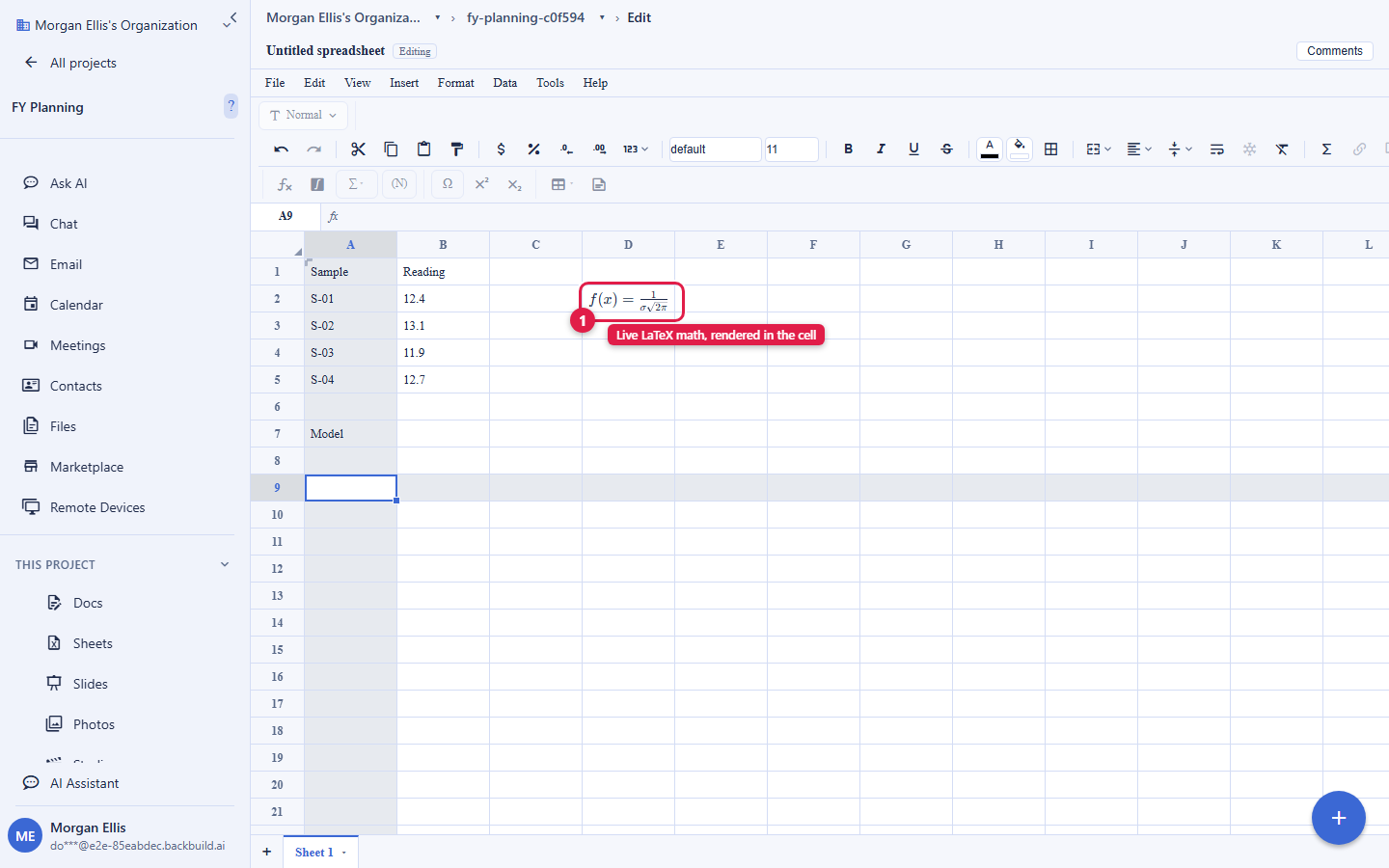
After this section you will write real mathematical notation inside a cell. A cell can hold live mathematical notation, inline within text or as a display equation, rendered through the same sanitized pipeline as Backbuild Docs. Instead of pasting an image of an equation or hacking superscripts, you write the math and the cell renders it, which is exactly what a scientific or engineering table needs.
What is supported: a KaTeX-class subset of LaTeX, not a full TeX distribution. The math renders the widely-used set of LaTeX math commands that a browser math renderer supports (fractions, roots, sums, integrals, Greek letters, matrices, operators, and the common symbols), which covers the notation most tables and papers use. It is not a complete TeX engine, so an arbitrary or exotic LaTeX macro is not guaranteed to render. When you need a submission-ready typeset build of a whole document, author it in Backbuild Docs and, with Backbuild Science, download the LaTeX source for your journal or pipeline to compile.
Expanding a Cell into a Mini-Document
After this section you will write a longer note without cramming it into a cell. When a cell's content outgrows the grid, expand it into a full editor in a modal, the same authoring surface as a document, and write freely with all of its formatting, then collapse it back. The grid stays a grid, and a cell that needs a paragraph gets one.
Images and Hyperlinks in the Grid
After this section you will place images and links directly in a sheet. Two ways to add an image, chosen by whether you want to store it or reference it:
- Upload an image into a cell. An uploaded image goes through the workspace's content-addressed asset pipeline, which strips location and camera metadata and checks the file's real type, and it is stored against your project under the same access control as the sheet. This draws on your plan's file-storage allowance; see File vs Database Storage.
- Reference an image by URL with
=IMAGE("https://..."). The cell renders the image from an https address in your browser. It is a display convenience, not a stored asset, so the image lives at that address rather than in your workspace. - Hyperlinks: add a link to a cell, including with the
=HYPERLINKfunction, to point at a document, a record, or an external page.
Can I really write LaTeX math inside a spreadsheet cell? Yes, and it renders live, inline or as a display equation, using the same editor as Backbuild Docs. The supported set is a KaTeX-class subset of LaTeX math, which covers the notation most tables and papers use (fractions, roots, sums, integrals, Greek letters, matrices, and the common operators and symbols). It is not a full TeX engine, so an arbitrary macro may not render. For a fully typeset document, author in Backbuild Docs and export the LaTeX source with Backbuild Science.
Which LaTeX commands work? The math commands a browser math renderer supports. If a command is part of the common KaTeX-supported math set, it renders; a niche or custom macro outside that set is not guaranteed to. When in doubt, write the equation and check that it renders in the cell.
Why use a spreadsheet for this at all instead of a notebook or a script? Because the numbers, the notation that explains them, the audit trail of who changed what, and the people you share it with all live in one place. A cell can hold the result and the equation that produced it, a colleague can co-edit the same grid, and you can export the whole thing as a portable SQLite database for a reproducible record (see Importing and Exporting). That combination is what a spreadsheet gives that a bare script does not.
Where to Go Next
- Formulas, Functions, and the Calculation Engine: the statistics and math behind an annotated results table.
- Importing and Exporting: take a workbook out as a portable SQLite database for a reproducible record.
- Collaboration, Comments, and Sharing: co-author a research table with your group.