

Expenses, Bills and Mileage
The money going out matters as much as the money coming in, and capturing it as you go is what keeps your deductions, your profit-and-loss, and your tax-time export honest. This guide teaches the whole money-out side of Backbuild Finances: logging an expense, entering and paying a bill, tracking vendors and the contractors you will owe a 1099, capturing a receipt so you are not keeping a shoebox, and recording mileage. After this page you will be able to record any cost correctly and find it again when you need it.
Expenses, bills, vendors, 1099 tracking, and mileage are part of the back office, free for teams up to 50 seats. See the pricing page.
Log an Expense
After this section you will record a cost in seconds. An expense is a cost you have already paid, as opposed to a bill you still owe. From the Finances sidebar go to Expenses.
- Choose New expense, pick the account it should post to (for example software, travel, or supplies), and enter the amount and date.
- Attach the vendor you paid and, if it is billable back to a customer, mark it so it can be added to that customer's next invoice.
- Save. The expense posts to the right account, so it lands in your profit-and-loss and your deductions without a second step.
Categorizing at the moment you spend is the whole trick to a painless year-end: every cost is already on the right account, so your tax preparer gets a clean export instead of a pile of uncategorized transactions.
Enter and Pay a Bill
After this section you will track what you owe. A bill is money you owe a vendor and have not yet paid. Recording bills is what gives you an accounts-payable picture and stops surprises.
- Go to Expenses, then Bills, and choose New bill.
- Select the vendor, add line items against the right expense accounts, and set the due date.
- When you pay it, record the payment against the bill and choose the account it came from. The payable clears and the payment posts to your ledger.
The accounts-payable aging view groups what you owe by how soon it is due, so you can manage cash and never miss a vendor deadline. If you record something in error, you can void it, which reverses the posting and keeps your trail intact.
Vendors and 1099 Contractors
After this section year-end 1099s will be a report, not a scramble. Each vendor has a record with their contact details, the running total you have paid them, and a statement you can send.
- Open a vendor and turn on the 1099 flag for anyone you pay as a contractor and will need to issue a form to.
- At year-end, run the 1099 report, which totals what each flagged vendor was paid for the year, so the people who need a form are found in one place instead of hunted through a year of transactions.
Contractor payments are part of the free back office. This tracks and totals what you paid; issuing and filing the government forms themselves is your responsibility or your accountant's, and the report is what makes that quick.
Capture a Receipt or Statement
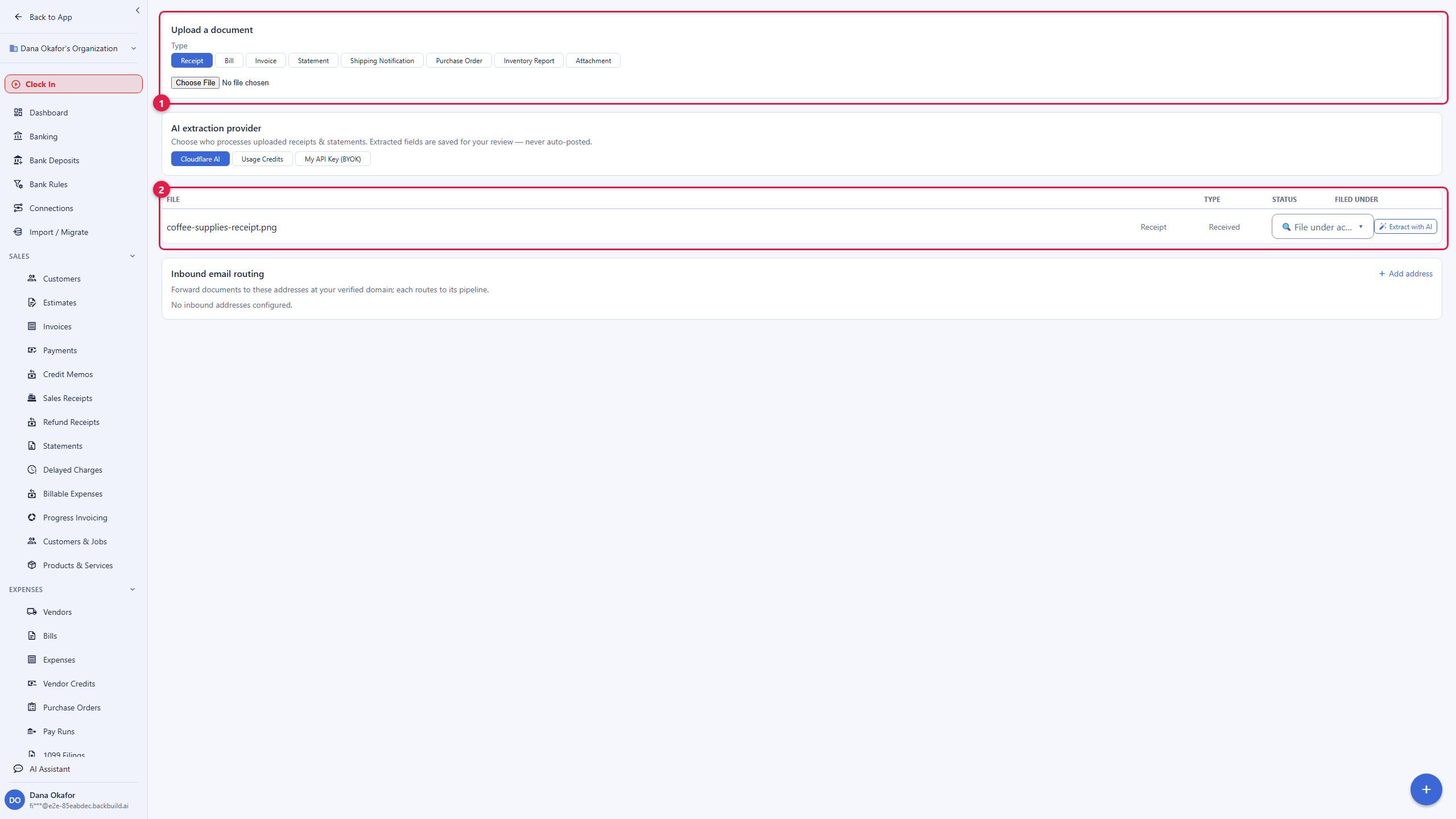
After this section your shoebox is gone. Instead of keying a receipt by hand, you can upload it and let the assistant read it.
- Open Documents in Finances and upload a receipt, a bill, or a bank statement (a photo or a PDF).
- The document is listed with its status, and you can run extract to have the assistant pull the structured data (vendor, date, amount, line items) into a draft.
- You review the draft and decide what posts. Nothing goes into your ledger on its own; the extraction is a starting point you approve, not an automatic entry.
That review step is deliberate. Accounting is exactly the place where you want a human to confirm before anything hits the books, and Backbuild Finances is built that way. See Access, Security and the API for how the AI is bounded.
Record Mileage
After this section your drives become a deduction. If you claim vehicle costs, mileage has to be logged to count.
- Open Mileage, add a trip with the date, distance, and purpose, and choose the vehicle.
- Post the mileage to your ledger so it lands as a cost on the right account and shows up in your reports and deductions.
Keeping mileage in the same books as everything else means your year-end picture is complete, with no separate mileage app to reconcile against.
What is the difference between an expense and a bill? An expense is a cost you have already paid; a bill is money you owe and will pay later. Bills give you an accounts-payable picture; expenses post straight to the account you choose.
Can it read my receipts so I stop typing them? Yes. Upload a receipt or statement and run extraction to pull the details into a draft. You review and approve before anything posts; nothing is entered automatically.
Is mileage built in? Yes. Log trips with distance and purpose and post them to your ledger, so vehicle costs are captured with the rest of your books.
How do I handle 1099 contractors? Flag the vendor as 1099 and, at year-end, run the 1099 report to total what each one was paid. That finds everyone who needs a form; issuing the forms is done by you or your accountant.
Can I bill an expense back to a customer? Yes. Mark an expense as billable and it can be added, with any markup you set, to that customer's next invoice.
Where to Next
- Banking and Reconciliation: bring in transactions and match them so your books agree with the bank.
- Reports and Sales Tax: see your spending in the profit-and-loss and payables aging.
- The Accounting Ledger: the accounts your expenses and bills post to.
- Payroll and Contractors: paying the people who work for you.