

Release Management & Distribution
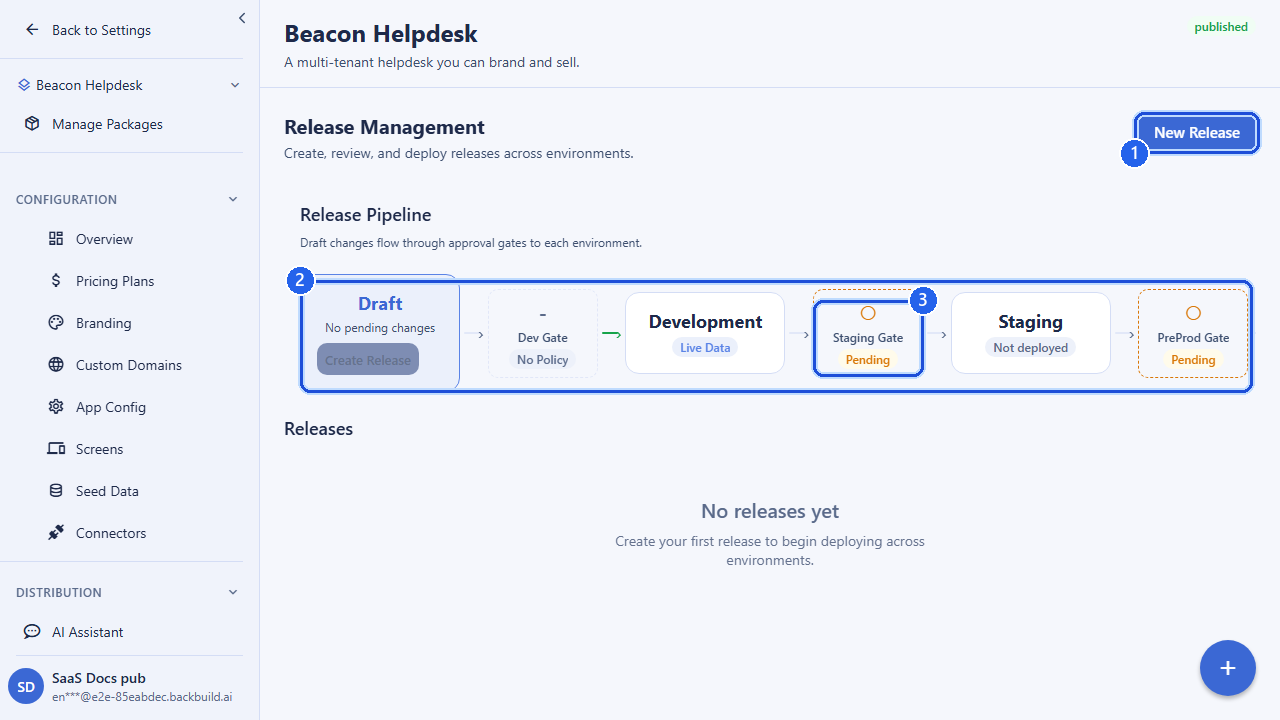
A release is a named, versioned snapshot of your SaaS package: the exact configuration state your product is in at the moment you cut it. Once captured, a release is the unit you promote forward: you deploy it to development, test it, request approval, and ship it through staging, preprod, and production to your live tenants. The same area also covers desktop distribution: publishing signed, auto-updating builds of your product that installed clients pull from your own update channels.
Pro Release management and distribution are part of the SaaS Builder, included with Backbuild Pro. See pricing.
Two layers of shipping
The SaaS Builder gives you two complementary shipping mechanisms, and most products use both:
- Releases & environment promotion. Capture your configuration as a versioned release and move it forward through your environments with approval policies, compliance checks, and controlled rollouts. This governs what configuration your tenants run.
- Desktop / app distribution. Publish downloadable,
cryptographically signed builds of your product (per OS and architecture)
onto named channels such as
stableorbeta, and let installed clients check for and pull the right update. This governs the binaries your end users install.
The two share the same vocabulary (versions, channels, promotion, rollback) but operate on different artifacts. The first half of this page covers releases and environment promotion; the second half covers desktop distribution.
The release lifecycle
Every release moves through a small set of statuses. You create a release as
a draft, exercise it, and advance it as it earns confidence.
| Status | Meaning |
|---|---|
draft | Freshly created. The captured configuration is editable and not yet promoted. |
testing | Under active verification, typically deployed to development or staging. |
approved | Signed off and cleared to promote toward production. |
rejected | Failed review; will not be promoted as-is. |
archived | Retired. Kept for history and diffing but no longer shipped. |
A typical flow: create a release → deploy it to development
→ move it to testing → request approval for
staging → deploy to staging → repeat for
preprod and production. Each promotion is an
explicit, audited step, and production deployments can be gated behind a
multi-approver policy (see Approval policies).
Environments
Your product runs across four logical environments, in promotion order:
development, staging, preprod, and
production. Development is where drafts land first; production is
where your paying tenants live. You can ask a package which release is
currently deployed to each environment, and pull the full deployment history
per environment to see what shipped, when, and by whom.
Deploying a release
Deploying a release applies its captured configuration to a target environment. You choose the environment and, optionally, how the change reaches your tenants by selecting a rollout strategy.
| Strategy | Behavior |
|---|---|
immediate | The release takes effect for everyone in the target environment at once. |
targeted | The release is applied only to a specific list of tenant organizations you name. |
percentage | The release is applied to a fixed percentage of tenants: a single-step canary. |
progressive | The release rolls out in scheduled stages, each widening the audience after an optional wait, advancing automatically. |
For a progressive rollout you supply an ordered list of stages, each with a
target_percentage (1–100) and a wait_hours
delay before the next stage begins. Backbuild schedules the stage
transitions for you; you can watch progress, advance manually, pause, or
cancel at any time (see Rollouts). Deploying also
refreshes the served application configuration so the new snapshot takes
effect for clients bootstrapping against that environment.
Example: progressive deploy to production
POST /v1/saas-packages/{packageId}/releases/{releaseId}/deploy
Authorization: Bearer <token>
Content-Type: application/json

{
  "environment": "production",
  "rollout_strategy": "progressive",
  "rollout_stages": [
    { "target_percentage": 10, "wait_hours": 24 },
    { "target_percentage": 50, "wait_hours": 24 },
    { "target_percentage": 100, "wait_hours": 0 }
  ],
  "notes": "Phased ship of the Q3 billing changes"
}
Rolling back and undeploying
If a deployment misbehaves, you have two recovery paths:
- Rollback reverts a
staging,preprod, orproductionenvironment to its previously deployed release. It is the fast way to get tenants back onto a known-good configuration. - Undeploy removes the active deployment from a
staging,preprod, orproductionenvironment entirely.
Both record notes for the audit trail. Rollback can be gated by a rollback-authorization approval policy if you require sign-off before reverting production.
Approval policies
Promotions into protected environments can require explicit, multi-party approval before they proceed. An approval policy is defined per package and per category, the kind of action it governs.
| Category | Gates |
|---|---|
staging_promotion | Promotion into staging. |
preprod_promotion | Promotion into preprod. |
production_deployment | Deployment to production. |
security_review | A required security sign-off. |
compliance_review | A required compliance sign-off. |
rollback_authorization | Authorizing a rollback. |
Each policy carries a rules tree: a boolean composition of
approval conditions. The top level is an AND/OR
node whose conditions are either further boolean nodes or
individual approval requirements. Supported leaf conditions are:
| Condition | Requires |
|---|---|
specific_users | A required_count of approvals from a named set of users. |
role | A required_count of approvals from members holding a given role. |
group | A required_count of approvals from one or more groups (optionally one from each). |
cross_role | Approvals spanning multiple distinct roles: a minimum number of roles represented and a minimum total approvals. |
This lets you express policies such as “two senior engineers and one compliance officer” or “any three of these five named approvers.” The rules tree is bounded in nesting depth, and approvers cannot approve their own request, enforcing separation of duties.
The approval workflow
- Request approval for a release against a target environment. This opens an approval request keyed to the policy for that category.
- Approve or reject: each authorized approver records their decision (with an optional comment, or a required reason on rejection).
- Check status at any time to see how the policy currently evaluates: who has approved, what is still outstanding, and whether the gate is satisfied.
Requesting approval before any policy exists for that category returns a conflict, so define the policy first. Once the policy is satisfied, the release becomes eligible to deploy to that environment.
Comments, compliance & diffs
Releases are collaborative. You can attach threaded
comments to a release (typed as
general, bug, test_pass,
test_fail, approval, rejection, or
task, and optionally scoped to a specific environment) to
keep test results and decisions next to the release they concern.
Before promoting, you can run a compliance check against a target environment to surface anything that would block the promotion. You can also diff two releases to see exactly what changed in the captured configuration between them, which is the basis for an informed approval. To branch new work off a shipped release, import it back into a fresh draft to edit and re-version.
A release also exposes its items (the version-pinned manifest of exactly what configuration the release contains), so you can inspect or audit the precise contents of any version.
Rollouts
When you deploy with a targeted, percentage, or
progressive strategy, Backbuild creates a rollout
plan that tracks how the release is reaching tenants. You can also
create a rollout plan explicitly against an existing active deployment.
Against a plan you can:
- Get status: per-stage progress, current percentage, and which tenants are covered.
- Advance: manually move a progressive rollout to its next stage instead of waiting for the scheduled delay.
- Pause: halt further widening (for example, while you investigate a metric), optionally with a reason.
- Cancel: stop the rollout entirely.
Progressive rollouts advance on their own schedule between stages; pausing or cancelling also stops the scheduled advance.
Desktop & app distribution
Beyond configuration releases, the distribution layer publishes signed, downloadable builds of your product and serves auto-update information to installed clients. The model is: a product has many versions; each version carries one or more artefacts (one per OS / architecture); versions live on named channels; and clients query the current version for their channel to know whether to update.
Publishing a version
Publishing is a staged, integrity-checked pipeline so a half-uploaded build is never served:
- Register / update the product (by slug): its display name, branding, optional custom domain, and data residency (
usoreu). - Start a version: declare the version string and the channel it targets. This opens a staged version you add artefacts to.
- Add artefacts: one per OS/architecture, each with its R2 storage key, archive format,
sha256hash, size, and any OS-specific signature metadata. - Complete: attach release-notes URL, minimum supported OS, and whether the update is a required upgrade.
- Finalize: submit the signed manifest (its
sha256and Ed25519 signature). Finalizing makes the version eligible to serve.
You can cancel a still-staged version before it is finalized. The hashes and the signed manifest are what let clients verify that what they downloaded is exactly what you published.
Channels, promotion, rollout & yanking
- Promote a version from one channel to another (e.g. move a
betabuild tostable) without re-uploading artefacts. - Set a rollout percentage on a published version so only a fraction of clients on that channel are offered it: a staged desktop rollout.
- Yank a version to immediately stop offering it (e.g. a regression slipped through), with a recorded reason.
Signing keys
Update integrity rests on a published signing-key chain. You register Ed25519 signing keys (and may chain a successor key signed by its predecessor for rotation), and revoke a key with a reason when it should no longer be trusted. Installed clients fetch the public key chain to validate every manifest they receive.
What clients call (public)
Installed apps are anonymous, so the update-check endpoints are public and
require an explicit org_id (the client cannot be inferred). They
return only public-safe fields:
- The current version for a product on a channel; the client passes its current version and an optional install identifier so you can honor staged rollout percentages.
- The public signing-key chain, so the client can verify the manifest signature before installing.
API reference
Unless marked public, every endpoint requires an authenticated
session and the relevant release or distribution permission (organization
owners and admins hold these by default). The owning organization is resolved
from your session. {packageId} is the SaaS package,
{releaseId} a release within it,
{rolloutId} a rollout plan, and {slug}
a distribution product slug. Successful reads and writes return a
{ "success": true, "data": ... } envelope.
Releases
| Method & path | Description |
|---|---|
POST /v1/saas-packages/{packageId}/releases | Create a release (captures current configuration). Body: release_name (required), release_notes. |
GET /v1/saas-packages/{packageId}/releases | List releases. Query: status, page, limit. |
GET /v1/saas-packages/{packageId}/releases/{releaseId} | Get a single release. |
PATCH /v1/saas-packages/{packageId}/releases/{releaseId}/status | Update status: testing, approved, rejected, or archived (optional reason). |
GET /v1/saas-packages/{packageId}/releases/diff?from={id}&to={id} | Diff two releases. |
GET /v1/saas-packages/{packageId}/releases/{releaseId}/items | List the version-pinned manifest items in a release. |
POST /v1/saas-packages/{packageId}/releases/{releaseId}/import-to-draft | Import a release back into a fresh draft. Body: environment. |
Deployment
| Method & path | Description |
|---|---|
POST /v1/saas-packages/{packageId}/releases/{releaseId}/deploy | Deploy to an environment. Body: environment (required), rollout_strategy, target_org_ids, target_percentage, rollout_stages, notes. |
POST /v1/saas-packages/{packageId}/releases/{releaseId}/rollback | Roll an environment back to its previous release. Body: environment (staging/preprod/production), notes. |
POST /v1/saas-packages/{packageId}/releases/{releaseId}/undeploy | Remove the active deployment from an environment. Body: environment, notes. |
GET /v1/saas-packages/{packageId}/environments | Current deployment status per environment. |
GET /v1/saas-packages/{packageId}/environments/history | Deployment history. Query: environment, page, limit. |
Approval policies & workflow
| Method & path | Description |
|---|---|
POST /v1/saas-packages/{packageId}/approval-policies | Create a policy. Body: category, name, rules (boolean tree), description. |
GET /v1/saas-packages/{packageId}/approval-policies | List policies for the package. |
DELETE /v1/saas-packages/{packageId}/approval-policies/{policyId} | Deactivate a policy. |
POST /v1/saas-packages/{packageId}/releases/{releaseId}/request-approval | Open an approval request for a target environment. |
POST /v1/saas-packages/{packageId}/releases/{releaseId}/approve | Record an approval. Body: environment, optional comment. |
POST /v1/saas-packages/{packageId}/releases/{releaseId}/reject | Record a rejection. Body: environment, reason (required). |
GET /v1/saas-packages/{packageId}/releases/{releaseId}/approval-status?environment={env} | Evaluate the policy for a release and environment. |
Comments & compliance
| Method & path | Description |
|---|---|
POST /v1/saas-packages/{packageId}/releases/{releaseId}/comments | Add a comment. Body: content, optional comment_type, environment, parent_comment_id. |
GET /v1/saas-packages/{packageId}/releases/{releaseId}/comments | List comments. Query: environment, comment_type, page, limit. |
POST /v1/saas-packages/{packageId}/releases/{releaseId}/compliance-check | Run a compliance check. Body: target_environment. |
Rollouts
| Method & path | Description |
|---|---|
POST /v1/saas-packages/{packageId}/rollouts | Create a rollout plan for an active deployment. Body: deployment_id, strategy, and the matching target_org_ids/target_percentage/stages. |
GET /v1/saas-packages/{packageId}/rollouts/{rolloutId} | Get rollout status with per-stage progress. |
POST /v1/saas-packages/{packageId}/rollouts/{rolloutId}/advance | Advance a progressive rollout to its next stage. |
POST /v1/saas-packages/{packageId}/rollouts/{rolloutId}/pause | Pause a rollout. Optional body: reason. |
POST /v1/saas-packages/{packageId}/rollouts/{rolloutId}/cancel | Cancel a rollout. Optional body: reason. |
Desktop / app distribution
| Method & path | Description |
|---|---|
PUT /v1/releases/products/{slug} | Register or update a distribution product. Body: base_tool, display_name, optional branding_config_id, custom_domain, data_residency. |
POST /v1/releases/products/{slug}/versions | Start a new version. Body: version, optional channel. |
POST /v1/releases/versions/{id}/artefacts | Add an OS/arch artefact. Body: os, arch, r2_key, archive_format, sha256_hex, size_bytes, optional os_signature. |
POST /v1/releases/versions/{id}/complete | Attach metadata. Body: optional release_notes_url, min_supported_os, required_upgrade. |
POST /v1/releases/versions/{id}/finalize | Submit the signed manifest. Body: manifest_sha256_hex, manifest_sig_hex. |
DELETE /v1/releases/versions/{id} | Cancel a still-staged version. |
POST /v1/releases/products/{slug}/channels/{channel}/promote | Promote a version to a target channel. Body: version, target_channel. |
PATCH /v1/releases/versions/{id}/rollout | Set rollout percentage. Body: product_slug, version, percentage (0–100). |
POST /v1/releases/versions/{id}/yank | Yank a version. Body: product_slug, version, reason. |
POST /v1/releases/signing-keys | Register a signing key. Body: key_id, public_key_hex, optional signed_by_key_id, successor_signature_hex. |
POST /v1/releases/signing-keys/{id}/revoke | Revoke a signing key. Body: reason. |
Update-check endpoints (public, no auth)
| Method & path | Description |
|---|---|
GET /v1/releases/{slug}/current?org_id={id} | Current version for a product on a channel. Query: org_id (required), optional channel, current_version, install_id_hash. |
GET /v1/releases/signing-keys/chain?org_id={id} | Public signing-key chain for manifest verification. Query: org_id (required). |
Related
- SaaS Packages: the product a release captures
- Store & App Distribution: store accounts, listings, and submissions
- Tenants: the customers a release ships to
- SaaS Builder overview
Frequently asked questions
- How are development, staging, and production kept separate?
- Each is a distinct environment. You validate configuration and pricing in a lower environment and promote a vetted release forward, rather than editing production by hand, so you never test against live customers.
- Can I roll a change out gradually instead of all at once?
- Yes. A progressive rollout advances through ordered percentage stages with wait times between them, and you can watch, pause, or cancel it at any point.
- Can I roll back if a release goes wrong?
- Yes. Staging, preprod, and production can roll back to the previous release, and a deploy can be undone. Both actions are audited.
- Who has to approve a promotion?
- Approval policies you define per environment decide that. Approvers cannot approve their own request, so separation of duties is enforced.