

The Accounting Ledger
Under the invoices and expenses sits a real double-entry general ledger, and this guide is for the person who wants to see it: the bookkeeper, the office manager, or the accountant who will judge the product on whether it respects genuine accounting discipline. It does. After this page you will understand the chart of accounts, how every transaction posts a balanced entry, how to write and safely reverse a journal, and how classes and custom fields give you dimensional reporting.
Double-entry accounting, the chart of accounts, journal entries, classes, and custom fields are part of the back office, free for teams up to 50 seats. See the pricing page.
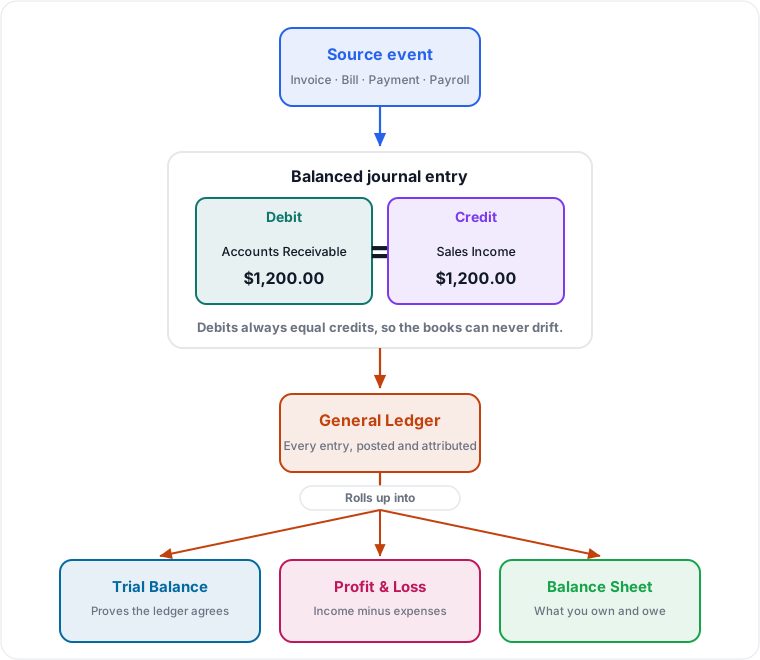
The Chart of Accounts
After this section you will organize your books. The chart of accounts is the list of buckets every transaction posts to, grouped by the five account types. Open it from the Finances sidebar under Accounting, then Chart of Accounts.
- Assets: what the business owns, such as bank accounts and receivables.
- Liabilities: what it owes, such as payables and loans.
- Equity: the owners' stake.
- Income: revenue you earn.
- Expenses: costs you incur.
You create, edit, and organize accounts, each with a name, a code, a type, and a detail category, and you can search the chart by name, code, or detail. A clean, well-organized chart is the foundation every report is built on, so it is worth setting up deliberately, or importing one you already trust (see Importing and Migrating).
Every Transaction Posts a Balanced Entry
After this section you will trust that the books balance. This is the heart of double-entry: every transaction records equal debits and credits, so the books can never silently drift out of balance. When you send an invoice, receive a payment, enter a bill, or run payroll, Backbuild Finances posts the balanced journal entry for you, behind the scenes, to the accounts those transactions touch. You get the discipline without doing the mechanics by hand, and the trial balance is always there to prove the ledger agrees.
Manual Journal Entries and Safe Reversals
After this section you will make and correct adjustments safely. Sometimes you need to post directly: an accrual, a depreciation entry, an adjustment your accountant asks for. Go to Accounting, then Journal Entries.
- Choose New journal entry, add lines with the accounts and the debit or credit amounts, and a memo.
- The entry will not post until debits equal credits, so you cannot accidentally record an unbalanced adjustment.
- To correct a posted entry, use reverse. A reversal posts an equal and opposite entry rather than deleting the original, so both the mistake and its correction stay on the record.
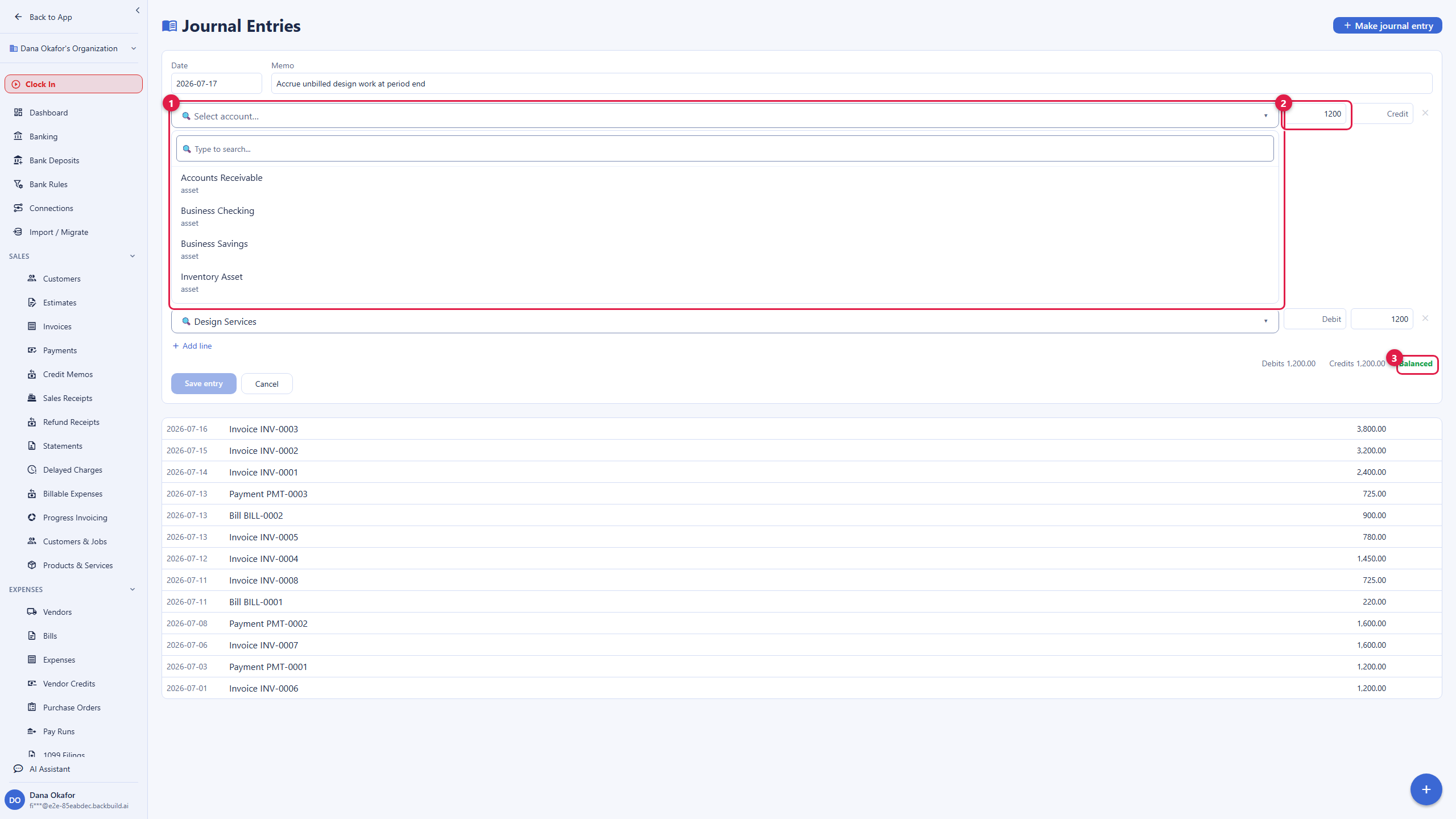
Reversing rather than deleting is the honest way to fix the books, and it is the behavior an auditor expects. Nothing quietly disappears, and every change is attributed to the person who made it. See Access, Security and the API for the audit trail.
Dimensional Reporting: Classes and Custom Fields
After this section you will report by more than account. A plain chart of accounts tells you what you spent; classes and custom fields tell you where and why.
- Classes tag a transaction with a dimension such as a location, department, or job, so you can produce a profit-and-loss for one class and compare across them.
- Custom fields let you attach your own structured data to records, so you capture the details your business actually reports on.
Classes and custom fields flow through to your reports, which is how a business with several locations or project-based work gets a real breakdown instead of one undifferentiated total.
Accounting Method, Currency, and Fiscal Year
After this section your book's ground rules are set. When your books are first provisioned, the base currency, the accounting method (cash or accrual), and the fiscal-year start month are set on the book and shown on the Finances dashboard. These are the ground rules every report honors, so your profit-and-loss and balance sheet reflect the basis you actually keep your books on. Reference data such as payment terms and foreign-exchange rates also lives under Accounting, so the values that drive due dates and conversions are yours to maintain.
Is this real double-entry, or a simplified expense tracker? Real double-entry. Every transaction posts equal debits and credits, there is a genuine chart of accounts and general ledger, and the trial balance proves the books agree.
Do journal entries actually have to balance? Yes. An entry will not post until debits equal credits, so you cannot record an unbalanced adjustment by accident.
Can I safely reverse a posted entry? Yes. Reversing posts an equal and opposite entry and keeps both the original and the correction on the record, attributed and audited, rather than deleting anything.
Can I report by location, department, or job? Yes. Tag transactions with classes and use custom fields, and both flow through to your reports for dimensional breakdowns.
Cash or accrual? You set the accounting method on the book, and every report honors it.
Where to Next
- Banking and Reconciliation: prove the ledger matches the bank.
- Reports and Sales Tax: the trial balance, profit-and-loss, and balance sheet the ledger produces.
- Importing and Migrating: bring a chart of accounts and history in from a spreadsheet or QuickBooks.
- Access, Security and the API: the audit trail and scoped access for your accountant.