

Release Management
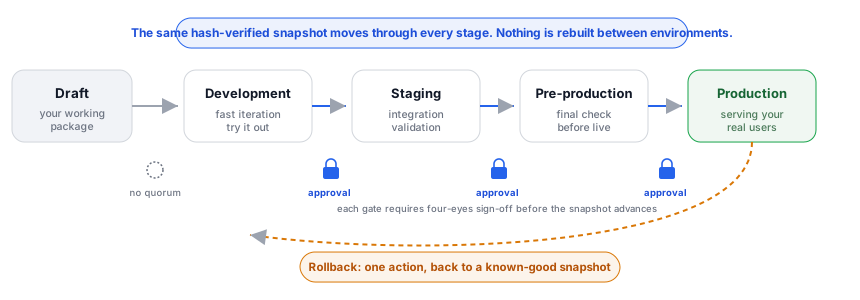
Release management is how you move the SaaS package you built (its screens, entities, workflows, pricing, roles, and AI skills) from your sandbox to your customers without breaking anything live. Every release is a complete, hash-verified snapshot of the package. You promote it through environments in a fixed order, gate the higher environments behind approvals, roll out gradually, and roll back to a known-good state in one action. Every step leaves an immutable, tamper-evident record you can hand to an auditor.
Pro Release management is part of the Backbuild Pro build-and-ship platform, alongside multiple environments and the SaaS marketplace. See pricing.
What a Release Is, and What It Captures
After this section you will know exactly what gets frozen into a release, and what does not, so what you test is what ships. A release is a versioned snapshot that captures the full state of a SaaS package at a single moment. When you create one, the system freezes the current configuration into an immutable record, computes a SHA-256 hash over its contents, and assigns it a version number automatically. From then on that snapshot never changes: it is the unit you promote, approve, and roll back to.
The number-one worry builders bring to promotion is that the snapshot quietly leaves something out, so production ends up different from what they tested. It does not. A snapshot captures every configurable part of the package:
| Component | What is captured |
|---|---|
| Package metadata | Name, description, version, owner. |
| Pricing plans | All pricing tiers, billing intervals, and amounts. |
| Screen definitions | UI screen layouts and component configurations. |
| Seed data | Default data loaded for new tenants. |
| Entity types | Custom entity type schemas and field definitions. |
| Workflows | Workflow definitions, triggers, and automation rules. |
| AI skills | Custom AI skill configurations and prompts. |
| Views | Saved filter and sort configurations. |
| Roles & permissions | Custom roles and permission mappings. |
| Connector configs | Third-party integration configurations. |
| App configs | Application-level settings and feature toggles. |
| Data bundles | Static data packages and asset references. |
What a release does not contain: your customers' live tenant data. A release is the configuration of the product, not the records your tenants create inside it. Promoting or rolling back a release changes the packaged configuration; it never touches, moves, or reverts live customer data. Keep that boundary in mind: rollback restores the app you shipped, not the data your users entered after it shipped.
Cut Your First Release
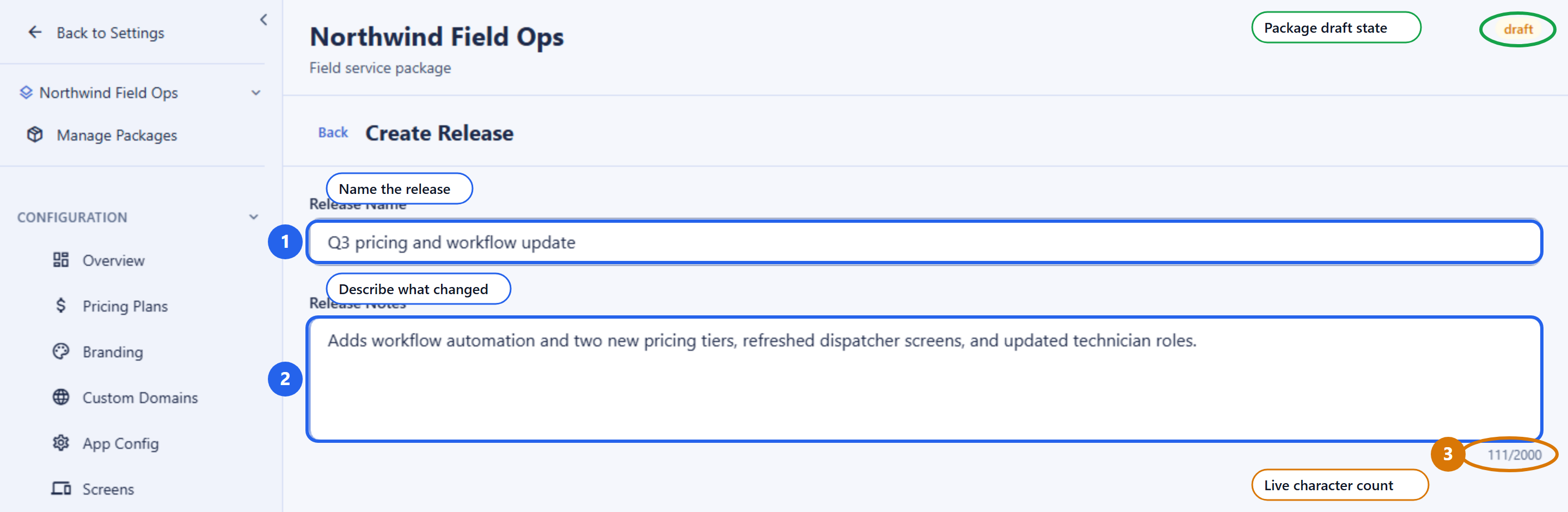
After this section you will be able to turn your current working package into a versioned release. Creating a release takes two pieces of information: a name and, optionally, notes. Everything else, the snapshot contents, the hash, and the version number, is captured for you.
| Field | Required | Meaning |
|---|---|---|
release_name | Yes | A human label for this release, 1 to 200 characters. |
release_notes | No | Free-form notes, up to 10,000 characters, describing what changed. |
You do not supply a version number. The system assigns the next integer
version automatically (one higher than the previous release of this package),
so versions are always sequential and never collide. The new release starts
in draft status.
POST /v1/saas-packages/019d.../releases
Authorization: Bearer $TOKEN
Content-Type: application/json

{
  "release_name": "Q3 pricing and workflow update",
  "release_notes": "Adds workflow automation and two new pricing tiers."
}

# Response
{
  "id": "019e...",
  "version": 7,
  "release_name": "Q3 pricing and workflow update",
  "release_notes": "Adds workflow automation and two new pricing tiers.",
  "snapshot_hash": "sha256:a1b2c3...",
  "status": "draft",
  "created_by": "019d...",
  "created_at": "2026-07-16T10:00:00Z"
}
The response returns the release metadata, not the full snapshot. The
version is an integer, and the snapshot_hash is the
fingerprint that lets anyone confirm later that the snapshot has not changed.
Compare Versions and Pin Every Resource
After this section you will be able to see exactly what changed between two releases, and trust that nothing drifts as it moves to production. Before you promote, you want a readable answer to “what actually changed since last time?” The diff view compares two release snapshots and reports what was added, changed, and removed across the package.
GET /v1/saas-packages/019d.../releases/diff?from=019e...&to=019f...
Authorization: Bearer $TOKEN
Every release also records a version-pinned manifest: each captured resource (each screen, entity type, workflow, pricing plan, and so on) is stored with the exact version it had at snapshot time. You can list those pinned items to see, resource by resource, precisely what this release contains.
GET /v1/saas-packages/019d.../releases/019e.../items
Authorization: Bearer $TOKEN
Because promotion carries the same immutable, hash-verified snapshot forward, there is no environment drift. What you approved in staging is byte-for-byte what deploys to production. The pinned manifest and the snapshot hash together guarantee it.
The Release Lifecycle
After this section you will understand the status a release moves through, and why a release must be approved before it can deploy anywhere. A release has a status that gates what you can do with it. You advance the status as the release is validated.
| Status | Meaning |
|---|---|
draft | Just created. The snapshot is frozen, but the release is not yet cleared for deployment. |
testing | Under validation. Reviewers are exercising it and recording findings. |
approved | Cleared for deployment. A release must reach this status before it can be deployed to any environment. |
rejected | Turned down. It will not deploy until it is re-worked and re-approved. |
archived | Retired from active use, retained for the record. |
The important rule: a release must be in approved status before it
can be deployed to any environment, including development. This keeps
a half-finished snapshot from being pushed anywhere by accident.
PATCH /v1/saas-packages/019d.../releases/019e.../status
Authorization: Bearer $TOKEN
Content-Type: application/json

{ "status": "approved" }
Promote Through Environments
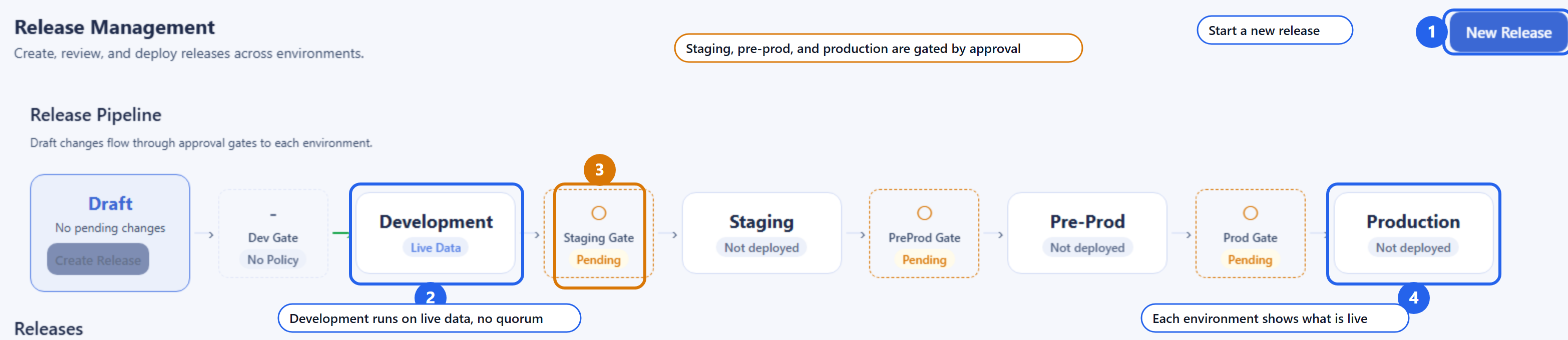
After this section you will be able to move a release from development to production in the correct order, and you will understand why the system refuses to let you skip a stage. Releases are promoted through four environments, each with a clear purpose.
| Stage | Environment | Purpose |
|---|---|---|
| 1 | Development | Fast iteration. You deploy here to try the release out and move quickly. |
| 2 | Staging | Integration validation of the full configuration under production-like conditions. |
| 3 | Pre-production | Final validation in a production-like environment before going live. |
| 4 | Production | Live deployment serving your real users. |
You deploy a release with the environment field. A deploy
supersedes whatever release was previously active in that environment and
records the change in the deployment history.
POST /v1/saas-packages/019d.../releases/019e.../deploy
Authorization: Bearer $TOKEN
Content-Type: application/json

{
  "environment": "staging",
  "notes": "All dev checks passing, ready for staging validation."
}
Sequential promotion is enforced, not suggested
Skipping a stage is refused, not merely discouraged. The order is enforced at the moment you deploy:
- Deploying to staging has no prerequisite.
- Deploying to pre-production requires an active staging deployment of that release.
- Deploying to production requires an active pre-production deployment of that release.
Attempting to jump ahead returns a precondition failure. This is what makes “we validated it at every level before it went live” a fact you can prove rather than a process you have to police by hand. A classic audit finding, a deployment that predates its own approval, cannot happen when the order and the approvals are enforced together.
Development stays fast
Development is for rapid iteration, so a deploy to development skips the
approval quorum and the separation-of-duties check. It still requires the
release to be in approved status, but it does not wait on a
review panel. The gating you configure applies to staging, pre-production, and
production. That is the balance most teams want: fast in dev, gated where it
counts. When you need an urgent fix in the higher environments, the change
still moves through the same gates; you satisfy them quickly by having the
required approvers act, rather than by turning the control off.
See What Is Live: Status Board and History
After this section you will be able to see, at a glance, which release is live in each environment, and the full history of every promotion. The environment status view shows the current deployment per environment, so you always know what is running where.
# Current deployment in each environment
GET /v1/saas-packages/019d.../environments
Authorization: Bearer $TOKEN

# Full promotion history (paginated, filterable by environment)
GET /v1/saas-packages/019d.../environments/history
Authorization: Bearer $TOKEN
The history is an auditable trail of every promotion: which release, to which environment, by whom, and when. It is the record a release coordinator uses to answer “who deployed what, and when?” without reconstructing it from chat.
Approvals and Separation of Duties
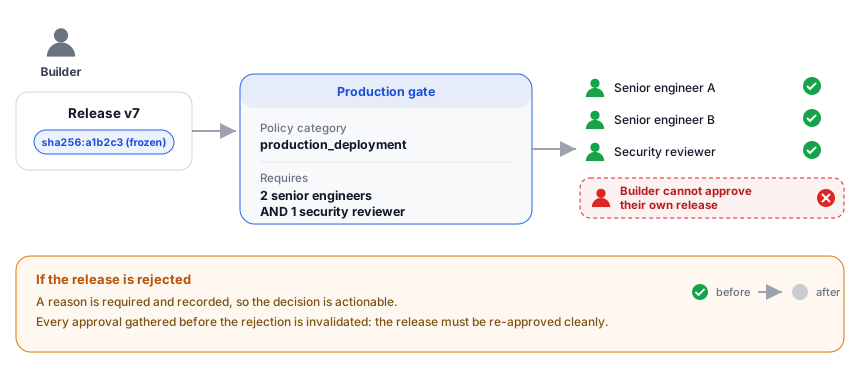
After this section you will be able to require the right people to sign off before a release reaches a gated environment, and you will understand why an approval cannot be reused or self-granted. An approval policy defines who must approve a promotion into a given category of environment. Policies are optional per category; where one is active, its full rule tree must be satisfied before the deploy is allowed.
Approval policy categories
| Category | Applies to |
|---|---|
staging_promotion | Promoting into staging. |
preprod_promotion | Promoting into pre-production. |
production_deployment | Deploying to production. |
security_review | A security sign-off requirement. |
compliance_review | A compliance sign-off requirement. |
rollback_authorization | Authorizing a rollback. |
Rules: N-of-M, roles, groups, and AND/OR
A policy’s rules field is a tree of conditions combined
with AND and OR, so you can express anything from “any one VP” to
“two of five senior engineers, and one security reviewer.” The leaf
conditions are:
| Condition | Satisfied when |
|---|---|
specific_users | The named users have approved. |
role | A required number of holders of a role have approved (N-of-M). |
group | Approvals come from a group, optionally requiring a number from each named group (from_each). |
cross_role | Approvals span more than one distinct role, so no single team can clear a change alone. |
Combine leaves with AND (all must hold) and OR (any one suffices). The tree can nest up to five levels deep, and a policy body is capped at 8 KiB, which is ample for real approval matrices.
POST /v1/saas-packages/019d.../approval-policies
Authorization: Bearer $TOKEN
Content-Type: application/json

{
  "category": "production_deployment",
  "name": "Production sign-off",
  "rules": {
    "operator": "AND",
    "conditions": [
      { "type": "role", "role_key": "senior_engineer", "required_count": 2 },
      { "type": "role", "role_key": "security_reviewer", "required_count": 1 }
    ]
  }
}
List the policies for a package with GET, and deactivate one with
DELETE /approval-policies/:policyId.
Requesting, approving, and rejecting
The approval workflow is scoped to a release and a target environment. You request approval, approvers approve or reject, and you can check where the release stands against the policy at any time before you deploy.
| Action | Endpoint | Body |
|---|---|---|
| Request approval | POST /releases/:releaseId/request-approval | environment |
| Approve | POST /releases/:releaseId/approve | environment, optional comment |
| Reject | POST /releases/:releaseId/reject | environment, required reason |
| Check status | GET /releases/:releaseId/approval-status?environment= | query only |
The status check evaluates the active policy and reports which conditions are satisfied, so the go or no-go is visible before you act. A rejection requires a reason, and that reason is recorded so it is actionable.
POST /v1/saas-packages/019d.../releases/019e.../approve
Authorization: Bearer $TOKEN
Content-Type: application/json

{
  "environment": "production",
  "comment": "Reviewed the diff and the compliance check. Approved."
}
Why an approval cannot be reused or self-granted
Two properties make these approvals trustworthy in a way that email and chat sign-offs never are:
- Bound to the exact release and environment. An approval is tied to a specific hash-verified snapshot and a specific environment. It cannot silently carry over to a different change or a different stage.
- Separation of duties. The person who created a release cannot approve their own release for promotion. A different user must approve it. This is the four-eyes principle required by SOC 2 and ISO 27001, enforced by the system rather than by policy alone.
- A rejection invalidates earlier approvals. If a release is rejected, approvals gathered before the rejection no longer count. The release must be re-approved cleanly, so a stale sign-off can never carry a change forward.
Review in Context: The Conversation Trail
After this section you will be able to discuss a release where the release lives, with typed, threaded entries that stay attached to the exact snapshot. Instead of scattering review across chat and email, each release carries its own conversation. Every entry is typed so the trail reads as a structured review, not a chat log.
| Field | Required | Meaning |
|---|---|---|
content | Yes | The comment text, 1 to 5,000 characters. |
comment_type | No | One of general, bug, test_pass, test_fail, approval, rejection, task. |
environment | No | The environment the comment relates to. |
parent_comment_id | No | Reply to another comment to build a thread. |
POST /v1/saas-packages/019d.../releases/019e.../comments
Authorization: Bearer $TOKEN
Content-Type: application/json

{
  "content": "Pricing tier copy reviewed and correct for staging.",
  "comment_type": "test_pass",
  "environment": "staging"
}
List comments with GET, filtered by environment and comment type.
The trail is part of the release’s record: corrections are new entries,
never rewrites.
Progressive Rollout
After this section you will be able to release to production gradually and keep your hand on the controls the whole time. When you deploy, you choose how widely the release applies. A rollout plan turns a deployment into a controlled, reversible ramp instead of an all-at-once flip.
| Strategy | What it does |
|---|---|
immediate | Apply the release to everyone at once. |
targeted | Enable the release for specific tenants first (up to 1,000 named tenants). |
percentage | Apply the release to a set percentage of tenants. |
progressive | Ramp through a series of stages, each with a cumulative target percentage and a wait time before the next stage. |
A progressive plan holds up to 20 stages, each with a target percentage from 1 to 100 and a wait time in hours. Stages advance automatically on schedule, or you can advance the next stage yourself. At any point you can pause, advance, or cancel, so if an early cohort looks wrong you stop the ramp immediately.
| Control | Endpoint |
|---|---|
| Create a rollout plan | POST /:packageId/rollouts |
| Inspect per-stage progress | GET /rollouts/:rolloutId |
| Advance to the next stage | POST /rollouts/:rolloutId/advance |
| Pause the ramp | POST /rollouts/:rolloutId/pause |
| Cancel the ramp | POST /rollouts/:rolloutId/cancel |
If a problem shows up mid-ramp, you are never stuck: pause or cancel the rollout, then roll back to a previous known-good snapshot as described next.
Rollback and Undeploy
After this section you will be able to return an environment to a known-good release in one action, and to remove a release from an environment entirely. Because snapshots are immutable, rollback is a safe operation: you are redeploying a state that already passed, not reconstructing it.
POST /v1/saas-packages/019d.../releases/019e.../rollback
Authorization: Bearer $TOKEN
Content-Type: application/json

{
  "environment": "production",
  "notes": "Regression observed in v7; returning to the prior known-good release."
}
Rollback re-activates the target release’s snapshot in the named environment. It restores the packaged configuration exactly, and it does not revert live customer data. It takes a single action and applies right away, and it is prominently recorded in the audit log and in the release’s tamper-evident chain.
To remove a release from an environment without replacing it with another, use undeploy:
POST /v1/saas-packages/019d.../releases/019e.../undeploy
Authorization: Bearer $TOKEN
Content-Type: application/json

{ "environment": "staging", "notes": "Pulling this release from staging." }
Keep Building After You Ship: Import to Draft
After this section you will be able to continue building from exactly what you shipped. A finalized release can be loaded back into the package’s editable draft so its configuration becomes your new working baseline. This is the supported way to branch fresh work from a known release: ship, then pick up exactly where that release left off. The request requires the environment whose deployed release you are importing.
POST /v1/saas-packages/019d.../releases/019e.../import-to-draft
Authorization: Bearer $TOKEN
Content-Type: application/json

{ "environment": "production" }
Compliance Checks and Audit Evidence
After this section you will be able to prove, on demand, that a change
was authorized, tested, approved by someone other than its author, and
deployed in order. Before a release is deployed to a target
environment, you can run an automated compliance check. It runs nine checks
mapped to industry control frameworks and writes the result as an immutable,
hash-chained record. The overall result is passed only when no
check fails; individual checks may pass, be skipped, or return a warning.
POST /v1/saas-packages/019d.../releases/019e.../compliance-check
Authorization: Bearer $TOKEN
Content-Type: application/json

{ "target_environment": "production" }| Check | Frameworks | Validates |
|---|---|---|
| Snapshot integrity | SOC 2 CC6.8 | The recomputed SHA-256 of the snapshot matches the stored hash, confirming no tampering since the snapshot was created. |
| Separation of duties (no self-approval) | SOC 2 CC8.1, PCI DSS 6.5.4 | The release creator did not approve their own release for this environment. |
| Approval exists | SOC 2 CC8.1 | At least one approval is recorded for this release and target environment. |
| Sequential promotion | ISO 27001 A.8.31 | The prerequisite environment is deployed (pre-production requires staging; production requires pre-production). |
| Privacy policy presence | GDPR Article 25 | The snapshot contains a non-empty privacy policy URL (a warning if missing). |
| No test or debug data in production | PCI DSS 6.5.6 | Production snapshots are scanned for test and debug indicators (skipped for non-production targets). |
| Data bundle presence | SOC 2 CC8.1 | The snapshot includes a data bundle with an integrity hash. |
| App configuration presence | SOC 2 CC8.1 | The snapshot includes at least one application configuration. |
| Deployment audit-chain integrity | SOC 2 CC7.1, HIPAA 164.312(b) | The deployment-history hash chain has no sequence gaps. |
This is exactly the evidence a Type II auditor samples. When an auditor pulls a change and traces it from request to deployment, the release carries its own linked evidence: the snapshot and its hash, the approvals with timestamps, the typed review trail, and the promotion history. The sequential gate plus timestamped approvals are what prevent the classic finding of a deployment that predates its approval.
The Tamper-Evident Audit Trail
After this section you will be able to answer, for a security review, exactly why nobody, including an administrator, can rewrite release history. Every release operation (create, deploy, approve, reject, rollback, and compliance check) is written to an append-only, cryptographically chained integrity log. Each entry is bound to the one before it, so the log forms a continuous chain.
- Snapshot hash. A SHA-256 hash over the full snapshot contents is stored on the release record, so anyone can confirm the snapshot has not changed.
- Integrity chain. Each record is cryptographically bound to the previous one, so the log cannot be altered after the fact without breaking the chain.
- Detectable tampering. The chain can be re-walked and re-verified to confirm no record was modified, deleted, inserted, or reordered.
- Signed with a protected key. The integrity log is signed with a key held on the server that is never exposed to clients.
In practice this means the audit trail is not something an administrator can quietly edit. Corrections are new recorded events, never rewrites of old ones. These records are retained as immutable audit evidence; for the retention schedule and the platform’s own attestations, see Security & Compliance and the Trust Center.
Who Can Do What
After this section you will be able to decide who in your organization can build, approve, deploy, and roll back. Release management follows the same role and permission model as the rest of the workspace. You grant each capability to the roles that should hold it, so builders build, reviewers review, and only the right people deploy to production.
| Capability | Permission |
|---|---|
| Create and update releases | saas_release.create, saas_release.update |
| View releases, history, and status | saas_release.view |
| Deploy and undeploy, manage rollouts | saas_release.deploy |
| Approve or reject a release | saas_release.approve |
| Roll back an environment | saas_release.rollback |
| Run compliance checks | saas_release.compliance |
| Add and read review comments | saas_release.comment, saas_release.view |
| Import a release back to draft | saas_release.import |
| Manage approval policies | approval_policy.create, approval_policy.view, approval_policy.delete |
Everything is scoped to your organization: a request that crosses the organization boundary is refused. See Roles & Permissions to assign these capabilities to roles.
Frequently Asked Questions
When I cut a release, what actually gets captured?
The entire package: screens, entities, workflows, roles and permissions,
pricing and package configuration, AI skills, connector configs, views, app
configs, seed data, and data bundles. It is captured deterministically and
hash-verified. What is not captured is your customers’ live tenant
data, so promotion and rollback change the app, never the records your users
created inside it.
How do I see what changed between two versions?
Use the diff view, which compares the two snapshots and lists what was added,
changed, and removed. Version numbers are assigned automatically as
sequential integers, so there is no ambiguity about which is newer.
Will the approval process slow down my dev iteration?
No. Deploying to development skips the approval quorum and the
separation-of-duties check so you can iterate fast. The gating applies to
staging, pre-production, and production.
Can stage-skipping actually be blocked, or is it just a
convention?
It is enforced. Pre-production requires an active staging deployment, and
production requires an active pre-production deployment. Attempting to skip a
stage is refused.
Is my approval bound to this exact version, or could it be reused on
a later change?
It is bound to that specific hash-verified snapshot and that specific
environment. It cannot transfer to a different change or stage, and a later
rejection invalidates approvals gathered before it.
Can I approve my own change?
No. The person who creates a release cannot approve it for promotion; a
different user must approve. This is enforced by the system, not left to
policy.
How fast is rollback, and is it lossless?
Rollback is a single action that re-activates a known-good prior snapshot
right away. It restores the packaged configuration exactly. It does not
revert live customer data.
Can I keep editing after I ship?
Yes. Import a shipped release back into your working draft with
import-to-draft, and it becomes your new baseline so you continue from
exactly what shipped.
Is the audit log truly immutable and tamper-evident?
Yes. It is append-only and hash-chained, and modified, deleted, inserted, or
reordered entries are detectable when the chain is re-walked. No user or
administrator can rewrite history; corrections are new events.
Which controls map to which framework?
The nine compliance checks carry explicit mappings to SOC 2, ISO 27001, PCI
DSS, HIPAA, and GDPR, listed in the compliance-checks table above, so you can
hand the mapping to your auditor.
API Reference
Release endpoints are scoped to a SaaS package (:packageId).
GET /v1/saas-packages/:packageId/releases: list releases (filter by status).POST /v1/saas-packages/:packageId/releases: create a release snapshot.GET /v1/saas-packages/:packageId/releases/:releaseId: get release details and snapshot contents.GET /v1/saas-packages/:packageId/releases/diff?from=&to=: diff two releases.GET /v1/saas-packages/:packageId/releases/:releaseId/items: list version-pinned manifest items.PATCH /v1/saas-packages/:packageId/releases/:releaseId/status: set release status.POST /v1/saas-packages/:packageId/releases/:releaseId/deploy: deploy to an environment.POST /v1/saas-packages/:packageId/releases/:releaseId/undeploy: remove from an environment.POST /v1/saas-packages/:packageId/releases/:releaseId/request-approval: request approval.POST /v1/saas-packages/:packageId/releases/:releaseId/approve: approve for an environment.POST /v1/saas-packages/:packageId/releases/:releaseId/reject: reject for an environment.GET /v1/saas-packages/:packageId/releases/:releaseId/approval-status?environment=: evaluate policy status.POST /v1/saas-packages/:packageId/releases/:releaseId/compliance-check: run the compliance checks.POST /v1/saas-packages/:packageId/releases/:releaseId/rollback: roll an environment back to this release.POST /v1/saas-packages/:packageId/releases/:releaseId/import-to-draft: import back into the editable draft.GET/POST /v1/saas-packages/:packageId/releases/:releaseId/comments: list or add review comments.GET /v1/saas-packages/:packageId/environments: current deployment per environment.GET /v1/saas-packages/:packageId/environments/history: promotion history.GET/POST /v1/saas-packages/:packageId/approval-policies: list or create approval policies.DELETE /v1/saas-packages/:packageId/approval-policies/:policyId: deactivate a policy.POST /v1/saas-packages/:packageId/rollouts,GET /rollouts/:rolloutId, andadvance/pause/cancel: manage progressive rollout.
Related reading
- SaaS Packages: the package a release snapshots.
- Binary Distribution & Data Residency: publishing signed desktop and CLI binaries, a separate system from SaaS package releases.
- Roles & Permissions: assign who can build, approve, and deploy.
- Security & Compliance: the platform’s wider posture and attestations.
See the SaaS Builder API for complete request and response documentation.