

Narration, Voices, Caching, and Cost
The narrated modules in Backbuild Studio, the Training Video, the Visual Storybook, and the Audiobook, all sit on one media engine. Learning that engine once tells you how every narrated production is voiced, timed, and priced. This guide covers choosing a voice or bringing your own, why the audio track is the master clock everything else follows, the caching that decides what a change costs, the output formats you can render to, the metadata written into a file, and the plain line between what is free and what draws credits. After it you will be able to keep a narration consistent across a whole library and predict, and minimize, what any edit will cost.
One Engine Behind Every Narrated Production
After this section you will understand what all three narrated modules share. Whatever you are making, a training video, a storybook, or an audiobook, the production has the same core: a script, a chosen voice, a timeline of cues, and optional music, sound effects, and overlays. The engine always produces an audio track first; a visual production then composes video on top of that audio. Because the pieces are shared, what you learn about voices and cost here applies identically to each module.
Voices: Choose One, or Bring Your Own
After this section you will voice a production and keep it consistent across many. Studio speaks your script with text-to-speech voices. Pick one from the voice catalog, which includes a set of ready voices for everyone plus any custom voices your organization has added, so a team can standardize on one or two house voices and every module in a library sounds the same. A default voice is always available, so you are never blocked from getting a result.
You can also bring your own voice by supplying your own provider key. The key is stored in the encrypted Secrets vault and never exposed, and speech produced on your own key is metered at zero credits, because your provider bills that usage directly. This is how a team with an existing voice contract keeps using it while paying nothing extra to Backbuild for the synthesis.
Can I keep one consistent voice across a whole library of modules? Yes. The voice catalog is shared across your productions, so you pick a house voice once and reuse it everywhere. Every module in the library then sounds the same, which is the consistency a training team needs across dozens of pieces.
How do I localize into many languages, and what does it cost? You produce a version per language by voicing the translated script with a voice for that language, and captions are generated per version from the alignment. The cost is the usual metered speech and render for each version, or zero speech if you bring your own key, rather than a per-language studio fee. There is no separate localization surcharge beyond the credits the work uses.
The Audio Is the Master Clock
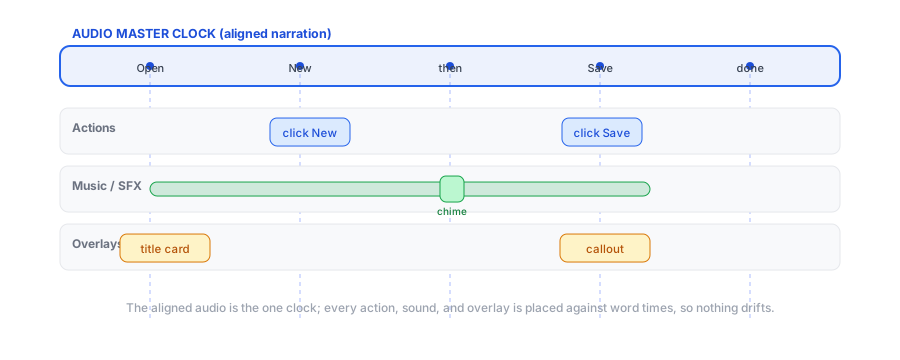
After this section you will understand why nothing drifts out of sync. After the voice is synthesized, Studio times the spoken words precisely, and that aligned audio becomes the single master clock for the whole production. Every action, highlight, sound effect, music change, overlay, and scene is placed against a word time, not against a stopwatch you have to keep matching. This is why a cue stays on its word when you rewrite a sentence, and why the finished media never slips: there is one clock, and it is the voice.
Change-Aware Caching: What a Change Costs
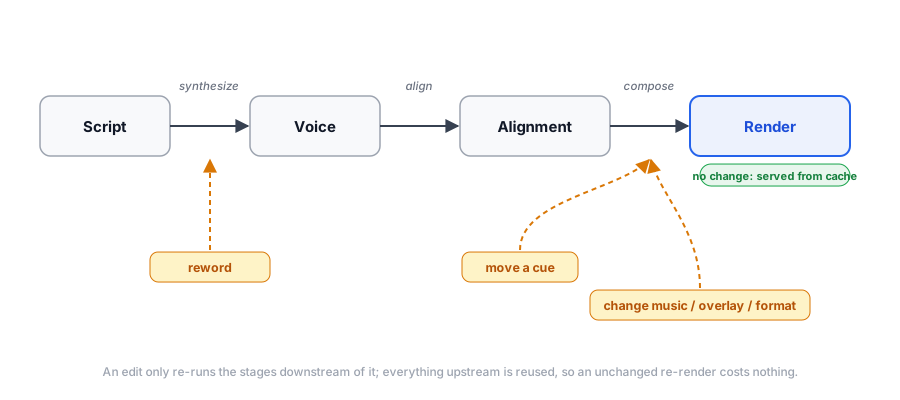
After this section you will predict and control the cost of every edit. Rendering has three cacheable stages: turning the script into voice, turning the voice into a word alignment, and turning the visuals and layers into the composed render. Studio caches each stage and re-does only the stage your change actually invalidates. That gives a simple, predictable cost model:
- No change: re-rendering a production you did not touch costs nothing. The cache serves the whole thing.
- Move or retime a cue: the words did not change, so the voice and the alignment are reused. There is no speech cost; only the composition is redone.
- Change music, an overlay, a caption, or the format: the voice and the recording are reused; only the composition is redone. No re-synthesis.
- Edit the wording: only the affected narration is re-synthesized and re-aligned, not the whole script.
Before any render, Studio shows what changed and a credit estimate for the work it will do, and the estimate is aware of your own keys, so bring-your-own-key speech shows as zero. You approve the estimate before anything is spent. This is the mechanism that turns fixing one step from a full re-record into a near-free edit.
If I tweak one line, do I pay to re-render everything? No. Only the narration you changed is re-synthesized and re-aligned; the rest of the voice, the recording, and the composition are reused. And you see the estimate before you approve the render.
Is there a monthly cap on how much video I can make? There is no fixed monthly video-minute cap. A render draws credits for the compute it uses, so your cost scales with what you actually produce, and an unchanged re-render is free.
Output Formats
After this section you will render to the right file for where it is going. Studio is preset-first: you pick an output preset and it sets a sensible codec and container for the destination, and you can override the details when you need to. The presets cover a vertical short at 9:16, a widescreen web video at 16:9, high-resolution 4K and 8K masters, an audiobook file with chapters, a podcast audio file, and a plain web audio file. A validator refuses an invalid combination, so you cannot accidentally ask for a codec a container cannot hold; you always get a file that actually plays.
Metadata Written Into the File
After this section you will ship a file that carries its own catalog information. Studio embeds studio-grade metadata directly into the output: descriptive fields, credits and contributors, rights, identifiers such as an ISBN, ASIN, or UPC with its check digit validated, publication details, and platform and search fields. For an audiobook the file also carries its chapters and cover art. These fields are prepared and embedded into the file; they are never used to publish anything on your behalf, so filling them in is safe and does not push your media anywhere.
Media Assets Are Immutable
After this section you will manage reusable assets with confidence. Intros, outros, music, sound effects, cover art, overlays, clips, and imported shapes live as media assets in your organization library and can be reused across productions. An asset is immutable: re-uploading a file creates a new asset rather than silently changing one already in use, so a production you rendered last month is not altered under you when someone updates a shared file.
What Is Free and What Draws Credits
After this section the cost model is unambiguous.
- Free on every plan: all the Studio editors, and in-browser export from the Video, Audio, and Music editors.
- On the paid plans, drawing credits: the composed cloud render that produces a finished training video, storybook, or audiobook. It is available on the paid plans and priced by the compute a render uses.
- Drawing credits, unless you bring your own key: text-to-speech and word alignment. On your own provider key, that usage is billed by your provider and metered at zero by Backbuild.
- Always free: laying out a production, moving cues, and re-rendering something you did not change.
The pricing page is the authoritative source for current rates and allowances, and Usage and Credits explains how metering and the prepaid guarantee work.
Is the exported file really mine, or is it locked to Backbuild? The file is a real, standard media file with your metadata embedded, and it is yours to host, distribute, or hand off. Nothing traps it in a proprietary format, and there is no watermark on your output.
Do I need a paid plan to use Studio at all? No. The editors and in-browser export are free on every plan. A paid plan adds the composed cloud render for the narrated modules; that is the part that draws credits.
Where to Go Next
- Making a Training Video: the flagship narrated module, in full.
- Audiobooks and Visual Storybooks: the other two narrated modules and their per-chapter economics.
- AI Agents, the API, and Governance: render from an agent or the API, and how the choice of speech provider is governed.