

Certifications
A certificate turns your verified proofs into portable evidence. Backbuild Prove packages the verified theorems, ties them to specific source by hash, signs the bundle with a key that never leaves your machine, and publishes it at a URL anyone can check with no account and no cost. Auditors, downstream consumers, and the public can all confirm the result independently.
After this page you will be able to publish a signed certificate, explain exactly what it does and does not assert, hand it to an auditor or embed it in a release, verify one as a third party, and revoke a certificate or a signing key when you need to.
Certificates are part of Backbuild Prove, which is launching soon. Free public verification of signed certificates is included on every plan. Join the waitlist for access at launch.
Ed25519 Signed Bundles
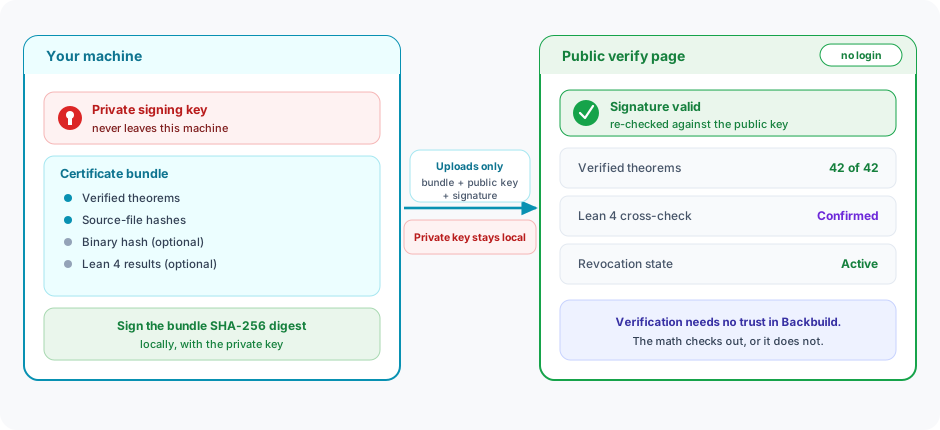
Certification bundles are signed with Ed25519, a modern elliptic-curve signature scheme. The signing key is generated locally on your machine and never transmitted to the server. Only the public key and signature are uploaded alongside the certificate.
This means that even Backbuild itself cannot forge a certificate on your behalf. The signature is tied to your private key, which only you control.
Bundle Contents
A certification bundle is a structured archive containing:
| File | Description |
|---|---|
manifest.json | Bundle metadata: bundle name, version, timestamp, theorem count, file count, binary count, and bundle format version. (The signer’s public key is submitted to the API at registration, not stored inside the archive.) |
theorems.json | All verified theorems with their proof status, axiom dependencies, and step count. |
file_hashes.json | SHA-256 hashes of every source file included in the verification. Ensures the certificate is tied to specific source content. |
binary_hashes.json | SHA-256 hashes of compiled binaries (when available). Ties the certificate to specific build artifacts. |
lean4_results.json | Lean 4 cross-check results (when available). Includes per-theorem equivalence check status. |
The bundle is packaged as a gzipped tar archive. The Ed25519 signature is computed over the bundle’s SHA-256 digest and submitted to the API alongside the signer’s public key when the certificate is registered; it is not stored as a file inside the archive.
Publishing
Publish a certification bundle using the CLI. The project ID, bundle name, and version are required:
backbuild prove publish \
  --project-id <uuid> \
  --name my-library-core \
  --version 1.2.0
Run backbuild prove run first so the bundle picks up your
verified theorem results. The publish command then runs through these
steps:
- Resolve signing key: locate or generate the org’s local Ed25519 signing key.
- Build: assemble the certification bundle from the verified theorem results, file hashes, and (optionally) binary and Lean 4 results.
- Sign: sign the bundle’s SHA-256 digest locally with your Ed25519 private key.
- Upload: upload the bundle to secure object storage via the API.
- Register: register the certification with the public key and signature.
On completion, the CLI prints the bundle ID and a public verification URL.
Trust Model
The trust model for Backbuild Prove certificates:
- Signing keys are client-side. The Ed25519 private key
is generated on your machine at
~/.backbuild/bbprove-keys/and never leaves it. - Only the public key and signature are sent to the server. The API stores the signed bundle and public key for third-party verification.
- Verification is independent. Anyone with the public key and bundle can verify the signature without contacting Backbuild servers.
- File hashes bind code to certificates. The certificate includes SHA-256 hashes of all source files and (optionally) compiled binaries. Changing a single byte invalidates the hash match.
Public Verification
Every published certificate is available at a public URL:
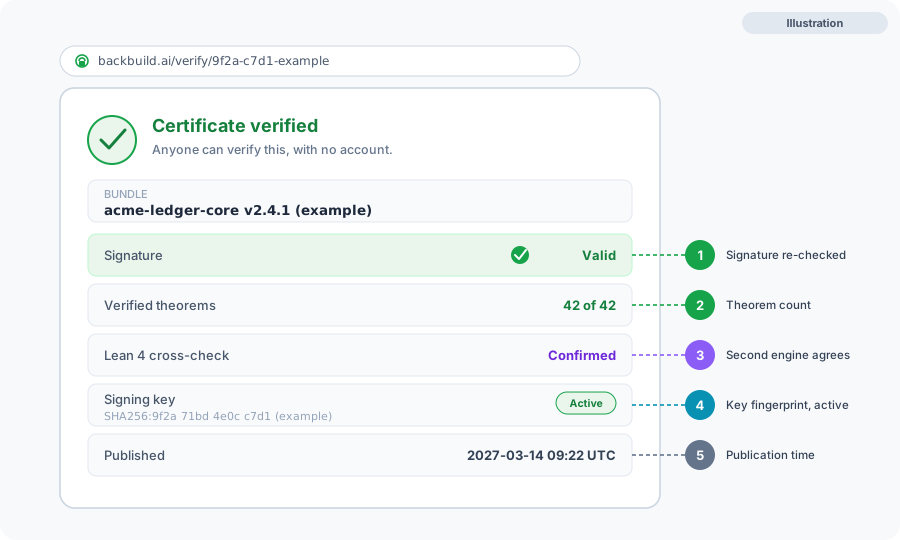
https://backbuild.ai/verify/{bundle_id}The verification page shows:
- Signer identity: public key, key fingerprint, and key label
- Signing-key lifecycle state (active, retired, or revoked)
- Signature and bundle SHA-256 digest, so the signature can be checked
- Verified theorem count and whether Lean 4 cross-check passed
- File and binary counts, plus an aggregate SHA-256 digest of the file hashes (the individual source-file paths are deliberately withheld from the public response)
- Publication timestamp and revocation status
No Backbuild account is required to view or verify a certificate, and public verification of signed proof certificates is free across all supported languages. Anyone can confirm that proven code is correct, at no cost, because the verification page is publicly accessible.
What a Certificate Asserts
Read a certificate precisely. It binds three things together and lets anyone confirm the binding:
- a specific set of source files, identified by hash;
- a specific set of proven properties (the verified theorems, their proof status, and axiom dependencies), optionally cross-checked by Lean 4;
- a signature from a specific key, so the whole bundle is tamper-evident and attributable.
A certificate therefore asserts that the listed properties were formally verified for exactly that source. It does not assert anything about properties you did not prove, code that was not included, or the truth of the assumptions you cited at trust boundaries: those remain exactly as explicit in the certificate as they were in your proofs. Changing a single byte of the certified source breaks the hash match, so a certificate can never silently apply to different code.
Supply-Chain Attestation
A signed certificate functions as a build-independent attestation you can carry through your software supply chain. Include the public verify URL in release notes, package metadata, and READMEs so consumers can confirm the properties for themselves. Because the certificate hashes both source and, when provided, compiled binaries, it ties a specific claim to a specific artifact, which complements provenance and attestation practices such as SLSA and in-toto: those establish how an artifact was built, while a Prove certificate establishes what was formally proven about it. The signing key is generated and held locally, so the attestation is under your control, not the platform's.
Local Signing and Air-Gapped Use
The signing key is generated on your machine and never transmitted; only the public key and the signature are uploaded. That means even Backbuild cannot forge a certificate on your behalf, and your private key is never a secret held by a third party. If your environment requires on-premise or air-gapped operation for source and keys, contact us through the contact page to discuss deployment options for your constraints.
Revocation
A published certificate can be revoked with a reason, and signing keys have their own lifecycle:
- Revoke a certificate. Revoke an individual bundle with a reason. The revocation reason is recorded and shown on the public verification page.
- Key compromise. Revoke the compromised signing key. Every certificate signed by that key then reports the key as revoked on its public verify page. Generate a new keypair and re-publish.
- Publishing a newer version. Publishing a new bundle under the same name with a higher version does not revoke the old one: each name+version is unique, and the earlier certificate stays valid until it is explicitly revoked.
Revoked certificates show a clear warning on the public verification page. Third parties checking the certificate will see the bundle’s revocation status and the signing key’s lifecycle state (active, retired, or revoked).
Use Cases
Compliance Audits
Provide auditors with a signed certificate that mathematically attests to the correctness of critical code paths. The certificate includes every verified theorem, its axiom dependencies, and file hashes that tie the proof to specific source code.
Supply Chain Verification
Include proof certificates in your software distribution. Downstream consumers can verify that the code they received has been formally verified by checking the certificate against the published source hashes.
Safety Certification
For systems that require formal evidence of correctness under standards such as aerospace (DO-178C), automotive (ISO 26262), and medical devices (IEC 62304), a signed proof certificate provides machine-checkable evidence, cross-checked by an independent engine and tied to specific source by hash, that can support a certification conversation. Because unchanged functions verify from cache, the evidence tracks the source instead of drifting from it, which lowers the cost of re-certification after a change.
Be precise about what this is: Prove produces verification evidence artifacts, not tool-qualification evidence. A certificate is not a claim that Prove is a qualified tool or an accepted means of compliance in your standard. Use the certificate as one input that strengthens your evidence package alongside your existing verification and validation, and evaluate tool qualification separately against your program's requirements.
Open Source Trust
Publish certificates for open-source libraries so that users can verify critical functions are formally proven correct. The public verification URL can be included in README files, release notes, and package metadata.
What does the certificate actually prove, and can a third party verify it without trusting you?
It proves the listed properties were formally verified for exactly the
hashed source, and it is signed so it is tamper-evident. Anyone can
re-check the signature against the public key in a browser, with no login,
at the public verify URL. Verification does not depend on trusting
Backbuild; it depends only on standard public-key cryptography. See What a Certificate Asserts.
Is this a qualified tool or an accepted means of compliance for my safety standard?
No. Prove produces machine-checkable verification evidence and a signed
certificate with compliance-control mapping; that supports a
certification conversation but is not tool-qualification evidence.
Evaluate qualification separately for your program.
Where do my source and my signing key go?
Proofs are verified against the service, but the private signing key is
generated locally and never transmitted. For air-gapped or on-premise
needs, see Local Signing and Air-Gapped Use.
If I publish a new version, does the old certificate stop being valid?
No. Each name and version is unique, and an earlier certificate stays
valid until you explicitly revoke it. See Revocation.
Next Steps
- CLI and CI: the
backbuild prove publishcommand - Lean 4 Cross-Check: independent verification included in certificates
- Project Settings: configure what is included in certification bundles