

Research Authoring & Export
This page teaches the core Backbuild Science workflow: how you author a manuscript in LaTeX, keep the data and figures behind it in the same project, get help from an AI assistant that is grounded in your own text, and export work that hands off cleanly to arXiv, a journal, or a reviewer. Each editor has its own full reference page; this page shows how they fit together for research.
The Backbuild Docs, Sheets, and Slides editors are part of the free Backbuild workspace. The research capabilities described here, LaTeX export, SQLite data export, and the AI research assistant, are part of Backbuild Science (free for verified students and faculty; paid plans otherwise).
Authoring in Backbuild Docs
Backbuild Docs is a real-time collaborative editor whose native, source-of-truth format is LaTeX. You write in a formatted WYSIWYG surface and the document is stored as LaTeX underneath, so you get the approachability of a word processor and the precision of LaTeX in one editor. For research this matters most in four places:
- Math without a compile wall. Inline and display equations render live as you type, with a symbol palette and a visual equation builder, so you build an expression without memorizing commands and without waiting on a compiler or fighting a red error screen.
- Source when you want it. Switch to an editable LaTeX source view, including the full preamble, or a side-by-side split, at any time. Fluent LaTeX writers keep full control; newer writers can ignore the source entirely.
- Citations and cross-references. Insert inline citations and build a bibliography in APA, MLA, and Chicago author-year styles, and cross-reference figures, tables, sections, and equations so the numbers stay correct as the document changes.
- Real co-authoring. Several authors edit the same document at once, with conflicting edits merged automatically, live presence, inline comments, tracked changes, and named version history. There is no per-collaborator seat gate.
For the complete editor reference, including page layout, import and export formats, and the current state of reference-manager import, see the Backbuild Docs editor.
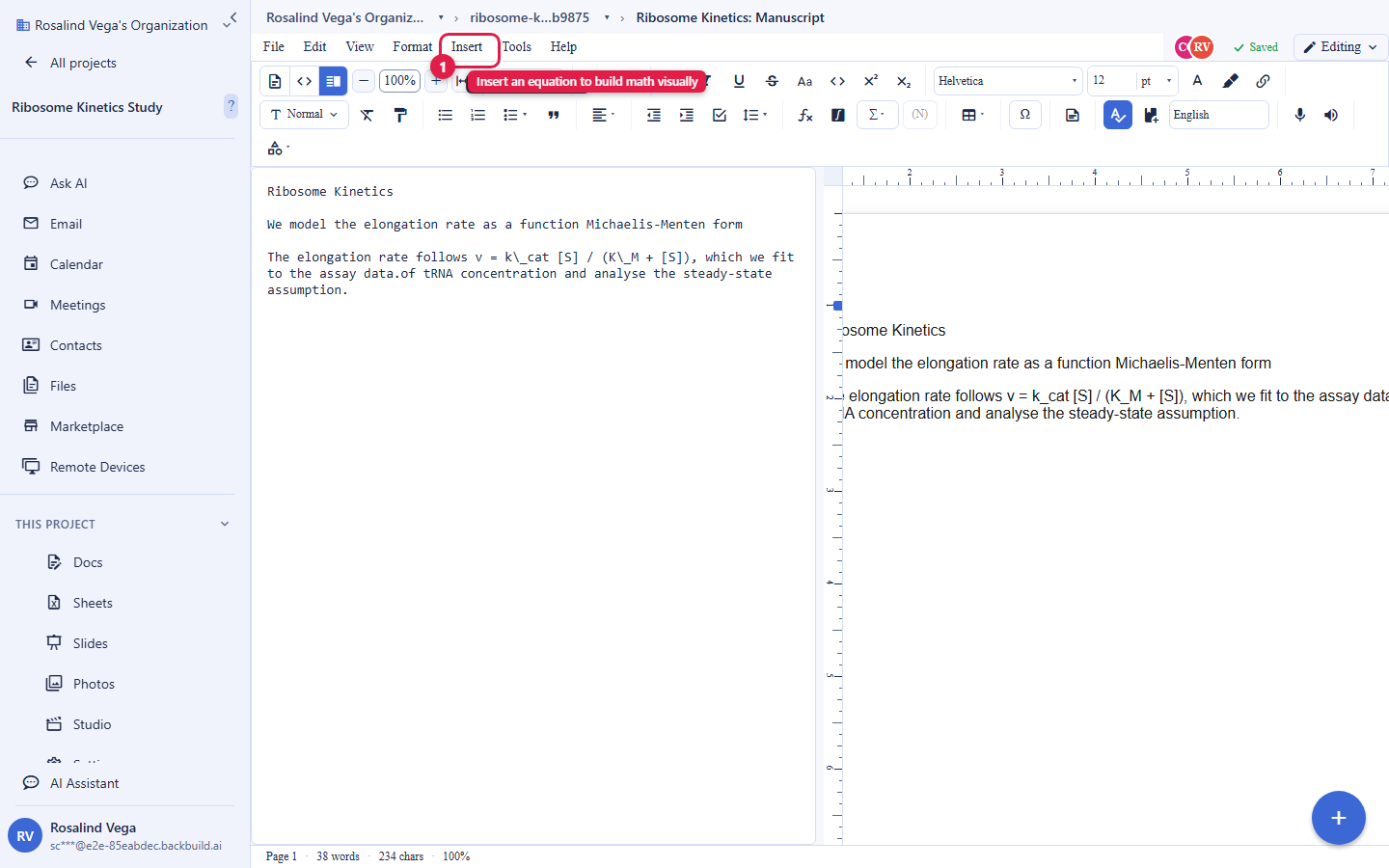
Bringing an existing manuscript in
If your work already exists elsewhere, import it and keep writing in Docs. Backbuild Docs imports Microsoft Word (DOCX), OpenDocument Text (ODT), RTF, HTML, and Markdown. Starter templates get common document types (academic paper, lab report, letter, CV, and problem set) going in one click. Direct import of a raw LaTeX project, and reference-manager sync, are covered on the Docs editor page, which is kept current as those capabilities ship; do not assume a capability the editor page does not list.
Exporting for submission and arXiv
When your manuscript is ready, export submission-ready LaTeX straight from Docs, with no copy-paste and no last-minute reformatting. The export is the LaTeX source your target compiles, which is exactly what a preprint server or journal build pipeline expects:
- For arXiv: submit the exported LaTeX source. arXiv compiles the source it receives, so you upload the source rather than a finished PDF, then check arXiv's own compiled preview before you finalize.
- For a journal: use the exported LaTeX for the submission or camera-ready build the journal's system runs.
- For a co-author or reviewer: export to LaTeX, or to Word, ODT, HTML, Markdown, RTF, EPUB, or plain text, whichever the recipient prefers.
Because Backbuild Docs renders your document live rather than running a queued compile, there is no per-compile time limit and no compile-minute meter, so a long, figure-heavy, big-bibliography document never times out mid-build. An in-app typeset PDF compiler is on the roadmap; today the editor renders live and exports the LaTeX source your journal or build pipeline compiles to PDF.
Working with data in Backbuild Sheets
Backbuild Sheets is the workspace spreadsheet, used in research for datasets, analysis, and results tables, with a formula engine of more than 500 functions, dynamic arrays, and rich-text and LaTeX cells. For research, the capability that matters most is reproducible export:
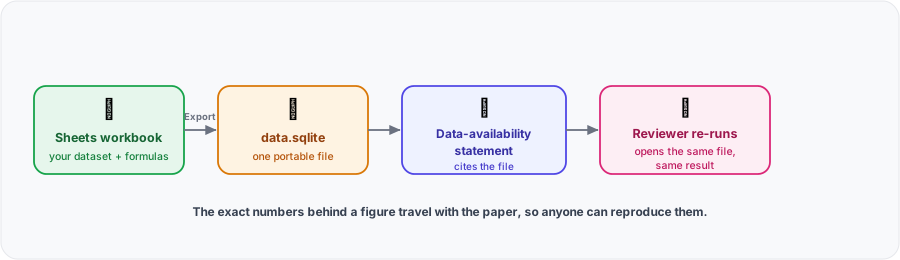
- SQLite export. Export a sheet or workbook as a single, portable SQLite database file that opens in standard tools for querying and analysis. This is the artifact you attach to a data-availability statement, so a reviewer can reproduce your analysis from the same data you used.
- Open interchange. Export CSV and TSV and XLSX for hand-off to other tools, and import CSV, XLSX, and ODS on the way in. Columnar Parquet export for analysis pipelines and long-term archival is coming soon.
See the Backbuild Sheets editor for the full formula engine, collaboration, and capacity details.
Meeting a funder data-availability mandate
Funders increasingly require that the data behind a paper be accessible at publication so results can be reproduced. Backbuild Science gives you the concrete artifacts to satisfy that: export your dataset as a portable SQLite database a reviewer can open and query directly, keep it in the same project as the manuscript so it never drifts out of sync, and point your data-availability statement at it. Where your results rest on a theorem or derivation, the proof system lets you ship a machine-checked proof alongside the paper, which is a stronger form of reproducibility than a prose sketch.
Talks and posters in Backbuild Slides
Backbuild Slides builds conference talks, lab meetings, and posters from the same project as your manuscript and data, with live LaTeX math on the slides, so your figures and results stay in one place from first draft to presentation. See the Backbuild Slides editor.
The AI research assistant
An AI assistant works inside your document. It can draft, rewrite, translate, and answer questions, grounded in the text you are working on, so it edits your actual manuscript rather than inventing content or citations from nowhere. You direct it; it does not act on your work without your ask.
AI usage is not bundled, and there is no model lock-in. Every Science plan, including the free Academic tier, can use the assistant. Bring your own AI provider keys, stored in the encrypted Secrets vault and never exposed, or buy universal usage credits to cover the usage. Your key, your model, your cost basis.
How it hands off and where your work lives
Everything you author lives in a project alongside your data, figures, proofs, references, and co-authors. That is where you control who can see unpublished work, invite collaborators, represent authorship, and send a reviewer an expiring, revocable link. See Collaborating & sharing research. Because your outputs export to open formats (LaTeX for the manuscript, SQLite for the data, standard file formats for everything else), your work is portable and never trapped.
Frequently asked questions
- Can I export clean LaTeX I can submit to arXiv or a journal?
- Yes. Export LaTeX straight from Docs. arXiv and journal pipelines compile the source you upload, so you submit the exported source and check the pipeline's own compiled preview before finalizing.
- What do I share so a reviewer can actually reproduce my analysis?
- Export your dataset as a portable SQLite database, keep it in the same project as the manuscript, and reference it from your data-availability statement. A reviewer opens the same file and re-runs your analysis.
- Does the AI assistant lock me into one bundled model?
- No. Bring your own AI provider keys (stored in the encrypted Secrets vault) or use usage credits. The assistant works over your own document and is not a bundled, single-model add-on.
- Do my references stay in sync with Zotero or a BibTeX file?
- Backbuild Docs manages citations and a bibliography natively in APA, MLA, and Chicago author-year. External BibTeX and reference-manager import are not yet wired into the editor; the current, honest state is on the Docs editor page, which is updated as that ships.
- Will a long, figure-heavy document time out when I build it?
- No. Docs renders live rather than running a queued compile, so there is no per-compile time limit and no compile-minute meter.