

Branding & Themes
Branding is how your product looks and feels to the people who use it. On Backbuild you brand your SaaS at the package level (app name, logo, favicon, splash, and a theme), and that branding flows automatically into the app configuration your web and native apps load at startup. Your tenants can layer their own logo and colors on top, giving you a true white-label product without shipping a code change.
Pro The SaaS Builder, Theme Studio, and white-label tenant branding are part of Backbuild Pro. See pricing.
Where Branding Lives
Your branding belongs to your SaaS package: the
distributable product you build, price, and sell. A package carries a small
set of first-class branding fields plus a full theme_config
object:
| Field | Type | What it controls |
|---|---|---|
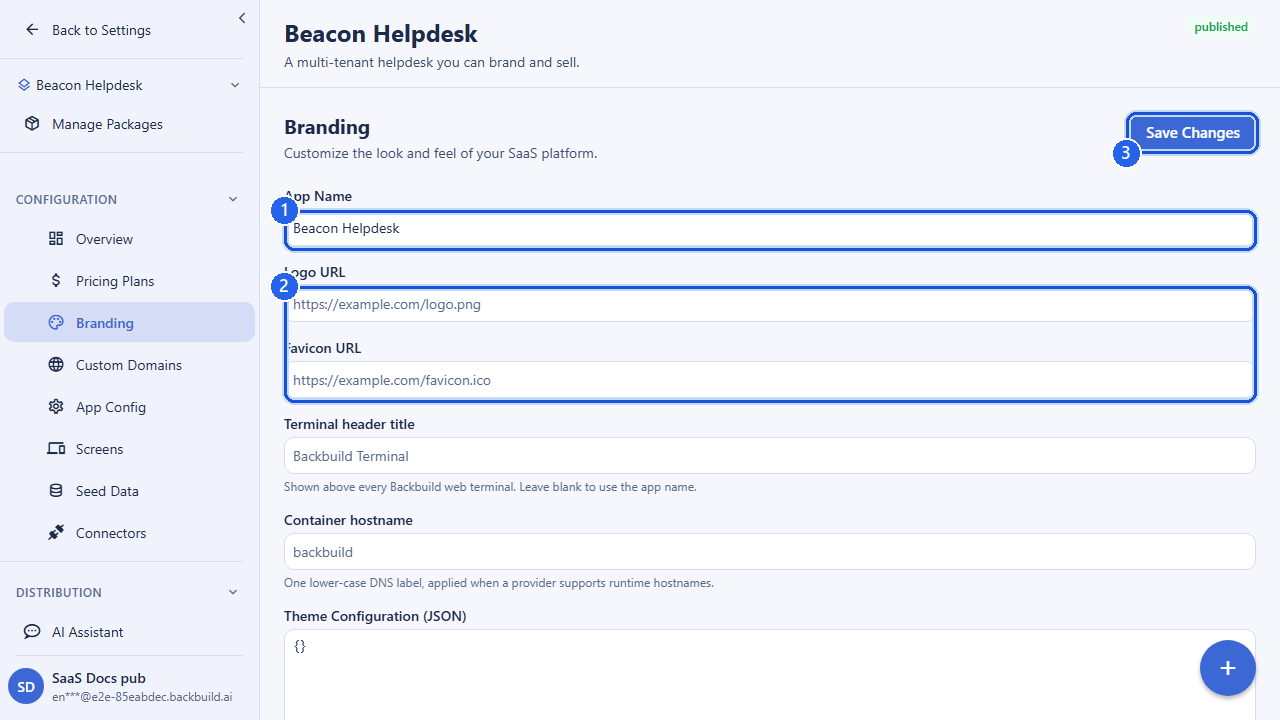
app_name | string | The product name shown in the header, the login screen, and the browser tab title. |
logo_url | URL | Your primary logo, displayed in the app chrome and on the sign-in page. Use an HTTPS URL to a hosted asset (SVG or PNG recommended). |
favicon_url | URL | The icon shown in the browser tab and bookmarks. |
theme_config | object | The full theme: colors, typography, layout, spacing, radii, shadows, and branding tokens. See Themes & Customization. |
The first three fields are the fastest way to brand a product. The
theme_config object is where the deeper visual identity lives,
and it is what the Theme Studio edits visually. Logo and favicon URLs are
capped at 2048 characters and must be valid absolute URLs; the app name is
a short string up to 255 characters.
Branding the package
Set branding when you update a package. Only the fields you send change; everything else is left untouched.
curl -X PUT https://api.backbuild.ai/v1/saas-packages/$PACKAGE_ID \
  -H "Authorization: Bearer $TOKEN" \
  -H "Content-Type: application/json" \
  -d '{
    "app_name": "Acme Desk",
    "logo_url": "https://assets.acme.com/logo.svg",
    "favicon_url": "https://assets.acme.com/favicon.ico"
  }'
Saving any of app_name, logo_url,
favicon_url, or theme_config automatically
invalidates the cached app configuration for every domain that points at
the package, so the new branding propagates to running apps without a
redeploy.
The Theme
The theme is the structured design system behind your product. It is a set
of design tokens, grouped into colors, typography, layout, spacing,
border radius, shadows, and branding, that the app turns into the
rendered look of every screen. You author it visually in the Theme Studio,
where changes preview live, or you can set theme_config
directly through the package API.
| Token group | Examples |
|---|---|
| Colors | primary, secondary, background, card, text, border, accent, danger, success, warning (with light/dark variants) |
| Typography | heading/body/code font families, base font size, line height, weights |
| Layout & spacing | container widths, sidebar width, header height, base spacing unit and scale |
| Border radius & shadows | corner rounding (sm/md/lg/pill) and elevation levels (xs–xl) |
| Branding | logo, favicon, app name, tagline |
A theme stored on the package is your base theme: the look every tenant sees by default. The Themes & Customization doc covers the full token reference, the visual editor, and theme inheritance in depth; this page focuses on how that theme attaches to a package and reaches your tenants.
Setting the theme on a package
curl -X PUT https://api.backbuild.ai/v1/saas-packages/$PACKAGE_ID \
  -H "Authorization: Bearer $TOKEN" \
  -H "Content-Type: application/json" \
  -d '{
    "theme_config": {
      "colors": {
        "primary": "#1a56db",
        "accent": "#f59e0b",
        "background": "#ffffff",
        "card": "#f9fafb",
        "text": "#111827"
      },
      "typography": {
        "font_family_body": "Inter, sans-serif",
        "font_family_heading": "Inter, sans-serif"
      },
      "border_radius": { "sm": "4px", "md": "8px", "lg": "12px" }
    }
  }'
Per-Tenant Branding (White-Label)
Each tenant of your product can apply their own branding on top of your base theme. This is what makes a deployment truly white-label: a tenant signs in and sees their own logo, their own colors, and their own app name, while still running on the product you built.
- Overrides, not replacements: a tenant only sets the properties that differ from your base theme (for example their primary color and logo). Everything else is inherited.
- You decide what is brandable: as the builder you control which theme properties tenants may customize.
- Instant: a tenant’s branding change is reflected immediately for every user in that tenant organization.
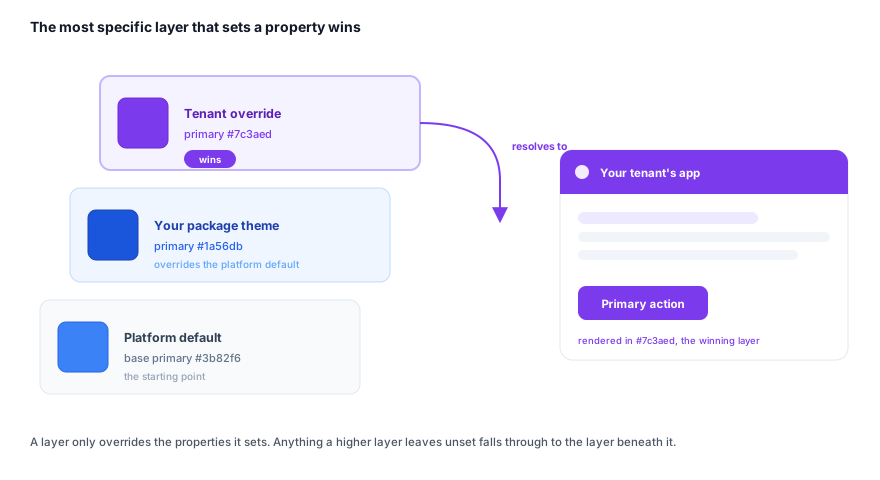
At render time the app resolves three layers and merges them: the platform default, your package (base) theme, and the tenant’s overrides. The most specific layer that sets a property wins, so you only ever specify the values that differ from the layer above.
Every customer-facing surface carries your brand
White-label only works if the platform’s identity never shows through. On Backbuild the surfaces a customer actually sees are all yours:
- The sign-in and login screen (your logo, app name, and colors).
- The app chrome: header, navigation, and the browser tab title and favicon.
- Your custom domain, so the address bar shows your hostname, not a Backbuild URL.
- Marketing pages served on your domain.
- On native builds, the app icon and splash screen shown before your app loads.
The Backbuild brand does not appear on any of these. A tenant, or a reseller’s client, sees only the product you built, under the brand you (or they) applied.
| Layer | Sets primary color | Resolved for this tenant |
|---|---|---|
| Platform default | #3b82f6 | overridden |
| Your package theme | #1a56db | overrides default |
| Tenant override | #7c3aed | #7c3aed (final) |
How Branding Reaches the App
Your apps do not hard-code branding. At startup they fetch their
configuration from the public app-config endpoint keyed by the
domain they are served from. That response carries the resolved branding
and theme for the package, with any tenant overrides already merged
in, so the app renders the right identity from the first paint.
# No auth required; cached for fast app bootstrapping
curl "https://api.backbuild.ai/v1/marketplace/app-config?domain=app.acme.com"

# Response includes resolved branding + theme
{
  "package_id": "019d...",
  "app_name": "Acme Desk",
  "logo_url": "https://assets.acme.com/logo.svg",
  "favicon_url": "https://assets.acme.com/favicon.ico",
  "theme": {
    "colors": { "primary": "#7c3aed", "...": "..." },
    "branding": { "logo_url": "https://assets.acme.com/logo.svg", "...": "..." }
  },
  "...": "..."
}
Because branding is served through app-config, an update to the package (or a tenant’s overrides) takes effect as soon as the cache is refreshed; there is nothing to rebuild. Each custom domain can resolve to a different tenant’s branding, which is how a single package serves many white-labeled sign-in experiences. See Custom Domains and App Configurations.
Native splash & icon
Native builds (iOS, Android, desktop) carry a couple of extra brand assets
on their per-platform app configuration: an icon_url, a
splash_screen_url, and a splash_background_color
(a six-digit hex value such as #0B1120). These define the
launch screen shown before your app loads. See
App Configurations for the
full per-platform field reference.
A Practical Branding Checklist
- Set
app_name,logo_url, andfavicon_urlon your package. - Author your base
theme_config(colors and typography first) in the Theme Studio or via the package API. - For native apps, set
icon_url,splash_screen_url, andsplash_background_coloron each platform’s app config. - Decide which theme properties your tenants may override for white-label deployments.
- Point a custom domain at the package and confirm the branding in the
app-configresponse.
API Reference
Package branding fields are managed through the SaaS package endpoints; the resolved result is served through the public marketplace app-config endpoint. The theme itself is edited through the Theme Studio endpoints documented on the Themes page.
| Method & path | Description |
|---|---|
GET /v1/saas-packages | List your SaaS packages. |
GET /v1/saas-packages/:packageId | Get a package, including its current branding fields and theme_config. |
PUT /v1/saas-packages/:packageId | Update branding: app_name, logo_url, favicon_url, theme_config (plus other package settings). Saving any of these invalidates cached app-config. |
GET /v1/marketplace/app-config?domain=… | Public, cached. Returns the resolved app configuration for a domain, including branding and the merged theme. No authentication required. |
GET /v1/marketplace/build-config?domain=…&platform=… | Public, cached. Returns build configuration (including resolved theme tokens) for a domain and platform. |
GET /v1/saas-packages/:packageId/app-configs | List per-platform app configurations carrying native icon and splash branding. |
Request fields for PUT /v1/saas-packages/:packageId
| Field | Type | Notes |
|---|---|---|
app_name | string | 1–255 chars. Optional. |
logo_url | URL or null | Up to 2048 chars. Send null to clear. |
favicon_url | URL or null | Up to 2048 chars. Send null to clear. |
theme_config | object | Theme tokens (colors, typography, layout, …). |
At least one field must be present in the body. See the SaaS API reference and Themes & Customization for the complete request and response shapes.
Frequently asked questions
- Does the platform’s brand leak to my customers anywhere?
- No. The sign-in screen, app chrome, tab title and favicon, custom domain, marketing pages, and native icon and splash all carry your brand. Backbuild’s identity does not appear on any customer-facing surface.
- Can each of my tenants (or an agency’s clients) have their own logo and colors?
- Yes. Each tenant applies overrides on top of your base theme, so they see their own logo, colors, and app name while running on the product you built. You decide which properties tenants may customize.
- Does changing branding require a redeploy?
- No. Branding is served through app-config keyed by domain. Saving a change invalidates the cache, and running apps pick up the new identity without a rebuild.
- How is the final look decided when three themes could apply?
- Three layers merge (platform default, your package theme, the tenant override), and the most specific layer that sets a property wins. You only ever specify what differs from the layer above.