

Microsoft Excel alternative: Backbuild Sheets vs Microsoft Excel
Microsoft Excel is the deepest, most mature spreadsheet application, delivered inside the Microsoft 365 suite; Backbuild Sheets is the spreadsheet and structured-data grid inside the Backbuild workspace, with a real formula engine of more than 500 functions, LAMBDA, spill arrays, and an in-cell QUERY language, plus in-cell LaTeX math and SQLite export that Microsoft Excel does not have, inside a full workspace with single sign-on and a tamper-evident audit log on every plan including Free. Microsoft Excel leads clearly today on its analytical stack: Power Query, Power Pivot and DAX, interactive PivotTables, VBA and Office Scripts, the Solver and Analysis ToolPak add-ins, its chart breadth, desktop-scale performance, and mature offline editing.
The short answer
Microsoft Excel is the deepest, most mature spreadsheet application, delivered inside the Microsoft 365 suite; on the Backbuild side that job is done by Backbuild Sheets, the spreadsheet and structured-data grid inside the Backbuild workspace, alongside Docs, Slides, Mail, Calendar, Finances, and the rest, with a zero-knowledge secrets vault, an AI and Model Context Protocol surface, a public REST API, and single sign-on with a tamper-evident audit log on every plan. Choose Backbuild Sheets if you want a spreadsheet with in-cell LaTeX math and SQLite export, an agent-drivable tool surface, governance included from the first seat, the option to bring your own AI provider, and a workspace that also holds mail at your own domain, double-entry accounting, a help desk, and a secrets vault in one subscription. Choose Microsoft Excel if the deciding factors are its analytical stack, Power Query, Power Pivot and DAX data models, interactive drag-and-drop PivotTables, VBA and Office Scripts, the Solver and Analysis ToolPak, chart-type breadth, desktop-scale performance and mature offline editing, near-universal .xlsx interchange, a perpetual-license option, or the Microsoft 365 and Copilot ecosystem.
Backbuild Sheets vs Microsoft Excel: feature by feature
Prices and limits below are quoted from each vendor’s own pages, observed 2026-07-19. The highlighted column is Backbuild. Row notes name the Backbuild surface each capability lives in.
| Backbuild Sheets Spreadsheet and structured-data grid inside a full workspace Workspace free up to 50 seats, including Backbuild Sheets, the AI assistant, and the REST API, with single sign-on, SCIM, and audit logging on every plan and no per-seat minimum. Paid plans run $19 to $149 per seat; Pro adds the SaaS Builder. Get Started Free | Microsoft Excel The mature spreadsheet app inside Microsoft 365 Excel for the web is free with a Microsoft account. The desktop app rides Microsoft 365: Business Basic at $6 (web and mobile Excel), Business Standard at $12.50 (desktop Excel), and Business Premium at $22 per user per month, billed annually, with an increase to enterprise plans from July 2026. Copilot in Excel is a separate $30 per user per month add-on. | |
|---|---|---|
| Price and limits | ||
| Free to use | Workspace free up to 50 seats | Excel for the web, free with a Microsoft account |
| Cost for the desktop app and admin controls | $0 on Free; $19 to $149 by plan | $6 to $22 per user (Microsoft 365) |
| AI add-on fee | AI included; bring your own provider or usage credits | Copilot in Excel, plus $30 per user |
| Perpetual one-time license option | Subscription only | Office 2024 perpetual license |
| Per-seat minimum | No minimum | No minimum on Microsoft 365 plans |
| Row or cell ceiling per sheet | No packaged cell cap; capacity scales with storage credits | 1,048,576 rows by 16,384 columns |
| Version history | Via OneDrive and SharePoint | |
| Spreadsheet core | ||
| Grid editing, number formats, and cell styling | ||
| Conditional formatting | ||
| Data validation (lists, checkboxes, reject or warn) | ||
| Filters, filter conditions, and sorting | ||
| Named ranges, merge, freeze panes, and find and replace | ||
| Multiple sheets or tabs per workbook | ||
| In-cell LaTeX and KaTeX math (via Backbuild Sheets rich cells; Microsoft Excel has no in-cell math typesetting) | ||
| Formulas and functions | ||
| Worksheet function library | More than 500 functions | About 500 worksheet functions |
| XLOOKUP, INDEX and MATCH, SUMIFS, and XIRR | ||
| Dynamic-array spill (UNIQUE, SORT, FILTER, SEQUENCE) | ||
| LAMBDA with LET, MAP, REDUCE, SCAN, BYROW, and BYCOL | ||
| In-cell SQL-style QUERY language (Excel answers with Power Query, which is not an in-cell function) | QUERY with a PIVOT clause | |
| Cross-sheet and cross-workbook formula references | Single-sheet references today | References across sheets and workbooks |
| Data analysis and modelling | ||
| Power Query (live extract, transform, and load from external sources) | ||
| Power Pivot and DAX data model | ||
| Interactive drag-and-drop PivotTables | QUERY PIVOT clause; no drag-and-drop pivot | |
| GETPIVOTDATA | ||
| Solver and Analysis ToolPak add-ins | ||
| Charts | 6 chart types (line, bar, column, area, scatter, pie) | About 17 chart categories |
| Live-binding charts that repaint as data changes | ||
| Desktop-scale performance on very large datasets | Incremental recalc; no published large-file benchmark | Mature desktop engine |
| Collaboration and sharing | ||
| Real-time co-editing with presence | Co-authoring in Excel for the web and shared files | |
| Threaded cell comments | ||
| Scoped, expiring, revocable sharing | User, group, department, and organization scopes | Link and per-person sharing |
| Universal file interchange (the .xlsx format nearly every tool reads) | Imports and exports .xlsx (values) | Native .xlsx, near-universal reach |
| AI and agents | ||
| Built-in AI assistant grounded in the sheet | Included on every plan | Copilot in Excel, paid add-on |
| AI builds a whole sheet from a prompt | Via the assistant or an agent over MCP | Copilot, with a cell-context ceiling |
| Native Model Context Protocol tool surface for the grid (27 sheet tools, so an agent authors a sheet end to end) | ||
| Bring your own AI provider and model | ||
| Automations that operate a real computer (a container with a browser, desktop, and terminal, on usage credits) | ||
| Automation and extensibility | ||
| In-cell macro or scripting language (Excel: VBA and Office Scripts; Backbuild: automations, MCP, and the REST API instead) | VBA and Office Scripts | |
| Scheduled automations without a per-run execution cap | Automations on every plan; no execution wall | Office Scripts with Power Automate |
| Vault secrets injected into automated work by grant (zero-knowledge vault; the model never sees a plaintext value) | ||
| Import, export, and API | ||
| Import CSV, TSV, XLSX, and ODS | ||
| Export CSV, TSV, and XLSX | ||
| XLSX export preserves formulas | Values-only snapshot today | Native format, preserves formulas |
| SQLite export (Microsoft Excel has no SQLite export) | SQLite export on paid plans | |
| Public REST API for the grid | On every plan | Excel REST API in Microsoft Graph |
| Security, identity, and governance | ||
| Single sign-on (SAML) | Every plan, including Free | Microsoft Entra ID, Microsoft 365 tiers |
| SCIM provisioning | SCIM 2.0 user provisioning | Entra ID provisioning (higher tiers) |
| Role-based access control | Every plan | Microsoft 365 admin roles |
| Tamper-evident audit log | Every plan, including Free | Microsoft Purview (higher tiers) |
| Zero-knowledge, post-quantum secrets vault in the same workspace | ||
| Bring your own AI provider so inference runs under your own agreement | ||
| Offline editing | Not the model today | Installed desktop app, offline-native |
| Native desktop apps (Windows and macOS installers) | Installed Office desktop apps | |
| Native mobile apps in the app stores today | In development; coming soon | |
| Workspace apps in the same subscription | ||
| Backbuild Mail (Microsoft’s similar offering: Outlook) | Outlook | |
| Mail at your own domain from a real mail server on the free plan | Own domain needs a paid Microsoft 365 plan | |
| Backbuild Calendar (Microsoft’s similar offering: Outlook Calendar) | Outlook Calendar | |
| Backbuild Contacts (Microsoft’s similar offering: Outlook contacts) | Outlook contacts | |
| Backbuild Docs (Microsoft’s similar offering: Word) | Word | |
| WYSIWYG with a raw LaTeX source mode and live math | ||
| Backbuild Slides (Microsoft’s similar offering: PowerPoint) | PowerPoint | |
| Backbuild Files (Microsoft’s similar offering: OneDrive and SharePoint) | OneDrive and SharePoint | |
| Backbuild Chat (Microsoft’s similar offering: Microsoft Teams) Soon | On the roadmap | Microsoft Teams |
| Backbuild Meetings (Microsoft’s similar offering: Microsoft Teams) Soon | On the roadmap | Microsoft Teams |
| Public intake forms (Microsoft’s similar offering: Microsoft Forms) Soon | On the roadmap | Microsoft Forms |
| Backbuild Photos (albums, slideshows, and a non-destructive layer editor) | ||
| Backbuild Finances (double-entry accounting, invoicing, bills, and bank reconciliation) | ||
| Help desk (tickets, workflow states, assignment, and replies as a built-in product) | 20 tickets/mo Free; unlimited paid | |
| Training course system (build and publish courses, quizzes, and certificates) | ||
| Backbuild Studio (screen-demo training videos narrated from a script) | Every plan; cloud rendering on paid plans | |
| Remote desktop (browser-based access to your own machines and cloud desktops) | ||
| Secrets vault (zero-knowledge, post-quantum password and secrets manager) | ||
A cross means the platform does not offer the feature today. Soon means the feature is on the Backbuild roadmap and not shipped yet. In the workspace apps group, each row is one app in the Backbuild subscription; where Microsoft 365 has a similar offering, the row note names it and the indented rows beneath list the features that differ. Microsoft Excel prices and limits are quoted from the Microsoft 365 business pricing page, the Microsoft Excel product page, its specifications and limits, and its developer documentation, observed 2026-07-19. Backbuild capabilities are cited to the verified documentation for formulas and functions, charts, sort, filter, and validation, collaboration and sharing, import and export, and the API reference.
Microsoft Excel and the Backbuild surfaces that do the same job
Microsoft Excel is the deepest, most mature spreadsheet application: a grid with about five hundred worksheet functions, dynamic arrays, LAMBDA, interactive PivotTables, Power Query and Power Pivot with DAX, the Solver and Analysis ToolPak add-ins, VBA and Office Scripts automation, roughly seventeen chart categories, a mature offline desktop app, and near-universal .xlsx interchange, all inside Microsoft 365 next to Outlook, Word, PowerPoint, OneDrive, and Microsoft Teams. On the Backbuild side the same spreadsheet job is done by Backbuild Sheets: a real formula engine with more than 500 functions, LAMBDA, spill arrays, and an in-cell QUERY language, real-time co-editing and comments, charts, conditional formatting, and validation, and in-cell LaTeX math. Backbuild Sheets sits in the wider Backbuild workspace, with the whole grid drivable through a public REST API and a native Model Context Protocol tool surface that Microsoft Excel answers with VBA, Office Scripts, and the Excel REST API in Microsoft Graph.
The Backbuild surfaces that answer Microsoft Excel
A reader coming from Microsoft Excel will recognise the grid; a few surrounding surfaces are worth naming plainly: the structured-data grid, the AI and Model Context Protocol surface, and the governance that rides along on every plan.
The grid, structured data, and saved views
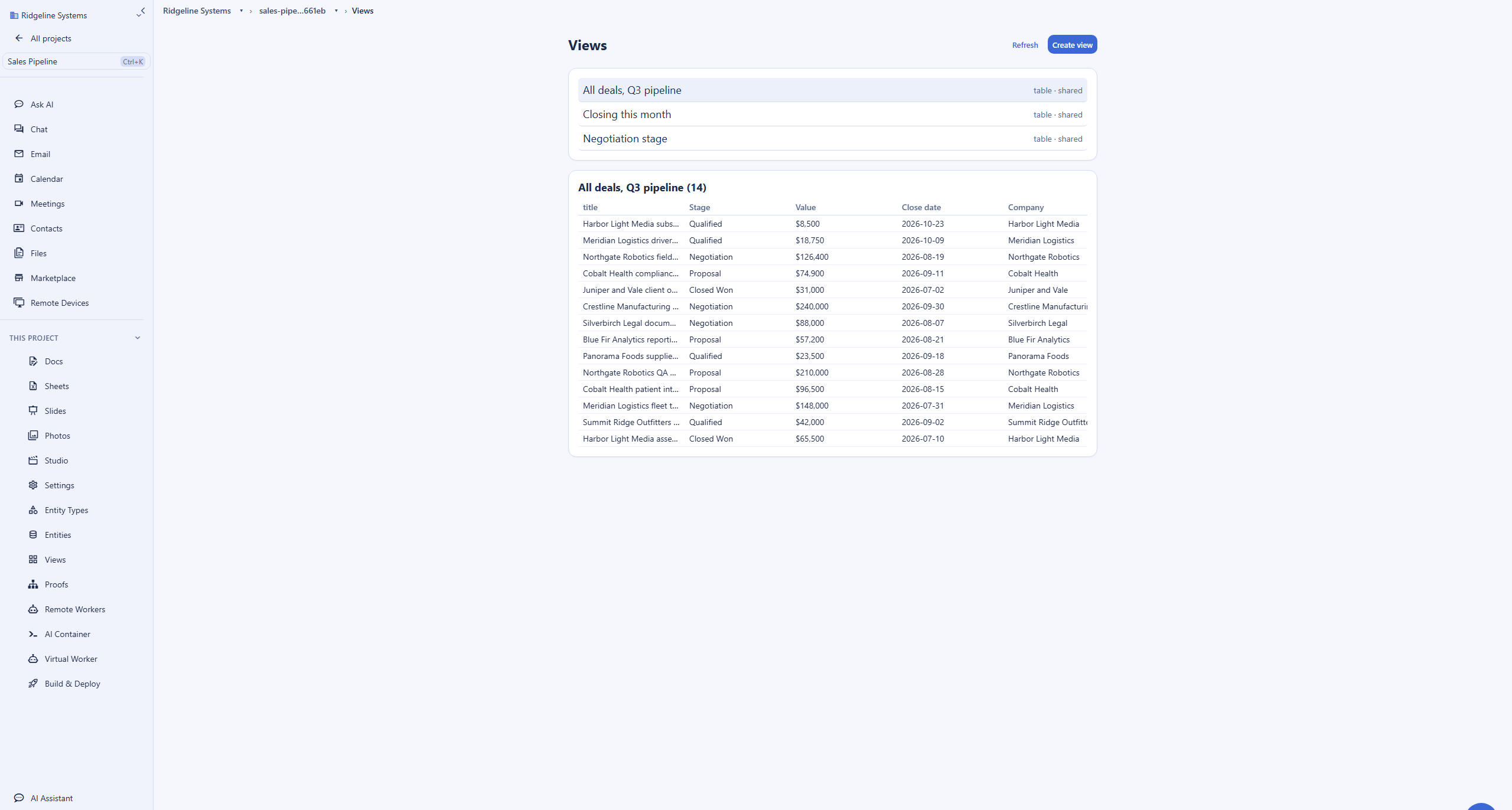
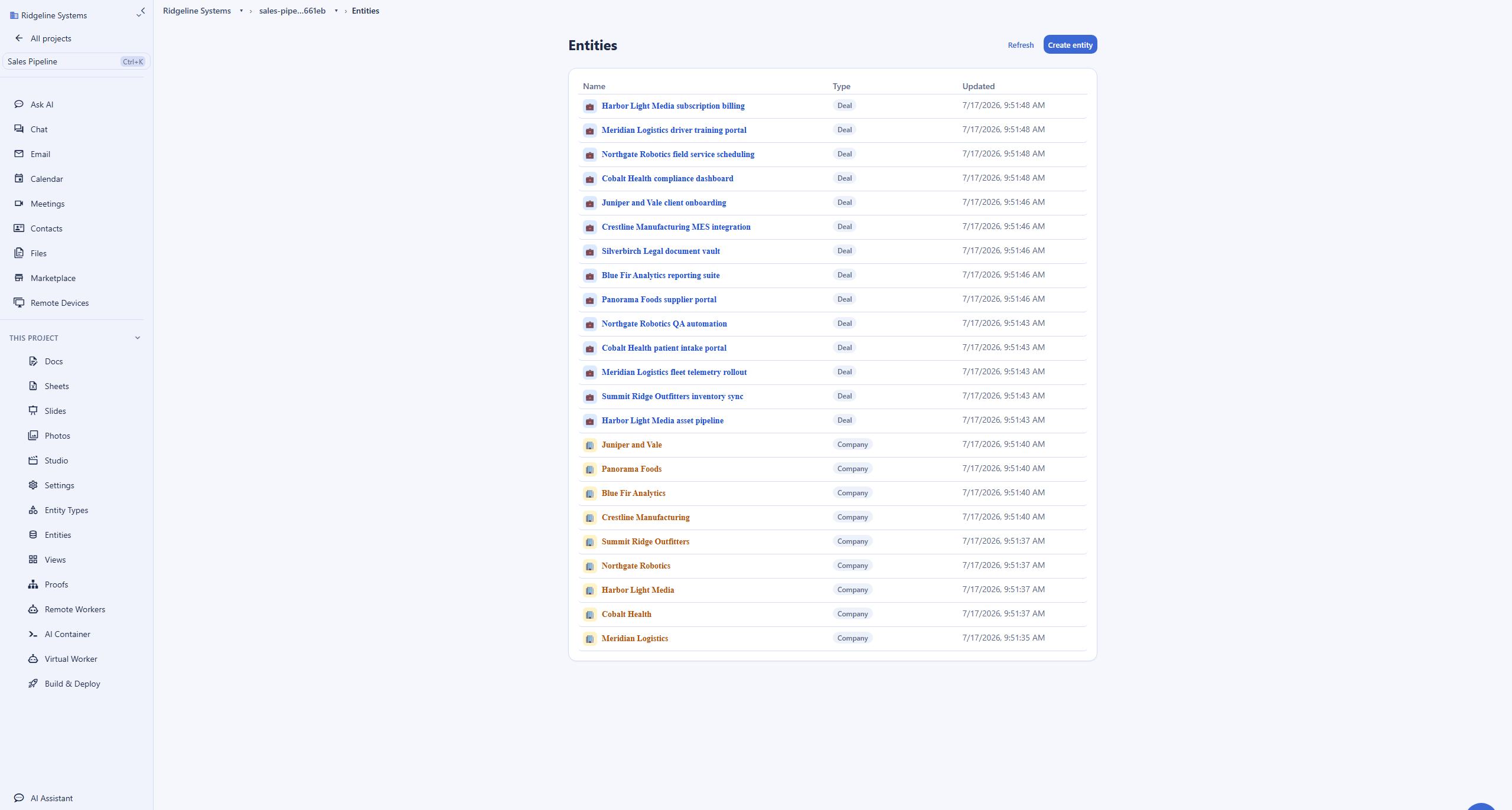
Microsoft Excel is a free-form grid: any cell can hold any value or formula, which is exactly what makes it flexible. Backbuild Sheets is the same kind of free-form grid, with more than 500 functions, dynamic-array spill, LAMBDA, and the in-cell QUERY language, and it lives beside a structured-data grid built on typed entity types for teams that want columns with enforced types, records with an owner and a workflow state, and saved views with filters and sorting over one dataset. The two are complementary: use Backbuild Sheets for the everyday spreadsheet, and reach for typed entities when a table needs validation, relationships, and per-record access control that a free-form grid does not enforce. Both surfaces, and the rest of the workspace, are readable and writable through the same REST API.
The formula engine, QUERY, and in-cell math
The Backbuild Sheets formula engine covers the shapes an analyst reaches for: XLOOKUP, INDEX and MATCH, SUMIFS, SUMPRODUCT, and XIRR, dynamic-array spill with UNIQUE, SORT, and FILTER, LAMBDA with LET, MAP, REDUCE, SCAN, BYROW, and BYCOL, and an in-cell SQL-style QUERY language with SELECT, WHERE, GROUP BY, a PIVOT clause, and ORDER BY, recalculated through an incremental dependency graph. On raw worksheet-function breadth the two are comparable. The decisive difference is the analytical stack around the grid: Microsoft Excel adds Power Query for live extract, transform, and load, Power Pivot with DAX data models over millions of rows, interactive drag-and-drop PivotTables, and the Solver and Analysis ToolPak add-ins, none of which Backbuild Sheets matches today. Backbuild Sheets adds one thing Microsoft Excel does not have: in-cell LaTeX and KaTeX math, so a cell can render a typeset equation, which matters to research and technical teams. For interactive cross-tabulation the Backbuild Sheets answer is the QUERY PIVOT clause, which is written rather than dragged.
AI, the Model Context Protocol, and the API
Both products bring AI to the grid. Microsoft Excel has Copilot in Excel, a paid add-on that builds and edits a sheet from a prompt and adds an inline COPILOT function, with a documented cell-context ceiling and accuracy caveats. Backbuild Sheets has the built-in AI assistant, included on every plan, and it exposes a native Model Context Protocol tool surface of 27 sheet tools, so an AI agent, whether Backbuild AI on usage credits or a model you bring, can create a workbook, write cells, set formulas, add tabs, import, and export end to end, with every action inside the caller permissions and audit logged. Microsoft Excel is automated through VBA and Office Scripts and the Excel REST API in Microsoft Graph. The Backbuild grid also answers a REST call directly through the Backbuild Sheets API, on every plan.
Where Microsoft Excel wins today
Microsoft Excel is the deepest spreadsheet in existence, and several of its strengths are things Backbuild Sheets does not match today. Stated plainly, and this list is long on purpose:
The analytical stack: Power Query, Power Pivot, and PivotTables
Microsoft Excel ships Power Query for live extract, transform, and load, Power Pivot with DAX data models over millions of rows, and interactive drag-and-drop PivotTables with GETPIVOTDATA. Backbuild Sheets answers pivots with the written QUERY PIVOT clause and has no Power Query or DAX equivalent. For data modelling and interactive analysis, Microsoft Excel leads decisively.
VBA, Office Scripts, Solver, and the ToolPak
The VBA and Office Scripts automation languages, the Solver optimizer, and the Analysis ToolPak statistics add-in have no direct equivalent in Backbuild Sheets, whose answer is a different mechanism: platform automations, the Model Context Protocol, and the REST API. If your workbook depends on an in-cell macro language or built-in what-if optimization, Microsoft Excel is the better fit.
Desktop scale, offline, charts, and .xlsx
The installed Excel desktop app is offline-native and built for very large datasets (up to 1,048,576 rows per sheet), ships about seventeen chart categories, and reads and writes the near-universal .xlsx format with formulas preserved. Backbuild Sheets does not offer full offline editing today, ships six chart types, and exports .xlsx as a values-only snapshot.
Ubiquity, the ecosystem, and a perpetual license
Excel is the category standard, rated a leader across tens of thousands of reviews, backed by the Microsoft 365 and Copilot ecosystem, and available either by subscription or as a perpetual one-time license. Backbuild is the newer entrant with a smaller base, and it is subscription-only with a free workspace tier for teams.
Common Microsoft Excel frustrations, and how Backbuild Sheets addresses them
Subscription cost and the Copilot add-on
A recurring reason people look for a Microsoft Excel alternative is subscription cost, rising further in 2026, with AI gated behind a separate Copilot add-on at 30 US dollars per user per month. Backbuild folds the spreadsheet into a workspace that is free for up to 50 seats, with the AI assistant included on every plan and the option to bring your own AI provider so inference is billed at your provider rate rather than a marked-up add-on.
Version chaos over emailed files
Teams describe a sprawl of Report_Final_v2 files and merge headaches when workbooks are emailed around. Backbuild Sheets is a real-time collaborative grid with presence, comments, and version history, so one shared workbook replaces the file copies, and sharing is scoped and revocable. Excel answers this with co-authoring when the file lives on OneDrive or SharePoint, though the emailed-desktop-file workflow remains common.
Error risk with no audit trail
Spreadsheet errors are famous and expensive, from a multi-billion-dollar copy-and-paste and formula mistakes to documented enterprise disasters. Backbuild Sheets sits in a workspace with a tamper-evident audit log and role-based access control on every plan, and beside a structured-data grid with typed columns and validation for tables that need enforced types the way a free-form grid does not. Excel adds governance and retention through Microsoft Purview on higher Microsoft 365 tiers.
The automation runtime and secrets in a cell
Bulk automation in Excel runs through Office Scripts and Power Automate or VBA, and a common and risky habit is keeping API keys and passwords in a worksheet. Backbuild automations run on every plan and can dispatch to an AI worker on a real containerized computer, and any credential the work touches lives in a zero-knowledge secrets vault and is released by single-use grant rather than pasted into a cell. The honest tradeoff: Backbuild has no in-cell macro language, so a VBA macro is a different pattern, not a drop-in port.
Which spreadsheet wins, by use case
Budgets, lists, and everyday spreadsheets
For a personal budget, a shared list, or a lightweight tracker, the deciding factors are cost, familiarity, and working everywhere. Microsoft Excel for the web is free with a Microsoft account, the installed app edits offline and is available as a perpetual one-time license, and nearly everyone already knows the interface. Backbuild Sheets matches the core editing experience and adds governance, but it is oriented to a team workspace rather than a single consumer account, has no full offline mode today, and its mobile apps are still in development.
Financial modelling, analysis, and reporting
This is the heart of Excel, and it is where Microsoft Excel leads clearly. Analysts and finance teams buy on the analytical stack, and Excel has Power Query, Power Pivot with DAX, interactive PivotTables, the Solver and Analysis ToolPak, cross-workbook references, and desktop-scale performance on very large files. Backbuild Sheets answers with more than 500 functions, LAMBDA, spill arrays, and the in-cell QUERY language whose PIVOT clause cross-tabulates a range in a formula, plus in-cell LaTeX math for technical reporting, and it sits beside double-entry accounting in Backbuild Finances when the report draws on the books. It does not match the Excel analytical stack.
Spreadsheet automation and programmatic sheets
Developers and power users automate spreadsheets to save labour: pull data, transform it, and push it back. Microsoft Excel does this through VBA, Office Scripts with Power Automate, and the Excel REST API in Microsoft Graph, a deep and well-known ecosystem. Backbuild Sheets is driven through a public REST API and a native Model Context Protocol surface of 27 tools, so an AI agent can build a sheet end to end, and automations can dispatch to an AI worker on a real computer with vault secrets injected by grant, on every plan and with no per-run execution cap. The honest gap: there is no in-cell macro language in Backbuild Sheets, so a VBA macro that lives inside the workbook is a different pattern.
Private, governed, and de-Microsoft teams
For a team that wants a spreadsheet under its own governance, or that has to answer to a security or compliance review, the deciding factors are encryption, access control, audit evidence, and data handling. Backbuild Sheets keeps data in a workspace with single sign-on and a tamper-evident audit log on every plan including Free, role-based access control, a zero-knowledge post-quantum secrets vault, and inference under your own AI provider agreement. With Microsoft Excel the equivalent identity, retention, and audit controls come from Microsoft Entra ID and Microsoft Purview, which are Microsoft 365 features on higher tiers, and Copilot runs on the bundled Microsoft model. The honest boundary applies to both: neither product end-to-end encrypts the spreadsheet body.
Consolidating the spreadsheet with the rest of the workspace
Around a spreadsheet, most teams also pay for mail, calendar, documents, slides, file storage, accounting, and support tooling. Microsoft Excel sits inside Microsoft 365, which covers Outlook, Word, PowerPoint, OneDrive, SharePoint, and Microsoft Teams, but not double-entry accounting, a help desk, or a secrets vault. Backbuild folds the spreadsheet into a workspace that also includes Mail at your own domain, Calendar, Docs, Slides, Photos, Files, double-entry accounting, a help desk, a training course system, and the secrets vault, in one subscription.
Security, identity, and governance evaluation
A security review of a spreadsheet platform turns on four questions: who can sign in, what each person can see, what evidence survives every change, and where the data and any credentials live. On identity, Backbuild ships single sign-on on every plan, including Free, and SCIM 2.0 provisioning. Microsoft offers single sign-on and provisioning through Microsoft Entra ID, which is strong and mature, but the enterprise identity and audit controls are a function of the Microsoft 365 tier, so a personal or web-only Excel account carries consumer-grade controls until the organization is on a business or enterprise plan.
On authorization and evidence, Backbuild applies organization-scoped roles beneath record-level sharing scopes, and writes a tamper-evident audit log on every plan. Microsoft Excel shares at the file and link level through OneDrive and SharePoint, and its retention, audit, and data-loss-prevention surface is Microsoft Purview, available on higher Microsoft 365 tiers. On data handling, Backbuild keeps any credentials the work touches in a zero-knowledge, post-quantum secrets vault the service cannot read, releasing them to automated work by single-use grant, where a common Excel pattern is to keep secrets in a cell. On AI governance, Backbuild lets an organization bring its own AI provider and model, so inference runs under its own agreement, where Copilot in Excel runs on the bundled Microsoft model.
The tradeoffs run both ways. Microsoft is the larger, longer-established vendor with a mature identity and compliance estate in Entra ID and Purview, a deep administrator community, and decades of certifications; Backbuild is the newer product, and its posture, while built to the standards auditors check, does not carry that long independent operating history yet. Neither product end-to-end encrypts spreadsheet content. The bottom line: if the review demands single sign-on, fine-grained access, an audit log, and a secrets vault without stepping up a paid tier, the Backbuild floor is higher; if it demands a mature, independently audited enterprise identity and compliance estate with a long track record, Microsoft 365 has more of it today.
The economics for a finance and procurement review
Excel for the web is free with a Microsoft account, and the cost appears when a team needs the installed desktop app, admin controls, and business identity, which means a Microsoft 365 subscription at 6, 12.50, or 22 US dollars per user per month, billed annually, with an increase to enterprise plans from July 2026 and AI gated behind a separate Copilot add-on at 30 US dollars per user per month. Around the spreadsheet, accounting, a help desk, and a password manager are separate purchases. Microsoft also offers a perpetual one-time license, which trades the cloud services and Copilot for a single up-front payment.
The Backbuild model is a single workspace subscription: free for up to 50 seats, then $19 to $149 per seat with no minimum, with variable usage (AI, containers, storage growth) drawing one published credit pool. Single sign-on, SCIM, and audit logging are included on every plan, the AI assistant is on every plan with the option to bring your own provider so inference is billed at the provider rate, and the same subscription includes Mail, double-entry accounting, a help desk, and the secrets vault, each of which is a separate invoice around Microsoft Excel. Be precise about the free tiers in both directions: an individual pays nothing for Excel for the web, and a team of up to fifty pays nothing on Backbuild, but the Backbuild free plan includes a fixed storage allowance before growth draws credits, so a team hosting heavy data can pay Backbuild for storage where a web-only Excel user would not.
The bottom line: for a single user on Excel for the web, Microsoft Excel is free and hard to beat on price, and the perpetual license suits anyone who wants no subscription at all; for a team that would otherwise buy Microsoft 365 plus Copilot plus accounting plus a help desk plus a password manager, the Backbuild single subscription consolidates several line items, and its governance does not cost an extra tier.
Rolling it out across a team
Adoption risk on a spreadsheet is concentrated in three places: how fast people are productive, whether existing files come across cleanly, and whether the tool fragments. On the first, both are fast, because the grid is a familiar surface; Microsoft Excel has the edge of decades of prior exposure and muscle memory. On the second, Excel files move into Backbuild Sheets through XLSX or CSV export and Backbuild Sheets import, with honest caveats to plan for: Power Query queries, Power Pivot models, PivotTables, and VBA macros do not carry over, and cross-sheet and cross-workbook references collapse to a single sheet, so workbooks that lean on the analytical stack need rework.
On governance during rollout, the Backbuild advantage is that single sign-on, role-based access control, and audit logging are on from the first seat, and the rest of the workspace, including the built-in help desk, is there on day one, so questions about the new tooling have somewhere to live without another purchase. The Microsoft advantage is muscle memory, the depth of the analytical stack, and mature mobile and offline apps: most people already know Excel, and it works without a connection. The bottom line: pilot both with real workbooks. If the team lives in Power Query, PivotTables, offline editing, and mobile, Microsoft Excel lands faster today; if it works in a governed workspace with the back office attached, Backbuild rolls out at zero cost for the whole team with governance included.
Data ownership, migration, and lock-in
The exit question deserves as much scrutiny as the entrance. Microsoft Excel data leaves through XLSX, CSV, and PDF export and through the Excel REST API in Microsoft Graph, and the native .xlsx format preserves formulas, PivotTables, and macros. Backbuild Sheets exports CSV, TSV, XLSX, and SQLite, and the REST API returns the grid on every plan; the honest gap on the way out is that Backbuild Sheets XLSX export is a values-only snapshot today, so a formula-preserving round trip is a place where Microsoft Excel is ahead.
Migrating into Backbuild is a two-lane move: grid-shaped files import from CSV, TSV, XLSX, and ODS, with formulas translated where the engine can on XLSX and ODS, and anything programmatic loads through the API or by handing the file to an AI agent over the Model Context Protocol, which can build the workbook end to end. The bottom line: both products let you leave, and the practical difference is that Microsoft Excel preserves the full workbook, including formulas and macros, in its native .xlsx, while Backbuild Sheets adds SQLite export and an uncapped, agent-drivable API for both directions.
Strategic fit and vendor risk
Microsoft Excel is the category-defining product, and the strategic case for it is depth and reach: the deepest spreadsheet in existence, the Power Query and Power Pivot analytical stack, VBA and Office Scripts, Microsoft 365 and the Copilot ecosystem behind it, and decades of adoption. The risk on that side is subscription cost that rises over time, an AI add-on priced separately, and governance and audit controls that sit on higher Microsoft 365 tiers.
The Backbuild strategic case is governance and consolidation: a real formula engine with in-cell math, an agent-drivable tool surface, security included on every plan, a secrets vault, and the whole workspace in one subscription. The real risks: it is the younger vendor, and it does not match Microsoft Excel on Power Query, Power Pivot and DAX, interactive PivotTables, an in-cell macro language, the Solver and Analysis ToolPak, chart breadth, desktop-scale performance, offline editing, or mobile maturity. The bottom line: choose Microsoft Excel when analytical depth, the automation ecosystem, offline, desktop scale, and category maturity are the controlling criteria; choose Backbuild Sheets when governance on every plan, in-cell math, an agent-drivable API, a secrets vault, and workspace consolidation matter more.
Frequently asked questions
Is there a free Microsoft Excel alternative?
Yes. Backbuild Sheets is included in the Backbuild workspace, which is free for teams of up to 50 seats, and the free plan also includes single sign-on, SCIM, a tamper-evident audit log, the AI assistant, and the public REST API, with 25 MB of database storage and 1 GB of file storage before further growth draws usage credits. Microsoft Excel for the web is also free with a Microsoft account, and the installed desktop Excel app rides a Microsoft 365 subscription that starts at 6 US dollars per user per month on Business Basic, which gives web and mobile Excel, and 12.50 US dollars per user per month on Business Standard, which adds the desktop app, both billed annually. So an individual can use Excel for the web at no cost, and a team of up to fifty people can use Backbuild Sheets, with governance included, at no cost.
Is Backbuild Sheets as powerful as Microsoft Excel on formulas and analysis?
On the core worksheet formula language they are close, and on the analytical stack around the grid Microsoft Excel is deeper. Backbuild Sheets ships a formula engine with more than 500 functions, LAMBDA with LET, MAP, REDUCE, SCAN, BYROW, and BYCOL, dynamic-array spill, and an in-cell SQL-style QUERY language that includes a PIVOT clause, which is comparable to Excel on raw worksheet-function breadth. Microsoft Excel then adds a data-analysis stack that Backbuild Sheets does not match today: Power Query for live external-source extraction and transformation, Power Pivot with DAX data models over millions of rows, interactive drag-and-drop PivotTables, the Solver and Analysis ToolPak add-ins, and cross-sheet and cross-workbook references. Backbuild Sheets adds in-cell LaTeX math that Excel does not have. For everyday modelling the engines are comparable, and for deep data modelling, pivots, and what-if optimization, Microsoft Excel leads clearly.
Does Backbuild Sheets have PivotTables, Power Query, and macros?
Not in those forms, and this is where Microsoft Excel is stronger. Excel has interactive drag-and-drop PivotTables with GETPIVOTDATA, Power Query for live extract-transform-load from external sources, Power Pivot with DAX data models, and VBA and Office Scripts as in-workbook automation languages. Backbuild Sheets answers pivots with an in-cell QUERY language whose PIVOT clause groups and cross-tabulates a range with a formula, which covers many reporting cases but is written rather than dragged and has no GETPIVOTDATA, and it answers automation with platform automations, a public REST API, and a native Model Context Protocol tool surface rather than an in-cell macro language. If interactive PivotTables, Power Query, Power Pivot, or VBA are central to your work, Microsoft Excel is the better fit today, and a drag-and-drop pivot surface for Backbuild Sheets is a capability we have queued rather than shipped.
Can Backbuild Sheets replace Microsoft Excel for a private or governed team?
For everyday spreadsheet work, yes, and this is where Backbuild is strongest. Backbuild Sheets keeps your data in a workspace with single sign-on, role-based access control, and a tamper-evident audit log on every plan including Free, a zero-knowledge post-quantum secrets vault for any credentials the work touches, and the option to bring your own AI provider so inference runs under your own agreement rather than a vendor-bundled model. With Microsoft Excel the equivalent identity, retention, and audit controls come from Microsoft Entra ID and Microsoft Purview, which are Microsoft 365 features gated to higher tiers, and Copilot in Excel runs on the bundled Microsoft model. Note the honest limit: Backbuild Sheets content is encrypted in transit and at rest but is not end-to-end encrypted, so if your requirement is zero-access encryption of the spreadsheet body itself, neither product provides it.
Does Backbuild Sheets work offline like Microsoft Excel?
This is a place where Microsoft Excel is ahead. The installed Excel desktop app is offline-native: you can open, edit, and save workbooks with no connection at all, and it is built for desktop-scale performance on very large files. Backbuild Sheets is a real-time collaborative grid and does not offer full offline editing today. If you regularly work on spreadsheets without a network connection, or on very large local datasets, Microsoft Excel is the better choice.
Can I buy Microsoft Excel without a subscription?
Yes. Alongside the Microsoft 365 subscription, Microsoft sells a perpetual one-time license of Office, including a standalone Excel 2024, that installs on one device with no recurring fee, though it does not include the cloud services or Copilot. Backbuild is subscription-only, with a free workspace tier for up to 50 seats and paid plans above it. If a one-time purchase with no ongoing subscription is a firm requirement, the perpetual Excel license is an option Backbuild does not match.
Can an AI agent build a Backbuild Sheets spreadsheet?
Yes, end to end. Backbuild Sheets exposes a native Model Context Protocol tool surface of 27 sheet tools, including create, write cells, set formula, read range, apply style, insert and delete rows and columns, manage tabs, import, export, and describe function. An AI agent, whether Backbuild AI on usage credits or a model you bring, can create a workbook, write data, set formulas, add tabs, and export it, all through the same tools, with every action running inside the caller permissions and audit logged. Microsoft Excel is automated through VBA, Office Scripts, and the Excel REST API in Microsoft Graph, and its AI is Copilot in Excel, a paid add-on; both approaches automate a sheet, and the mechanism differs.
How do I move a Microsoft Excel workbook into Backbuild Sheets?
Save the workbook as XLSX or CSV, then import it into Backbuild Sheets, which reads CSV, TSV, XLSX, and ODS, translating formulas where it can on XLSX and ODS import. Values and structure move cleanly. Be aware of the honest gaps on the way in: Power Query queries, Power Pivot data models, PivotTables, VBA macros, and Office Scripts do not carry over, and cross-sheet and cross-workbook references collapse to a single sheet, so a workbook that leans on the Excel analytical stack or on references across sheets needs rework. For anything programmatic, the public REST API and the Model Context Protocol tools can load and read a sheet directly.
What does Backbuild Sheets include that Microsoft Excel does not?
In the grid itself, in-cell LaTeX and KaTeX math, an in-cell SQL-style QUERY language, and SQLite export. Around the grid, a native Model Context Protocol tool surface, single sign-on, SCIM, role-based access control, and a tamper-evident audit log on every plan including Free with no step up to a higher tier, a zero-knowledge post-quantum secrets vault with grant-based secret injection for automations, the option to bring your own AI provider and model, containerized automations that can operate a real browser, desktop, and terminal, and a workspace that folds in double-entry accounting in Backbuild Finances, a help desk, a training course system, and Backbuild Studio, each of which is a separate product or subscription around Microsoft Excel.
Try Backbuild Sheets free
A real formula engine with more than 500 functions, LAMBDA, spill arrays, and an in-cell QUERY language, real-time co-editing, in-cell LaTeX math, and SQLite export, inside a workspace that is free for up to 50 seats with single sign-on, SCIM, and audit logging included and no per-seat minimum. If the deciding factors are Power Query, Power Pivot, interactive PivotTables, VBA, the Solver, chart-type breadth, offline editing, or desktop-scale performance, Microsoft Excel is the stronger choice today.
Get started free