

ClickUp alternative: the Backbuild data platform and workspace vs ClickUp
ClickUp is an all-in-one work platform built on the task, with more than fifteen views, ClickUp Docs, Whiteboards, Dashboards, Goals, Chat, and automations; Backbuild answers it with a real relational database with typed relationships, lookups, and rollups, saved views, and automations with no monthly action cap, together with Backbuild Docs and Backbuild Sheets, inside a full workspace that ClickUp does not have, with single sign-on and a tamper-evident audit log on every plan including Free, no per-plan record caps, and no per-seat minimum. ClickUp still leads today on the breadth of its rendered view types, its task and project management depth, its Whiteboards, Mind Maps, and native Chat, its catalog of more than one thousand integrations, and its native mobile apps.
The short answer
ClickUp is an all-in-one work platform whose load-bearing primitive is the task, with more than fifteen view types, ClickUp Docs, Whiteboards, Dashboards, Goals, native Chat, and automations; on the Backbuild side that job is done by a real relational data platform (entity types and entities on a relational database, typed relationships, saved views, workflows, AI skills, and automations) together with Backbuild Docs and Backbuild Sheets, inside the full Backbuild workspace. Choose Backbuild if you want a governed relational database with typed relationships, lookups, rollups, and referential integrity instead of tasks with custom fields, automations with no monthly action cap, single sign-on, SCIM, and audit logging on every plan including Free, a 72-endpoint data-model REST API with no monthly call quota, an AI assistant on every plan with the option to bring your own provider, and no per-plan record caps and no per-seat minimum, inside a workspace that also includes Mail at your own domain, a real spreadsheet, double-entry accounting, and a secrets vault. Choose ClickUp if the deciding factors are the breadth of its more than fifteen rendered view types, its task and project management depth with seven levels of subtasks, dependencies, and sprints, its Whiteboards, Mind Maps, and native Chat, its large template and integration ecosystem, or its native mobile apps in the app stores.
Backbuild vs ClickUp: feature by feature
Prices and limits below are quoted from each vendor’s own pages, observed 2026-07-18. The highlighted column is Backbuild. Row notes name the Backbuild surface each capability lives in.
| Backbuild Relational data platform and work management inside a full workspace Workspace free up to 50 seats, including the data platform, Backbuild Sheets, the AI assistant, and the full REST API, with single sign-on, SCIM, and audit logging on every plan, no per-seat minimum, and no monthly automation-action cap. Pro, $49/seat/mo, adds the SaaS Builder. Get Started Free | ClickUp All-in-one work platform of Spaces, Lists, tasks, views, and automations Free Forever with 60 MB storage and no API, no dashboards, no whiteboards, no single sign-on. Unlimited $7, Business $12 per seat, billed annually. Dashboards and whiteboards start on paid plans; single sign-on, SCIM, custom roles, and audit logs are Enterprise only. AI is the ClickUp Brain add-on, billed to every paid member. | |
|---|---|---|
| Price and limits | ||
| Free plan | Up to 50 seats, full data platform | Unlimited tasks, 60 MB storage |
| Cost per additional editor | $0 on Free; $19 to $149 by plan | $7 Unlimited, $12 Business, per seat |
| Per-seat minimum | No minimum; pay per seat | No minimum on paid plans |
| AI billed only where it is used, not to every seat | Assistant on every plan; per-use credits | Brain add-on billed to all paid members |
| Monthly automation-action cap | None on any plan | 5,000 Business; 250,000 Enterprise |
| Records before a forced upgrade | No per-plan record cap; storage credit-metered | Unlimited tasks; 300-task relationship cap |
| Change history and activity log | Audit logged on every plan; version history | Audit log Enterprise only |
| Data model (a relational database vs tasks with custom fields) | ||
| Structured records model | Entity types on a relational database | Tasks with custom fields |
| Custom field and column types | 31 field types | Custom fields (most on Unlimited and up) |
| Linked records across tables (via entity types and typed relationships; ClickUp via the Relationship custom field) | Relationship field, up to 300 tasks | |
| Two-way relations between records | Relationships and Dependencies | |
| Rollups of related records | Rollups, cannot feed a formula field | |
| Dedicated lookup field across a relationship | Relationship display fields, limited | |
| Enforced referential integrity and legal-link restrictions | ||
| Formula fields computed on each record | Rollups on records; full formulas in Backbuild Sheets | Formula fields (Unlimited and up) |
| Record workflow states with legal transitions | Custom statuses and automations | |
| Validated type evolution without breaking live records | Field edits apply immediately | |
| Performance at scale (reviewers report lag on large ClickUp workspaces) | No cap; scales with storage credits | Task and navigation lag reported |
| Views over one dataset | ||
| Saved views with filters, sort, and grouping | ||
| Board, timeline, gantt, and calendar layouts rendered in place with drag and drop | Grid today; tickets board and gantt render; layouts Soon | More than 15 view types rendered in place |
| Mind map and infinite-canvas whiteboard views | Backbuild Diagrams on the roadmap | Whiteboards and Mind Maps |
| Workload and resource-capacity view | Not a saved-view layout today | Workload view (Business and up) |
| Map view of geolocated records | Map view | |
| Full calendar app with month, week, and day layouts (via Backbuild Calendar, with two-way Google, Microsoft 365, and CalDAV sync) | Calendar view of tasks | |
| Structured data-entry with validation | Entity editor as a validated form | Task detail and custom fields |
| Public intake forms from anyone Soon | On the roadmap; in-workspace entry uses the entity editor | Forms view (Unlimited and up) |
| Rows re-filtered to each viewer’s access on every run | Space, Folder, and List permissions | |
| Task and project management | ||
| Nested subtasks | Typed parent and child relationships | Subtasks up to 7 levels |
| Blocking and waiting-on dependencies | Typed relationships with directional meaning | Task dependencies |
| Packaged sprint and agile module with points and burndown | Sprints (Unlimited and up) | |
| Time tracking, timesheets, and billable time (Backbuild records time and mileage in Backbuild Finances, with approval and billing rollup; ClickUp times tasks natively) | Time and mileage in Backbuild Finances | Native task timers and timesheets |
| Packaged goals and OKR module | Modeled as entity types and rollups | Goals (Unlimited and up) |
| Automations | ||
| Trigger plus action automation rules | Every plan, including Free | Small allowance on Free; more on paid |
| No monthly action cap | 5,000 to 250,000 actions by tier | |
| Record event triggers (Backbuild also triggers on email, calendar, and help desk events) | Task event triggers | |
| Scheduled time triggers | Recurring automations | |
| Outbound webhook action | Webhooks | |
| Hand an event to an AI agent | Brain AI automations (add-on) | |
| Role-gated approval workflows with states and transitions | Approvals via automations | |
| Author AI skills as governed state machines (states, transitions, and per-state prompts and models) | ||
| Dispatch an automation to an AI worker on a real computer (a container with a browser, desktop, and terminal, on usage credits) | ||
| Vault secrets injected into automated work by grant (zero-knowledge vault; the model never sees a plaintext value) | ||
| Dashboards and reporting | ||
| Dashboards with widgets combining data | Charts in Backbuild Sheets; entity dashboards Soon | Dashboards (Unlimited and up) |
| Cross-source reporting | Sheets query language plus the API | Dashboard cards across Lists |
| Spreadsheet grid | ||
| Real-time spreadsheet with a formula engine (via Backbuild Sheets, free on every plan; ClickUp has a Table view, not a spreadsheet) | ||
| Function library | More than 500 functions | Formula fields only |
| LAMBDA and dynamic spill arrays | ||
| In-cell SQL-style QUERY language | ||
| Charts | Dashboard charts | |
| AI and agents | ||
| Built-in AI assistant grounded in your data | ClickUp Brain (add-on) | |
| AI builds the data model and automations end to end | Brain and AI agents | |
| Open agent protocol over MCP (Backbuild spans the whole platform; ClickUp exposes tasks and docs) | Whole platform | ClickUp MCP server |
| Full AI included on the free plan | Assistant on every tier, usage credits | Brain is a paid add-on |
| AI billed per user only where it is used | Billed to all paid members | |
| AI worker operating a real computer (a full desktop, browser, and terminal, not only in-app agents) | Virtual Workers, on usage credits | |
| Bring your own AI providers and models | Bundled models, metered credits | |
| API, integrations, and migration | ||
| Public REST API for the data model | 72 endpoints | REST API (tasks, docs, users) |
| API available on the free plan | No API on Free Forever | |
| API spans the entire platform (OpenAPI 3.1, every surface) | Tasks, docs, users | |
| Monthly or per-minute API rate cap | None; not credit-metered | 100 req/min to Business; 10,000 Enterprise |
| Hosted MCP server for AI agents | Native, whole platform | ClickUp MCP (tasks and docs) |
| Signed outbound webhooks with delivery log | Webhooks | |
| First-party one-click integration catalog | Provider integrations plus custom tools; smaller catalog today | More than 1,000 integrations |
| Extensions and app marketplace (Backbuild: installable, publishable SaaS packages, part of Backbuild Pro) | SaaS packages on the Backbuild marketplace | Integrations and API apps |
| Per-role app publishing without code (Backbuild’s saved views with role-based access, packaged by the SaaS Builder into installable, sellable apps) | Views plus RBAC; SaaS Builder packages (Pro) | Views with permissions |
| CSV and Excel import | ||
| Export beyond CSV | Excel export; SQLite export on paid plans; plus the full API | Task export CSV and Excel (paid) |
| Security, governance, and native apps | ||
| Single sign-on (SAML) | Every plan, including Free | Enterprise only (Google on Business) |
| SCIM provisioning | SCIM 2.0 user provisioning | Enterprise |
| Role-based access control and custom roles | Every plan | Base roles; custom roles Enterprise |
| Tamper-evident audit log | Every plan, including Free | Enterprise audit log |
| Per-field access controls and masking | ||
| Record sharing scopes (user, group, department, organization, with the five-right model) | Space, Folder, and List permissions and guests | |
| Zero-knowledge, post-quantum secrets vault | ||
| Offline-first sync | Limited offline mode | |
| Native desktop apps (Windows and macOS installers) | ||
| Native mobile apps in the app stores today | In development; coming soon | |
| Workspace apps in the same subscription | ||
| Backbuild Mail (mail at your own domain from a real mail server) | ||
| Backbuild Chat (ClickUp ships native Chat; Backbuild Chat is on the roadmap) Soon | On the roadmap for every plan | ClickUp Chat |
| Backbuild Meetings (secure video meetings; ClickUp offers SyncUps and a Zoom integration, not a meetings app) Soon | On the roadmap for paid plans | SyncUps and Zoom integration |
| Backbuild Calendar (ClickUp’s similar offering: a calendar view of tasks) | Calendar view | |
| A full calendar app with month, week, and day layouts | Task view only | |
| Two-way sync with Google, Microsoft 365, and CalDAV | Google Calendar sync | |
| Backbuild Contacts (shared address book) | ||
| Backbuild Docs (ClickUp’s similar offering: ClickUp Docs) | ClickUp Docs | |
| WYSIWYG with a raw LaTeX source mode and live math | ||
| Export to LaTeX, DOCX, ODT, HTML, Markdown, RTF, and EPUB | PDF and Markdown export | |
| Backbuild Sheets (a real spreadsheet grid; ClickUp has a Table view, not a spreadsheet) | ||
| Backbuild Slides (presentation decks with themes, charts, and PowerPoint export) | ||
| Backbuild Diagrams (ClickUp’s similar offering: Whiteboards and Mind Maps) Soon | On the roadmap for every plan | Whiteboards and Mind Maps |
| Backbuild Photos (albums, slideshows, and a non-destructive layer editor) | ||
| Backbuild Files (ClickUp’s similar offering: file attachments on tasks) | File attachments | |
| A standalone file explorer with folders and per-audience libraries | ||
| Training video editor (Backbuild Studio screen-demo videos narrated from a script) | Every plan; cloud rendering on paid plans, on usage credits | |
| Video, audio, and music editors (in Backbuild Studio) Soon | Authoring preview today; rendering on the roadmap | |
| Backbuild Finances (double-entry accounting, invoicing, bills, and bank reconciliation) | ||
| Help desk (tickets, workflow states, assignment, and replies as a built-in product) | 20 tickets/mo Free; unlimited paid | |
| Training course system (build and publish courses, quizzes, and certificates) | ||
| Remote desktop (browser-based access to your own machines and cloud desktops) | ||
| Secrets vault (zero-knowledge, post-quantum password and secrets manager) | ||
A cross means the platform does not offer the feature today. Soon means the feature is on the Backbuild roadmap and not shipped yet. In the workspace apps group, each row is one app in the Backbuild subscription; where ClickUp has a similar offering, the row note names it and the indented rows beneath list the features that differ. ClickUp prices and limits are quoted from the ClickUp pricing page, its features page, and its developer documentation, observed 2026-07-18. Backbuild capabilities are cited to the verified documentation for entity types, relationships, views, workflows, Backbuild Sheets, and the API reference.
ClickUp and the Backbuild surfaces that do the same job
ClickUp is an all-in-one work platform built on one load-bearing primitive: the task. Tasks live in a hierarchy of Spaces, Folders, and Lists, carry custom fields, subtasks, dependencies, and statuses, and are presented through more than fifteen view types, board, list, table, calendar, gantt, timeline, workload, map, and the infinite-canvas Whiteboards and Mind Maps, rolled up into dashboards and driven by no-code automations, alongside ClickUp Docs, Chat, Goals, and Forms. On the Backbuild side the same job is done by the data platform: entity types define the model on a relational database, entities are the records, typed relationships link them with lookups and rollups, saved views present one dataset many ways, and automations react to events, with Backbuild Docs for documents and Backbuild Sheets supplying the spreadsheet grid that ClickUp does not have. Both surfaces, and everything else in the workspace, are drivable through the same REST API and through AI agents over the Model Context Protocol.
The Backbuild surfaces that answer ClickUp
Several of these surfaces will be new to a reader coming from ClickUp: entity types and typed relationships, saved views, and Backbuild Sheets. Each has a specific job, a specific mechanism, and a specific price.
Entity types, records, and typed relationships
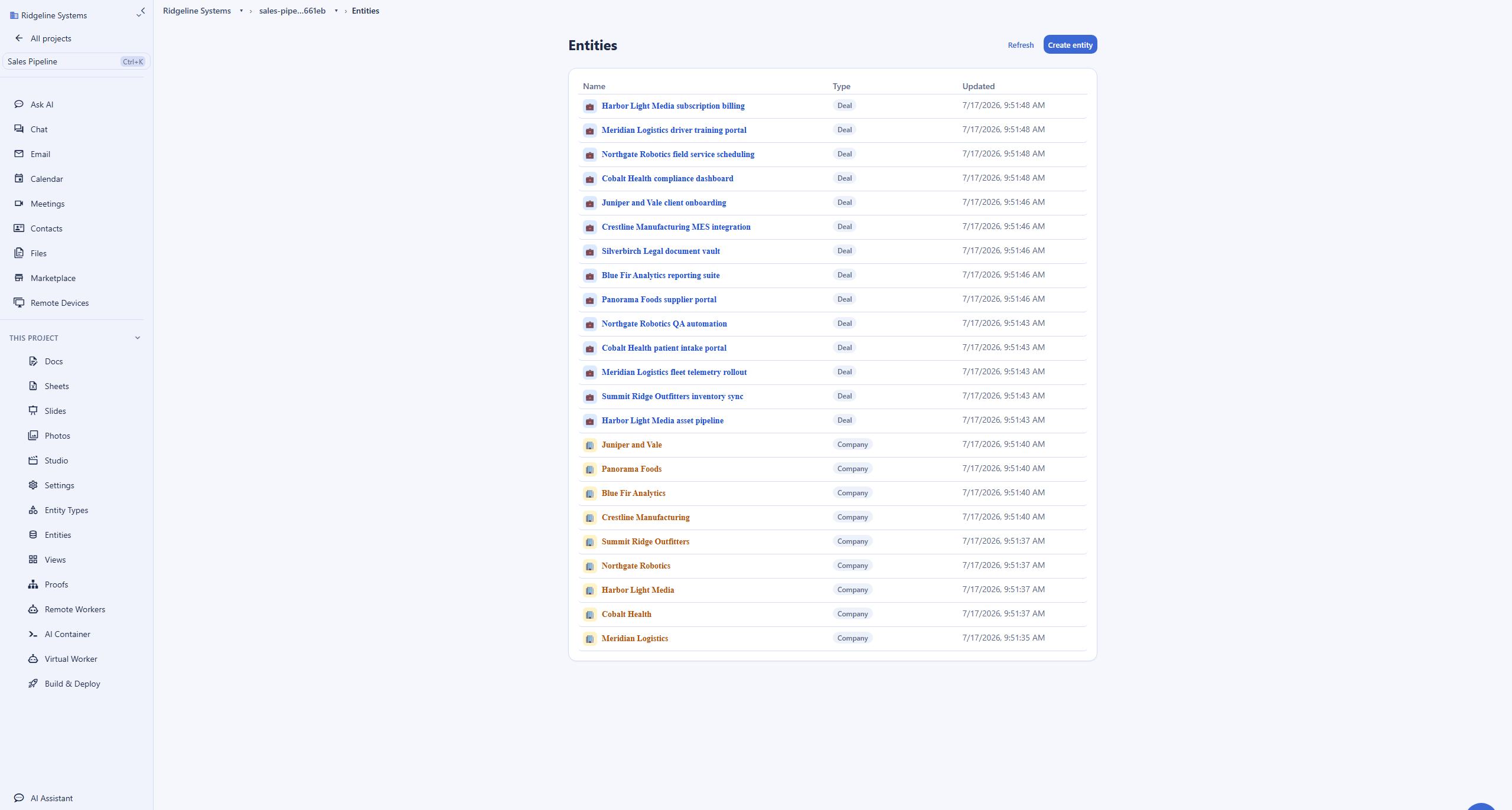
A ClickUp task is a row with custom fields; the Backbuild entity type is the schema of one kind of record, a Deal, a Supplier, an Asset, defining thirty-one field types including references to other records, people, groups, and roles, with required flags and validation the platform enforces on every save. Entities are the records themselves, each carrying an owner, sharing scopes, and a workflow state, with every create, update, and delete audit logged. Typed relationships are the linked records: directional connections with their own meaning, with a dedicated lookup field that pulls a value across a link and a rollup field that lists and counts related records, backed by enforced referential integrity and legal-link restrictions. ClickUp links data with a Relationship custom field that connects up to 300 tasks, with rollups that summarize related and subtask values but cannot feed a formula field, and no enforced referential integrity. Backbuild adds versioned type evolution, where schema changes are validated against live records instead of applying instantly, and has no per-plan record cap.
Saved views: layouts, forms, and per-role working surfaces
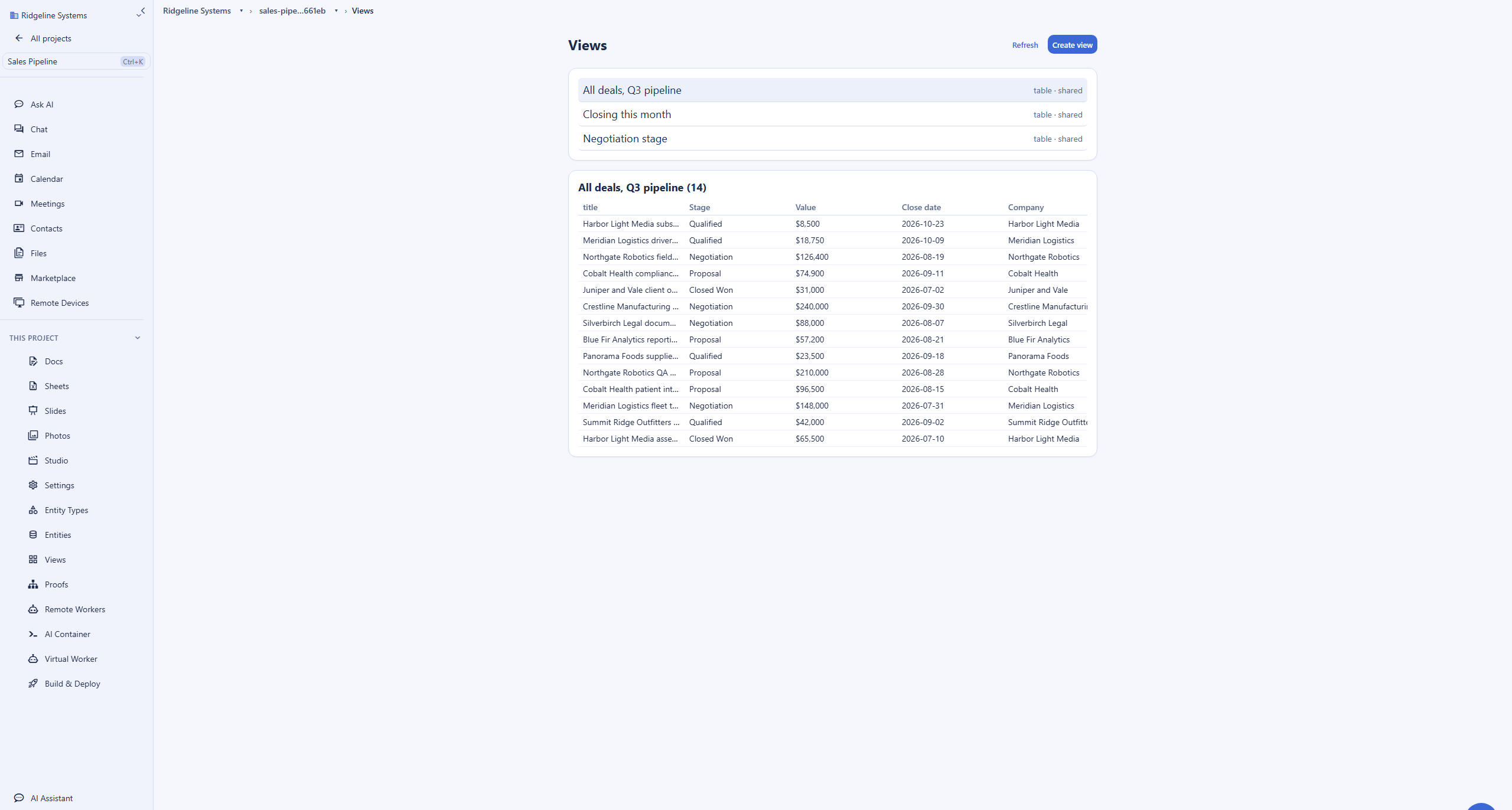
A saved view is a named definition over one dataset: the entity type to show, filters, sorting, grouping, and a view type of table, board, list, calendar, timeline, or gantt. Views are private by default and shareable deliberately, and every execution re-filters rows to the running viewer’s access on the server, so sharing a view definition never widens data access; that property turns views into per-role working surfaces, a sales pipeline board for one role and a finance table for another over the same records. On rendering, the current state is specific and worth stating plainly: the app opens a saved view as a paginated grid today, dedicated layouts are coming soon, the help desk tickets surface already renders a drag and drop board and a gantt chart, and Backbuild Calendar renders full calendar layouts. This is where ClickUp is clearly ahead today: ClickUp ships more than fifteen view types and renders every board, timeline, gantt, and calendar layout in place, with drag and drop, and adds Whiteboards, Mind Maps, workload, and map views Backbuild does not offer as saved-view layouts. On data entry, both ship a form surface: the Backbuild entity editor renders each type’s fields as a validated form for members, and ClickUp collects public submissions through the Forms view; Backbuild’s public intake form surface is on the roadmap.
Documents and the spreadsheet grid
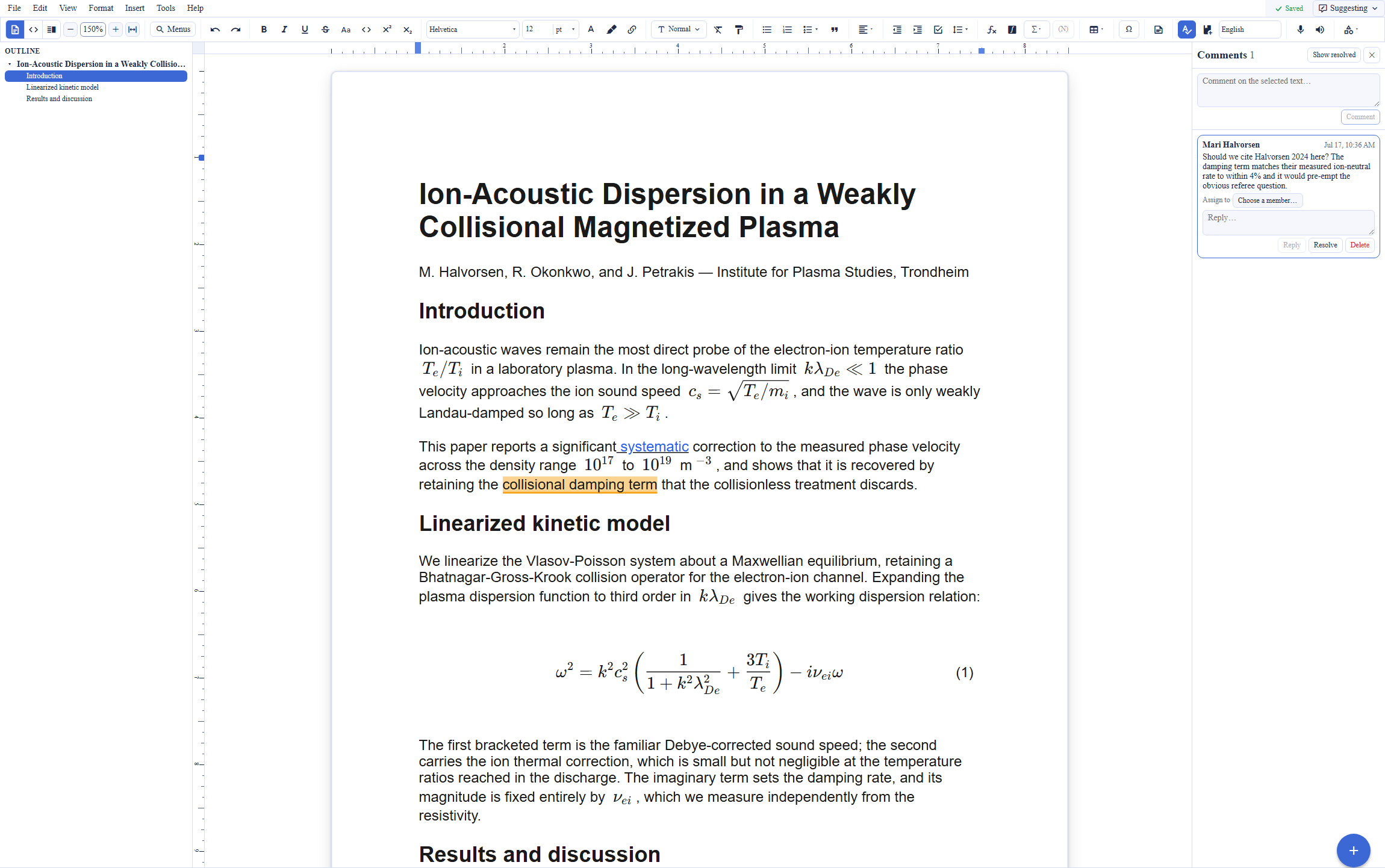
ClickUp answers the document job with ClickUp Docs, a capable real-time editor with nested pages and task embedding. Backbuild answers it with Backbuild Docs, a WYSIWYG editor with a raw LaTeX source mode, live math, real-time co-authoring, and export to LaTeX, DOCX, ODT, HTML, Markdown, RTF, and EPUB, and with Backbuild Sheets supplying the real spreadsheet grid that ClickUp does not have, with more than 500 functions, LAMBDA, spill arrays, and an in-cell query language. Where ClickUp has the more mature Whiteboards and Mind Maps for brainstorming, Backbuild has the deeper document and spreadsheet surface; both live in the same workspace as the data platform.
Where ClickUp wins today
ClickUp is the longer-established product in this category, with a large installed base, and several of its strengths are things Backbuild does not match today.
View-type breadth and rendered layouts
ClickUp ships more than fifteen view types, including board, timeline, gantt, calendar, workload, and map, plus infinite-canvas Whiteboards and Mind Maps, and renders every layout in place with drag and drop. Backbuild defines board, list, table, calendar, timeline, and gantt views over one dataset and returns them through the API, but saved entity views open as a paginated grid in the app today, with dedicated layouts coming soon; a drag and drop board and a gantt chart already render on the help desk tickets surface, and Backbuild Calendar renders full calendar layouts. The concession here is view-type breadth and in-app rendering polish, not the underlying view model.
Task and project management depth
ClickUp is built for project management, and it packages the depth to match: seven levels of subtasks, task dependencies, sprints with points, native time tracking and timesheets, and a Goals module. Backbuild models the same work with entity types, typed parent and child relationships, workflow states, and rollups, and records billable time and mileage in Backbuild Finances, but it has no packaged sprint module and no task-native stopwatch, so a team whose daily surface is a burndown chart or a start-stop task timer will find ClickUp more finished today.
Docs, Whiteboards, Mind Maps, and native Chat
ClickUp bundles a strong set of adjacent surfaces: ClickUp Docs with real-time co-editing and nested pages, infinite-canvas Whiteboards that convert shapes into tasks, Mind Maps, and native Chat. Backbuild answers Docs with Backbuild Docs, but its diagram surface is on the roadmap as Backbuild Diagrams and its team Chat is coming soon, so ClickUp holds the more complete brainstorming and conversation surface today.
Templates, integrations, and native mobile apps
ClickUp ships a large template center and automation-recipe library, so a new team can start from a finished List rather than a blank one, its catalog lists more than one thousand integrations, and its iOS and Android apps are in the app stores today. Backbuild covers external connections with provider integrations, the full REST API, signed webhooks, MCP, and custom tools built in the Tool Builder, and its Windows and macOS desktop apps ship now with mobile coming soon, so ClickUp holds the larger template and integration head start and the more mature phone experience today.
Common ClickUp frustrations and how Backbuild addresses them
An AI add-on billed to every paid seat
ClickUp Brain is a separate AI add-on stacked on a paid plan, and reviewers note it is billed to every paid member on the workspace, not only the people who use it, so enabling it can roughly triple the per-seat cost. Backbuild includes the AI assistant on every plan on usage credits, and an organization can bring its own AI provider so inference is billed at the provider rate, and a seat that never touches AI adds nothing for it.
Automation-action caps that run out mid-month
ClickUp meters automations by action, with a 5,000-action monthly cap on Business and 250,000 on Enterprise. Backbuild includes workflows and automations on every plan, including Free, with no monthly action cap; actions that consume compute or an AI model draw on usage credits or your own AI provider keys.
A task list is not a relational database
Reviewers who compare the two note that ClickUp is a task tracker at heart, with cross-task links limited to a relationship field and rollups that cannot feed a formula. Backbuild ships typed relationships with a dedicated lookup field, rollups that aggregate across links, and enforced referential integrity, on a model with validation and versioned type evolution, and no 300-task relationship cap.
Security features gated to Enterprise
On ClickUp, SAML single sign-on, SCIM, custom roles, and audit logs arrive only with Enterprise, with Google single sign-on on Business. Backbuild includes single sign-on, SCIM, and a tamper-evident audit log on every plan, including Free, with per-organization roles and per-field access controls and masking on records, so the security posture does not depend on the contract tier.
No API on the free plan and a per-minute rate cap
ClickUp offers no REST API on Free Forever and rate-limits paid plans to 100 requests a minute up through Business. Backbuild ships the full platform REST API on every plan, including Free, with no monthly call quota, generated from an OpenAPI 3.1 specification, alongside signed webhooks and a hosted MCP server.
Reporting locked behind a spreadsheet you do not have
ClickUp has a Table view but no spreadsheet, so heavier calculation and modeling usually move to an external tool. Backbuild includes Backbuild Sheets free on every plan, with more than 500 functions, LAMBDA, dynamic spill arrays, an in-cell query language, and charts, alongside the same data, so modeling stays in the workspace.
Which platform wins, by use case
Running projects and work across a team
This is ClickUp’s home turf and the reason many teams adopt it: a List of tasks with owners, dates, dependencies, and status, rendered as a drag and drop board, timeline, or gantt, with sprints, time tracking, and Goals, rolled up into dashboards. Backbuild answers with a relational project model, entity types for tasks linked to sprints linked to people, presented through saved board and timeline view definitions, with workflow states and legal transitions keeping status honest and automations that fire on record events or a schedule with no monthly action cap. The tradeoff is depth against polish: Backbuild adds referential integrity, no record cap, uncapped automations, and a real spreadsheet, while ClickUp renders the draggable board, timeline, gantt, and workload layouts in place today, packages sprints and task-native time tracking, and ships Whiteboards and native Chat, which Backbuild does not match today.
A cheaper ClickUp alternative without an AI seat surcharge
Small businesses, agencies, and solo operators run into ClickUp’s pricing shape quickly: the capabilities a growing team wants, dashboards, whiteboards, the API, and single sign-on, sit up the Unlimited, Business, and Enterprise tiers, and AI is a Brain add-on billed to every paid member. Backbuild is free for the first 50 seats with no minimum, and the capabilities ClickUp tiers up, saved views, automations, the API, and single sign-on, are on the free plan, with the AI assistant included on every plan and no per-seat AI surcharge. When the work turns into money, invoicing and double-entry accounting are built into the same workspace instead of a second subscription, and mail at your own domain and a real spreadsheet are included too. ClickUp’s edge for this audience is its large template library, which gets a first List running from a finished starting point faster.
A relational database instead of tasks and custom fields
Operations, revenue, and content teams reach for ClickUp Lists to track suppliers, orders, deals, and assets, then hit the edges of the task model: cross-task links limited to a relationship field, rollups that cannot feed a formula, and no referential integrity, with the relationship field capped at 300 tasks. Backbuild builds the same domain with entity types and typed relationships that carry lookups, rollups, and enforced referential integrity, presents it through saved views, and fires automations on record events, on schedules, or into an approval workflow with role-gated transitions, with no per-plan record cap and a real spreadsheet alongside in Backbuild Sheets. The difference that cuts the other way: ClickUp renders its board, timeline, and gantt layouts in place today, where Backbuild’s saved views open as a grid with layouts coming soon.
Automations without a monthly action cap
Teams that lean on ClickUp automations run into the meter: 5,000 actions a month on Business, with 250,000 reserved for Enterprise, and reviewers report automations that fire inconsistently under load. Backbuild runs trigger and action automations on every plan, including Free, with no monthly action cap, triggered by record, email, calendar, and help desk events or a schedule, with signed webhook actions and a hand-off to an AI agent. It goes further than a serverless step: an automation can dispatch work to an AI worker on a real containerized computer with a browser, desktop, and terminal, and that worker draws credentials from the zero-knowledge vault by grant, so the model never sees a plaintext secret.
Developers building on the data and API
Developers use ClickUp as a backend with an API, then work within the constraints that there is no API on the free plan and a 100-request-a-minute rate cap up through Business. Backbuild’s REST API is generated from an OpenAPI 3.1 specification and spans the whole platform; the projects, entities, and data-model group alone documents 72 endpoints for types, records, relationships, permission grants, media, and views, with no monthly call quota on any plan, including Free. Add signed webhooks with a delivery log, SQLite export on paid plans, and an MCP surface any AI coding tool can drive across the whole platform, where ClickUp exposes MCP for tasks and docs, and the developer surface is materially broader.
Replacing several subscriptions with one workspace
ClickUp consolidates tasks, docs, whiteboards, dashboards, chat, and goals into one work platform. Backbuild consolidates further inside one subscription: Backbuild Mail at your own domain from a real mail server, Backbuild Calendar with two-way Google, Microsoft 365, and CalDAV sync, a real spreadsheet, Backbuild Docs, Backbuild Slides, Backbuild Photos with a layer editor, double-entry accounting, a help desk, a training course system, and a secrets vault, each of which is a separate subscription in a ClickUp-centered stack. The honest limit: ClickUp’s own bundle already covers native Chat and whiteboards that Backbuild has on the roadmap.
Security, identity, and governance evaluation
A security review of a work platform turns on four questions: who can get in, what each person can see, what record survives every change, and what the answers cost. On identity, Backbuild ships single sign-on on every plan, including Free, and SCIM 2.0 user provisioning. ClickUp gates SAML single sign-on, SCIM, custom roles, and its audit log to Enterprise, offering only Google single sign-on on Business, so on ClickUp the identity posture is a function of the contract, and a small team on Unlimited or Business does not get it.
On authorization, the difference is granularity. ClickUp’s model runs at the Space, Folder, and List level with guest roles, and custom roles arrive on Enterprise. Backbuild applies organization-scoped roles beneath record-level sharing scopes (user, group, department, organization) with a five-right model, per-field access modes, and field masking, and re-filters every view execution to the running viewer’s access on the server, so sharing a view can never leak rows the viewer is not entitled to see. On evidence, Backbuild writes a tamper-evident audit log on every plan, where ClickUp’s audit log arrives with Enterprise. Credentials the workspace touches can live in the zero-knowledge, post-quantum secrets vault in the same workspace, and automated work draws them by grant, injected at the moment of use so the model never sees a plaintext value. On AI governance, Backbuild lets an organization bring its own AI providers and models or run on usage credits, so inference can run under the organization’s own provider agreement, where ClickUp Brain runs on a bundled, credit-metered model.
Data-handling history belongs in the same review. In April 2026, ClickUp disclosed that a client-side feature-flag configuration had exposed a set of customer email addresses and an embedded API token; ClickUp rotated the token and corrected the configuration. It is a reminder that a work platform holds real operational data, and that where credentials touch the workspace, an encryption and grant model matters: Backbuild keeps secrets in a zero-knowledge vault the service cannot read and releases them to automated work by single-use grant, and it writes the audit log on every plan rather than only on Enterprise.
The tradeoffs run both ways. ClickUp is the older product with a longer public track record, a large base of administrators who know its permission model, and an Enterprise tier with its own governance and compliance program; Backbuild is newer, and its posture, while built to the standards auditors check, does not yet carry that long independent history. The bottom line: if the evaluation demands single sign-on, SCIM, fine-grained access, and audit evidence without an Enterprise contract, Backbuild’s floor is materially higher; if it demands a mature Enterprise security program with a long operating history and a large administrator community, ClickUp has more of it today.
The economics for a finance and procurement review
The ClickUp line item is driven by three levers: the plan a team lands on for the capability it needs, the seat rate, and the way automations and AI are metered. Seats run 7 US dollars on Unlimited and 12 on Business, per seat, billed annually. The upgrade trigger is often a feature rather than storage: dashboards, private whiteboards, and most automations start on paid plans, the API and SAML single sign-on are gated up the tiers, and AI is a Brain add-on billed to every paid member, which can roughly triple the per-seat cost, while automation actions are capped per month by tier.
Backbuild’s model is flatter: the workspace is free to 50 seats, paid plans run $19 to $149 per seat with no minimum, and variable usage (AI, containers, storage growth) draws one published credit pool that rolls over for up to three months. Automations carry no monthly action cap, single sign-on and audit logging are included on every plan, and the AI assistant is on every plan with the option to bring your own AI provider so inference is billed at the provider’s own rate rather than as a per-seat surcharge. The consolidation math matters as much as the rate card: the same subscription includes the full workspace app roster compared in the matrix above, Backbuild Mail, Backbuild Calendar, Backbuild Contacts, Backbuild Docs, Backbuild Sheets, Backbuild Slides, Backbuild Photos, Backbuild Files, Backbuild Finances, a help desk, a training course system, and the secrets vault, several of which are separate invoices in a ClickUp-centered stack.
Be precise about the free tiers in both directions: a small team that stays inside ClickUp’s free plan pays nothing for unlimited tasks, and a team of fifty pays nothing on Backbuild, but Backbuild’s free plan includes a fixed storage allowance before further growth draws credits, so a small team hosting heavy data or attachments can pay Backbuild for storage where a ClickUp team on Free would not. The bottom line: ClickUp’s cost climbs with the tier a needed feature sits on, the AI add-on across every seat, and the automation meter; Backbuild’s grows with seats on the tier you choose and metered usage you can read on one page.
Rolling it out across a team
Adoption risk on this category is concentrated in three places: how fast the first useful List or dataset appears, whether the team can find a starting point, and whether the tool fragments into copies. On the first two, ClickUp is genuinely fast: a List, a few custom fields, and a rendered view exist within minutes, and its template center means most teams start from a finished List rather than a blank one, though reviewers also note that ClickUp’s breadth of options can overwhelm new users. Backbuild’s equivalent first hour runs through view templates that arrive pre-configured, a familiar spreadsheet, and an assistant that builds the model from a prompt; it is comparable for the data model, but a team whose muscle memory is ClickUp’s template gallery and rendered layouts will feel both today.
On governance during rollout, the structural difference is that Backbuild’s private-by-default views with server-side re-filtering let a lead share a definition without ever widening data access, and versioned type evolution means an admin can change the model without breaking live records mid-rollout, where a ClickUp custom-field change applies instantly across every view. Rollout also inherits the rest of the workspace on day one, including the built-in help desk, so support requests about the new tooling have somewhere to live without another purchase. The bottom line: pilot both with the actual daily surface in mind. If the pilot group lives in rendered boards, whiteboards, chat, and templates, ClickUp lands faster today; if it works in a governed relational model, automations without a cap, and a real spreadsheet, Backbuild rolls out at zero cost for the whole team with single sign-on and audit logging included from the first seat.
Data ownership, migration, and lock-in
The exit question deserves as much scrutiny as the entrance. ClickUp data leaves as a List export to CSV or Excel, but the API that would carry structure programmatically is absent on the free plan and rate-limited on paid plans. Backbuild’s export posture is broader by design: Backbuild Sheets exports Excel and, on paid plans, SQLite, Backbuild Docs exports to LaTeX, DOCX, ODT, HTML, Markdown, RTF, and EPUB, and the full REST API returns every record, type, relationship, and view, with no call quota to meter the exit.
Migration into Backbuild has two lanes. Grid-shaped Lists import into Backbuild Sheets from Excel and CSV, and into an entity type from the same export. Relational structure moves through the entities API: create the types, then load records and typed relationships, or hand the exported data to an AI agent over MCP and let it build the types, records, views, and automations end to end. Because a ClickUp relationship connects tasks rather than exporting a joinable key, rebuilding the connections as typed relationships through the API is the reliable path. The bottom line: both platforms let you leave, but Backbuild’s wider document export, SQLite export, uncapped API, and agent-drivable loading make both directions of the move cheaper to execute.
Strategic fit and vendor risk
ClickUp is a category leader for all-in-one work management, and the strategic case for it is maturity and breadth: a large installed base, a deep template and automation-recipe library, a catalog of more than one thousand integrations, a bundle that spans tasks, docs, whiteboards, chat, and dashboards, and an aggressive AI program around ClickUp Brain. The risk on that side is a pricing model that gates capability by tier and meters automations and AI: billing the Brain add-on to every paid member and reserving the API, single sign-on, and audit logs for higher tiers show how a committed workspace absorbs vendor pricing decisions, and reviewers raise performance at scale and a steep learning curve as recurring frictions.
Backbuild’s strategic case is depth and consolidation: a real relational database and a real spreadsheet rather than one flexible task model, the whole workspace app roster compared in the matrix in one subscription, security included rather than tiered, an OpenAPI-documented exit, and an open agent protocol across the platform as the AI strategy rather than a single bundled add-on. The real risks: it is the younger vendor, its saved-view layout rendering is still maturing, its dashboards, public intake forms, native Chat, whiteboards, and native mobile apps have not shipped, and its template and integration libraries are smaller. The bottom line: choose ClickUp when rendered-layout breadth, packaged project management, whiteboards and chat, template and integration breadth, and category maturity are the controlling criteria; choose Backbuild when relational depth, uncapped automations, a real spreadsheet, tool consolidation, a security floor on every plan, and AI openness matter more.
Frequently asked questions
Is there a free ClickUp alternative?
Yes. The Backbuild workspace is free for teams of up to 50 seats, and the free plan includes the whole data platform (custom entity types, saved views, typed relationships, workflows, AI skills, and automations), Backbuild Sheets, the AI assistant, the full platform REST API, and single sign-on, SCIM, and a tamper-evident audit log, with no per-plan record-count cap, no monthly automation-action cap, and no monthly API call quota. The ClickUp Free Forever plan gives unlimited tasks and members but caps storage at 60 MB, ships no REST API, no dashboards, no whiteboards, and no single sign-on, and reserves single sign-on, SCIM, and audit logs for Enterprise. So fifty people can run relational data, saved views, and automations on Backbuild at no cost, with an API, single sign-on, and audit logging included from the first seat.
Is Backbuild cheaper than ClickUp?
For most teams, yes, and the AI line item is where the gap widens. ClickUp seats run 7 US dollars on Unlimited and 12 on Business, billed annually, and ClickUp Brain is a separate add-on billed to every paid member on the workspace, not only the people who use it, which reviewers note can roughly triple the per-seat cost once the higher Everything AI tier is enabled. Backbuild is free for the first fifty seats and then charges per seat with no minimum, the AI assistant is included on every plan on usage credits, and an organization can bring its own AI provider so inference is billed at the provider rate rather than a marked-up bundle. Backbuild also folds mail at your own domain, a real spreadsheet, double-entry accounting, a help desk, and a secrets vault into the same subscription, each of which is a separate purchase in a ClickUp-centered stack.
Does Backbuild have a relational database instead of ClickUp tasks?
Yes, and it is a deeper data model. A ClickUp task carries custom fields, and cross-task links come from a Relationship custom field that connects up to 300 tasks, with rollups that summarize related or subtask values but cannot feed a formula field. Backbuild ships custom entity types on a relational database with thirty-one field types, typed and directional relationships between records, dedicated lookup fields, rollups that aggregate across links, and enforced referential integrity, plus record workflow states with legal transitions and an audit trail on every change. There is no per-plan record cap, and capacity scales with storage credits rather than a per-relationship task ceiling.
Does Backbuild have the view types ClickUp has?
Backbuild saves board, list, table, calendar, timeline, and gantt view definitions over one dataset and returns each view type through the API. On breadth and rendering, ClickUp leads today: it ships more than fifteen named view types, including Whiteboards, Mind Maps, Workload, and Map, and draws every board, timeline, gantt, and calendar layout in place with drag and drop. In the Backbuild app today a saved entity view opens as a paginated grid whatever its type, with dedicated board, calendar, timeline, and gantt layouts coming soon, though the help desk tickets surface already renders a drag and drop board and a gantt chart and Backbuild Calendar renders full month, week, and day layouts. The honest difference here is view-type breadth and in-app rendering polish, not the underlying view model.
Does Backbuild cap automations the way ClickUp does?
No. ClickUp meters automations by action: the Business plan includes 5,000 automation actions per month and Enterprise reaches 250,000, and the free plan runs a small monthly allowance. Backbuild includes workflows and automations on every plan, including Free, with no monthly action cap; actions that consume compute or an AI model draw on usage credits or your own AI provider keys. Backbuild automations also fire on email, calendar, and help desk events, run on a schedule, call signed webhooks, and can hand work to an AI worker on a real containerized computer.
Does Backbuild have single sign-on and audit logs without an Enterprise plan?
Yes. Backbuild includes single sign-on, SCIM 2.0 user provisioning, role-based access control, and a tamper-evident audit log on every plan, including Free, along with per-field access controls and masking on records. ClickUp reserves SAML single sign-on, SCIM, custom roles, and audit logs for its Enterprise plan, and offers only Google single sign-on on Business, so on ClickUp the identity and governance posture is a function of the contract, and a small team on Unlimited or Business does not get it.
Can Backbuild replace ClickUp?
For most ClickUp work, yes. Task lists and trackers move to entity types, typed relationships, saved views, workflows, and automations, all drivable through a REST API with no monthly call quota and through AI agents over the Model Context Protocol, and the rest of the workspace, mail at your own domain, a real spreadsheet, calendar, docs, slides, photos, files, double-entry accounting, a help desk, and a secrets vault, is included rather than assembled. ClickUp remains the better fit today when the deciding factor is the breadth of its more than fifteen rendered view types, the depth of its task and project management with seven levels of subtasks, dependencies, sprints, and native time tracking, its Whiteboards and Mind Maps, its native Chat, its large template and integration ecosystem, or its native mobile apps in the app stores.
How do I migrate from ClickUp to Backbuild?
A ClickUp List exports to CSV or Excel, which imports into Backbuild Sheets, and a grid-shaped List can be loaded into an entity type from the same export. Relational structure moves through the entities REST API: create the entity types, then load records and their typed relationships programmatically, or hand the exported data to an AI agent over the Model Context Protocol, which can build the entity types, records, views, and automations end to end. Because a ClickUp relationship connects tasks rather than exporting a joinable key, cross-task links are best rebuilt as typed relationships on the Backbuild side. There is no per-plan record cap waiting on the other side, and your data exports back out at any time through the same API.
Try the Backbuild workspace free
A real relational database with typed relationships, lookups, rollups, and referential integrity; saved views and automations with no monthly action cap; Backbuild Docs and Sheets for documents and the spreadsheet grid; and a full-platform REST API on every plan with no monthly call quota, inside a workspace that is free for up to 50 seats with single sign-on, SCIM, and audit logging included and no per-seat minimum. If the deciding factors are the breadth of more than fifteen rendered view types, packaged sprints and time tracking, Whiteboards and native Chat, a large template and integration library, or native mobile apps in the app stores, ClickUp is the stronger choice today.
Get started free