

Bubble alternative: the Backbuild SaaS Builder vs Bubble
Bubble is a mature no-code platform for building, hosting, and monetizing custom web and mobile apps on a freeform visual canvas, with a built-in database and workflow engine and a large plugin and template marketplace. On the Backbuild side that job is done by the SaaS Builder together with the data platform it packages (entity types, entities, typed relationships, saved views, workflows, and automations) and the surrounding platform: a full REST API and native Model Context Protocol tools, single sign-on, roles, and a tamper-evident audit log on every plan, a zero-knowledge secrets vault, and containerized automation. Bubble leads on freeform visual design and ecosystem breadth; Backbuild builds an app by packaging governed data-platform objects into an installable, multi-tenant, sellable product rather than by drawing pixels on a canvas.
The short answer
Bubble is a no-code platform for building, hosting, and monetizing custom web and mobile apps on a freeform visual canvas; on the Backbuild side that job is done by the SaaS Builder together with the data platform it packages (entity types, entities, typed relationships, saved views, workflows, and automations) and the surrounding platform, building an app by packaging governed data-platform objects into an installable, multi-tenant, sellable package rather than by drawing pixels on a canvas. Choose Bubble when freeform visual design is the deciding factor: it has a drag-and-drop page canvas with pixel-level control, a mature visual workflow editor, a plugin and template marketplace with hundreds to thousands of plugins, a native mobile builder, and one of the largest no-code communities in the category. Choose the Backbuild SaaS Builder when the product is structured data with per-role apps and governance: a free relational data platform with saved views that double as forms and per-role apps, packaged by the SaaS Builder into a multi-tenant product with release management and staged rollouts, Stripe Connect billing and publishing to the app stores and a marketplace, a full REST API on every plan, single sign-on, SCIM, roles, and audit logging on every plan including Free, and AI on your own provider key or transparent usage credits instead of a per-activity Workload Unit meter.
The Backbuild SaaS Builder vs Bubble: feature by feature
Prices and limits below are quoted from each vendor’s own pages, observed 2026-07-20. Bubble’s pricing page renders with JavaScript, so its figures are quoted with that date and corroborated by dated reviews. The highlighted column is Backbuild.
| Backbuild SaaS Builder on the free data platform Data platform free on every plan; SaaS Builder on Pro from $49/seat/mo Get Started Free | Bubble No-code visual web and mobile app builder Free tier with no live deploy; paid from about $29/mo, plus Workload Unit usage | |
|---|---|---|
| Price and access | ||
| Starting price | Free data platform | Free tier; paid from about $29/mo |
| Build and run apps on the free tier | Per-role apps free via saved views and roles | Free tier has no live deploy |
| Usage metering model | Pooled monthly credits and per-seat | Workload Units, $0.30 per 1,000 overage |
| Bring your own AI provider and model | Bundled models | |
| Programmatic data export, no source lock-in | Full REST API over every entity | No source-code export |
| App building approach | ||
| App construction model | Structured screen definitions and views over the data platform | Freeform visual drag-and-drop canvas |
| Freeform pixel-level page design | Bubble leads | |
| General website and landing-page builder Soon | On the roadmap | Visual page editor |
| Reusable UI components | Screen templates, themes, and layout presets | Reusable elements |
| Per-role apps from data and permissions | Saved views plus role-based access | Built manually on the canvas |
| Saved views (table, board, list, calendar, timeline, gantt, custom) | Built manually per page | |
| Publish to the Apple App Store, Google Play, and Microsoft Store | SaaS Builder, Pro | Native mobile builder |
| The application database | ||
| Relational database with typed relationships | Entity types, entities, typed relationships | Native relational database |
| Row-level data access controls | Row-level security and role-based access | Privacy rules |
| Public data API on the database | Every plan, including Free | Data API, metered by Workload Units |
| Record and throughput ceiling | No packaged record cap; scales with storage credits | Throughput ceiling reported at scale |
| Workflow and automation | ||
| Visual workflow and logic engine | Workflows and automations | Mature visual workflow editor |
| Scheduled and recurring runs | Recurring workflows, Growth and up | |
| Governed finite-state-machine AI skills | ||
| Containerized automation (real Linux desktop, browser, terminal) | ||
| Grant-based vault secrets for automated authentication | AI never sees plaintext | Keys in plugin and workflow config |
| AI and agents | ||
| Chat-to-build AI | Agent builds structure over MCP | Bubble AI Agent |
| Native Model Context Protocol tool surface | ||
| In-app AI assistant | Every plan, on credits or your key | Workload Unit metered |
| Publish, release, and multi-tenant | ||
| Multi-tenant provisioning | Tenant provisioning, Pro | Sub-apps, Team and up |
| White-label and custom branding | Pro | Branding controls, higher tiers |
| Custom domains | Pro | Starter and up |
| Release management, staged rollout, and rollback | Pro | Version control and branches, Growth and up |
| Multiple environments (dev, staging, preproduction, production) | Pro | Development and live versions |
| Subscription billing on the app you build | Pricing plans and Stripe Connect | Via Stripe plugins |
| Marketplace to publish and sell what you build | Backbuild marketplace | Template and plugin marketplace |
| Extensibility and ecosystem | ||
| Plugin marketplace breadth | Bubble leads | Hundreds to thousands of plugins |
| Template marketplace breadth | Bubble leads | Hundreds of templates |
| Public REST API across every surface | Every plan, including Free | Data and Workflow API, metered |
| Connect to external REST APIs | Integrations and automations | API Connector |
| Community and education scale | Bubble leads | More than six million builders reported |
| Hosting and operations | ||
| Managed hosting and deployment | Build jobs and store submission | Managed AWS hosting |
| Cloud choice beyond a single managed provider | Containerized runtime | AWS only; dedicated instance on Enterprise |
| Offline continuity | ||
| Security, identity, and governance | ||
| Single sign-on (SAML and OIDC) | Every plan, including Free | Enterprise plan only |
| SCIM 2.0 user provisioning | Every plan | Enterprise identity, no standalone SCIM |
| Role-based access control | Every plan, including Free | App roles built manually; team roles on higher tiers |
| Tamper-evident audit log | Every plan, including Free | Logs on Enterprise |
| SOC 2 Type II attestation | Built to the control bar; not yet attested | Enterprise plan |
| Zero-knowledge post-quantum secrets vault | ||
| Post-quantum encrypted remote desktop | ||
| Workspace apps alongside what you build | ||
| Backbuild Mail (email at your own domain) | ||
| Backbuild Chat (team chat) Soon | On the roadmap for every plan | |
| Backbuild Meetings (secure video meetings) Soon | On the roadmap for paid plans | |
| Backbuild Calendar (two-way Google, Microsoft 365, and CalDAV sync) | ||
| Backbuild Contacts (shared address book) | ||
| Backbuild Docs (native LaTeX documents with live math) | ||
| Backbuild Sheets (spreadsheet grid with a formula engine) | ||
| Backbuild Slides (native LaTeX deck editor) | ||
| Backbuild Diagrams Soon | On the roadmap for every plan | |
| Backbuild Photos (photo library with a layer editor) | ||
| Photo editor (non-destructive layer editing) | ||
| Video editor (in Backbuild Studio) Soon | Authoring preview today; rendering on the roadmap | |
| Training video editor (screen-demo videos narrated from a script) | Every plan; cloud rendering on paid plans | |
| Audio editor (in Backbuild Studio) Soon | Authoring preview today; rendering on the roadmap | |
| Music editor (in Backbuild Studio) Soon | Authoring preview today; rendering on the roadmap | |
| Backbuild Files (file explorer with per-audience libraries) | ||
| Backbuild Finances (double-entry accounting, invoicing, bills) | ||
| Help desk (tickets, workflow states, assignment, replies) | 20 tickets/mo Free; unlimited paid | |
A cross means the product does not offer the capability today. Soon marks a Backbuild roadmap item. Where Backbuild leads on freeform design, ecosystem breadth, or community, the Backbuild column says so plainly. In the workspace apps group, each row is one app that ships alongside what you build in Backbuild; Bubble is an app builder rather than a workspace and does not carry these apps. Bubble prices, tier gating, and Workload Unit figures are quoted from Bubble pricing and dated reviews such as this pricing analysis, observed 2026-07-20; the pricing page renders with JavaScript, so figures are hedged.
No-code app builder: two approaches to the same job
Both products let a team ship a software product without a full engineering team, and they take different routes to it. Bubble is a freeform visual builder: you place elements on a drag-and-drop page canvas with pixel-level control, model data in a native relational database with privacy rules, and build logic in a visual workflow editor, then host the result on Bubble’s managed AWS infrastructure. That freeform canvas is the source of Bubble’s flexibility: almost any custom interface can be drawn, and the plugin marketplace fills gaps.
Backbuild builds an application from structured objects rather than pixels. A team defines entity types and typed relationships on the relational data platform, renders them through saved views that double as forms and per-role apps, and adds workflows and automations. The SaaS Builder then packages that model, its entity types, relationships, workflows, and views, into an installable product without a rebuild, with tenant provisioning, release management, and multiple environments. The screens are composed from structured definitions with layout presets, not a freeform pixel canvas, so the general website and landing-page builder for fully custom front-end control is on the roadmap. The trade is directional: Bubble gives freeform design flexibility for an arbitrary interface, and Backbuild gives structured, governed packaging with a data platform, an API, and identity controls already attached.
The data platform the SaaS Builder packages
The foundation of a Backbuild application is the data platform, and it is free on every plan. A team defines custom entity types with typed fields, links them with typed relationships that carry lookups, rollups, and referential integrity, and stores records as entities. This is a real relational database, the same class of foundation Bubble provides with its native database and privacy rules, with row-level access governed by role-based access control rather than left to hand-built rules on each page.
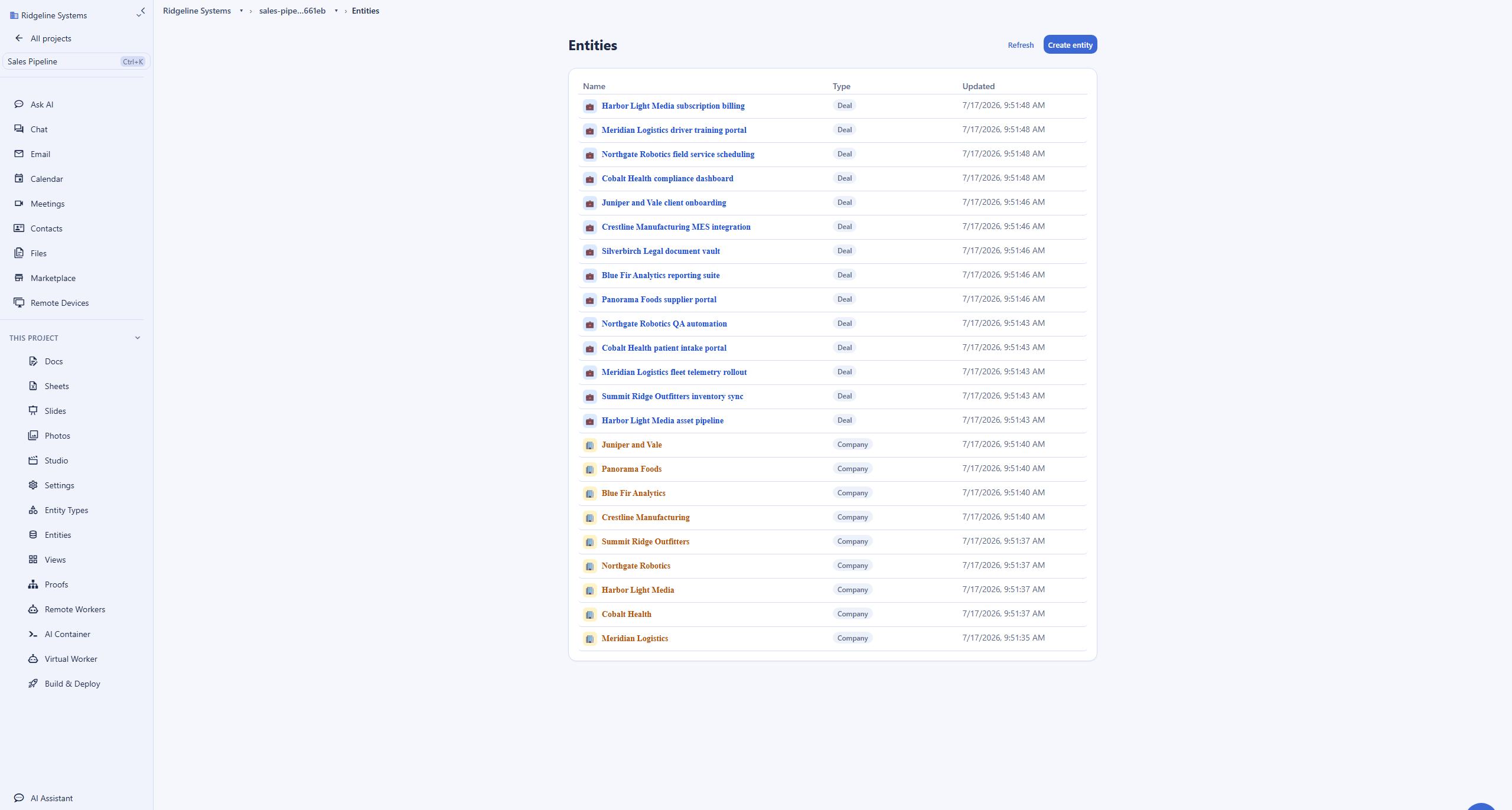
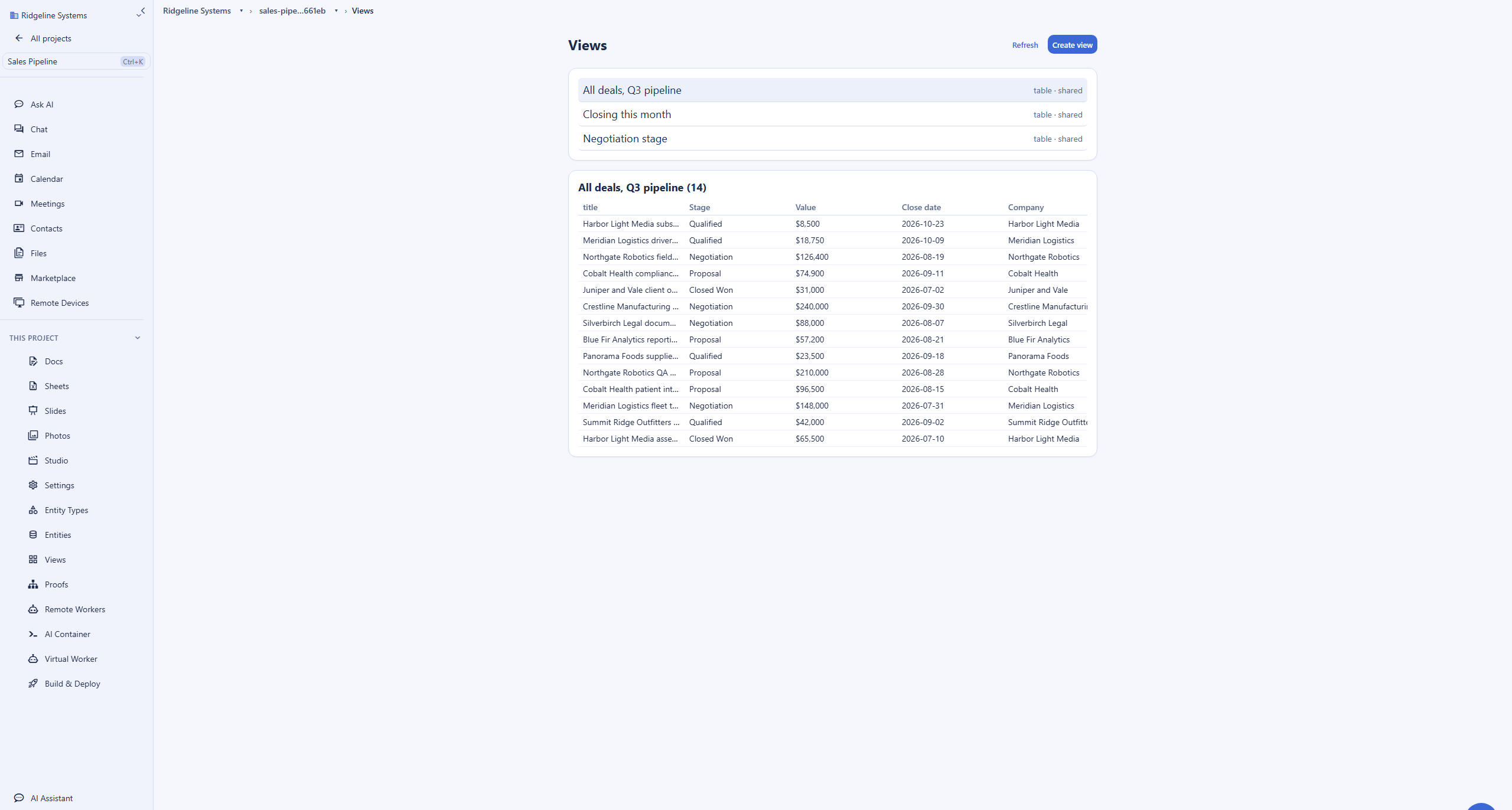
Entities render through saved views: table, board, list, calendar, timeline, gantt, and fully custom layouts, with entities shown as icons or thumbnails for a gallery-style view. A view is not just a display; it doubles as a custom form for data entry and, combined with role-based access control, as a per-role app, so a single data model can present a different working surface to each audience without building each screen from scratch. Where Bubble builds a page for every screen on the canvas, Backbuild derives per-role surfaces from the shared data model and its permissions.
Over the data sit workflows and automations, plus a finite-state-machine skills system for AI that runs governed, deterministic state transitions inside automations rather than free-form prompting. Every object on the platform is reachable over the public REST API and the native Model Context Protocol tools on every plan, so the same data that powers the app is drivable programmatically and by an AI agent, which is also the answer to lock-in: data on the platform reads and writes through the API rather than being trapped behind a visual editor.
From data to a shipped product: the packaging ladder
Backbuild answers the build-an-app job as a ladder, credited at each honest tier. At the base, per-role custom views turn the data platform into working internal apps for free. The SaaS Builder, on the Pro plan, is the packaging step: it assembles existing entity types, relationships, workflows, and views into an installable, sellable application without a rebuild, and adds the product machinery around it, tenant provisioning, pricing plans, Stripe Connect billing, white-label branding, and custom domains. For fully custom front-end control beyond structured views, the general website and landing-page builder is on the roadmap. For arbitrary software beyond the platform, the project system links to Git and hooks into the tool surface and AI over the Model Context Protocol to drive container-based development.
Publishing, tenants, and release management
Once a package exists, the SaaS Builder ships it the way a software team would. Multiple environments (dev, staging, preproduction, and production) hold the package as it moves toward release, release management stages a rollout and rolls it back if needed, and the same package fans out three ways: to provisioned tenants of the product, to the Apple App Store, Google Play, and Microsoft Store through store submission, and to the Backbuild marketplace for sale or resale. Bubble ships an app through its own development and live versions with branches and merge, provisions client instances with sub-apps on its Team plan and higher, and distributes a mobile build through its native mobile builder; both products deliver staged release and multi-tenant distribution through different machinery.
Automation that operates a real computer, with grant-based secrets
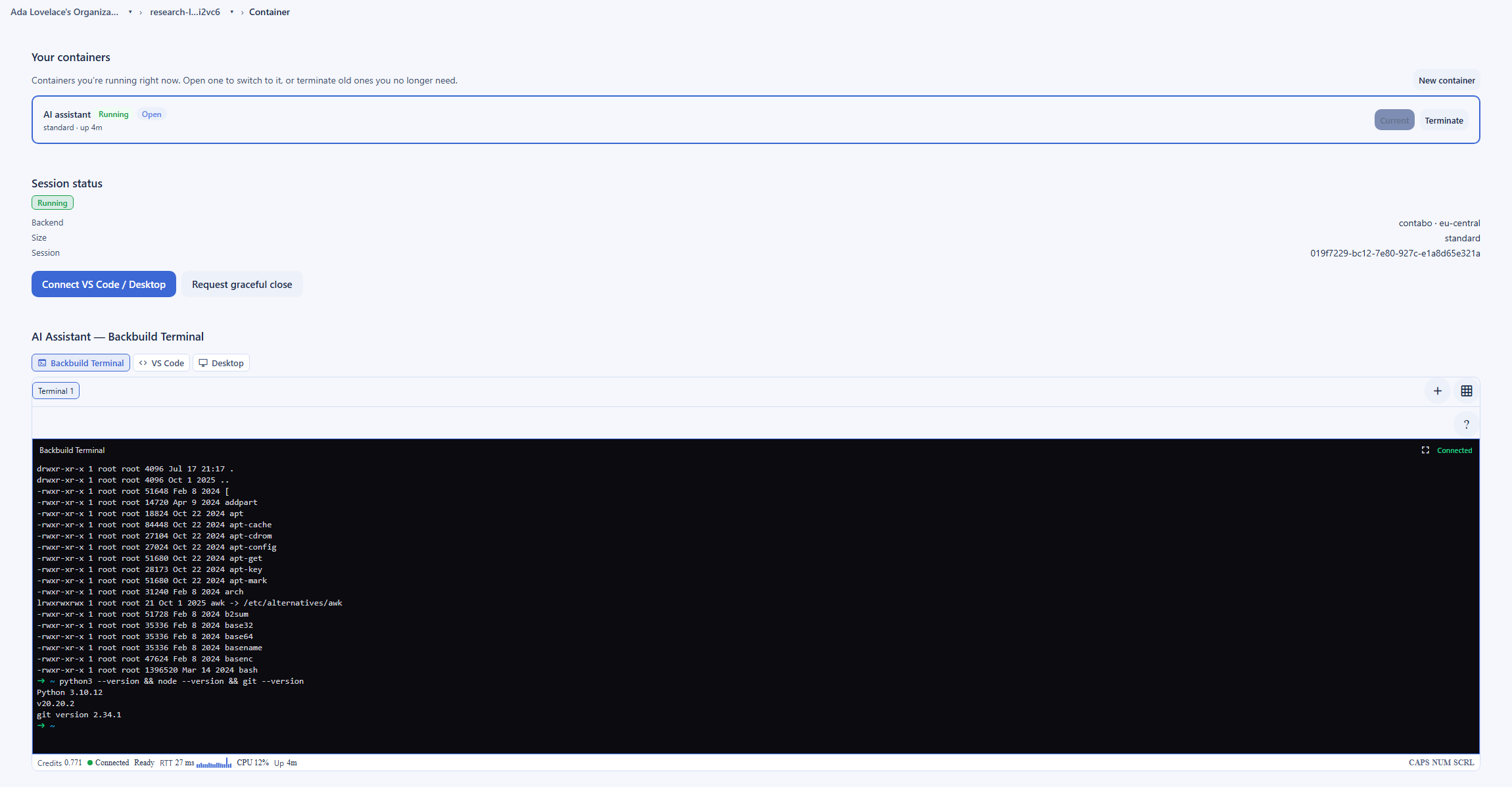
Bubble automates an app through server-side and recurring workflows and the API Connector, which reach external services over API calls. Backbuild automations can go further: a run can spin up a fully containerized environment with a real Linux desktop, a controllable browser, an in-browser terminal, and the full Linux tool suite, so an automation operates a real computer rather than only calling APIs. For the credentials those automations need, Backbuild uses grant-based access to the zero-knowledge, post-quantum secrets vault: secrets are injected as opaque, single-use references, so neither the AI nor the automation script ever sees plaintext, and the remote desktop surface is post-quantum encrypted. This contrasts with automation flows that store API keys in step or plugin configuration.
Where Bubble leads today
Freeform visual design
Bubble’s drag-and-drop canvas gives pixel-level control over arbitrary page layouts and responsive design. Backbuild builds from structured screen definitions and saved views, and its general website and landing-page builder for fully custom front-end control is on the roadmap, so for freeform visual design Bubble is the deeper tool.
Plugin and template marketplace
Bubble’s marketplace carries hundreds to thousands of plugins and hundreds of templates. Backbuild answers extensibility with first-party integrations, connectors, publishable packages, and the REST API, a first-party breadth rather than a large third-party plugin catalog.
A mature visual workflow editor
Bubble’s visual logic editor is long-established and refined. Backbuild delivers the same class of capability through workflows, automations, and finite-state-machine AI skills, with a different, more governed editing model; Bubble’s editor is the more polished today.
Community, education, and track record
Bubble reports more than six million builders, with agencies, bootcamps, and a large body of tutorials, and a long track record. Backbuild is earlier-stage and pre-launch in its public posture, so a team that values a large community and an established base should account for that plainly.
Common Bubble frustrations and how Backbuild addresses them
Workload Unit pricing that spikes
Bubble meters app activity in Workload Units, so queries, workflows, and API calls consume the plan and then bill overage, and reviewers report real production cost well above the headline plan. Backbuild makes the data platform free and meters AI and container usage on transparent, pooled monthly credits or your own AI provider key.
No source-code export and lock-in
Reviewers cite Bubble’s absence of a source-code export as a lock-in concern. Backbuild exposes its entire data platform over a public REST API and native Model Context Protocol tools, so entities and their contents are reachable and movable programmatically.
Single sign-on and governance behind Enterprise
Bubble gates single sign-on, a SOC 2 Type II report, and a dedicated instance to Enterprise. Backbuild ships single sign-on, SCIM 2.0, role-based access control, and a tamper-evident audit log on every plan, including Free.
Scaling and throughput ceilings
Community threads describe throughput limits and workflow timeouts at scale, and reviews note database and performance ceilings. Backbuild’s data platform has no packaged record cap, capacity scales with storage credits, and automation can run on a containerized runtime rather than a single shared tier.
AWS-only hosting
Bubble hosts on managed AWS with no on-premises or private-hosting option below Enterprise. Backbuild runs the workspace and offers a containerized automation runtime with a real Linux environment, a different operational surface than a single managed host.
Credentials stored in app configuration
Automation flows commonly store API keys in plugin and workflow configuration. Backbuild injects secrets from a zero-knowledge, post-quantum vault as opaque single-use references, so neither the AI nor the automation script sees plaintext.
Which tool wins, by use case
Solo founders and indie SaaS builders
A founder shipping a first product balances speed, cost, and a ceiling. Bubble is fast from idea to a working prototype and can take a freeform, design-led app a long way, at the cost of a Workload Unit meter that climbs with usage and no source export if the product outgrows it. The Backbuild SaaS Builder suits a product whose shape is structured data with per-role apps: model it on the free data platform, package it with the SaaS Builder on the Pro plan, and bill customers through Stripe Connect, with the data reachable over the API so the product is never trapped. For a freeform, visually rich app, Bubble is the deeper tool; for a structured, governed product with a clean API and billing built in, Backbuild fits.
No-code agencies and freelancers
Agency work runs on turnaround, margin, and reuse. Bubble is a strong fit here: a freeform builder that delivers bespoke client interfaces quickly, a plugin and template marketplace that speeds delivery, and sub-apps for multi-client work, backed by a large agency community. Backbuild answers the same brief through packaging: build a data model once, then package it with the SaaS Builder and provision a tenant per client with per-tenant branding and domains, governed by role-based access on every plan. An agency that sells freeform, design-heavy builds leans to Bubble; an agency that sells a repeatable, multi-tenant product with governance leans to the Backbuild SaaS Builder.
Internal tools for a business team
For internal apps (a lightweight CRM, an operations tracker, an approval portal), the fastest route is often to derive the app from the data. Backbuild builds these for free: entity types model the records, saved views present them as tables, boards, calendars, and forms, and role-based access turns one model into a different per-role app for each team, with no per-query meter. Bubble can build the same internal tool on its canvas and database, with more freeform layout control, but the free tier has no live deploy, and running the tool draws on the Workload Unit meter. For a data-shaped internal tool, Backbuild reaches a working, governed app with less assembly and no usage meter.
Technical leads planning to scale
A technical lead evaluates performance, ownership, and an exit path. Bubble concerns raised by this audience include throughput ceilings at scale, no source-code export, and AWS-only hosting. Backbuild answers ownership with a full REST API and native Model Context Protocol tools on every plan, so the platform is drivable and the data is portable, with no packaged record cap and a containerized runtime for heavier automation. The honest limit is the opposite one: for a fully bespoke, freeform interface, Backbuild is not the freeform canvas Bubble is, and arbitrary software beyond the platform is the Git-linked development path rather than the SaaS Builder.
Regulated and governance-first teams
Some teams cannot adopt a tool until identity and audit are in place. Backbuild ships single sign-on over SAML and OIDC, SCIM 2.0 provisioning, role-based access control, and a tamper-evident audit log on every plan, including Free, plus a zero-knowledge secrets vault for the credentials around the app. Bubble provides single sign-on, a SOC 2 Type II report, and a dedicated instance on its Enterprise plan, which is mature but gated to that tier. The reverse also holds: Bubble publishes a SOC 2 Type II report today, while Backbuild documents its controls as built to that bar with attestation pending, so a team that requires the certificate now records that difference.
Developers automating and extending an app
Both products expose programmatic surfaces, shaped differently. Bubble offers a Data and Workflow API and the API Connector, metered by Workload Units, plus a plugin marketplace for extensions. Backbuild’s REST API and native Model Context Protocol tools span every surface on every plan, an AI agent can build and drive an app over MCP, and automations can operate a real containerized computer with grant-based vault credentials. For a team that wants a large third-party plugin catalog, Bubble leads; for a team that wants an unmetered API, agent control, and automation that operates a real machine, Backbuild leads.
Security, identity, and governance evaluation
The identity story separates these products at the plan level. Backbuild ships single sign-on over SAML and OIDC, SCIM 2.0 provisioning so the identity provider creates, updates, and deactivates users automatically, role-based access control with per-organization isolation, and a tamper-evident audit log on every plan, including Free. Bubble delivers single sign-on, a SOC 2 Type II report, a dedicated instance, and a static IP through its Enterprise plan, which is a mature offering but gated to that tier. An organization that requires single sign-on before any tool touches company data gets it on the Backbuild free plan, and on Bubble provisions it on Enterprise.
On attestations the positions reverse. Bubble publishes a SOC 2 Type II report on its Enterprise plan. Backbuild documents its controls as built to the requirements of SOC 2 and the related frameworks, with attestation pending rather than published; an evaluation that requires the certificate today records that difference directly, set against single sign-on and audit arriving on every Backbuild plan.
On data handling around the app, Backbuild adds two controls Bubble does not carry. Automation credentials come from a zero-knowledge, post-quantum secrets vault as opaque single-use grants, so the AI and the automation script never see plaintext, where a Bubble workflow typically holds keys in plugin and workflow configuration. And AI runs on your own AI provider key under your own provider agreement, or on Backbuild usage credits, rather than on a bundled model, a data-governance point IT reviewers examine.
The economics for a finance and procurement review
The two cost models bill different things. Bubble bills a plan plus Workload Units, a usage metric consumed by every query, workflow, and API call, with overage at about 0.30 US dollars per 1,000 units; web plans are commonly quoted from about 29 US dollars a month to several hundred at the Team tier, and one analysis lists higher combined web and mobile figures. Reviewers report that real production cost, with plugins and buffers, runs well above the headline plan, which makes the usage meter the number a procurement file must model, not the plan price.
Backbuild prices the platform, not the app activity. The data platform is free on every plan, the SaaS Builder to package and sell a product is on the Pro plan from 49 US dollars per seat per month, and AI and container usage draw from pooled monthly credits or cost nothing to Backbuild when the organization links its own AI provider key, in which case inference is billed by the provider at the provider rate. There is no per-query or per-workflow meter on the data platform itself.
For a team building internal, data-shaped apps, the Backbuild number is zero; for a team shipping a commercial product, the comparison is a predictable per-seat Pro price against a Bubble plan plus a usage meter that scales with app traffic. The procurement file should model both against actual usage, and set the consolidation of the wider Backbuild workspace, which carries Mail, Calendar, Docs, Sheets, Finances, and more at no separate cost, against Bubble’s deeper freeform builder and larger ecosystem.
Rolling it out across a team
Adoption friction runs in Bubble’s favor for freeform work: the visual canvas is approachable, the template marketplace gives a running start, and a large community and body of tutorials shorten the learning curve. The friction it leaves is operational: the free tier has no live deploy, running the app draws on the Workload Unit meter, and single sign-on and audit sit on Enterprise.
Backbuild’s rollout is data-first and governed from the start: model the data, derive per-role apps from saved views, and every app inherits the same roles, audit trail, and identity as the rest of the workspace. The learning curve is the data-modeling one rather than a visual-design one, so a team comfortable with entity types and relationships reaches a working, governed app quickly, while a team that expects a freeform page canvas adjusts to composing screens from structured definitions and views.
Neither product locks the archive in the same way. Bubble versions an app with branches and merge inside its editor, while Backbuild exposes the whole data platform over the REST API, so the data an organization builds is reachable and movable programmatically. The rollout that fits Backbuild is to standardize data-shaped and governed apps on the platform and reach for the Git-linked development path for arbitrary software the SaaS Builder does not cover.
Strategic fit and vendor risk
Bubble is an established platform, one of the largest in the no-code category, with a reported base of more than six million builders, a deep marketplace, and a long track record. The strategic question is shape and cost rather than viability: Bubble is a freeform builder whose activity is metered in Workload Units, whose apps do not export as source, and whose single sign-on and compliance controls sit on the Enterprise plan.
Backbuild is earlier-stage and pre-launch in its public posture, a fact an evaluation sets against what ships in the product: the SaaS Builder packages a free relational data platform into an installable, multi-tenant product, the whole platform is drivable over a public REST API and native Model Context Protocol tools, identity and audit arrive on every plan, and the app sits inside an all-in-one workspace whose apps span Mail, Chat, Meetings, Calendar, Contacts, Docs, Sheets, Slides, Diagrams, Photos, the Photo Editor, Video Editor, Training Video Editor, Audio Editor, Music Editor, Files, Finances, and the Helpdesk, with the Secrets vault beside them.
The decision cuts two ways: an organization that needs a freeform visual builder, the largest plugin and template ecosystem, and an established community buys Bubble; an organization whose product is structured data with per-role apps, governance, a clean API, and consolidation into a single workspace packages it with the Backbuild SaaS Builder and keeps its data reachable over the API.
Frequently asked questions
What is the best Bubble alternative for building a SaaS product?
It depends on the approach that fits the product. Bubble builds a custom web or mobile app on a freeform visual canvas, which is the deeper tool for arbitrary, pixel-designed interfaces. The Backbuild SaaS Builder takes a different route: you model the product as a governed data platform (entity types, entities, typed relationships, saved views, workflows, and automations, all free on every plan), then the SaaS Builder packages those objects into an installable, multi-tenant, sellable application on the Pro plan, with tenant provisioning, pricing plans, Stripe Connect billing, white-label branding, custom domains, release management, and publishing to the app stores and a marketplace. Backbuild suits teams that want structured, governed SaaS packaging inside a full workspace; Bubble suits teams that want freeform visual control over an arbitrary custom app.
Is there a cheaper alternative to Bubble?
The two products meter cost differently. Bubble charges a plan plus Workload Units, a usage metric consumed by every query, workflow, and API call, with overage billed at about 0.30 US dollars per 1,000 Workload Units, and multiple reviews report that real production cost runs well above the headline plan price. Backbuild makes the data platform (entity types, entities, views, workflows, and automations) free on every plan, prices the SaaS Builder to package and sell a product on the Pro plan from 49 US dollars per seat per month, and meters AI and container usage on transparent, pooled monthly credits, or on your own AI provider key at your provider rate. A team building internal, per-role apps on the data platform pays nothing; a team publishing a commercial product pays the Pro seat price rather than a scaling usage meter.
How does the Backbuild SaaS Builder differ from Bubble as an app builder?
Bubble is a freeform visual builder: you draw pages on a drag-and-drop canvas, wire a native database, and build logic in a visual workflow editor. Backbuild builds an application from structured objects instead of pixels: you define entity types and relationships on the relational data platform, render them through saved views (table, board, list, calendar, timeline, gantt, and custom layouts) that double as forms and per-role apps, and add workflows and automations, then the SaaS Builder packages that model into an installable product. The trade is directional: Bubble gives freeform design flexibility for any custom interface, and Backbuild gives structured, governed packaging with a data platform, an API, and identity controls built in.
Does the Backbuild SaaS Builder support multi-tenant apps like Bubble sub-apps?
Yes. The SaaS Builder, on the Pro plan, provisions tenants, applies white-label branding and custom domains per tenant, and manages releases with staged rollouts and rollback across dev, staging, preproduction, and production environments. Bubble addresses multi-instance work with sub-apps on its Team plan and higher, which clone a templated app per client. Both deliver multi-tenant deployment; the mechanisms differ, with Backbuild provisioning tenants of one packaged application and Bubble cloning app instances.
Can I sell an app I build, and take payments, the way I can with Bubble?
Partly today, with more on the roadmap. The SaaS Builder ships pricing plans, promotions, and Stripe Connect billing for subscriptions on the app you build, plus publishing to the Apple App Store, Google Play, Microsoft Store, and the Backbuild marketplace, all on the Pro plan. Multi-currency selling and standalone subscriptions and memberships outside the SaaS Builder are on the roadmap and marked accordingly. Bubble monetizes an app through Stripe and other payment plugins from its marketplace, which is a mature and flexible route for arbitrary payment flows.
Does the Backbuild data platform cost extra, like Bubble Workload Units?
No. Entity types, entities, typed relationships, saved views, workflows, finite-state-machine AI skills, and automations are on the free plan, and the public REST API and the AI assistant are on every plan. There is no per-query or per-workflow usage meter on the data platform itself; storage draws from a monthly allowance and then from pooled usage credits, and AI and container runs draw from those same credits or run on your own AI provider key. Bubble meters app activity in Workload Units, so query volume, workflows, and API calls all consume the plan allowance and then bill as overage.
Does Backbuild have single sign-on and audit logging without an enterprise plan?
Yes. Single sign-on over SAML and OIDC, SCIM 2.0 user provisioning, role-based access control, and a tamper-evident audit log are on every plan, including the free plan. Bubble gates single sign-on, a SOC 2 Type II report, a dedicated instance, and a static IP to its Enterprise plan. An organization that requires single sign-on before any tool touches company data gets it on the Backbuild free plan, and on Bubble provisions it on Enterprise.
What does Bubble do that the Backbuild SaaS Builder does not?
Bubble leads on freeform visual design and ecosystem. Its drag-and-drop canvas gives pixel-level control over arbitrary page layouts, it has a mature visual workflow editor, a plugin marketplace with hundreds to thousands of plugins, a large template marketplace, a native mobile builder, and one of the largest no-code communities and education ecosystems in the category, with more than six million builders reported. Backbuild builds from structured screen definitions and saved views rather than a freeform canvas, its general website and landing-page builder is on the roadmap, and it answers extensibility with first-party integrations, connectors, publishable packages, and the REST API rather than a large third-party plugin marketplace. For an arbitrary, freeform custom web app, Bubble is the deeper tool.
Can I move an app off Bubble, and does Backbuild avoid lock-in?
Bubble does not export source code, and reviewers cite the absence of a code or data migration path as a lock-in concern. Backbuild exposes its entire data platform over a public REST API, so entities, relationships, and their contents read and write programmatically across every plan, and the platform is drivable over native Model Context Protocol tools as well. That does not make a Bubble app portable into Backbuild automatically, because the two model applications differently, but it does mean data built on the Backbuild data platform is reachable and movable through the API rather than trapped behind a visual editor.
Is Backbuild a drop-in replacement for Bubble?
No, and it is not positioned as one. Bubble is a general-purpose freeform app builder for arbitrary custom web and mobile apps. The Backbuild SaaS Builder is a structured way to package a governed data platform into a multi-tenant product, inside a full workspace with an API, identity controls, a secrets vault, and containerized automation. They answer the same job, building and shipping a software product without a full engineering team, through different approaches. A team whose product is a freeform, design-led custom interface fits Bubble; a team whose product is structured data with per-role apps, governance, and a clean API fits the Backbuild SaaS Builder.
Build on the Backbuild data platform, free
A free relational data platform with entity types, typed relationships, saved views, workflows, and automations, a SaaS Builder that packages them into an installable, multi-tenant, sellable product, a full REST API and native Model Context Protocol tools, single sign-on and audit logging on every plan, and a zero-knowledge secrets vault, all inside an all-in-one workspace.
Get started with Backbuild