

Spark alternative: Backbuild Mail vs Spark
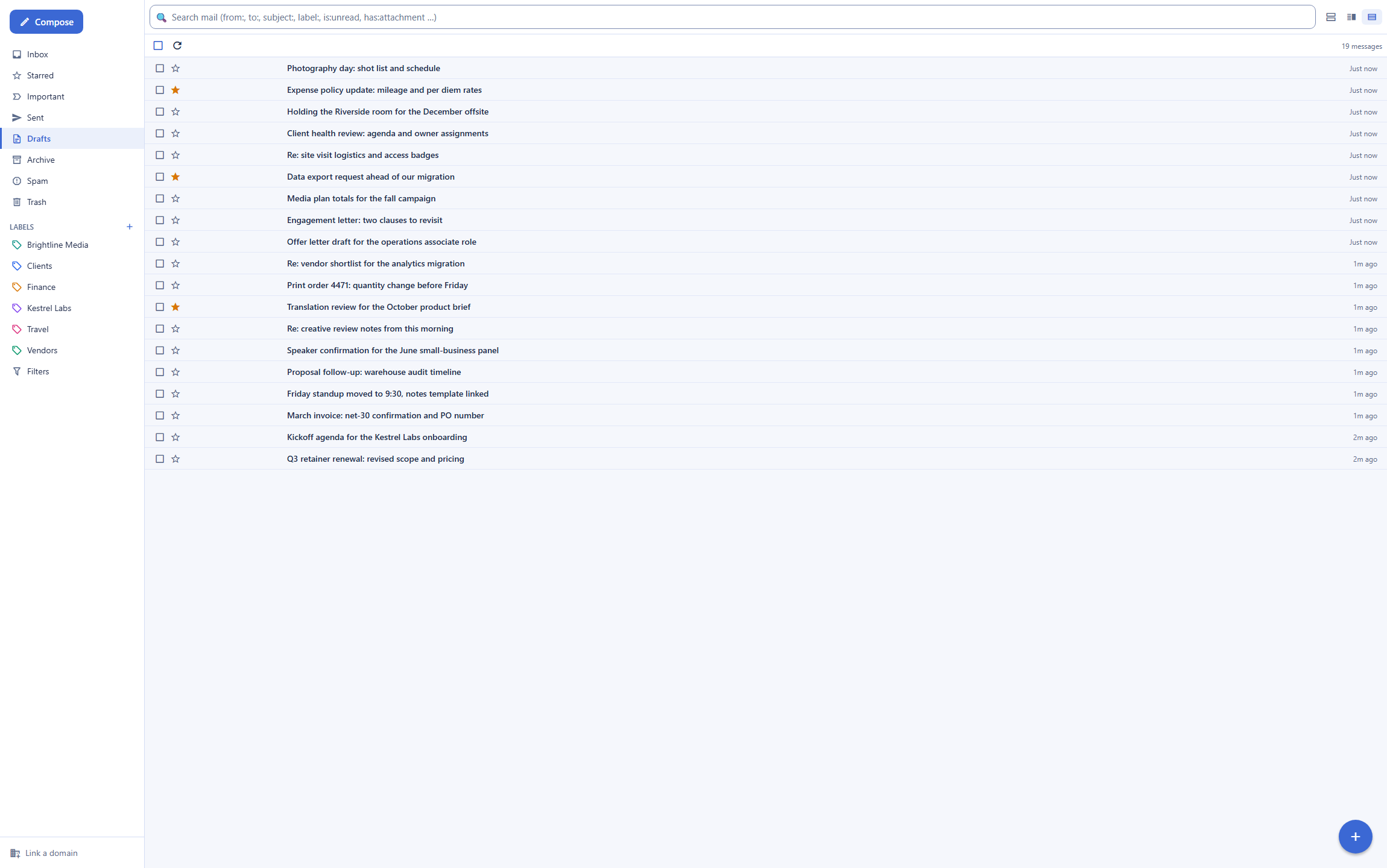
Backbuild Mail hosts email at your own domain free on every plan with a guided DNS setup, runs server-side full-text search that reads the message body, ships shared team mailboxes, and exposes a public REST API and native MCP tools across the whole mail surface. Spark by Readdle is a polished, multi-account email client for Gmail, Outlook, iCloud, and IMAP, celebrated for its Smart Inbox, its team collaboration, and its mature native apps, and that polish is the reason to choose it.
The short answer
Spark is a polished, multi-account email client that layers a Smart Inbox, AI, and team collaboration onto your existing Gmail, Outlook, iCloud, or IMAP mailbox; Backbuild Mail instead runs the mailbox itself at your own domain inside the Backbuild workspace, beside Docs, Sheets, Slides, Calendar, and Finances, with a public REST API, native MCP tools, and single sign-on and audit logging on every plan. This is an app-to-app comparison with the platform around each product named on both sides, and the models differ honestly. Spark fits an individual or a team that wants automatic inbox sorting, one client across several providers, in-inbox collaboration such as shared drafts, private comments, and delegation, and mature native mobile apps. Backbuild Mail fits teams and businesses that want their own domain without a client fee on top, governed access on every plan, and mail their software and AI agents can drive. Two honest notes before the details: Spark does not host your mailbox, so it keeps your current provider and its cost, while switching to Backbuild Mail means changing host, not just client; and Spark leads today on the Smart Inbox, multi-account aggregation, in-inbox collaboration depth, and native app maturity, none of which Backbuild Mail matches.
Backbuild Mail vs Spark: feature by feature
Prices and limits below are quoted from each vendor's own pages, observed 2026-07-20. Both products have a free plan; Spark bills its paid tiers per seat, and its team collaboration and AI live on the Plus and Pro tiers. The highlighted column is Backbuild Mail.
| Backbuild Mail Email at your own domain in the free workspace Free on every plan; workspace from $19/seat Get Started Free | Spark Smart email client for Gmail, Outlook, iCloud, and IMAP Free plan; Plus $10/seat, Pro $20/seat, Enterprise custom | |
|---|---|---|
| Price and access | ||
| A free plan that includes the mail app | ||
| Starting price for the paid tier | Free, up to 50 team members | Plus $10/seat, Pro $20/seat |
| A single per-seat price covers the whole stack | Mail and workspace in one plan | A client fee on top of your mail host |
| Can be bought outright, no subscription | Subscription only | |
| Mail hosting and category | ||
| Hosts your mailbox at your own domain | 2 domains free; unlimited paid | Not a host; connects your accounts |
| Layers onto existing email accounts | Backbuild Mail is the host | |
| Unifies several providers in one inbox (Gmail, Outlook, iCloud, Exchange, Yahoo, IMAP) | ||
| Own-domain email on the free plan | Included free | You bring your own mail host |
| Smart inbox and triage | ||
| Smart Inbox (automatic newsletter, notification, and people buckets) | ||
| Priority Email and Gatekeeper (screen unknown senders) | ||
| Group by sender and Set Aside | ||
| Folders, labels, and server-evaluated filters | Uses your account's labels and folders | |
| Reading, writing, and organizing | ||
| Undo send | ||
| Scheduled send and snooze | ||
| Follow-up reminders (nudge when a reply is overdue) | ||
| Email templates and reusable snippets | Custom templates on Plus | |
| Custom HTML signatures | ||
| Server-side full-text search of the message body | Own index, structured operators | Searches your connected accounts |
| Real-time, multi-device sync | ||
| Reader privacy on remote images (a sender's tracking pixel does not see your IP address) | Signed server-side image proxy | |
| AI, agents, and the API | ||
| AI compose, reply, translate, and summarize | Spark +AI on Plus and Pro | |
| AI meeting notes | 40/mo Plus; unlimited Pro | |
| AI included on every plan | AI ships on paid tiers | |
| Bring your own AI provider and model | Runs on Spark's bundled model | |
| Public REST API across the whole mail surface | ||
| Native MCP tools for domain and mailbox provisioning | ||
| Command-line triage | Over the REST API | Spark CLI on Pro |
| An AI agent can triage, draft, and send through the API (under your organization's permissions and audit log) | ||
| Workspace automations and custom AI skills that drive mail (over the REST API) | ||
| Team collaboration | ||
| Shared team mailboxes with read and write grants (support@ without an extra seat) | Shared inboxes on paid tiers | |
| Auto-provisioned mailboxes for organization members | ||
| Real-time co-drafting of one message | ||
| Private comments and mentions on a thread | ||
| Assign or delegate an email to a teammate | ||
| Read statuses on sent mail | Pro tier | |
| Every shared-inbox action attributed in an audit trail | ||
| HubSpot CRM integration | Pro tier | |
| Domains and deliverability | ||
| Guided DNS setup with read-back verification (MX, SPF, DKIM, DMARC) | ||
| Automatic DNS provisioning on a Cloudflare-connected domain | ||
| Bring your own outbound provider, routed by category (provider key held in the vault, never echoed) | ||
| Alias addresses on your domain | Aliases deliver into a mailbox; a verified alias can send | Uses your account's send-as addresses |
| Identity, governance, and administration | ||
| Single sign-on | Free, every plan | Enterprise only |
| SCIM provisioning | User provisioning today | Enterprise only |
| Role-based access control across the workspace | Enterprise controls | |
| Tamper-evident audit log on every plan | Enterprise only | |
| End-to-end or zero-access encryption | Neither; see the Proton Mail comparison | Stores tokens and data server-side |
| Published third-party attestations (SOC 2, ISO 27001) | Not yet third-party audited | SOC 2 and ISO 27001 |
| Clients and migration | ||
| Web app | ||
| Desktop app (Windows, macOS) | Free, Windows and macOS | Mac and Windows |
| Native mobile apps in the app stores today | Built; store rollout in progress | iOS, Android, Apple Watch |
| IMAP, POP, or SMTP with a third-party mail client | Spark connects over IMAP | |
| Offline mailbox | Caches connected accounts | |
| Keeps your existing mailbox in place, no migration | Changing host means moving mail | |
| Workspace apps in the same subscription | ||
| Backbuild Mail (Spark's similar offering: the Spark email client, compared row by row throughout this table) | Spark | |
| Backbuild Chat (team chat) Soon | On the roadmap for every plan | |
| Backbuild Meetings (video meetings) Soon | On the roadmap for paid plans | |
| Backbuild Calendar | Built-in calendar | |
| Backbuild Contacts | Uses your account's contacts | |
| Backbuild Docs (native LaTeX with live math) | ||
| Backbuild Sheets (spreadsheet grid with a formula engine) | ||
| Backbuild Slides (presentations) | ||
| Backbuild Diagrams Soon | On the roadmap for every plan | |
| Backbuild Photos (with a non-destructive layer editor) | ||
| Training video editor (Backbuild Studio screen-demo videos narrated from a script) | ||
| Video, audio, and music editors (in Backbuild Studio) Soon | Authoring preview today; rendering on the roadmap | |
| Backbuild Files (cloud storage) | ||
| Backbuild Finances (double-entry accounting, invoicing, bills, and bank reconciliation) | ||
| Helpdesk (tickets, workflow states, assignment, and replies) | 20 tickets/mo Free; unlimited paid | |
| Secrets vault (post-quantum, zero-knowledge) | ||
A cross means the product does not offer the feature today. Soon means the feature is on the Backbuild roadmap and not shipped yet. Spark prices, tiers, and gating are quoted from the Spark pricing page, observed 2026-07-20; annual billing runs below the monthly figures shown, and Spark is a client, so the mail host it connects to is billed separately by Google, Microsoft, Apple, or your provider. In the workspace apps group, each row is one app in the Backbuild subscription; Spark is a single email client, and Readdle's other apps are sold separately, so they do not appear as one bundled suite here.
Two shapes: a smart client over your accounts, and a host in your workspace
The deepest difference between these products decides most of the rows above, and it is not a feature, it is a category. Spark is a client that connects to your existing Gmail, Outlook, iCloud, Exchange, Yahoo, and IMAP accounts and gathers them into one polished inbox with automatic sorting, AI, and team collaboration. It does not host or run the mailbox; it sits on top of mail hosts you already pay for, and it stores access tokens and message data on its own servers to power its cloud features. Backbuild Mail makes the opposite choice: it hosts the mailbox at your own domain inside the workspace, provisioning and verifying the DNS, and it exposes the whole surface over a REST API. That difference cuts both ways and both directions belong on the page. Spark keeps your current mailboxes in place, so there is nothing to migrate, and it unifies several providers a Backbuild mailbox cannot gather. Backbuild Mail replaces the host, so email at your own domain is free on every plan, but moving to it means moving mail, not just changing the client.
The API, MCP tools, and AI agents
Programmatic access separates these products for any business that automates. The whole Backbuild Mail surface is drivable over the public REST API: create and manage mailboxes, send and read messages, manage labels and filters, upload and fetch attachments, and link and verify domains, with every call authenticated, organization-scoped, and gated by the same roles and permissions as the app. Domain onboarding and mailbox provisioning are also exposed as native MCP tools, so an AI agent connected to the workspace can stand up a working mailbox at a verified domain end to end, and an agent working through the REST API can triage, draft, and send mail under the caller's permissions with every action recorded in the audit log. The assistant behind that agent runs on your own AI provider and model, or on Backbuild usage credits. Spark ships capable AI of its own, an AI assistant, AI compose, translate, email summaries, and AI meeting notes, and Spark Pro adds the Spark CLI for triaging mail from a terminal, but that AI runs on Spark's bundled model, it lives on the paid tiers rather than every plan, and there is no public REST API a customer can script the mailbox against. The AI is a fast assistant inside the client; it is not an automation surface a team can build on.
Common Spark frustrations and how Backbuild Mail addresses them
Paying a client fee on top of your mail
Spark is a client, so its paid tiers add 10 to 20 US dollars per seat a month on top of the Google, Microsoft, or Apple subscription that hosts the mailbox, and reviewers note it charges for things that are free in the underlying provider. Backbuild Mail hosts the mailbox itself, so email at your own domain is free on every plan, and the whole workspace is included.
Tokens and messages stored on a vendor's servers
To power its cloud features, Spark stores account access tokens and message data on its own servers, with no way to disable the cloud components. Backbuild Mail hosts its own mail rather than holding tokens for third-party accounts, and every mailbox action is authorized against organization-scoped roles with the outbound provider key held in a zero-knowledge vault and never echoed.
No public API for automation
Spark Pro adds a CLI for terminal triage, but there is no public REST API a customer can script the mailbox against. Backbuild exposes the whole mail surface over the REST API and provisioning over native MCP tools, so scripts, automations, and AI agents can operate the mailbox under role-based permissions.
Single sign-on and audit locked to Enterprise
Spark places single sign-on, provisioning, and security controls on its Enterprise plan. Backbuild includes single sign-on, SCIM provisioning, role-based access, and a tamper-evident audit log on every plan, including Free.
AI locked to one bundled model
Spark +AI runs on its own bundled model, with no way to choose the provider, and it sits on the paid tiers. Backbuild lets an organization bring its own AI provider and model, or run on usage credits, included on every plan, so inference runs under the organization's own provider agreement.
No shared inbox governed with an audit trail
Spark shared inboxes and delegation are strong, but they run on the accounts it connects to. Backbuild Mail ships shared mailboxes with read and write grants, live sync, and an audit trail that attributes every send and delete, with no extra seat per shared address, hosted on your own domain.
Where Spark leads today
Spark is a mature, well-loved email client, and a switcher gives up genuine things. Its signature feature is the Smart Inbox, which automatically sorts mail into newsletters, notifications, and real-people buckets, with Priority Email and a Gatekeeper that screens unknown senders, and Backbuild Mail does not sort the inbox automatically. Spark also unifies several providers, Gmail, Outlook, iCloud, Exchange, Yahoo, and any IMAP account, in one inbox, which a host like Backbuild Mail does not do. Its team collaboration is genuinely deep: shared inboxes, real-time co-writing of one draft, private comments, and email assignment and delegation, and third-party reviewers rate it above Gmail and Outlook for in-inbox collaboration. Around that sit power features Backbuild Mail does not offer: follow-up reminders, templates, Set Aside, and read statuses. Its native apps span macOS, Windows, iOS, Android, and Apple Watch, they read mail offline, and Spark carries published SOC 2 and ISO 27001 attestations, where Backbuild is built to those frameworks but not yet audited. A buyer whose day is a busy multi-account inbox, and who values automatic sorting and collaboration above hosting and governance, has a concrete reason to choose Spark.
Which tool wins, by use case
Individuals taming a noisy multi-account inbox
A person juggling personal and work mail across two or three providers buys on one calm inbox on every device, and that is Spark's home ground. Its Smart Inbox sorts mail automatically, its Gatekeeper screens strangers, and it unifies Gmail, Outlook, and iCloud in one place, with mature apps on every platform, and Backbuild Mail does not aggregate outside accounts or sort the inbox by category. What Backbuild offers this reader instead is a different value: a free mailbox at their own domain, server-side search across the whole archive from any device, and a workspace that runs the rest of the business in the same subscription.
Small teams running support@ and sales@
A team lead running a shared support or sales line buys on visibility into who is handling what, and Spark is built for that: shared inboxes, real-time co-drafting, private comments, and email assignment and delegation, with read statuses and a HubSpot integration on Pro. Backbuild Mail answers the same job with a different mechanic: shared mailboxes with read and write grants and an audit trail attributing every action, hosted on your own domain with no extra seat, but it does not offer real-time co-drafting of one message, private per-thread comments, or assignment. Where Backbuild pulls ahead for this audience is cost and automation: the shared inbox is free on every plan, and an API and MCP tools let an agent triage and draft at scale on the team's own AI provider.
Founders who want email at their own domain
A founder standing up email for a new company wants a credible address at the company domain, shared inboxes, and governance, without paying twice. Backbuild Mail covers each: own-domain email free, with a wizard that provisions and verifies MX, SPF, DKIM, and DMARC, shared mailboxes for support@ and billing@ at no extra seat, and single sign-on and audit logging on every plan, all inside a workspace that also covers invoicing and accounting and the calendar. Spark would sit on top of a Google, Microsoft, or Apple subscription the team buys separately, and it does not host the domain, so the company still runs its mail somewhere else at 10 to 20 US dollars per seat a month more for the client.
Developers and automation builders
For anyone who treats the mailbox as infrastructure, the API decides. Backbuild exposes every mail operation over the public REST API and provisioning over native MCP tools, documented in the API reference, with bring-your-own outbound provider routing whose key lives in the vault and is never echoed. An AI agent on your own provider keys can run triage on the same surface. Spark offers a CLI for terminal triage on Pro, but it has no public API a script or a third-party agent can drive, so automation stops at the tools Spark ships.
IT and security evaluators
An access-control review asks who can sign in, how accounts are provisioned and deprovisioned, what is logged, and where mail and AI data go. Backbuild answers on every plan: single sign-on, role-based access, and a tamper-evident audit log free, SCIM user provisioning, and bring-your-own AI provider so inference runs under the organization's own agreement. Spark gates single sign-on, provisioning, and security controls to its Enterprise plan, and because it is a client, it stores tokens and message data on its own servers. Spark's counterweight is external validation: it holds SOC 2 and ISO 27001 attestations, where Backbuild is built to those frameworks but not yet third-party audited.
The daily inbox experience
A person evaluating these two products for daily use is comparing the inbox loop: finding mail, writing mail, and staying organized. On organizing, the honest read is that Spark leads: its Smart Inbox sorts mail into categories automatically, Priority Email surfaces what matters, and Gatekeeper screens strangers, where Backbuild Mail organizes with folders, labels, and filters you configure and does not categorize the inbox on its own. On writing, the two are closer: both offer undo send, scheduled send, and snooze, and both ship AI drafting, though Backbuild's assistant runs on the customer's own AI provider and is included on every plan while Spark's runs on its bundled model on the paid tiers. Spark also adds templates and follow-up reminders Backbuild Mail does not.
On finding old mail, the direction reverses. Backbuild Mail keeps a server-side full-text index and answers structured queries like from: and has:attachment identically from every device, because it hosts the mailbox, while some reviewers report Spark's Smart Search misclassifying or missing results. Where Spark's daily experience is stronger: its native apps are mature across macOS, Windows, iOS, Android, and Apple Watch while Backbuild's mobile apps are built and still rolling out to the stores, and it reads mail offline, which Backbuild Mail does not. The daily bottom line: Spark gives the smarter, more polished inbox with automatic sorting and mature apps; Backbuild Mail gives a free own-domain mailbox with reliable cross-device search inside a full workspace.
Running shared team email
The person who moves a team onto shared email answers for onboarding, shared addresses, collaboration, and leavers. The first structural difference is the category: Spark does not host mail, so a rollout means every seat already has, and keeps paying for, a Gmail, Outlook, or iCloud account, and Spark is a per-seat client layered on top. Backbuild provisions the mail itself: provisioning policies create a mailbox for each member automatically once the domain wizard has verified DNS, and the free desktop app covers members who want an installed client.
On the collaboration itself, Spark is deeper today. Spark lets teammates co-write one draft in real time, leave private comments on a thread, and assign or delegate an email, and reviewers rate that in-inbox teamwork highly. Backbuild Mail takes a different approach: shared mailboxes give several teammates read or write access to one real inbox, with every send and delete attributed in the audit trail, but it does not offer co-drafting, private comments, or assignment. On leavers, Backbuild access ends with organization membership under role-based access control, and the audit log carries the deprovisioning evidence on every plan, where Spark places its provisioning and security controls behind the Enterprise tier. The rollout bottom line: for a team whose value is rich in-inbox collaboration, Spark leads on the mechanics; for a team that wants a governed, audited shared mailbox on its own domain at no extra cost, Backbuild does the structural work.
Security, identity, and data governance evaluation
A security review of a mail platform turns on identity controls, evidence, and where data goes. On identity, Backbuild ships single sign-on on every plan including Free with SCIM 2.0 user provisioning, where Spark gates single sign-on, provisioning, and security controls to Enterprise. On evidence, Backbuild's audit log is tamper-evident, written in the same transaction as the operation it records, and free on every plan, while Spark places its administrative controls on Enterprise. Spark's genuine advantage here is external validation: published SOC 2 and ISO 27001 attestations, where Backbuild is built to those frameworks but not yet third-party audited.
On where data goes, the difference matters to a reviewer. Spark is a client that stores access tokens and message data on its own servers to power its cloud features, with no opt-out of the cloud components, and runs AI on its own bundled model. Backbuild lets the organization bring its own AI provider, so inference runs under the organization's own provider agreement, and every mailbox action is authorized against organization-scoped roles, inbound HTML is sanitized, and remote images load through a signed proxy that hides the reader's IP. Neither product is end-to-end or zero-access encrypted; a reviewer who needs the provider to be technically unable to read the mail should read the Proton Mail comparison instead. A reviewer who must present a current attestation today leans Spark; a reviewer building least-privilege access with provisioning, attribution, and AI-provider control without an enterprise contract leans Backbuild.
The economics for a finance and procurement review
The cost comparison has a defining feature: Spark is a client, so on its paid tiers its price is additive. A team running on Google Workspace, Microsoft 365, or iCloud already pays for the mailbox, and Spark adds a per-seat client fee on top, with Plus at 10 US dollars per seat a month and Pro at 20. Spark does have a free tier, which is a real advantage over a paid-only client, but the features a business buys Spark for, team collaboration, AI, and read statuses, sit on the paid tiers, and reviewers note it charges for capabilities that are free in the underlying provider. Backbuild Mail is not additive: email at the company's own domain is free on every plan, the workspace is included on the free plan, and paid plans run 19 to 149 US dollars per seat a month, with outbound overage drawing usage credits rather than forcing a plan change.
On what the choice displaces, the gap widens. Backbuild's same subscription includes accounting and invoicing, the calendar, a secrets manager, and a helpdesk, so it consolidates spend rather than adding to it, and Readdle's other apps are separate purchases. AI is structural too: Spark's AI ships inside the paid tiers on a bundled model, while Backbuild passes AI through at the customer's own provider rate or usage credits, a line procurement can price against an existing AI vendor agreement. For a finance owner, the question is whether Spark's smart-client experience is worth a recurring per-seat cost on top of an existing mail bill, or whether a hosted mailbox and a consolidated workspace at no client fee is the better structural spend.
Strategic fit and vendor considerations
The strategic question is which bet each product represents. Spark is a mature, well-regarded client: a polished, multi-account inbox with a Smart Inbox, AI, and team collaboration, backed by Readdle's long track record and mature native apps and published SOC 2 and ISO 27001 attestations. An organization whose team already lives in Google, Microsoft, or Apple mail and values automatic sorting and collaboration is squarely in its center of gravity. Backbuild is a workspace platform in Early Adopter Alpha whose mail app is one surface among Backbuild Mail, Chat, Meetings, Calendar, Contacts, Docs, Sheets, Slides, Diagrams, and Photos, the photo, video, training video, audio, and music editors, Files, Backbuild Finances, and the helpdesk, with a public REST API and an MCP tool surface positioning every one of those surfaces, mail included, as programmable infrastructure for software and AI agents.
Lock-in and continuity run differently on each side. Spark does not hold your mail: it reads mailboxes Google, Microsoft, or Apple host, so leaving Spark leaves the mailboxes untouched, though it does store tokens and message data on its servers while connected. Backbuild's mail is standard MIME held by a key-holding service, retrievable over the API, and the platform around it is young: several workspace members are marked Soon on the pricing page, mobile distribution is still rolling out, and third-party audits are not yet in hand. An organization betting on the smartest multi-account inbox over existing hosts is betting with Spark; an organization betting on consolidation, hosting its own domain, and agent-operated work is betting with Backbuild's roadmap.
Frequently asked questions
Is Spark email free?
Spark has a free plan. The Spark Free tier connects unlimited email accounts and includes the Smart Inbox, smart notifications, and a calendar, and the +AI features and team collaboration sit on the paid Plus tier at 10 US dollars per seat a month and the Pro tier at 20 US dollars per seat a month. Backbuild Mail is also free, but the model differs: Backbuild Mail hosts the mailbox at your own domain on every plan, where Spark Free is a client that connects to a Gmail, Outlook, iCloud, or IMAP mailbox you already host elsewhere.
Is there a free alternative to Spark?
Yes. Backbuild Mail is the email app in the free Backbuild workspace, and it includes email at your own domain on every plan, with two linked domains, 500 outbound sends a month, and mailboxes for your team members. The difference is category, not just price: Spark is a client that layers a Smart Inbox and team collaboration onto your existing mailbox across several providers, while Backbuild Mail hosts the mailbox itself and adds a public REST API, MCP tools, and governance on every plan. Spark keeps its Smart Inbox, its mature mobile apps, and multi-account aggregation, which Backbuild Mail does not offer.
Does Backbuild Mail have a Smart Inbox like Spark?
No. Spark automatically sorts incoming mail into newsletters, notifications, and real-people buckets with its Smart Inbox and Priority Email, and this automatic categorization is one of its most loved features. Backbuild Mail organizes with folders, labels, and server-evaluated filters that you configure, and it does not sort the inbox by category automatically. A reader who buys on automatic priority sorting will prefer Spark on this point.
Can Backbuild Mail connect my Gmail, Outlook, and iCloud accounts in one inbox like Spark?
No. Spark aggregates several providers, Gmail, Outlook, iCloud, Exchange, Yahoo, and any IMAP account, into one unified inbox, and this multi-account aggregation is a core reason people use it. Backbuild Mail is the opposite shape: it hosts the mailbox at your own domain rather than connecting to accounts hosted elsewhere, so it does not unify external Gmail or Outlook inboxes. If gathering multiple existing providers into one client is the goal, Spark is built for it and Backbuild Mail is not.
Does Spark have a shared inbox and team collaboration?
Yes, and it is one of Spark strengths. Spark offers shared inboxes, real-time co-writing of one draft, private comments and mentions on a thread, and the ability to assign and delegate an email to a teammate, and third-party reviewers rate this collaboration highly. Backbuild Mail ships shared team mailboxes with read and write grants and an audit trail that attributes every action, but it does not offer real-time co-drafting of a single message, private per-thread comments, or email assignment, so a team that runs on those specific mechanics will find Spark deeper on collaboration today.
Does Spark have a public API for automation?
No. Spark Pro includes the Spark CLI for triaging mail from a terminal, and Spark exposes AI features inside its own product, but it has no public REST API a customer can script the mailbox against. Backbuild Mail makes the whole mailbox and domain surface available over the public REST API and native MCP tools, so scripts, automations, and AI agents can operate the mailbox under the same organization permissions and audit logging as a person.
Does Spark include single sign-on and audit logs for my team?
Only on its top tier. Spark places security controls and SOC 2 on its Enterprise plan. Backbuild includes single sign-on, SCIM user provisioning, role-based access control, and a tamper-evident audit log on every plan, including Free. Spark counterweight is that it holds published third-party attestations, SOC 2 and ISO 27001, where Backbuild is built to those frameworks but not yet independently audited.
Try Backbuild Mail free
Email at your own domain on every plan, a guided DNS setup, server-side full-text search, shared team mailboxes, undo send, scheduled send, and snooze, a public REST API with native MCP tools, and single sign-on with audit logging, inside the free Backbuild workspace. If your first requirement is an automatic Smart Inbox, one client across several existing providers, or in-inbox collaboration such as co-drafting and delegation, Spark is the stronger choice.
Get started with Backbuild Mail