

Proton Mail alternative: Backbuild Mail vs Proton Mail
Backbuild Mail includes email at your own domain free on every plan with a guided DNS setup, server-side full-text search that reads the message body, shared team mailboxes, and a public REST API across the whole mail surface. Proton Mail keeps custom domains on paid plans and searches message bodies through a per-browser local index, because its end-to-end and zero-access encryption makes the provider technically unable to read stored mail, and that property is the reason to choose it.
The short answer
Proton Mail is the encrypted email app inside the Proton suite, which also spans Calendar, Drive, Docs, Sheets, Meet, Pass, VPN, and the Lumo assistant plus Wallet and Authenticator; Backbuild Mail is the email app inside the Backbuild workspace, and it arrives with the platform that surrounds every Backbuild app: the public REST API, native MCP tools, the AI assistant with bring-your-own AI providers, the zero-knowledge Secrets vault, and single sign-on, SCIM provisioning, role-based access, and a tamper-evident audit log on every plan. Backbuild Mail fits teams and businesses that want their own domain without a subscription, search that reads old mail, shared team inboxes, and mail their software and AI agents can drive. Proton Mail fits anyone whose first requirement is that the provider be technically unable to read stored mail: end-to-end and zero-access encryption, Swiss jurisdiction, and open-source, independently audited clients.
Backbuild Mail vs Proton Mail: feature by feature
Prices and limits below are quoted from each vendor's own pages, observed 2026-07-16. Proton bills per user on business plans; annual billing prices are shown. The highlighted column is Backbuild Mail.
| Backbuild Mail Email at your own domain in the free workspace Free on every plan; workspace from $19/seat Get Started Free | Proton Mail Encrypted email, Swiss privacy Mail Plus $3.99/mo annual; Unlimited $9.99/mo; Workspace $12.99 to $19.99/user/mo | |
|---|---|---|
| Price and access | ||
| Starting price | Free, up to 50 team members | Free; paid from $3.99/mo |
| Email at your own domain on the free plan | 2 domains free; unlimited paid | Paid plans only |
| Free-plan sending | 500 sends/mo, then usage credits | 150 messages/day |
| Free-plan storage | 1 GB, then usage credits | 1 GB, 1 address |
| Mailboxes for the whole team on the free plan | Auto-provisioning policies per member | 1 user |
| Security and privacy | ||
| End-to-end and zero-access encryption of the mailbox | ||
| Encrypted in transit (TLS) and at rest | ||
| OpenPGP with external contacts | ||
| Password-protected messages to outside recipients | ||
| Expiring, self-destructing messages | ||
| Reader privacy on remote images (the sender's tracking pixel does not see your IP address or location) | Signed server-side image proxy | Tracker blocking |
| Swiss privacy jurisdiction | ||
| Open-source, independently audited clients | ||
| Published third-party attestations (SOC 2 Type II, ISO 27001) | Not yet third-party audited | |
| Identity, governance, and administration | ||
| Single sign-on | Free, every plan | Professional and Enterprise plans |
| SCIM provisioning | User provisioning today | With SSO on Professional plans |
| Role-based access control across the workspace | Admin and member roles | |
| Tamper-evident audit log on every plan | ||
| Shared team mailboxes with read and write grants (support@ without an extra seat) | Requested since 2018, not offered | |
| Auto-provisioned mailboxes for organization members | Admin creates each address | |
| Mailbox essentials | ||
| Folders, labels, and server-evaluated filters (filters can re-run over existing mail) | Limited on Free; unlimited paid | |
| Server-side full-text search of the message body | On-device index, per browser | |
| Undo send | ||
| Scheduled send and snooze | ||
| Real-time, multi-device sync | ||
| Alias addresses on your domain | Aliases deliver into a mailbox; a verified alias can send | 10 addresses on Mail Plus; more by tier |
| Catch-all address on your domain | Paid plans | |
| Random hide-my-email aliases | ||
| Domains and deliverability | ||
| Guided DNS setup with read-back verification (MX, SPF, DKIM, DMARC) | ||
| Automatic DNS provisioning on a Cloudflare-connected domain | ||
| Bring your own outbound provider, routed by category (provider key held in the vault, never echoed) | ||
| Self-test a sending route end to end | ||
| AI, agents, and the API | ||
| Public REST API across the whole mail surface (mailboxes, messages, labels, filters, attachments, domains) | No public API; Bridge on paid desktop | |
| Native MCP tools for domain and mailbox provisioning | ||
| An AI agent can triage, draft, and send through the API (under your organization's permissions and audit log) | ||
| AI assistant included on every plan | Scribe: paid per-user add-on on business plans | |
| Bring your own AI provider and model | Bundled models; Lumo on Workspace Premium | |
| Workspace automations and custom AI skills on every plan (they drive mail through the REST API) | ||
| Clients and migration | ||
| Web app | ||
| Desktop app (Windows, macOS) | Free | Paid, after a 14-day trial |
| Native mobile apps in the app stores today | Built; store rollout in progress | |
| IMAP and SMTP with a third-party mail client | Bridge: paid, desktop only | |
| Offline mailbox | In the desktop app | |
| Migrate mail in from Gmail or Outlook | Easy Switch | |
| Workspace apps in the same subscription | ||
| Backbuild Mail (Proton’s similar offering: Proton Mail, compared row by row throughout this table) | Proton Mail | |
| Backbuild Chat (team chat) Soon | On the roadmap for every plan | |
| Backbuild Meetings (Proton’s similar offering: Proton Meet video meetings) Soon | On the roadmap for paid plans | Proton Meet, Workspace plans |
| Backbuild Calendar (Proton’s similar offering: Proton Calendar) | Proton Calendar | |
| Two-way sync with Google Calendar, Microsoft 365, and CalDAV | ||
| End-to-end encrypted events | ||
| Appointment booking pages Soon | On the roadmap | |
| Backbuild Contacts (Proton’s similar offering: encrypted contacts in Proton Mail) | ||
| Backbuild Docs (Proton’s similar offering: Proton Docs collaborative documents) | Proton Docs | |
| Native LaTeX format with live math and an editable source view | ||
| End-to-end encrypted documents | ||
| Backbuild Sheets (Proton’s similar offering: Proton Sheets) | Proton Sheets | |
| Backbuild Slides (presentations) | ||
| Backbuild Diagrams Soon | On the roadmap for every plan | |
| Backbuild Photos (Proton’s similar offering: photo backup in Proton Drive) | Drive photo backup | |
| Non-destructive layer photo editor | ||
| Automatic phone photo backup | ||
| Photo editor (in Backbuild Photos) | ||
| Video editor (in Backbuild Studio) Soon | Authoring preview today; rendering on the roadmap | |
| Training video editor (Backbuild Studio screen-demo videos narrated from a script) | ||
| Audio editor (in Backbuild Studio) Soon | Authoring preview today; rendering on the roadmap | |
| Music editor (in Backbuild Studio) Soon | Authoring preview today; rendering on the roadmap | |
| Backbuild Files (Proton’s similar offering: Proton Drive cloud storage) | Proton Drive | |
| End-to-end encrypted cloud storage | ||
| Edit stored photos and media in place with built-in editors | ||
| Backbuild Finances (double-entry accounting, invoicing, bills, payroll records, and bank reconciliation) | ||
| Helpdesk (tickets, workflow states, assignment, and replies) | 20 tickets/mo Free; unlimited paid | |
| Secrets vault (Proton’s similar offering: Proton Pass) | Proton Pass | |
| Post-quantum key exchange for the vault | ||
| Random hide-my-email aliases from the password manager | ||
| Authenticator: TOTP one-time codes | In the Secrets vault, free | Proton Authenticator, free |
| VPN | Unlimited and Workspace plans | |
| Bitcoin wallet | Proton Wallet | |
A cross means the product does not offer the feature today. Soon means the feature is on the Backbuild roadmap and not shipped yet. Proton prices and limits are quoted from Proton's plans support page, its Mail pricing page, and its Proton Workspace announcement, observed 2026-07-16; monthly billing runs above the annual figures shown. In the workspace apps group, each row is one app in the Backbuild subscription; where Proton has a similar offering, the row note names it and the indented rows beneath list the features that differ, in both directions.
Two designs: zero-access encryption and a server the software can use
The deepest difference between these products is architectural, and it decides most of the rows above. Proton Mail encrypts stored mailboxes with end-to-end and zero-access encryption: Proton's servers hold ciphertext they cannot decrypt, so a subpoena, a breach, or a curious employee cannot expose stored message content. The cost of that guarantee is that the server can do nothing useful with the mail. Body search runs against a local index built in each browser, which does not work in private windows, and search quality has been a running community complaint for years. Backbuild Mail makes the opposite choice: mail is encrypted in transit and at rest, but the service holds the keys, and the server uses that access to run full-text search across the whole message body with structured operators, server-evaluated filters, spam filtering, sanitized HTML rendering, and a signed image proxy that loads remote images server-side so a sender's tracking pixel never sees your IP address. One caveat runs in Proton's direction too: its end-to-end guarantee holds between Proton users, and mail to a Gmail or Outlook address leaves over TLS like anyone else's unless a password-protected message or a PGP key exchange is used.
The API, MCP tools, and AI agents
Programmatic access separates these products for any business that automates. The whole Backbuild Mail surface is drivable over the public REST API: create and manage mailboxes, send and read messages, manage labels and filters, upload and fetch attachments, and link and verify domains, with every call authenticated, organization-scoped, and gated by the same roles and permissions as the app. Domain onboarding and mailbox provisioning are also exposed as native MCP tools, so an AI agent connected to the workspace can stand up a working mailbox at a verified domain end to end, and an agent working through the REST API can triage, draft, and send mail under the caller's permissions with every action recorded in the audit log. The assistant behind that agent runs on your own AI provider and model, or on Backbuild usage credits. Proton's AI writing assistant, Scribe, is a paid per-user add-on on business plans, its Lumo assistant sits on Workspace Premium, and there is no public API: the supported programmatic route is Proton Mail Bridge, a desktop application on paid plans that exposes local IMAP and SMTP to one machine.
Common Proton Mail frustrations and how Backbuild Mail addresses them
Paying to use your own domain
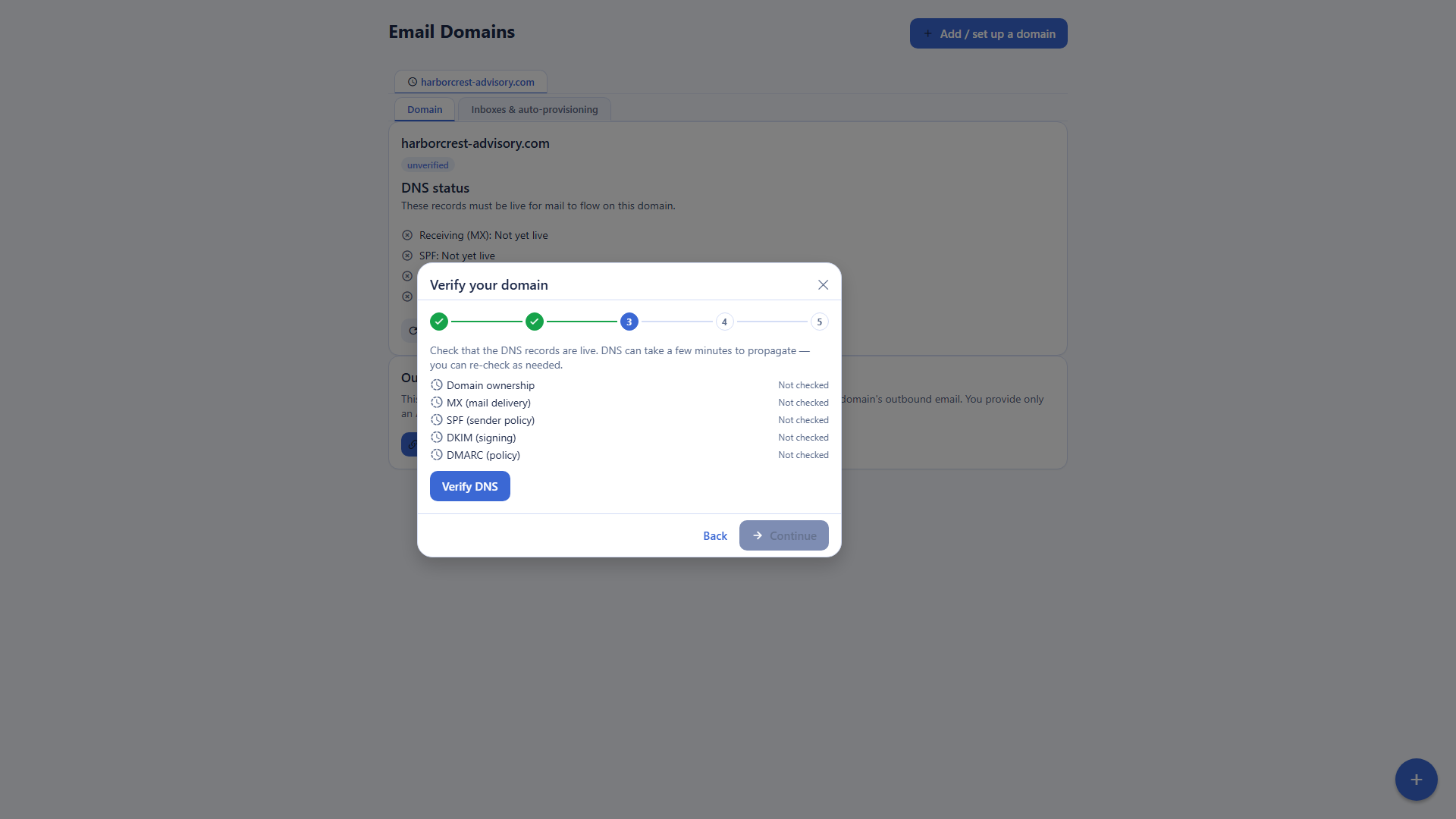
Proton supports custom domains on paid plans only, so a freelancer who wants mail at their own domain subscribes first. Backbuild Mail includes email at your own domain on every plan, including free, with two linked domains and a wizard that provisions and verifies the DNS.
Search limited by the encryption model
Proton cannot read encrypted bodies on its servers, so body search depends on a local per-browser index that does not work in private windows, and search has been a long-running community complaint. Backbuild Mail runs server-side full-text search across the whole message body, with operators, from any device.
No shared mailbox for support@
A shared team inbox has been requested on Proton's feedback board since 2018 and is not offered; teams fall back to forwarding rules. Backbuild Mail ships shared mailboxes with read and write grants, live sync, and an audit trail attributing every action, with no extra seat per shared address.
No API and few integrations
Proton has no public API; programmatic access means Bridge on a paid desktop. Backbuild exposes the whole mail surface over the REST API and provisioning over native MCP tools, so scripts, automations, and AI agents can operate the mailbox under role-based permissions.
The desktop app costs money
Proton's desktop app is a paid feature after a 14-day trial. The Backbuild desktop app for Windows and macOS is free, with the whole workspace inside it.
Tight free-plan limits
Proton Free is 1 GB, one address, and no custom domain, capped at 150 messages a day. The Backbuild free plan includes email at your own domain, two linked domains, and 500 sends a month, with overage on usage credits rather than a hard wall.
Where Proton Mail leads today
Proton's strengths are real and structural. Its end-to-end and zero-access encryption is the strongest confidentiality model offered by any mainstream mail provider, backed by Swiss jurisdiction, open-source clients with published independent audits, and SOC 2 Type II and ISO 27001 attestations. Around the core sit capabilities Backbuild Mail does not offer: OpenPGP interoperability, password-protected messages to outside recipients, expiring messages, random hide-my-email aliases, an offline desktop mailbox, mature native mobile apps, and Easy Switch migration from Gmail and Outlook. The suite around it includes a VPN, a Bitcoin wallet, and Proton Meet video meetings. Users whose requirements center on these capabilities have a concrete reason to pay for Proton.
Which tool wins, by use case
Privacy-first personal email
This one goes to Proton. A person who chooses email specifically so the provider cannot read it wants zero-access storage, a Swiss legal home, and clients whose code has been publicly audited, and Backbuild Mail does not offer that model: its own documentation states the server can read message bodies. The costs of Proton's design, weaker search and a paid custom domain, are costs a privacy-first user accepts knowingly.
Freelancers and solo founders who want email at their own domain
A freelancer wants a credible address at their own domain, cheaply, and the back office around it. Backbuild Mail includes the own-domain mailbox free, with a wizard that provisions MX, SPF, DKIM, and DMARC and verifies each record by reading back what is published, so deliverability is not a research project. The same free workspace covers invoicing and accounting and the calendar. Proton prices the same outcome at $3.99 a month and up for one custom domain, and its domain setup is likewise guided. The pause for a tool-driven freelancer: Backbuild Mail has no IMAP, while Proton reaches Apple Mail or Thunderbird through Bridge on a paid desktop plan.
Small business teams and the shared support@ inbox
A team's mail needs are structural: everyone gets an address, support@ and billing@ are worked by several people, and leavers must lose access cleanly. Backbuild Mail covers each: provisioning policies create mailboxes for members automatically, and shared mailboxes carry read and write grants with live sync and an attributed audit trail, at no per-address seat charge. Proton's business plans provide per-user addresses at $12.99 to $19.99 per user a month on its Workspace plans, but shared mailboxes remain an open feature request dating to 2018, so the support@ pattern falls back to forwarding and duplicated replies.
Power users with years of mail
Someone with a decade of correspondence lives by search. Backbuild Mail's server-side index reads the whole body of every message and answers structured queries like from: and has:attachment with date ranges, identically from every device. Proton's body search runs on a local index built per browser and is unavailable in private windows, a limit its heaviest users have complained about for years. Working against Backbuild here: no Easy Switch equivalent imports the old archive in, and there is no offline mailbox, where Proton's paid desktop app reads mail offline.
Developers and operators who script their mail
For anyone who treats the mailbox as infrastructure, the API decides. Backbuild exposes every mail operation over the public REST API and provisioning over native MCP tools, documented in the API reference, with a self-test mailbox to verify a sending route from a script and bring-your-own outbound provider routing whose key lives in the vault and is never echoed. An AI agent on your own provider keys can run triage on the same surface. Proton offers no public API; the supported programmatic path is Bridge, a paid desktop application exposing local IMAP and SMTP, which does not serve headless automation.
Security-sensitive and regulated organizations
The two products defend different flanks. Proton offers the strongest content confidentiality: the provider cannot read stored mail, with SOC 2 Type II and ISO 27001 attestations behind it. Backbuild offers the governance surface an access-control review asks for: single sign-on, role-based access, and a tamper-evident audit log on every plan, SCIM user provisioning, and per-organization isolation with every mailbox action attributed, though it does not yet present third-party audit certificates. E-discovery style obligations cut both ways: a zero-access archive cannot be searched server-side by design, while Backbuild's server-side search makes retention review practical and its zero-knowledge vault keeps credentials, rather than correspondence, beyond provider reach.
The daily inbox experience
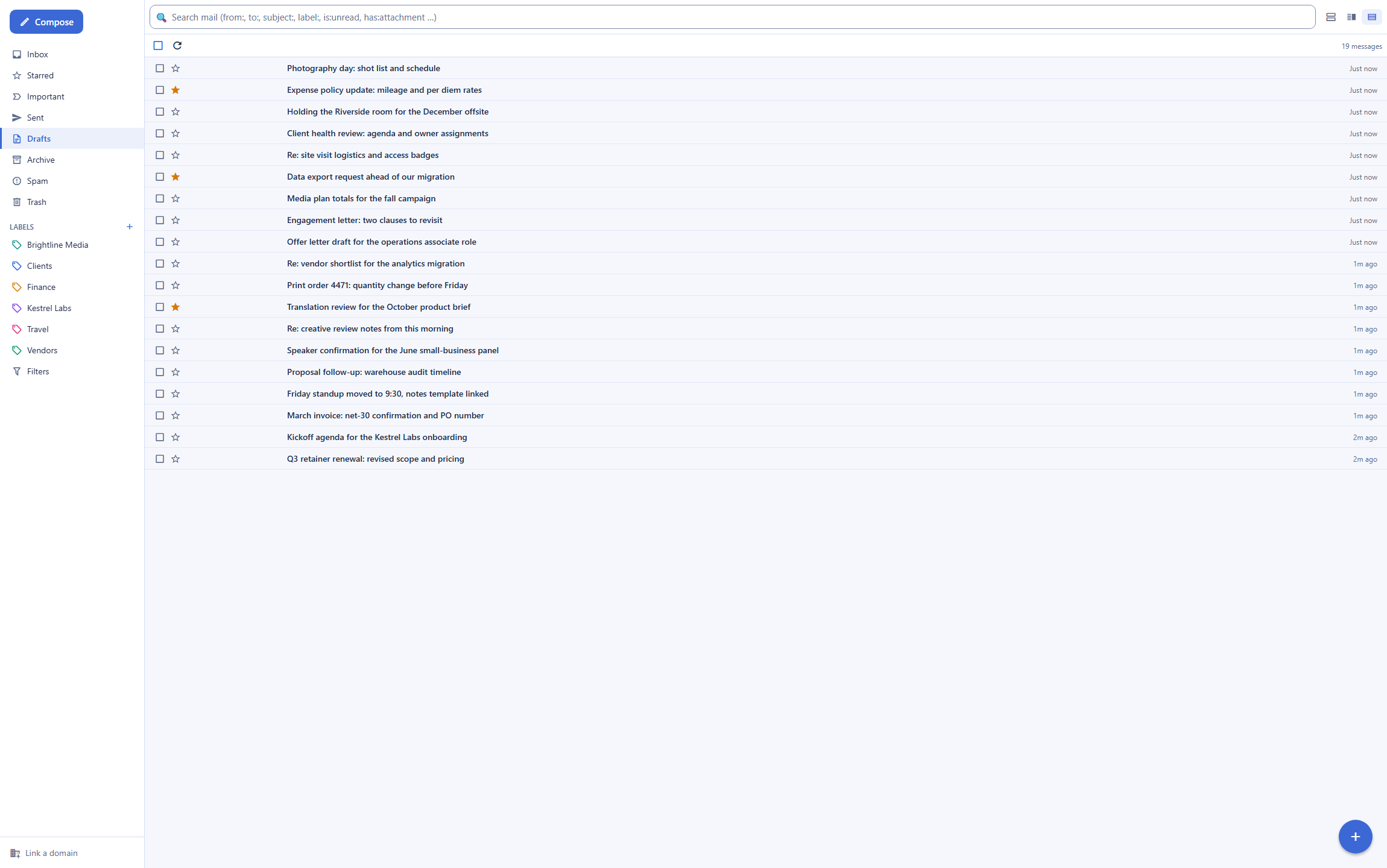
A person evaluating these two products for daily use is comparing the inbox loop: finding mail, writing mail, and staying organized. On finding, the difference is architectural rather than cosmetic: Backbuild Mail searches the full body of every message server-side, with operators that combine sender, label, read state, attachments, and dates, while Proton builds its body index locally in each browser, so a new device or a private window starts blind. On writing, the two are closer: both offer undo send, scheduled send, and snooze (Proton's undo window runs up to 20 seconds), and Backbuild adds continuous draft autosave with a reading pane that can sit below, beside, or off, plus keyboard triage.
On staying organized, Backbuild's labels nest, filters run server-side and can re-run over existing mail, and none of it is tier-gated; Proton reserves unlimited folders, labels, and filters for paid plans. Where Proton's daily experience is stronger: its iOS and Android apps are mature and shipped while Backbuild's mobile apps are built and still rolling out to the stores, and its desktop app reads mail offline, which Backbuild Mail does not. The daily bottom line: Backbuild Mail gives the faster find-and-file loop on any device with a browser; Proton gives the polished native-app loop and the encryption comfort, at the price of search.
Rolling it out across a team
The person who moves a team onto a mail system answers for onboarding, shared addresses, and leavers. On onboarding, Backbuild provisioning policies create a mailbox for each member automatically once the domain wizard has verified DNS, and the free desktop app covers members who want an installed client. On Proton, an administrator creates each user and address in the organization panel, with Easy Switch pulling each member's old Gmail or Outlook mail in, a genuine advantage during the cutover month since Backbuild has no import tool today.
On shared addresses, the difference is categorical: Backbuild shared mailboxes give several teammates read or write access to one real inbox, with every send and delete attributed in the audit trail, while Proton teams have requested shared mailboxes since 2018 and work around the gap with forwarding. On leavers, Backbuild access ends with organization membership under role-based access control, and the audit log carries the deprovisioning evidence; Proton administrators deactivate the user in the organization panel. The rollout bottom line: for a team whose mail is collaborative, Backbuild's shared-mailbox and provisioning model does the structural work; for a team of individuals who each keep an encrypted mailbox, Proton's per-user model with Easy Switch is a smooth landing.
Security, identity, and data governance evaluation
A security review of a mail platform turns on the threat model, identity controls, and evidence. On the threat model, the products optimize for different adversaries. Proton removes the provider itself from the trust boundary: zero-access storage means a compromise or compulsion of the provider cannot yield stored plaintext, a property no key-holding service, Backbuild included, can claim. Backbuild optimizes against the adversaries inside and around an organization: every mailbox action is authorized against organization-scoped roles, cross-organization access returns a uniform not-found, inbound HTML is sanitized, and remote images load through a signed proxy that hides the reader's IP.
On identity, Backbuild ships single sign-on on every plan including Free with SCIM 2.0 user provisioning, where Proton gates SSO to its Professional and Enterprise tiers and SCIM rides on that SSO configuration. On evidence, the ledgers differ: Backbuild's audit log is tamper-evident, written in the same transaction as the operation it records, and free on every plan; Proton's strength is externally validated posture, SOC 2 Type II and ISO 27001 plus published client audits, where Backbuild is built to those frameworks but not yet third-party audited. On AI governance, Backbuild lets the organization bring its own AI provider, so inference runs under the organization's own provider agreement; Proton's Scribe and Lumo run on Proton's bundled models. A reviewer who must certify vendor attestations today leans Proton; a reviewer building least-privilege access with provisioning and attribution on a budget leans Backbuild.
The economics for a finance and procurement review
The cost comparison has three parts: what mail costs, what forces upgrades, and what the choice displaces. On the mail itself, Backbuild Mail is free on every plan, including email at the company's own domain with 500 sends a month, with overage drawing usage credits per recipient rather than triggering a plan change; the workspace itself is included on the free plan, and paid plans run $19 to $149 per seat per month. Proton's ladder is per-user: Mail Plus at $3.99 a month billed annually, Unlimited around $9.99, and Workspace Standard at $12.99 and Premium at $19.99 per user per month, with monthly billing priced above each annual figure.
On upgrade pressure, the items that move a Proton user from free to paid are the custom domain, storage, addresses, and unlimited folders and filters, the desktop app, and Bridge; on Backbuild the corresponding items are free, and the meters that do scale, outbound sends beyond 500 a month and mailing-list blasts beyond 5, are usage-priced. On displacement, Backbuild's same subscription includes accounting and invoicing, the calendar, a secrets manager, and a helpdesk; Proton's Unlimited and Workspace bundles include a VPN and Proton Pass, strong value for a privacy-centered stack. AI is structural: Proton meters Scribe as a per-user add-on, while Backbuild passes AI through at the customer's own provider rate or usage credits, a line procurement can price against an existing AI vendor agreement.
Strategic fit and vendor considerations
The strategic question is which platform bet each product represents. Proton is a long-established privacy company: mail, calendar, storage, documents, VPN, passwords, and an AI assistant, all organized around the promise that the provider cannot read user content, under Swiss jurisdiction, with a business suite offering and third-party attestations. An organization whose brand or obligations center on confidentiality is squarely in its center of gravity. Backbuild is a workspace platform in Early Adopter Alpha whose mail client is one surface among Backbuild Mail, Chat, Meetings, Calendar, Contacts, Docs, Sheets, Slides, Diagrams, and Photos, the photo, video, training video, audio, and music editors, Files, Backbuild Finances, and the helpdesk, with a public REST API and an MCP tool surface positioning every one of those surfaces, mail included, as programmable infrastructure for software and AI agents.
Lock-in and continuity run differently on each side. Proton's zero-access design means the vendor holds ciphertext; leaving means exporting through its own tools, and the workflow features around the mailbox are subscription-bound. Backbuild's mail is standard MIME held by a key-holding service, retrievable over the API, and the platform around it is young: several workspace members are marked Soon on the pricing page, mobile distribution is still rolling out, and third-party audits are not yet in hand. An organization betting on consolidation, automation, and agent-operated work is betting with Backbuild's roadmap; an organization betting on the strongest available confidentiality guarantee, delivered by a vendor with a decade of reputation staked on it, is betting with Proton.
Frequently asked questions
Is there a free alternative to Proton Mail?
Yes. Backbuild Mail is the email client in the free Backbuild workspace, and it includes email at your own domain on every plan, with two linked domains, 500 outbound sends a month, and mailboxes for your team members. Proton Free provides 1 GB of storage, one Proton address, no custom domain, and a sending limit of 150 messages a day. If the requirement is that the provider be technically unable to read stored mail, Proton is the product built for that model at any price.
Is Backbuild Mail cheaper than Proton Mail?
For email at your own domain, yes. Backbuild Mail includes custom-domain email free on every Backbuild plan, where Proton requires a paid plan for any custom domain: Mail Plus is 3.99 US dollars a month billed annually (4.99 billed monthly) for one domain, Proton Unlimited is around 9.99 a month for three, and the business Workspace plans run 12.99 to 19.99 US dollars per user a month. The wider Backbuild workspace is included on the free plan as well; paid plans start at 19 US dollars per seat.
Is Backbuild Mail end-to-end encrypted like Proton Mail?
No, and this is the central difference between the two products. Proton Mail uses end-to-end and zero-access encryption, so Proton itself cannot read stored mailboxes. Backbuild Mail is encrypted in transit over TLS and encrypted at rest, but the service holds the keys and the server can read message bodies, which is what makes server-side full-text search, spam filtering, and HTML sanitization work. A buyer whose defining requirement is provider-blind mail should choose Proton. A buyer who wants professional email at their own domain with strong search, team mailboxes, and an API gets those from Backbuild Mail.
Can Backbuild Mail search my email better than Proton Mail?
For message-body search across an old mailbox, yes. Backbuild Mail keeps a server-side full-text index, so search reads senders, subjects, and the whole message body with operators like from:, label:, is:unread, and has:attachment, from any device. Proton cannot read encrypted bodies on its servers, so body search depends on a local index built in each browser: it is per device and does not work in private windows. The stronger search is a direct consequence of Backbuild Mail not being zero-access; that is the trade between the two designs.
Can I use my own domain for free with Backbuild Mail?
Yes. Email at your own domain is included on every Backbuild plan, including free, with two linked domains on Free and unlimited domains on paid plans. A guided wizard provisions and verifies the DNS records, MX for receiving and SPF, DKIM, and DMARC for sending, and on a Cloudflare-connected domain the records are written automatically. Proton supports custom domains on paid plans only.
Does Backbuild Mail have an API?
Yes. The whole mailbox and domain surface is available over the public REST API: create mailboxes, send and read messages, manage labels and filters, upload attachments, and link and verify domains. Domain and mailbox provisioning is also exposed as native MCP tools that an AI agent can call, and an agent working through the REST API operates under the same organization permissions and audit logging as a person. Proton Mail has no public API; its supported route for third-party access is Proton Mail Bridge, a desktop application on paid plans.
Can my team share a mailbox like support@ or billing@?
In Backbuild Mail, yes. A shared mailbox is a real inbox that several teammates are granted into with read or write access: everyone works the same mail in real time, write grants can reply as the address, and every action is recorded in an audit trail attributed to the person who did it. There is no extra seat charge for a shared address. Proton Mail does not offer shared mailboxes; the request has been open on its community feedback board for years.
Can I connect Backbuild Mail to Apple Mail or Thunderbird over IMAP?
No. Backbuild Mail does not expose IMAP, POP, or SMTP endpoints, so you use it through the web app and the free Windows and macOS desktop app. Proton also has no direct IMAP: it requires Proton Mail Bridge, which runs only on paid plans and only as a desktop application. If a third-party IMAP client is essential, Proton with Bridge supports it and Backbuild Mail does not.
Try Backbuild Mail free
Email at your own domain on every plan, a guided DNS setup, server-side full-text search, shared team mailboxes, undo send, scheduled send, and snooze, a public REST API, and single sign-on with audit logging, inside the free Backbuild workspace. If your first requirement is that the provider be unable to read your mail, Proton Mail is the stronger choice.
Get started with Backbuild Mail