

Zendesk alternative: the Backbuild Helpdesk in your workspace
Zendesk is a dedicated omnichannel customer-support suite: ticketing plus live chat, voice, and a help center, and a marketplace of more than a thousand apps. On the Backbuild side that job is done by the Backbuild Helpdesk, a complete ticketing help desk, together with the workspace it lives in: a relational data platform for custom ticket-linked data, Virtual Workers and finite-state-machine AI skills for governed triage, the public REST API and native MCP tools, and single sign-on with a tamper-evident audit log on every plan. Zendesk still leads today on omnichannel channels, a customer-facing help center, its app marketplace, and turnkey autonomous AI resolution.
The short answer
Zendesk is a dedicated omnichannel customer-support suite: ticketing plus live chat, voice, and a help center, with a large app marketplace and mature routing; on the Backbuild side that job is done by the Backbuild Helpdesk and the workspace around it. Choose the Backbuild Helpdesk if you want a real ticketing help desk, with custom workflow states, priorities, ticket types, hierarchy, and per-state SLAs, inside a workspace that adds a relational data platform for custom ticket-linked data, governed AI triage with a human-approval floor, a full REST API with no monthly call quota and native MCP tools, and single sign-on and audit logging on every plan including Free, with no separate per-agent support-suite subscription. Choose Zendesk if the deciding factors are omnichannel channels (live chat, voice, social, and inbound email), a customer-facing help center and community forums, the marketplace of more than a thousand apps, turnkey autonomous AI resolution, or its enterprise scale and track record.
The Backbuild Helpdesk vs Zendesk: feature by feature
Prices and limits below are quoted from each vendor’s own pages, observed 2026-07-18. The highlighted column is the Backbuild Helpdesk. A cross means the feature is not offered today, and Soon means it is on the Backbuild roadmap and not shipped yet.
| The Backbuild Helpdesk A ticketing help desk built into the Backbuild workspace Included in the workspace with no separate per-agent support fee. Free covers 20 tickets a month; every paid plan, $19 to $149 per seat, is unlimited. Single sign-on and audit logging on every plan. Get Started Free | Zendesk An omnichannel customer-support suite: tickets, chat, voice, and a help center No free tier; a trial, then per agent per month. Support Team $19, Suite Team $55, Suite Professional $115. Autonomous AI resolutions billed at $1.20 to $1.50 each on top. | |
|---|---|---|
| Price and limits | ||
| Free plan | Up to 20 tickets a month | No free tier; trial only |
| Entry price | $0 on Free; $19 to $149 per seat | $19 per agent, Support Team |
| Separate per-agent support-suite subscription | Included in the workspace | Priced per agent |
| Ticket volume on paid plans | Unlimited | Unlimited, agent-priced |
| Autonomous AI resolution cost | Usage credits or your own AI provider | $1.20 to $1.50 per resolution |
| Ticketing core | ||
| Tickets and a staff queue | ||
| Public replies separated from internal notes | Public replies and internal notes | |
| Requester and staff privacy wall | End-user and agent roles | |
| Assignment | ||
| Priorities | Low, normal, high, urgent | |
| Categories and routing rules | Triggers and routing | |
| Canned responses and macros | Canned responses | Macros |
| Customer satisfaction (CSAT) | ||
| Snooze, watchers, and merge | Snooze and merge | |
| Saved queue views (List, Grid, Board, and Table) | Views | |
| Bulk actions over a selection | ||
| Export a filtered queue | CSV, Sheets, and Docs | CSV, capped at 1,000 tickets |
| Issue tracking and workflow depth | ||
| Custom workflow states and transitions | Custom ticket statuses (Professional) | |
| Ticket types (Bug, Epic, and your own) | Question, incident, problem, task | |
| Parent-child hierarchy (epic to subtask) | ||
| Typed relations between tickets | Problem and incident links | |
| Per-state SLAs and work-in-progress limits | SLA management | |
| Approval and step-up gates on transitions | ||
| Labels and custom fields with internal-only visibility | Tags and custom fields | |
| Channels and self-service | ||
| Inbound email-to-ticket Soon | On the roadmap | |
| Live chat and messaging widget | Messaging and live chat | |
| Voice and telephony | Zendesk Talk | |
| Social-channel intake | Social messaging | |
| Public anonymous ticket portal | Authenticated filer or subscriber | Help center and web form |
| Customer-facing knowledge base and help center | Zendesk Guide | |
| Community forums | Guide community (higher tiers) | |
| AI and automation | ||
| Turnkey autonomous per-resolution AI bot | Governed Virtual Workers instead | AI agents, per-resolution billing |
| Agent-assist draft replies | Drafted as internal notes | Copilot (add-on) |
| Governed finite-state-machine AI skills for triage | Triggers and automations | |
| Human-approval floor before a reply is sent | Configurable | |
| Bring your own AI providers and models | Bundled model | |
| AI without a per-resolution overage | Usage credits, no per-resolution meter | $1.20 to $1.50 per resolution |
| Workforce management and quality-assurance scoring | Add-on bundles | |
| Custom data, reporting, and platform | ||
| Relational data platform for custom ticket-linked data (entity types, views, automations) | Custom objects (higher tiers) | |
| No packaged record ceiling on custom data | Scales with storage credits | Object and record limits |
| Reporting and analytics | Saved views and Sheets export | Zendesk Explore (deeper) |
| Built-in accounting for money-touching support (refunds, credits, invoicing) | Backbuild Finances | |
| White-label subscriber ticketing routed per package | Multi-brand (Enterprise) | |
| Internal IT or HR service desk without a second instance | One workspace | Separate Employee Service Suite |
| API, integrations, and MCP | ||
| Public REST API drives the whole help desk | ||
| Monthly or throttled API limits | No call quota | Rate-limited; High Volume add-on |
| Native MCP tools for AI agents | Ticket and configuration tools | |
| Signed outbound webhooks with a delivery log | Webhooks | |
| Third-party app marketplace | SaaS packages; smaller catalog today | More than 1,000 apps |
| Security, identity, and governance | ||
| Single sign-on | Every plan, including Free | Higher tiers |
| SCIM provisioning | Every plan | Enterprise |
| Role-based access control, default-deny | Every plan | Custom roles (Enterprise) |
| Tamper-evident audit log | Every plan, including Free | Access log (Enterprise) |
| Strict per-organization tenant isolation | ||
| Step-up multi-factor on elevated configuration | Two-factor authentication | |
| Sandbox environment | Sandbox (Enterprise) | |
| Per-region data residency tier | Data residency option | |
| Native apps | ||
| Native desktop app (Windows and macOS) | Web app | |
| Native mobile agent app in the app stores | In development; coming soon | |
A cross means the platform does not offer the feature today. Soon means the feature is on the Backbuild roadmap and not shipped yet. Zendesk prices, tiers, and limits are quoted from Zendesk pricing, its service product pages, its developer API reference, and dated third-party analyses, observed 2026-07-18. Backbuild capabilities are cited to the verified documentation for the help desk, types, workflows, and SLAs, AI support, the API and MCP, and security and governance.
Zendesk and the Backbuild surfaces that do the same job
Zendesk is a customer-support suite built around a set of bundled products: a ticketing agent workspace, live chat and messaging, voice through Zendesk Talk, social intake, a customer help center and community in Zendesk Guide, reporting in Zendesk Explore, and a marketplace of more than a thousand apps. It is a deep, mature suite whose reach spans many channels. The Backbuild side is narrower in channels but sits inside a workspace: the Backbuild Helpdesk is the ticketing help desk, and around it the workspace carries a relational data platform for custom ticket-linked data, Virtual Workers and finite-state-machine AI skills for governed triage, built-in accounting for money-touching support, and the everyday workspace apps. Every one of these surfaces is drivable through the same REST API and through AI agents over the Model Context Protocol. Zendesk bundles channels, a customer help center, and analytics that the Backbuild Helpdesk does not, and the Backbuild workspace bundles a data platform, governed AI automation, and back-office apps that Zendesk does not.
The Backbuild Helpdesk, feature by feature
The Backbuild Helpdesk is a real ticketing product, not a repurposed database board. It ships the queue, the ticket, the workflow engine, and the governance a support or issue-tracking team runs on.
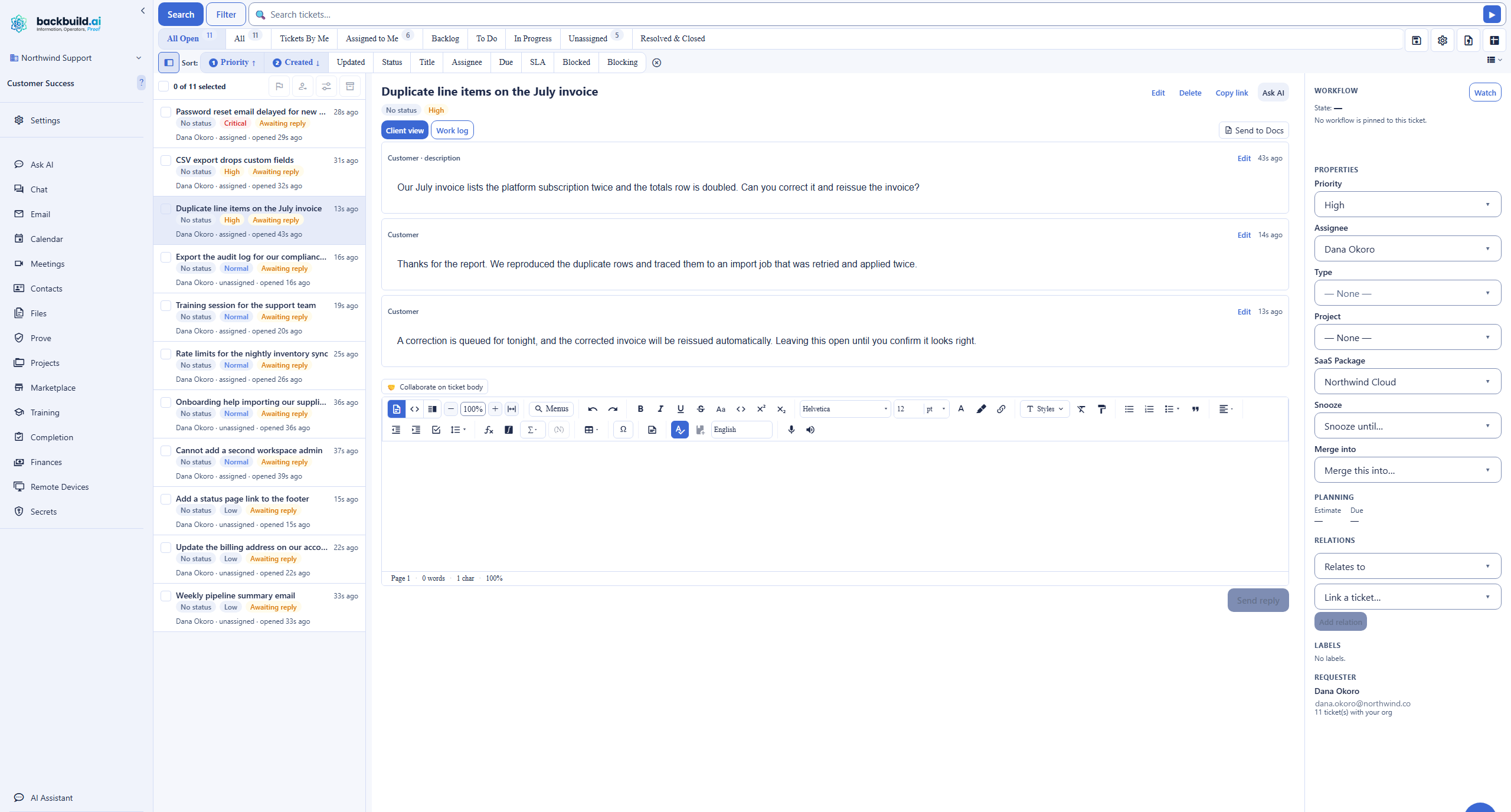
A requester files a ticket through the Open Ticket dialog, and agents work it in the Tickets console, with quick-filter chips that carry live counts, a search mode and a structured filter builder, saved views a team can share, and List, Grid, Board, and Table layouts. Inside a ticket, the Client view and Work log tabs keep public replies to the requester separated from internal notes the requester never sees, and a message can be edited with version history. The workflow layer is where the Backbuild Helpdesk goes deep: custom workflow states and transitions, ticket types like Bug and Epic with parent-child hierarchy from epic to subtask, typed relations between tickets, per-state SLAs and work-in-progress limits, approval and step-up gates, labels, and custom fields with internal-only visibility. Administration covers categories, routing rules, SLA policies, and canned responses, and the whole queue exports to CSV, Backbuild Sheets, and Backbuild Docs.
Custom ticket-linked data, governed AI triage, and the back office
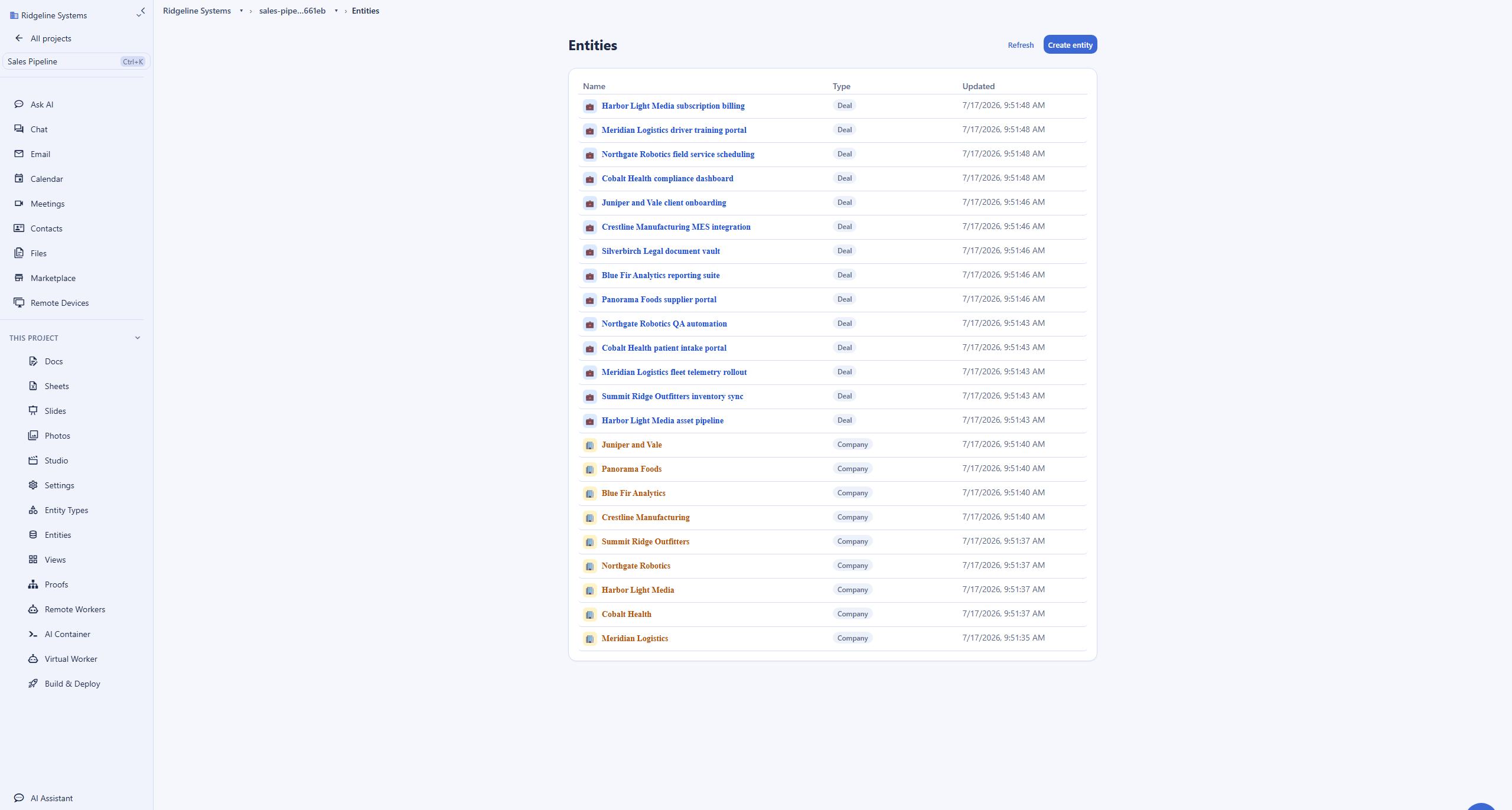
Around the ticket queue, the workspace adds surfaces a support team reaches for. The relational data platform holds custom ticket-linked data as entities of custom types with typed relationships, lookups, and referential integrity, so a ticket links to a real customer, asset, or account record rather than a flat text field, and there is no packaged record ceiling. Governed AI triage comes from assigning a Virtual Worker and a finite-state-machine skill to a workflow stage: the worker drafts a reply as an internal note, auto-dispatch is off by default and carries per-ticket budgets, and a person approves before anything is sent. Backbuild Finances keeps invoicing and a double-entry ledger in the same workspace, so a support case that ends in a refund or a credit does not cross into a separate accounting subscription. The whole help desk is drivable over the public REST API and native MCP tools, so an agent, an automation, or an AI worker can create, query, and configure tickets programmatically.
Where Zendesk wins today
Zendesk is the far more established support suite, with a very large installed base and a long track record, and several of its strengths are things the Backbuild Helpdesk does not match today.
Omnichannel channels in one ticket
Zendesk unifies email, live chat and messaging, voice through Zendesk Talk, and social channels into a single ticket with full context. The Backbuild Helpdesk is ticket-focused: inbound email-to-ticket is on the roadmap, and there is no live-chat widget, telephony, or social intake today. A team whose support spans many real-time channels gives up genuine capability by moving off Zendesk now.
A customer help center and community
Zendesk Guide is a mature customer-facing help center with public self-service articles, multi-language content, and community forums. Backbuild ships authenticated ticketing and Backbuild Docs for internal knowledge, but it has no public knowledge-base or community-forum product, so a team that needs branded self-service should treat this as a real gap.
The app marketplace and mature routing
Zendesk’s marketplace of more than a thousand apps and its mature skills-based routing and SLA management are a deep ecosystem built over many years. Backbuild answers external connection with publishable SaaS packages, the full REST API, signed webhooks, and custom tools, but its catalog is smaller today.
Turnkey autonomous AI, WFM, and reporting
Zendesk ships a turnkey autonomous AI agent with published deflection numbers, workforce-management scheduling, quality-assurance scoring, and deep reporting in Zendesk Explore. Backbuild answers automation with governed Virtual Workers and finite-state skills, a different, human-approved mechanism, and reporting through saved views and Sheets export rather than a dedicated analytics product.
Common Zendesk frustrations and how the Backbuild Helpdesk addresses them
Per-agent price and add-on creep
Zendesk is priced per agent, from 19 US dollars for Support Team to 115 for Suite Professional, and teams report all-in costs one and a half to three times the sticker once add-ons are counted. The Backbuild Helpdesk is included in the workspace with no separate per-agent support fee, free for up to 20 tickets a month, and unlimited on paid plans.
Per-resolution AI billing with no hard cap
Zendesk bills its autonomous AI at 1.20 to 1.50 US dollars per resolved conversation with no hard cap on overages. Backbuild meters AI on usage credits and lets a team bring its own AI provider and model, so inference runs at the provider’s own rate under the team’s own agreement rather than a per-resolution meter.
Running two instances for internal and external support
Zendesk cannot combine customer and employee support in one instance, so a team that wants both runs a separate Employee Service Suite instance. The Backbuild Helpdesk runs a customer queue, an internal IT or HR service desk, and an engineering issue tracker in one workspace, separated by categories, workflows, and access rather than by tenants.
Governance gated to the Enterprise tier
On Zendesk, custom roles, the sandbox, and the detailed access log arrive on the Enterprise tier. The Backbuild Helpdesk includes single sign-on, role-based access control, and a tamper-evident audit log on every plan, including Free, with step-up multi-factor on elevated configuration, so the security posture does not depend on the tier.
Migration lock-in on the way out
Teams leaving Zendesk report that CSV export flattens custom fields to anonymous identifiers, trims conversation history, and caps at a thousand tickets. Backbuild loads and exports tickets over a REST API with no monthly call quota, or an AI agent over MCP can rebuild the types, states, and records end to end, so both directions of the move are cheaper to execute.
Weak issue tracking for engineering
Zendesk is a support tool rather than an issue tracker, so engineering teams bolt on a separate tool like Jira and lose the thread. The Backbuild Helpdesk carries ticket types, parent-child hierarchy from epic to subtask, typed relations, and custom workflow states natively, so a support ticket can become a tracked bug in the same system.
Which tool wins, by use case
A support team running a ticket queue and hitting SLAs
This is the most common reason a team buys Zendesk: a shared queue, response and resolution SLAs, and CSAT reporting. The Backbuild Helpdesk answers with a staff console of List, Grid, Board, and Table views, saved views, and bulk actions, custom workflow states with per-state SLAs and work-in-progress limits, public replies separated from internal notes, and CSAT, and it is included in the workspace with no separate per-agent fee where Zendesk charges from 19 US dollars per agent per month with no free tier. The counterweight is channels and maturity: if the queue is fed by live chat, phone, and social as well as email, Zendesk unifies them in one ticket today and Backbuild does not.
A small business or store answering customer email
Founders and small stores often find Zendesk built for a company with a dedicated support-operations team, and it has no permanent free plan. The Backbuild Helpdesk is free for up to 20 tickets a month and lives in a workspace that already carries mail at your own domain, documents, and a calendar, so a small team runs support without a second subscription or a support-operations hire. The honest limits are real: without inbound email-to-ticket yet, a requester files through the app rather than by replying to an email, and a customer who expects a public help center will not find one.
An internal IT or HR service desk
Zendesk cannot combine customer and employee support in one instance, so an internal desk usually means a separate Employee Service Suite instance to run and pay for. The Backbuild Helpdesk runs an internal IT or HR service desk in the same workspace as the rest of a team, with custom workflow states, per-state SLAs, approval gates on transitions, and ticket types, and a relational data platform that links a ticket to the asset, system, or employee record it concerns. Governance is included: single sign-on, role-based access control, and a tamper-evident audit log on every plan.
Turning support tickets into tracked engineering work
Zendesk is a support tool rather than an issue tracker, so a support ticket that turns out to be a bug is usually handed to a separate tool like Jira, and the two systems drift apart. The Backbuild Helpdesk carries issue-tracking depth natively: ticket types like Bug and Epic, parent-child hierarchy from epic to subtask, typed relations between tickets, and custom workflow states with work-in-progress limits, and the same tickets are drivable over the REST API and MCP, so a support ticket becomes a tracked engineering item in one system. Zendesk keeps the advantage in raw support channel breadth and its marketplace of engineering integrations.
Offering support to your own subscribers
A software company or agency that resells software wants its own subscribers to file support, routed per product and branded. Zendesk answers with multi-brand on the Enterprise tier. The Backbuild Helpdesk routes subscriber tickets per SaaS package, so a company that publishes its own product on Backbuild gives its subscribers a support channel routed to its organization under a label it controls, in the same workspace where it builds and sells the product. The tradeoff is channel breadth and the maturity of Zendesk’s multi-brand help centers.
Omnichannel customer support across chat, phone, and social
For a team whose support is spread across live chat, phone, social, and email, Zendesk is the stronger choice today. Live chat and messaging, Zendesk Talk for voice, and social intake all land in one ticket, and Zendesk Guide gives customers a self-service help center. The Backbuild Helpdesk is ticket-focused, with inbound email-to-ticket on the roadmap and no chat, voice, or social intake, so it does not cover this shape of support yet.
Security, identity, and governance evaluation
A security review of a help desk turns on four questions: who can get in, what each agent can see, what record survives every change, and what the answers cost. On identity, the Backbuild Helpdesk ships single sign-on on every plan, including Free, and SCIM provisioning across plans, with default-deny role-based access control that separates who can read tickets from who can configure the help desk. Zendesk provides single sign-on and directory provisioning as well, though its custom agent roles and its detailed access log sit on the Enterprise tier, so a small team on a lower plan does not have the granular controls.
On what survives a change, the Backbuild Helpdesk writes a tamper-evident, append-only audit trail on every plan, keeps a strict per-organization tenant isolation and an internal-notes privacy wall so a requester never sees staff notes, and requires step-up multi-factor on elevated configuration changes. Zendesk answers with a mature access log and enterprise controls, but the deeper audit and role features arrive at the top of its range. On AI governance, an organization can bring its own AI providers and models so inference runs under its own agreement, and automated triage drafts as internal notes behind a human-approval floor, where Zendesk runs its autonomous AI on a bundled model.
The tradeoffs run both ways. Zendesk is the older platform, with a long independent track record, published compliance attestations, a sandbox for safe configuration, and a per-region data-residency option that Backbuild does not match today. The bottom line: if the review demands single sign-on, fine-grained roles, a tamper-evident audit trail, and AI that runs under your own provider agreement without an upgrade, the Backbuild Helpdesk sets that floor higher on every plan; if it demands a formal data-residency tier, an isolated sandbox, and a decade of attested operating history, Zendesk has more of it today.
The economics for a finance and procurement review
The Zendesk line item is per agent per month, and the total often exceeds the sticker. The Support Team plan starts at 19 US dollars, Suite Team at 55, and Suite Professional at 115 per agent per month, there is no free tier, and its autonomous AI resolutions are billed on top at roughly 1.20 to 1.50 US dollars per resolved conversation with no hard cap, which is why teams report all-in costs well above the list rate. Capability also sets the tier: custom roles, the sandbox, and the detailed access log sit on Enterprise.
The Backbuild Helpdesk changes the shape of the bill. It is included in the workspace with no separate per-agent support-suite subscription: the free plan covers 20 tickets a month, and paid plans, from 19 to 149 US dollars per seat, make ticket volume unlimited while also carrying the rest of the workspace. AI runs on usage credits or an AI provider you bring yourself rather than a per-resolution meter, and governance is included on every plan rather than reserved for a higher tier. The counterweight is scope: Zendesk buys omnichannel channels, a customer help center, and a large marketplace that the Backbuild Helpdesk does not include. The bottom line: for a ticket-and-email support team, the Backbuild Helpdesk removes both the per-agent support-suite line and the per-resolution AI meter, and folds the help desk into a workspace subscription; for a team that needs the full omnichannel suite, Zendesk’s price buys capability the Backbuild Helpdesk does not have.
Rolling it out across a support team
Adoption risk on a help desk is concentrated in the switch itself: open tickets have to keep moving, and agents have to find their queue on day one. Zendesk’s advantage here is familiarity and maturity: most support agents have used it, and its onboarding, macros, and views are well worn, though administrators note the configuration can take months and needs someone to own it. The Backbuild Helpdesk reduces the switch cost differently: it is already inside a workspace a team may use for mail, documents, and a calendar, so agents work tickets next to the rest of their day, and the queue is drivable over the REST API and MCP for a scripted or AI-assisted import.
On governance during rollout, the structural difference is that the Backbuild Helpdesk keeps role-based access and the internal-notes privacy wall from the first seat, so a lead can bring agents in without widening what requesters see, and governed AI triage stays behind a human-approval floor during the learning period. The unavoidable caveat is channels: because inbound email-to-ticket, chat, and voice are not shipped, a rollout that depends on those should keep Zendesk for the customer channels and use the Backbuild Helpdesk for the internal and issue-tracking side. The bottom line: pilot both with the real intake in mind. If the queue is fed by many live channels, Zendesk is the smoother path today; if it is fed by tickets and email inside a workspace a team already uses, the Backbuild Helpdesk rolls out at no separate cost with governance from the first seat.
Data ownership, migration, and lock-in
The exit question deserves as much scrutiny as the entrance. Teams leaving Zendesk report real friction: CSV export flattens custom fields to anonymous identifiers, trims conversation history to headers, breaks relational links, and caps at a thousand tickets at a time, and deleted tickets and comments are excluded, so a full migration usually runs through the API or a migration tool. The Backbuild Helpdesk’s export posture is broad by design: the REST API returns every ticket, message, type, and relationship, a filtered queue exports to CSV, Backbuild Sheets, and Backbuild Docs, and there is no monthly call quota to meter the exit.
Migration into the Backbuild Helpdesk has one main lane: tickets and their custom fields are recreated through the public REST API, or the exported data is handed to an AI agent over MCP, which can build the ticket types, workflow states, and linked records end to end. Because the API is uncapped, loading a large backlog does not meter against a plan. The bottom line: both tools let you leave, but the Backbuild Helpdesk’s uncapped API and agent-drivable loading make both directions of the move cheaper to execute, while Zendesk’s advantage is the maturity of the migration tools and partners built around its long-established format.
Strategic fit and vendor risk
Zendesk is the category incumbent, and the strategic case for it is maturity and reach: a long operating history, an enormous installed base, the deepest ecosystem of marketplace apps, mature omnichannel channels, and a customer help center few pure ticketing tools match. The risk on that side is cost and complexity: the per-agent price and uncapped per-resolution AI billing, and the configuration burden reviewers describe, are what send teams looking for an alternative in the first place.
The Backbuild Helpdesk’s strategic case is consolidation and governance: a real ticketing help desk with issue-tracking depth, inside a workspace that adds a data platform, accounting, and governed AI, with security included rather than tiered, an uncapped, OpenAPI-documented exit, and an open agent protocol across the platform. The real risks: it is the younger vendor and pre-launch, in early adopter alpha, it has no omnichannel channels or customer help center, its marketplace and reporting are smaller, and its native mobile app is still coming. The bottom line: choose Zendesk when omnichannel breadth, a customer help center, marketplace depth, and a long track record are the controlling criteria; choose the Backbuild Helpdesk when a governed ticket-and-issue system inside a consolidated workspace, with a security floor on every plan and no per-agent or per-resolution meter, matters more, and omnichannel channels can wait or run alongside.
Frequently asked questions
Is there a free alternative to Zendesk?
Yes. Zendesk has no permanent free tier; it offers a trial and then charges per agent per month, starting at 19 US dollars for the Support Team plan. The Backbuild Helpdesk is included in the Backbuild workspace with no separate per-agent support-suite subscription, and the free plan covers up to 20 tickets a month, with single sign-on, role-based access control, and a tamper-evident audit log on every plan. A small team can run a real support queue, with workflow states, priorities, assignment, public replies separated from internal notes, and CSAT, at no cost, and paid plans from 19 US dollars per seat make ticket volume unlimited.
Why is Zendesk so expensive, and what is cheaper?
Zendesk is priced per agent per month, and the total often runs well above the sticker: the Support Team plan starts at 19 US dollars, the Suite Team plan at 55, and Suite Professional at 115, and its autonomous AI resolutions are billed on top at roughly 1.20 to 1.50 US dollars per resolved conversation with no hard cap, so teams report all-in costs that run one and a half to three times the list price. The Backbuild Helpdesk is included in the workspace subscription with no separate per-agent support fee, its AI runs on usage credits or on an AI provider you bring yourself rather than a per-resolution meter, and the free plan covers up to 20 tickets a month. Where Zendesk earns its price is omnichannel breadth, a customer help center, and a large app marketplace that the Backbuild Helpdesk does not match today.
Can Backbuild replace Zendesk?
For teams whose support runs on tickets, the Backbuild Helpdesk covers the core: filing, a staff console with List, Grid, Board, and Table views, custom workflow states, categories, priorities, assignment, public replies separated from internal notes, per-state SLAs, ticket types with hierarchy and relations, custom fields, CSAT, and export. It cannot replace Zendesk for a team that depends on omnichannel intake, because Backbuild does not yet offer live chat, telephony, social intake, or inbound email-to-ticket, and it has no customer-facing knowledge base or community forums like Zendesk Guide. A team whose support is email, chat, and phone across many channels should stay on Zendesk or run the Backbuild Helpdesk for the internal and issue-tracking side while keeping Zendesk for the customer channels.
Does Backbuild have live chat and phone support like Zendesk?
Not today. Zendesk is an omnichannel suite with live chat and messaging, voice through Zendesk Talk, and social-channel intake, all landing in one ticket. The Backbuild Helpdesk is ticket-focused: a requester files a ticket and both sides continue on the ticket thread, with public replies separated from internal notes. Inbound email-to-ticket is on the roadmap, and there is no live-chat widget, telephony, or social intake yet. For a team whose first requirement is real-time chat or phone support, Zendesk is the stronger choice right now.
Does Backbuild have a customer knowledge base or help center like Zendesk Guide?
No. Zendesk Guide is a dedicated customer-facing help center with public self-service articles, multi-language content, and community forums, and it is a genuine strength of the suite. Backbuild ships authenticated ticketing plus Backbuild Docs for internal knowledge, but it does not have a public help-center or community-forum product. A team that needs a branded self-service knowledge base and a customer community should weigh that gap; a team that mainly needs to work a ticket queue with governed workflows does not.
What is the best Zendesk alternative for an internal IT or engineering team?
This is where the Backbuild Helpdesk is strongest. It runs an internal IT or HR service desk and an engineering issue tracker in the same workspace as the rest of a team, without running two separate instances the way a combined customer and employee Zendesk setup requires. Ticket types like Bug and Epic support parent-child hierarchy from epic to subtask and typed relations between tickets, custom workflow states carry per-state SLAs and work-in-progress limits, transitions can require approval or a step-up, and a relational data platform links tickets to custom records such as assets or systems. Zendesk answers internal support with a separate Employee Service Suite and issue tracking with third-party integrations to a tool like Jira.
How do I migrate away from Zendesk?
Zendesk exports tickets to CSV, and teams report friction on the way out: custom fields flatten to anonymous identifiers, conversation history is trimmed, relational links break, and the export is capped at a thousand tickets at a time, so a full migration usually needs the API or a migration tool. Into Backbuild, tickets and their custom fields are recreated through the public REST API, or by handing the exported data to an AI agent over the Model Context Protocol, which can build the ticket types, workflow states, and records end to end. Because the Backbuild REST API has no monthly call quota, loading a large backlog does not meter against a plan, and everything exports back out the same way.
What does Zendesk do better than Backbuild?
Several things, and they are real. Zendesk is a full omnichannel suite with live chat, voice, social, and inbound email in one ticket, where Backbuild is ticket-focused. Zendesk Guide is a mature customer-facing help center and community that Backbuild has no equivalent for. Zendesk has a marketplace of more than a thousand apps, mature skills-based routing and SLA management, turnkey autonomous AI resolution with published deflection numbers, workforce management and quality-assurance scoring, deep reporting in Zendesk Explore, a data-residency option, and a long enterprise track record. Backbuild is newer and pre-launch, in early adopter alpha, and answers automation with governed Virtual Workers and finite-state-machine skills rather than a turnkey bot.
Try the Backbuild Helpdesk free
A real ticketing help desk, with custom workflow states, priorities, assignment, replies, SLAs, ticket types, and CSAT, inside a workspace that adds a relational data platform, governed AI triage, built-in accounting, a full REST API and native MCP tools, and single sign-on and audit logging on every plan, free for up to 20 tickets a month. If the deciding factors are omnichannel channels, a customer help center, the app marketplace, or turnkey autonomous AI, Zendesk is the stronger choice today.
Get started free