

OneDrive alternative: Backbuild Files vs Microsoft OneDrive
Microsoft OneDrive is the cloud file storage and sync app inside Microsoft 365, with a mature OneDrive sync client and Files On-Demand, Personal Vault, ransomware detection with Files Restore, and Microsoft Purview compliance across the Microsoft 365 estate. On the Backbuild side that same job is done by Backbuild Files, the file app inside a full workspace, with governance on every plan, a relational data platform for structured data alongside the files, an AI assistant with native Model Context Protocol tools, a public REST API, and a zero-knowledge Secrets vault. Microsoft OneDrive still leads on its mature block-level desktop sync, Personal Vault, ransomware detection and file recovery, automatic image and PDF text recognition, very large uploads, native mobile apps, deep Office co-authoring, Purview retention and eDiscovery, and its published certifications and near-universal enterprise adoption.
The short answer
Both store files in the cloud, but they aim at different jobs. Choose Backbuild Files if you want file storage governed the same way as the rest of your work, files that open straight in the Docs, Sheets, and Slides editors, a relational data platform for structured data in the same place, a zero-knowledge Secrets vault, and single sign-on, SCIM, per-organization roles, and a tamper-evident audit log on every plan, inside an all-in-one workspace. Choose Microsoft OneDrive if you want its mature block-level sync client with Files On-Demand and Known Folder Move, Personal Vault, ransomware detection with a 30-day Files Restore, automatic image and PDF text recognition in search, very large per-file uploads, mature native mobile apps, deep Office co-authoring, or storage bundled with Microsoft 365. Both store, share, and open files in built-in editors; Backbuild does not offer a desktop sync client, ransomware rollback, automatic optical character recognition, or large per-file uploads today, and Microsoft OneDrive keeps a relational data platform, a zero-knowledge vault, and the advanced governance controls out of its lower tiers.
Backbuild Files vs Microsoft OneDrive: feature by feature
Microsoft OneDrive is free with 5 GB; paid storage rides with Microsoft 365, from 1.99 US dollars a month for 100 GB up to 1 TB per user, and the business plans start from about 6 US dollars per user a month, with the advanced governance reserved for Business Premium and the enterprise tiers. Prices below are from the Microsoft pricing pages, observed 2026-07-20. The highlighted column is Backbuild Files.
| Backbuild Files Governed file storage, editors, and a data platform in one workspace In the workspace on every plan; 1 GB on Free, then storage per seat metered on usage credits, with no separate storage subscription Get Started Free | Microsoft OneDrive Cloud file storage and sync inside Microsoft 365 Free with 5 GB; Microsoft 365 Basic $1.99/mo for 100 GB; Personal $9.99/mo for 1 TB; business plans from about $6/user/mo with 1 TB; advanced governance on Business Premium and Enterprise | |
|---|---|---|
| Price and storage | ||
| Free tier | In the workspace, 1 GB | 5 GB |
| Storage model | Per seat, metered on credits | Flat tiers bundled with Microsoft 365 |
| Included storage on paid plans | 25 GB / 100 GB / 1 TB per seat | 100 GB to 1 TB per user |
| Large low-cost bulk storage | Credit-metered | Up to 1 TB, expandable |
| Per-file upload size | 25 MB on web upload | Up to 250 GB per file |
| Files and organization | ||
| Upload and store any file | ||
| Folders: create, rename, delete, nested | ||
| Drag and drop upload | ||
| List, detail, and grid views | ||
| Audience-scoped libraries (personal, department, org) | SharePoint libraries | |
| Files roll up per project | ||
| Files open in built-in editors | Docs, Sheets, Slides | Word, Excel, PowerPoint |
| Real-time co-authoring in the editors | ||
| Native LaTeX and live math in the editors | ||
| Machine-checked proof blocks in documents | ||
| Desktop sync, offline, and clients | ||
| Block-level desktop sync client | OneDrive sync app | |
| Files On-Demand cloud placeholders | ||
| Known Folder Move (Desktop, Documents, Pictures) | ||
| Offline availability of stored items | Docs, Sheets, Slides only | Any file, local copy |
| Native desktop app | Workspace app, Windows and macOS | Sync client |
| Native mobile apps Soon | Rolling out | iOS and Android |
| Search | ||
| Search across file names and content | ||
| Automatic image and PDF text recognition | Background OCR | |
| AI semantic search by meaning | Copilot on Microsoft 365 | |
| Sharing and collaboration | ||
| Public and organization-wide share access | ||
| Granular subject sharing (user, group, department, project) | People and groups | |
| Access ladder from view up to edit, revocable | View and edit links | |
| Expiring and password-protected links | Signed, short-lived links | Expiry and password |
| Cross-organization recipient sharing | External sharing | |
| Visibility floor: unauthorized read returns 404 | ||
| Versioning, recovery, and screening | ||
| Version history | Audit-logged writes and publish | Up to 25 prior versions |
| File recovery and rewind Soon | Roadmap | Files Restore, 30 days |
| Ransomware detection and alerting | Detection and alerts | |
| Extra-secured, separately authenticated file folder | Secrets vault for credentials | Personal Vault |
| Content screening on upload (malware, active content) | Malware scan | |
| Authenticated download only, no guessable URLs | Shared links | |
| AI and agents | ||
| AI semantic search and indexing of files | Copilot, Microsoft 365 tiers | |
| In-app AI assistant reads your files | Copilot, add-on fee | |
| AI-generated files kept under the same governance | Artifacts | |
| Bring your own AI provider and model | Bundled Copilot model | |
| Native Model Context Protocol tools | ||
| Integrations, API, and automation | ||
| Public REST API over the file surface | No monthly call quota | OneDrive and Graph API |
| Large third-party integration ecosystem | First-party plus REST API and MCP | Microsoft 365 and Power Automate |
| Structured data alongside files (relational platform) | Entity types and views | Dataverse, a separate license |
| Automations over files and records | Power Automate | |
| Security, identity, and governance | ||
| Single sign-on | Every plan | Microsoft Entra ID |
| SCIM user provisioning | Every plan | Microsoft Entra ID |
| Per-organization roles and tiered admin | Every plan | Admin center |
| Tamper-evident audit log | Every plan | Purview audit |
| Data loss prevention for files | Purview, higher tiers | |
| Retention and eDiscovery hold | Purview, higher tiers | |
| Device approval and remote wipe | Microsoft Intune | |
| Client-side or end-to-end encryption of files | ||
| Zero-knowledge secrets vault in the workspace | ||
| Published certifications and long track record | Built to meet, not yet audited | |
| Workspace apps in the same subscription | ||
| Files (Backbuild Files) (OneDrive is the storage app in Microsoft 365) | OneDrive | |
| Native LaTeX and math in the editors | ||
| Machine-checked proof blocks in documents | ||
| Relational data platform alongside files | Dataverse, separate license | |
| Governance (SSO, roles, audit) on every plan | Advanced on top tiers | |
| Files On-Demand block-level sync and Known Folder Move | ||
| Personal Vault, ransomware detection, and Files Restore | ||
| Automatic text recognition and very large uploads | ||
| Email at your own domain (Backbuild Mail vs Outlook) | Outlook and Exchange | |
| Team chat (Backbuild Chat vs Microsoft Teams) Soon | On the roadmap | Microsoft Teams |
| Meetings (Backbuild Meetings vs Microsoft Teams) Soon | On the roadmap | Microsoft Teams |
| Calendar (Backbuild Calendar vs the Outlook calendar) | Outlook calendar | |
| Contacts (Backbuild Contacts vs Outlook contacts) | Outlook contacts | |
| Documents (Backbuild Docs vs Word) | Word | |
| Spreadsheets (Backbuild Sheets vs Excel) | Excel | |
| Presentations (Backbuild Slides vs PowerPoint) | PowerPoint | |
| Diagrams (Backbuild Diagrams vs Visio) Soon | On the roadmap | Visio, a separate subscription |
| Photos (Backbuild Photos) | ||
| Photo editor | ||
| Video, audio, and music editors Soon | Authoring preview | Clipchamp (basic video) |
| Accounting and invoicing (Backbuild Finances) | ||
| Password and secrets manager (Backbuild Secrets) | ||
| Help desk and support tickets | ||
| Remote desktop and cloud desktops | Windows 365, separate | |
| Autonomous AI virtual workers | ||
| Training course system | Viva Learning (add-on) | |
A cross means the tool does not offer the feature today. "Soon" marks a capability on the Backbuild roadmap. Microsoft OneDrive prices, plans, and features are quoted from the OneDrive plans and pricing page, the Microsoft 365 business plans, the Files On-Demand help pages, the OneDrive sharing help, and a dated third-party review, observed 2026-07-20. Backbuild capabilities are cited to the Backbuild Files documentation, the storage documentation, and the pricing page.
Two shapes for the same job
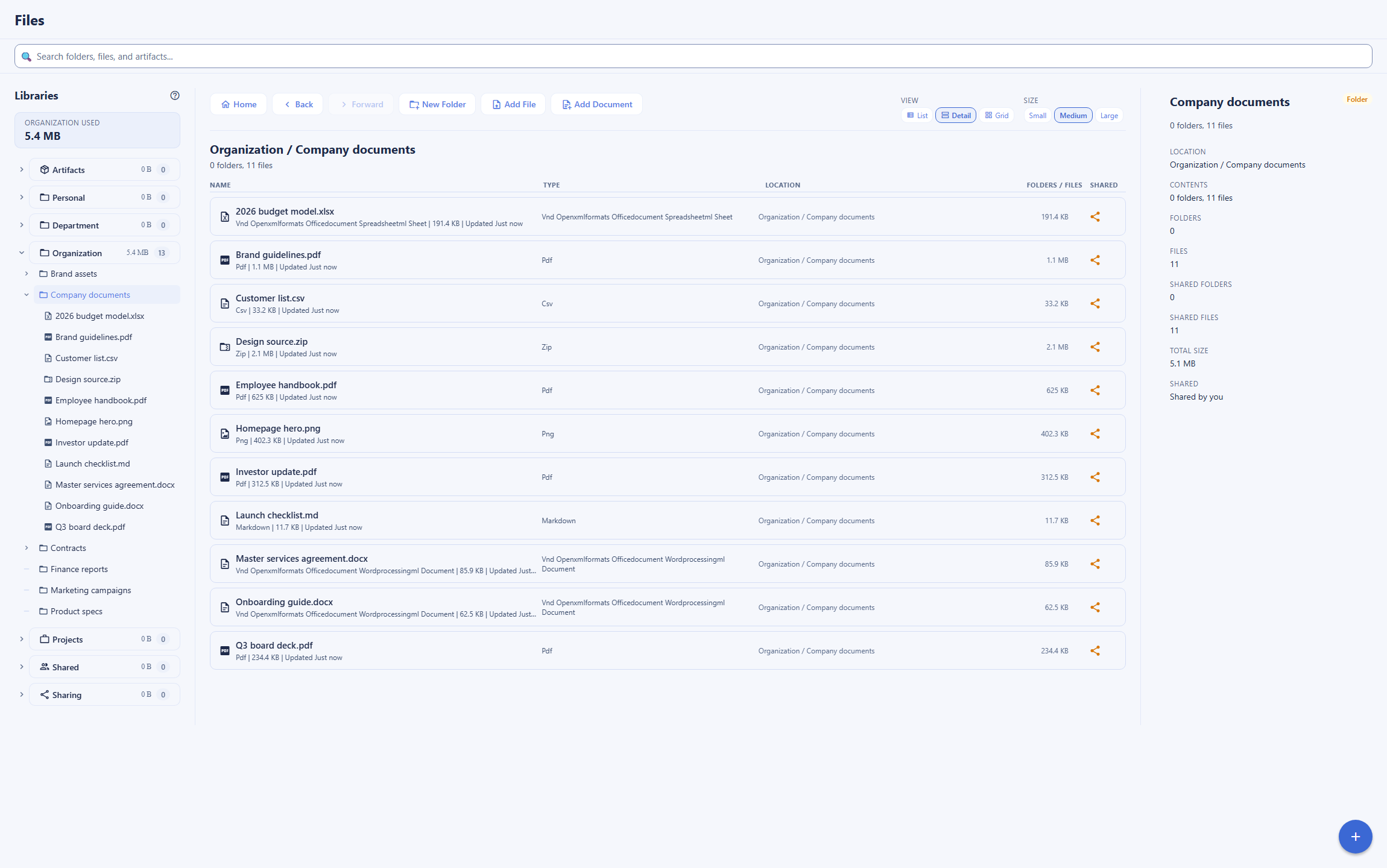
Microsoft OneDrive is the storage app inside a mature productivity suite. Its center of gravity is depth and reach: a block-level sync client with Files On-Demand that keeps a local folder mirrored to the cloud, Known Folder Move that redirects the Desktop, Documents, and Pictures folders into the cloud, Personal Vault for the most sensitive files, ransomware detection with a 30-day Files Restore, automatic text recognition inside images and PDFs, and the files opening in Word, Excel, and PowerPoint with live co-authoring. Around it sits the rest of Microsoft 365, Outlook, Teams, SharePoint, and the Purview compliance estate. Backbuild Files is the file app inside a different workspace: you upload files, organize them into folders and libraries, and grant exactly the access you intend, and the files sit next to the relational data platform, the document editors, the Secrets vault, and the governance that applies to everything in the organization. The two overlap on storing, sharing, and editing files, but the surround is not the same. Where you want a mature local sync client, ransomware recovery, and search that reads scanned text, Microsoft OneDrive leads. Where you want files governed and worked on in the same place as the rest of your structured data, with the advanced controls included on every plan, Backbuild is the stronger fit.
Where Microsoft OneDrive leads
Microsoft OneDrive is one of the most widely adopted cloud file services, and several of its strengths are things Backbuild Files does not do at all today.
Block-level desktop sync, Files On-Demand, and native mobile
The OneDrive sync client keeps a local folder mirrored to the cloud with a block-level sync engine and Files On-Demand placeholders on Windows and macOS, and Known Folder Move can back up the Desktop, Documents, and Pictures folders automatically, with mature native mobile apps carrying it everywhere. Backbuild ships a native desktop workspace app and uploads files through the web and the API, but it has no local-folder sync daemon, and its mobile apps are rolling out. For continuous background sync of a large folder, Microsoft OneDrive leads decisively.
Personal Vault, ransomware detection, and Files Restore
Microsoft OneDrive adds Personal Vault, a separately authenticated folder for sensitive files, runs ransomware detection that alerts on suspicious mass changes, and lets Files Restore roll the whole store back to any point in the last 30 days. Backbuild keeps writes audit-logged and screens uploads, but a full file recovery and rewind feature is on the roadmap rather than shipped. For built-in ransomware recovery, Microsoft OneDrive leads.
Search with automatic text recognition and large uploads
Microsoft OneDrive runs automatic text recognition on scanned images and PDFs, so a phrase inside a photographed receipt becomes searchable, and it accepts files up to 250 GB. Backbuild search is AI semantic search by meaning over the formats the assistant reads, a different mechanism that does not extract text from scanned images today, and web upload is capped at 25 MB per file. For scanned-image search and very large single files, Microsoft OneDrive leads.
Office co-authoring, ecosystem, and track record
Microsoft OneDrive opens files in Word, Excel, and PowerPoint with mature real-time co-authoring, connects to the whole Microsoft 365 ecosystem and Power Automate, has near-universal enterprise adoption, and carries published certifications and a long operating history. Backbuild answers integration with a public REST API, native Model Context Protocol tools, and first-party integrations, but it is newer, its catalog is smaller, and it is not yet independently audited. For Office co-authoring, ecosystem breadth, and vendor maturity today, Microsoft OneDrive leads.
Common Microsoft OneDrive frustrations and how Backbuild Files addresses them
Advanced governance locked to the top tiers
Microsoft 365 includes single sign-on and an admin center, but it reserves the advanced controls, data loss prevention, retention, and eDiscovery through Microsoft Purview, and device management through Intune, for its Business Premium and enterprise tiers. Backbuild puts single sign-on, SCIM, per-organization roles, and a tamper-evident audit log on every plan, including Free, so the identity and audit controls an administrator needs do not require an upgrade.
One bundled AI model and a per-user AI fee
Microsoft OneDrive AI runs on Copilot, bundled to Microsoft and OpenAI models and priced as a per-user add-on. Backbuild lets you bring your own AI provider and model, so inference runs under your own provider agreement, the assistant is on every plan on usage credits, and the credentials AI work needs live in a zero-knowledge Secrets vault the model never reads in plaintext.
No structured data next to the files
Storing files does not track the records around them, so teams pair Microsoft OneDrive with a separate database, or add Power Apps and Dataverse as another paid layer. Backbuild ships a relational data platform of custom entity types, typed relationships, and saved views in the same workspace on the Free plan, so records and their attached files share one governed home.
Reports of sync problems and folder redirection surprises
Users have reported episodes of stuck sync and confusion after the Desktop and Documents folders were redirected into the cloud, discussed at length in dated product reviews. Backbuild has no local-folder sync daemon to jam and keeps files where you put them, with writes and publishes audit-logged, though it also does not offer the background local sync that is the source of both the convenience and the friction on Microsoft OneDrive.
How access to a file is decided
Backbuild Files decides who can open a file from two layers: a baseline visibility floor set by where the file lives, plus explicit shares granted on top. Anyone outside that audience who tries to open the file receives a 404, the same result as a file that does not exist, so there is no way to tell the file is even there. Microsoft OneDrive shares through links and SharePoint sites with view or edit access and optional link expiry and passwords; Backbuild adds a finer access ladder and a stricter default.
Which tool wins, by use case
Storing and syncing personal files
This is the use case Microsoft OneDrive was built for and where it leads. When the job is to keep a large folder of documents, photos, or design assets mirrored between a machine and the cloud, always up to date in the background, the OneDrive sync client with Files On-Demand, Known Folder Move, and mature native mobile apps are the most direct path, and Personal Vault adds a separately locked folder for the most sensitive files. Backbuild Files stores and shares files through the web and the API and does not offer a local sync daemon, so for personal cloud storage with continuous folder sync, Microsoft OneDrive is the better fit.
Files that live inside your actual work
Both tools open documents in built-in editors, so a stored file is not a dead attachment in either one. The difference is what the editor does. Backbuild Files keeps files next to editors that add native LaTeX and live math and machine-checked proof blocks, and a file attached to a project rolls up with the rest of that project work under one governance model. Microsoft OneDrive opens files in Word, Excel, and PowerPoint, which are deep, widely adopted editors with mature co-authoring, but they do not typeset native LaTeX or check formal proofs. For teams whose documents carry mathematics or verified results, Backbuild fits the job better; for everyday word processing and spreadsheets with the deepest formatting and the widest reach, Microsoft OneDrive is excellent.
Team file storage with governance built in
For a business standing up shared storage, the deciding question is control: who can reach a file, how access is provisioned, and what is logged. Microsoft 365 has single sign-on, SCIM, and an admin center, but it reserves the advanced governance, data loss prevention, retention, and eDiscovery through Purview, and device management through Intune, for its Business Premium and enterprise tiers. Backbuild puts single sign-on, SCIM, per-organization roles, and a tamper-evident audit log on every plan, files carry a strict visibility floor where an unauthorized read returns 404, and sharing grants a precise access level to a user, group, department, project, or the whole organization. For governed team storage without paying up to a top tier for the audit and identity controls, Backbuild leads; for organizations that need Purview-grade retention and eDiscovery today, Microsoft OneDrive leads.
Files alongside structured data
Many teams do not just store files; they track the records the files belong to, a client, a contract, a deliverable, and on Microsoft 365 that means pairing OneDrive with a separate database or adding Power Apps and Dataverse as another paid layer. Backbuild answers both in one workspace: the relational data platform holds custom entity types with typed relationships and saved views on the Free plan, and a file can live next to the record it belongs to under the same governance. For work where files and the data around them belong together, Backbuild covers the whole job without a second product.
Ransomware protection and file recovery
For an individual or a business that treats the cloud as its safety net, the deciding question is what happens after files are lost or encrypted. Microsoft OneDrive is strong here: ransomware detection alerts on a suspicious mass change, Files Restore rolls the whole store back to any point in the last 30 days, and per-file version history keeps prior versions. Backbuild keeps writes and publishes audit-logged and screens uploads for malware and active content, but a full file recovery and rewind is on the roadmap rather than shipped, so it cannot roll the file store back to a point in time today. For built-in ransomware detection and a 30-day rewind, Microsoft OneDrive leads.
Programmatic and AI-driven file access
For developers and automation, both tools expose their files. Microsoft OneDrive has a mature OneDrive and Microsoft Graph API and a large ecosystem built on it plus Power Automate, a genuine strength. Backbuild exposes the whole file surface over a public REST API with no monthly call quota, adds native Model Context Protocol tools so an AI agent can drive files directly, and lets the AI assistant read and semantically search the formats it understands on your own model. Microsoft OneDrive AI runs through Copilot, bundled to Microsoft and OpenAI models. For building on a file API with a broad connector ecosystem today, Microsoft OneDrive leads on maturity; for agent-native file access, a no-quota API, and a choice of model in the same workspace as the data, Backbuild leads.
Finding a document across a large library
Search is one of the places Microsoft OneDrive is strongest. Its indexing includes automatic text recognition inside scanned images and PDFs, so a phrase inside a photographed page is findable, and it recognizes objects in photos. Backbuild search takes a different approach: AI semantic search by meaning, which returns the right passage even when the wording does not match, but it does not read text out of scanned image files today. For a library heavy in scanned documents and images, Microsoft OneDrive leads; for asking plain-language questions across the documents the assistant understands, Backbuild semantic search is the more direct tool.
How the two compare for each part of a buying decision
Storing and working with files day to day
The daily evaluation turns on how a person actually touches their files. For someone whose habit is to drag files into a folder on their desktop and have them appear everywhere, Microsoft OneDrive is the more direct tool: the OneDrive sync client and Files On-Demand make the cloud feel like a local disk, Known Folder Move backs up the standard folders, native mobile apps carry that everywhere, and search reaches into scanned images. For someone whose files are documents they open and edit, both tools open a stored file in a built-in editor, so neither round-trips through a separate application, but Backbuild adds native LaTeX, live math, and machine-checked proof blocks and organizes files into libraries scoped by audience rather than one personal drive.
The offsetting consideration is upload limits and recovery. Backbuild caps web upload at 25 MB per file today and does not roll files back to a point in time, where Microsoft OneDrive handles files up to 250 GB and offers Files Restore, so a person routinely moving large media, or who wants a one-click rewind, is better served by Microsoft OneDrive. The bottom line for this evaluation: for a synced local folder, large files, and point-in-time recovery, Microsoft OneDrive is the stronger daily tool; for editing documents with math or verified results in place and organized, governed storage, Backbuild is stronger.
Rolling it out across a team
An administrator judges provisioning, access control, and what happens when someone leaves. Microsoft 365 is mature here, with an admin center, single sign-on and SCIM through Microsoft Entra ID, and it gates the strongest controls, data loss prevention, retention, and eDiscovery through Purview, and device management with remote wipe through Intune, to its Business Premium and enterprise tiers. Backbuild includes single sign-on, SCIM, per-organization roles, and a tamper-evident audit log on every plan, and files enforce a visibility floor plus explicit shares so access is precise by default, though it does not offer data loss prevention, eDiscovery hold, or device wipe today.
The genuine gaps run both ways. Microsoft leads on data loss prevention, retention and eDiscovery, device management, and the maturity of its admin estate; Backbuild leads on getting core identity and a tamper-evident audit without an upgrade, and on a stricter sharing default. The bottom line: a team that needs Purview-grade retention, data loss prevention, and device wipe leans Microsoft OneDrive; a team that wants single sign-on, roles, and audit included from the first plan leans Backbuild.
Security and data-handling evaluation
A review of a storage service looks at where files sit, how access is scoped, what governance is included, and how content is processed. Both are cloud services that encrypt files at rest and in transit, and neither is zero-knowledge for general files: Microsoft OneDrive adds Personal Vault with extra authentication and local BitLocker encryption for a subset of files, but Microsoft still holds the keys, and Backbuild Files makes no end-to-end claim for the file store either. Microsoft is the more mature and externally validated of the two, with published certifications and a long operating history, which for many reviewers is the deciding evidence, and Backbuild is newer and not yet independently audited.
On the controls Backbuild does include, it leads in two places a reviewer cares about. Access is scoped to a per-organization workspace with roles and a tamper-evident audit log on every plan, where Microsoft reserves data loss prevention and long audit retention for its top tiers, and an unauthorized read of a file returns 404 with no existence oracle, a stricter default than a shareable link. The credentials that file work often needs live in a zero-knowledge, post-quantum Secrets vault in the same workspace, encrypted so that neither Backbuild nor the AI can read them, and the AI assistant can run on your own provider under your own agreement. The bottom line: for external certifications, Personal Vault, and a proven record, Microsoft OneDrive leads on evidence; for included per-organization governance, a stricter access default, and provider-blind secret handling, Backbuild leads on the model.
The economics for a finance buyer
The cost question is total spend, how it scales, and how many separate products a decision commits to. Microsoft OneDrive is storage sold with the Microsoft 365 suite, from about 6 US dollars per user a month with 1 TB pooled, or through consumer plans from 1.99 US dollars a month for 100 GB, with a 5 GB free tier. For a buyer who mainly needs storage bundled with the familiar Office apps, Microsoft OneDrive is an efficient purchase, and that is a real advantage. Backbuild Files is included in the workspace on every plan, with storage metered per seat on usage credits rather than a fixed storage fee.
The larger economic point is consolidation. Because Files, the data platform, the editors, the accounting app, the help desk, and the Secrets vault are one product, adopting Backbuild can retire a separate database or Power Apps license, a password manager, and an accounting subscription at once, which turns the comparison from a storage line item into a workspace decision. The offsetting consideration is fit and scale: a team whose Office documents already live in Microsoft 365 and whose only added need is storage may find that OneDrive is already paid for, and Microsoft carries the maturity some finance teams count as lower switching risk. The bottom line: for consolidated cost and included governance, Backbuild is materially cheaper; for storage bundled with the Office apps a team already runs, Microsoft OneDrive is hard to beat on price alone.
Strategic fit and vendor risk
At the sponsor level the decision is about direction and durable risk rather than individual features. Microsoft OneDrive offers a proven service inside the widely adopted Microsoft 365 suite, with a long track record and published certifications, a low-surprise choice for an organization that wants mature file storage and sync and the familiar Office apps. Its trade-offs are governance reserved for the top tiers, a bundled AI model with a per-user fee, and content processed for search and AI features.
Backbuild consolidates file storage, structured data, the document editors, a zero-knowledge vault, and the rest of an organization core tools into one governed workspace, with governance on every plan and a public REST API and Model Context Protocol tools across the whole surface, and a choice of AI model. The strategic upside is fewer vendors and files governed like everything else; the strategic risk is that Backbuild is newer, not yet independently audited, and does not match Microsoft OneDrive on desktop sync, ransomware recovery, search with text recognition, or ecosystem breadth. The bottom line: an organization optimizing for mature storage and sync inside the familiar Office suite leans Microsoft OneDrive, while one consolidating vendors and prioritizing governed files next to their data and documents leans Backbuild.
Frequently asked questions
Is there a free alternative to Microsoft OneDrive?
Yes, with a difference in the storage model. Backbuild Files is part of the Backbuild workspace on every plan, including the Free plan, which includes 1 GB of storage. Paid plans add credit-metered storage per seat: 25 GB per seat on Lite, 100 GB per seat on Pro, and 1 TB per seat on Enterprise, with overage billed on usage credits. Microsoft OneDrive gives 5 GB free, and sells larger storage through Microsoft 365, from 1.99 US dollars a month for 100 GB with Microsoft 365 Basic up to 1 TB per user on Microsoft 365 Personal and the business plans. Microsoft no longer offers a storage-only OneDrive plan, so paid storage rides with a Microsoft 365 subscription. If the first requirement is a large, cheap pool of raw storage bundled with the Office apps, Microsoft OneDrive is built for exactly that. If the requirement is file storage governed the same way as the rest of the work, sitting next to structured data and the document editors, with single sign-on and a tamper-evident audit log at no extra tier, Backbuild is the better fit.
Does Backbuild have a desktop sync client like Microsoft OneDrive?
No, and the OneDrive sync client is a genuine Microsoft OneDrive strength. Microsoft OneDrive keeps a local folder mirrored to the cloud with a block-level sync client on Windows and macOS, adds Files On-Demand so files stay in the cloud as placeholders until opened, and can redirect the Desktop, Documents, and Pictures folders into the cloud with Known Folder Move. Backbuild does not ship that kind of local-folder sync daemon. Files in Backbuild are uploaded and downloaded through the web app and the REST API, with a 25 MB per-file cap on web upload today. Backbuild does ship a native desktop workspace app for Windows and macOS, but it is the workspace, not a OneDrive-style file-sync client. If continuous background sync of a large local folder is the first requirement, Microsoft OneDrive leads decisively.
How much storage do you get, and how does the cost compare?
Backbuild Files includes 1 GB on the Free plan and adds storage per seat on paid plans: 25 GB per seat on Lite, 100 GB per seat on Pro, and 1 TB per seat on Enterprise, with any overage billed on usage credits rather than a fixed monthly storage fee. Microsoft OneDrive gives 5 GB free, 100 GB on Microsoft 365 Basic for 1.99 US dollars a month, and 1 TB per user on Microsoft 365 Personal for 9.99 US dollars a month, with the business plans pooling 1 TB per user from about 6 US dollars per user a month. For an individual who mainly needs a big bucket of cheap storage bundled with Office, the Microsoft tiers are the cheaper way to buy raw space. For a team that values governance, structured data, and the editors in one place, Backbuild bundles the file surface into the workspace price with storage metered per seat.
Does Backbuild protect against ransomware the way OneDrive Files Restore does?
Not today, and this is a genuine Microsoft OneDrive strength. Microsoft OneDrive runs ransomware detection that alerts you when a mass file change looks like an attack, and Files Restore can roll an entire OneDrive back to any point in the last 30 days, alongside per-file version history. Backbuild keeps writes and publishes audit-logged and mirrors document data so the record of what changed is preserved, but a full file recovery and rewind feature is on the roadmap rather than shipped, so it does not offer a one-click point-in-time rollback of the whole file store today. For built-in ransomware detection and a 30-day rewind, Microsoft OneDrive leads.
Can Backbuild search scanned images and PDFs the way Microsoft OneDrive does?
Not with automatic optical character recognition, which is a genuine Microsoft OneDrive strength. Microsoft OneDrive runs background text recognition on scanned images and PDFs so their contents become searchable, and it recognizes objects in photos as well. Backbuild search works differently: it is AI semantic search over the file formats the assistant can read, so it finds passages by meaning even when the wording does not match, but it does not automatically read text out of scanned image files today. For finding a phrase inside a photographed receipt or a scanned contract image, Microsoft OneDrive leads; for asking a plain-language question across the documents the assistant understands, Backbuild semantic search is the stronger tool.
What can Backbuild Files do that Microsoft OneDrive cannot?
A few things stand out. First, structured data lives next to the files: the workspace ships a relational data platform of custom entity types, typed relationships, and saved views, so records and files share one governed home, which Microsoft OneDrive has no in-suite equivalent for without adding Power Apps and Dataverse as a separate paid layer. Second, a zero-knowledge, post-quantum Secrets vault sits in the same workspace for the credentials file work often needs, encrypted so that neither Backbuild nor the AI can read them. Third, the file surface is drivable by AI agents through native Model Context Protocol tools, and the AI assistant can run on your own linked provider and model rather than a single bundled model. Fourth, single sign-on, SCIM, per-organization roles, and a tamper-evident audit log are included on every plan including Free. Microsoft OneDrive, for its part, leads on its mature sync client, Personal Vault, ransomware detection with Files Restore, automatic text recognition, very large uploads, native mobile apps, the Microsoft 365 ecosystem, Purview retention and eDiscovery, and its long track record.
Does Microsoft OneDrive have single sign-on and audit logs, or does Backbuild win there?
Microsoft OneDrive rides inside Microsoft 365, which does have single sign-on and SCIM provisioning through Microsoft Entra ID, an admin center, and audit logging through Microsoft Purview, so it is not accurate to say Microsoft has no governance. The difference is tier gating. Backbuild ships single sign-on, SCIM, per-organization roles, and a tamper-evident audit log on every plan including Free, while Microsoft reserves the advanced controls, data loss prevention for OneDrive and SharePoint, retention and eDiscovery hold, long audit retention, and device management through Intune, to its higher Microsoft 365 tiers such as Business Premium, E3, and E5. So both have identity and audit; Backbuild includes the governance without an upgrade, and Microsoft reserves the advanced pieces for its higher tiers.
Does Backbuild let an AI assistant work with my files?
Yes. Files stored in Backbuild are indexed for AI in the formats the assistant understands, including PDF, office documents, and text, so the in-app AI assistant can read and semantically search them, and any AI agent can drive the whole file surface through native Model Context Protocol tools and the public REST API. That assistant can point at your own linked AI provider and model or run on usage credits. Microsoft OneDrive offers AI over files through Copilot on Microsoft 365 tiers, bundled to Microsoft and OpenAI models and priced as a per-user add-on. So both can bring AI to files; the difference is that in Backbuild the assistant and the agent tools are part of the same workspace as the files, and you choose the model.
Try Backbuild Files free
Store files and share them at exactly the access level you intend, open documents, spreadsheets, and decks straight in the editors with native LaTeX and live math, keep structured data next to the files, and drive it all through a public REST API and native Model Context Protocol tools, with a zero-knowledge Secrets vault and single sign-on, SCIM, per-organization roles, and a tamper-evident audit log on every plan, inside an all-in-one workspace. If your first requirement is a block-level desktop sync client, ransomware recovery with a point-in-time rewind, automatic text recognition in scanned files, very large per-file uploads, or storage bundled with the Office apps, Microsoft OneDrive is the stronger choice today.
Get started free