

Overleaf alternative: Backbuild Docs vs Overleaf
Backbuild Docs is a WYSIWYG document editor whose native format is LaTeX, with math that renders as you type and real-time co-authoring, comments, tracked changes, version history, and offline editing free on every plan. Overleaf is a hosted LaTeX editor built around a TeX Live compile loop, with tracked changes and full history on its paid plans and one collaborator per project on its free tier. Overleaf leads when a document depends on niche CTAN packages or must be compiled to its final typeset PDF inside the tool.
The short answer
Overleaf is a hosted collaborative LaTeX editor built around a compile loop, with a template gallery, journal submission integrations, reference manager sync, and institutional plans; on the Backbuild side the same job is done by Backbuild Docs, a WYSIWYG editor on a native LaTeX source with live math rendering, together with the platform around it: proof blocks from Backbuild Prove and Backbuild Science, the AI assistant on your own AI provider or usage credits, the MCP and REST API surfaces, granular document sharing, Git linked projects, and the full Backbuild workspace. Backbuild Docs fits teams that want free collaboration with tracked changes and history, math without a compile queue, offline editing, and agent-driven authoring. Overleaf fits documents that need an in-browser TeX Live compiler with the full CTAN package ecosystem, its journal and conference template gallery, or its submit-to-publisher integrations.
Backbuild Docs vs Overleaf: feature by feature
Prices and limits below are quoted from each vendor's own pages, observed 2026-07-16. The highlighted column is Backbuild Docs.
| Backbuild Docs WYSIWYG LaTeX editor in the free workspace Free on every plan; workspace from $19/seat Get Started Free | Overleaf Hosted LaTeX editor with a TeX compiler Student $10/mo, Standard $21/mo, Professional $42/mo | |
|---|---|---|
| Price and access | ||
| Starting price | Free, up to 50 team members | Free; paid from $10/mo |
| Collaborators on the free plan | No collaborator cap | 1 per project |
| Compile or render wait | None; renders live | Compile timeout: 10s free, 240s paid |
| Version history on the free plan | Full history | 24 hours |
| AI on the free plan | Your own AI keys, or usage credits | 5 AI Assist uses per day |
| Editing and math | ||
| WYSIWYG editing surface | Native; LaTeX is the stored format | Visual Editor; the PDF still comes from a compile |
| Editable LaTeX source and split view | ||
| Math renders as you type | In the Visual Editor | |
| Finished document without a compile queue | ||
| Visual equation builder | ||
| Symbol palette | Paid | |
| Equation numbering and cross-referenced equations | ||
| In-app TeX compile to a typeset PDF Soon | Renders live and prints today | |
| Full CTAN and TeX Live package ecosystem | ||
| Page setup, live rulers, columns, headers and footers | Through LaTeX packages | |
| Offline editing | No; edit elsewhere via paid Git sync | |
| Spell check and autocomplete | ||
| Collaboration and review | ||
| Real-time co-authoring with presence | ||
| Comments | ||
| Tracked changes | Free | Paid |
| Named versions and restore | Free | Paid; 24h on Free |
| In-document team chat Soon | Comment threads today; chat on the roadmap | |
| Sharing and access control | ||
| Share a document by invitation | ||
| Anyone-with-the-link access | Link sharing | |
| Access levels per grant | Viewer, Commenter, Suggester, Editor | Edit or view |
| Audience scopes: person, role, group, department, project, organization, or another organization | Person or link | |
| Revocable grants, re-checked on every read | Remove a collaborator or turn link sharing off | |
| Organization policy ceiling on every share, with audit | ||
| References and citations | ||
| BibTeX and biblatex .bib import | Rolling out per organization | Native, all plans |
| Reference library with DOI lookup | Rolling out per organization | Advanced reference search, Paid |
| Zotero integration | Rolling out; uses your own Zotero key | Paid |
| Mendeley integration | Paid | |
| Citations styled in APA, MLA, Chicago | Any style via BibTeX styles | |
| Cross-references, footnotes, endnotes, index, table of authorities | Via LaTeX packages | |
| Formal proof checking | ||
| Proof blocks in the document, checked by a higher-order-logic kernel | With Backbuild Science or Backbuild Prove | |
| Whole-document check of theorem environments | With Backbuild Science or Backbuild Prove | |
| Lean 4 cross-check of verified results | With Backbuild Science; on Prove, Business and Enterprise | |
| AI and agents | ||
| Inline AI assistant in the editor | AI Assist, metered by plan | |
| Bring your own AI provider and model | Bundled models only | |
| Agent drafts an entire document from one prompt | Over the MCP document tools | In-editor assists only |
| MCP tool surface over documents | ||
| Public REST API for creating and editing documents | ||
| Import, export, and publishing | ||
| Convert Word, ODT, RTF, HTML, and Markdown on import | ||
| Export submission-ready LaTeX | ||
| Export Word, ODT, HTML, Markdown, RTF, EPUB | ||
| Journal and conference template gallery | Starter templates | Thousands of templates |
| Submit-to-publisher integrations | ||
| Git, sync, and local files | ||
| Edit a document that lives in your local Git repository | Paired desktop app, the IDE extension, or a Git linked project in a container through the VS Code Server capability | Clone the project with Git, Paid |
| Hosted two-way GitHub sync per project Soon | Coming soon | Paid |
| Dropbox sync Soon | On the roadmap | Paid |
| Project repository links and container CI/CD deployment | ||
| Security, identity, and administration | ||
| Single sign-on | Free, every plan | Commons and Organization plans |
| SCIM provisioning | User provisioning today | |
| Role-based access control | Per-project owner and collaborator roles | |
| Tamper-evident audit log | Free, every plan | Organization plan |
| Self-hosted deployment | Server Pro and Community Edition | |
| Published ISO 27001 certification and FedRAMP authorization | ||
| Native desktop apps (Windows and macOS installers) | ||
| Native mobile apps in the app stores today | In development; coming soon | |
| Workspace apps in the same subscription | ||
| Backbuild Mail (email at your own domain; 500 sends a month on Free, then credits) | ||
| Backbuild Chat (team chat) Soon | On the roadmap for every plan | |
| Backbuild Meetings (secure video meetings) Soon | On the roadmap for paid plans | |
| Backbuild Calendar (full calendar with two-way Google, Microsoft 365, and CalDAV sync) | ||
| Backbuild Contacts (shared address book) | ||
| Backbuild Docs (Overleaf’s similar offering: the Overleaf editor, compared row by row throughout this table) | The Overleaf editor | |
| Backbuild Sheets (collaborative spreadsheets with LaTeX math in cells) | ||
| Backbuild Slides (Overleaf’s similar offering: beamer presentation templates compiled to PDF) | Beamer templates | |
| Design-first deck editing with themes, transitions, animations, and PPTX export | ||
| LaTeX-native slide decks | Native LaTeX decks on the same Docs editor, no compile loop | Compiled from beamer source |
| Backbuild Diagrams (Overleaf’s similar offering: code-defined TikZ figures) Soon | On the roadmap for every plan | TikZ via LaTeX packages |
| Backbuild Photos (photo library with albums, slideshows, and governed sharing) | ||
| Photo editor (non-destructive layer editing in Backbuild Photos) | ||
| Video editor (in Backbuild Studio) Soon | Authoring preview today; rendering on the roadmap | |
| Training video editor (Backbuild Studio screen-demo videos narrated from a script) | Every plan; cloud rendering on paid plans, on usage credits | |
| Audio editor (in Backbuild Studio) Soon | Authoring preview today; rendering on the roadmap | |
| Music editor (in Backbuild Studio) Soon | Authoring preview today; rendering on the roadmap | |
| Backbuild Files (Overleaf’s similar offering: project files, up to 2,000 files and 50 MB per upload) | Project files | |
| A standalone file explorer with folders and per-audience libraries | ||
| Git access to the whole project’s files Soon | Coming soon | Paid |
| Backbuild Finances (double-entry accounting, invoicing, bills, payroll records, and bank reconciliation) | ||
| Helpdesk (tickets, workflow states, assignment, and replies) | 20 tickets/mo Free; unlimited paid | |
| Secrets vault (zero-knowledge, post-quantum password and secrets manager) | ||
A cell marked Paid means Overleaf offers the feature only on a paid subscription, per Overleaf's premium features documentation. A cross means the product does not offer the feature today. Soon means the feature is on the Backbuild roadmap and not shipped yet. The formal proof rows unlock with either of two standalone products: Backbuild Science, available now and free for verified students and faculty, or Backbuild Prove, launching soon with pre-order plans from $10 per seat per month billed yearly. In the workspace apps group, each row is one app in the Backbuild subscription; where Overleaf has a similar offering, the row note names it and the indented rows beneath list the features that differ, in both directions.
Two editing models: a compile loop and a live surface
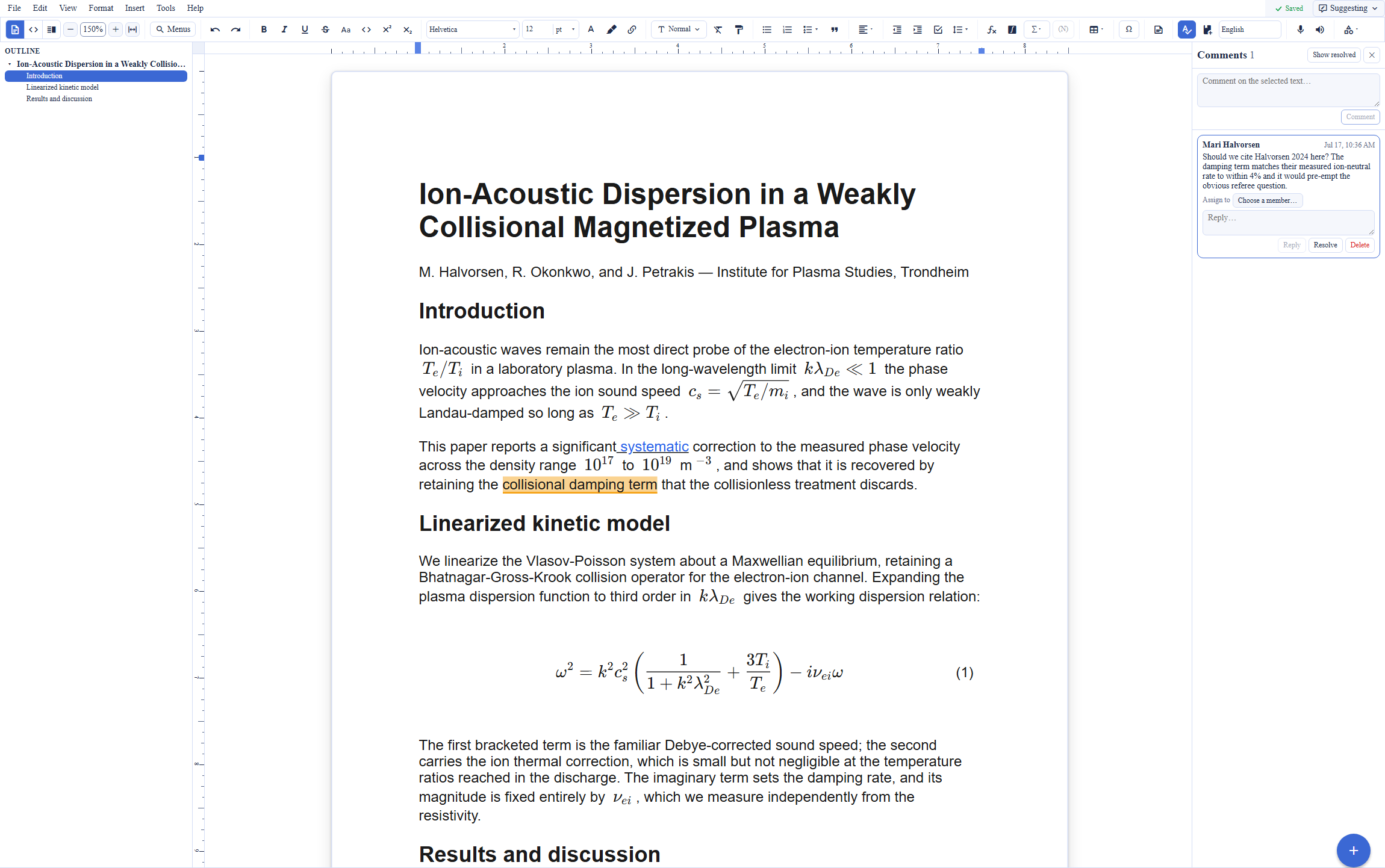
Overleaf presents a LaTeX source pane next to a compiled preview: the author writes commands, the server runs a TeX Live compile, and the typeset PDF appears when the compile finishes, subject to a 10 second timeout on the free plan and 240 seconds on paid plans. Its Visual Editor renders headings and equations in place, but the finished document still comes from the compile. Backbuild Docs inverts the model: the formatted page is the editing surface, LaTeX is the stored format, and math renders as you type, with an editable source view and a split view one menu away. There is no compile queue to wait on and no compile timeout to hit, whatever the document's size. The tradeoff is equally concrete: Backbuild Docs does not run a TeX engine, so a document that depends on arbitrary CTAN packages reaches its final typeset PDF through an exported LaTeX source and an external build, where Overleaf produces it in the browser.
Machine-checked proofs inside the manuscript
For theorem-dense writing, Backbuild Docs connects to a capability no product in the hosted LaTeX editor category offers: formal verification of the mathematics in the document. Proof blocks sit in the document, and each block carries an obligation checked by a small higher-order-logic kernel; a result is either established from the foundational axioms or it is not. Theorem environments across a whole document can be walked and checked together, a verified result can be referenced from the prose so the claim and its machine-checked certificate travel together, and an optional cross-check replays a verified result through Lean 4, an independent proof assistant, so two unrelated kernels must both accept it. Either of two standalone products unlocks this proof surface in Backbuild Docs: Backbuild Science, which is available now and free for current students and faculty with a valid academic ID, or Backbuild Prove, available for pre-order with plans from $10 per seat per month billed yearly; on Prove, the Lean 4 cross-check sits on the Business and Enterprise plans, while Backbuild Science includes it. Overleaf typesets a proof exactly as written and takes no position on whether it is correct; checking it means moving the mathematics to a separate proof assistant by hand.
AI assistance: bundled assists and agent-driven authoring
Overleaf's AI Assist works inside the editor: language feedback, paraphrasing, LaTeX error explanation, and generated fragments such as a table or an equation from a prompt, running on Overleaf's bundled models with a daily allowance metered by plan, 5 uses a day on the free tier. Backbuild's AI surface differs in two structural ways. First, the model is the customer's choice: link your own AI provider keys, or run on Backbuild usage credits, so inference runs under your own provider agreement at your own provider's rates. Second, the AI is not confined to in-editor assists. Backbuild exposes its document tools over the Model Context Protocol, so an agent can create a document, write and revise LaTeX content section by section, read the result back, manage versions, and export the finished source, end to end. One prompt to a connected AI tool can produce a complete, math-laden draft in Backbuild Docs, and the same tool surface is available to automations and agent workflows and through the public REST API. The inline assistant in the editor handles the interactive work: rewriting, translating, continuing a draft, and answering questions grounded in the document.
Git workflows and local files
Overleaf's answer to version control is a paid integration tier: raw Git access to a project, a two-way GitHub bridge, and Dropbox sync. Backbuild's answer runs through the project system. A project links to one or more Git repositories, each link carrying a branch, a subpath, and a role, and a repository on your own machine can be paired through the Backbuild desktop app, so a document that lives in your local repository opens in the cloud editor and edits are written back to the local file, guarded by a content check that refuses a stale write. The IDE extension offers the same local-file editing path inside the editor you already use, and a Git linked project can be opened on a Backbuild container and edited there through the VS Code Server capability. The same repository links feed container-based deployment pipelines for teams whose documents sit next to code. Hosted two-way GitHub synchronization per project is coming soon and Dropbox synchronization is on the roadmap; today, a team whose workflow is push-to-GitHub round-tripping of the manuscript itself will find that hosted mechanism only on Overleaf's paid plans.
Common Overleaf frustrations and how Backbuild Docs addresses them
The free compile timeout
Overleaf stops a free-plan compile after 10 seconds, a ceiling that broke established thesis templates when it was tightened in October 2023, and reviewers report that performance degrades on larger documents. Backbuild Docs renders the document live as it is typed, so there is no compile queue and no per-compile time limit at any document size.
Collaboration behind the paywall
On Overleaf, tracked changes and full history are paid features and the free plan allows one collaborator per project. Backbuild Docs includes real-time co-authoring, tracked changes, comments, and full version history free, with up to 50 team members on the free plan.
Nothing works without a connection
Overleaf's documented offline path is syncing the project out through its paid Git integration and editing somewhere else. Backbuild Docs keeps a local copy in the browser, so writing continues offline and changes merge automatically on reconnect.
Deadline-day availability
A hosted compile service is a single point of failure at the worst moment; an Overleaf outage the evening before the NeurIPS 2025 deadline left authors locked out of their papers. Backbuild Docs edits offline from the browser's local copy, and the document exports as plain LaTeX at any time, so the manuscript is never reachable only through one vendor's compile farm.
Metered, bundled AI
Overleaf's AI Assist runs on its bundled models with a daily allowance per plan. Backbuild's AI runs on your own provider keys or on usage credits: the model is your choice, the rate is your provider's, and the allowance is whatever your provider agreement supports.
Getting work out of LaTeX
Sharing a LaTeX manuscript with a co-author who works in Word is awkward in a source-first tool. Backbuild Docs imports Word, ODT, RTF, HTML, and Markdown and exports Word, ODT, HTML, Markdown, RTF, and EPUB alongside submission-ready LaTeX, so the document moves between formats without copy-paste.
Where Overleaf leads today
Overleaf's core strength is the thing it was built around: a real TeX Live compiler in the browser with the full CTAN package ecosystem, which no WYSIWYG surface substitutes for when a document depends on niche packages or a venue's exact class file. Around that compiler sit a gallery of thousands of journal, conference, thesis, and CV templates, direct submission integrations including arXiv-ready output, reference manager sync with Zotero, Mendeley, and Papers, and GitHub and Dropbox bridges. Institutions can run it themselves: Server Pro is a supported self-hosted deployment, a Community Edition is open source, and the hosted service carries ISO 27001 certification and FedRAMP authorization. Community sentiment reflects a mature product: practitioners describe it as the tool that made collaborative LaTeX ordinary. Teams whose work depends on these capabilities have a concrete reason to pay for Overleaf.
Which tool wins, by use case
Collaborative academic papers
For a paper with several co-authors, the deciding factor is what collaboration costs. Backbuild Docs gives every author real-time editing with presence, comments, tracked changes, and version history at no cost, and review roles are explicit: a reviewer can be granted Commenter or Suggester access, so supervisor markup arrives as suggestions the author accepts or rejects. Overleaf offers simultaneous editing and comments on the free plan but caps it at one collaborator per project and holds tracked changes and full history for paid plans; once a lab pays, it is an excellent collaborative editor, and its compiler produces the final typeset PDF in the browser.
A thesis or dissertation
A thesis is long and figure-heavy, which is exactly where Overleaf's free 10-second compile timeout bites; maintainers of a university thesis template documented their template failing to compile inside the free limit, and reviewers report the paid tier remains expensive for students. Backbuild Docs renders live with no compile timeout at any length, keeps full version history free across the years a thesis takes, and edits offline in the library or on a train. One requirement cuts the other way: a thesis that must be compiled against a university's exact class file inside the tool is Overleaf's job, and Backbuild Docs instead exports the LaTeX source for that build.
University teams and labs
For a lab standardizing on one tool, the evaluation comes down to seat cost, onboarding, and admin control. Backbuild Docs is free for the whole team, with single sign-on, role-based access control, and a tamper-evident audit log on every plan including Free, and SCIM user provisioning for institutions that automate their directory. The surrounding workspace covers the rest of the lab's back office in the same subscription. Overleaf's institutional offerings are mature: Commons brings SSO, domain enrollment, and usage analytics to a whole campus, and Group plans centralize billing, but identity and audit features sit on the institutional tiers and the collaboration features individual members feel every day are per-seat paid unlocks.
Course staff and problem sets
For assignments and problem sets, the on-ramp decides. Backbuild Docs starts students in a formatted editor with live math and a visual equation builder, so a first-year writes mathematics before learning LaTeX commands, and the source view is there when the course teaches the commands themselves. Nothing a class needs sits behind a per-student gate. Overleaf's assignment templates and zero-install sharing are genuinely convenient, and its compiler shows students the typeset result, but the free tier's one-collaborator cap and compile timeout arrive mid-course exactly when problem sets grow.
Journal submission and camera-ready builds
Submission is where Overleaf is strongest. Its gallery carries official templates for major publishers, the compiler builds against the venue's class file, and submission integrations package the project for arXiv and submit directly to partner journals. Backbuild Docs covers the writing and revision stage and then exports a submission-ready LaTeX source for the venue's build; its reference library imports the .bib file and styles citations, but it has no journal template gallery and no submission pipeline.
Industry research and technical writing
Industry teams write math-heavy documents that move between LaTeX, Word, and the web, and they answer to security review. Backbuild Docs imports and exports the office formats directly, its AI runs on the company's own provider agreement, a practical point where practitioners cite data handling as a reason for moving confidential work off hosted LaTeX tools, and the workspace around it carries role-based access, audit logging, and a secrets vault on every plan. Overleaf is LaTeX-first with limited office round-tripping; its enterprise posture is credible and certified, including a self-hosted Server Pro, which remains the stronger answer for an organization that requires on-premises deployment.
Theorem-dense manuscripts
Mathematics, theoretical physics, and computer science papers live and die on whether the proofs hold across revisions. In every hosted LaTeX editor the proof is prose: rename a hypothesis in section 2 and nothing warns that the lemma in section 5 silently broke. Backbuild attaches machine-checked obligations to the document: proof blocks are verified by a small higher-order-logic kernel, the whole document's theorem environments can be re-checked after every revision, and a Lean 4 cross-check replays the result through an independent kernel. The proof surface unlocks with Backbuild Science, available now and free for current students and faculty with a valid academic ID, or with Backbuild Prove, available for pre-order from $10 per seat per month billed yearly. Overleaf offers no comparable capability at any tier; the alternative is maintaining a separate formalization by hand alongside the manuscript.
The daily writing experience for a researcher
An author evaluating these tools spends the evaluation on four things: the editing loop, the mathematics, the review workflow, and what happens on a bad network. On the editing loop, Backbuild Docs is a formatted surface whose stored format is LaTeX, so the page being written is the page being produced, with the source and split views one menu away; Overleaf is source-first, and its Visual Editor narrows but does not remove the compile step between writing and the typeset result. On mathematics, both render equations while typing; Backbuild Docs adds a visual equation builder and a free symbol palette, while Overleaf's symbol palette is a paid feature, and Overleaf alone typesets through the real TeX engine, which matters the moment a paper needs a package the live renderer does not cover.
On review, the free tiers diverge sharply: tracked changes, comments, and full version history are free in Backbuild Docs, against paid tracked changes and a 24-hour free history window on Overleaf, which for a supervisor-student revision cycle is the difference between a working markup loop and screenshots over email. On resilience, Backbuild Docs edits offline from a local copy and merges on reconnect; Overleaf requires a connection, and its outage on the eve of the NeurIPS 2025 deadline is the failure mode a deadline-driven author should price in. The bottom line for a working author: Backbuild Docs gives a faster, freer daily loop and Overleaf gives the authoritative typeset output; which one dominates depends on whether the final PDF must be built inside the editor.
Rolling it out across a lab or department
The person who standardizes a group on a tool answers for onboarding, seats, and the inevitable roster churn. On seats, the arithmetic is short: Backbuild's free plan covers up to 50 team members with collaboration features included, while Overleaf prices the features a group actually adopts it for, from $10 to $42 per person per month, with Group plans starting at five seats. On onboarding, both tools are zero-install in the browser; Backbuild Docs additionally imports the Word and Markdown documents a new member arrives with, and desktop apps for Windows and macOS cover members who prefer an installed client.
On churn, the questions are access and continuity. Backbuild handles both structurally: document shares are scoped to a person, role, group, department, project, or the organization, so a departing student's access ends with their membership rather than by hunting down per-document invitations, and every grant and revocation lands in the audit log. Overleaf's sharing is per-project invitations and links, workable at small scale and manual at lab scale, with centralized management arriving on the Commons and Organization tiers. A lab already embedded in journal-template workflows will still keep Overleaf in the loop for submission builds; the rollout question is which tool is the default surface the group writes in every day.
Security, identity, and data governance evaluation
An IT or security review of a document platform turns on identity, access control, auditability, and where the data and the AI inference run. On identity, Backbuild ships single sign-on on every plan including Free and SCIM 2.0 user provisioning with per-organization bearer tokens; Overleaf offers SSO and managed accounts on its Commons and Organization tiers. On access control, Backbuild's model is organization-wide: roles and permissions govern every surface, and document sharing carries four capability levels across audience scopes from a single person to the whole organization, including grants to a named outside organization, a policy ceiling no grant can exceed, and an audit record for every grant and revocation; Overleaf's access model is per-project owner, editor, and viewer, with audit logging on the Organization plan.
On AI governance, the architectures differ materially. Overleaf's AI Assist runs on vendor-bundled models; Backbuild lets the organization bring its own AI provider and keys, so document content flows to a model under the organization's own data processing agreement, and the workspace includes a zero-knowledge, post-quantum secrets vault for the credentials that surround a research pipeline. In the other direction, two Overleaf capabilities are decisive for some reviewers and absent from Backbuild: a self-hosted deployment (Server Pro) for organizations that cannot use a hosted service at all, and published certifications, ISO 27001 and FedRAMP authorization, where Backbuild does not present third-party audit certificates today. A security team that requires certified hosting today has a concrete reason to choose Overleaf's Organization tier; a team whose priorities are granular access control, provisioning on every plan, and AI under its own provider agreement will find Backbuild's posture the stronger fit.
The economics for a finance and procurement review
The cost comparison has three components: the editor seats, the features that force upgrades, and the adjacent subscriptions the choice displaces. On seats, Backbuild Docs is free on every plan, with the workspace's paid tiers at $19, $49, and $149 per seat per month for teams that want the wider platform; Overleaf runs $10 per month for students, $21 for Standard, and $42 for Professional, billed per person. On upgrade pressure, the features that push an Overleaf group from free to paid are collaborators beyond one, tracked changes, history beyond 24 hours, longer compiles, and the integrations; every item on that list except the compiler itself is free in Backbuild Docs, so the procurement question reduces to whether the group needs the in-tool TeX build.
On displacement, the subscriptions worth counting sit next to the editor: Backbuild's same subscription includes email at the organization's own domain, a full calendar, double-entry accounting with invoicing, a secrets manager, and a helpdesk, line items a small research group or company otherwise buys separately. AI cost is structural rather than a line item: Overleaf meters its bundled AI by plan, while Backbuild passes AI through at the customer's own provider rates or usage credits, which procurement can price directly against its existing AI vendor agreement. The one unavoidable Overleaf line item is the case where the deliverable depends on its compiler and templates; groups in that position frequently need only a subset of members on paid Overleaf seats for the submission stage.
Strategic fit and vendor considerations
The strategic question is what each product is positioned to be. Overleaf is a focused, long-established LaTeX service: the default collaborative LaTeX tool of the academic world, with a template ecosystem, publisher integrations, and an open-source Community Edition that anchors its longevity. Backbuild is a workspace platform in Early Adopter Alpha whose document editor is one surface among Backbuild Mail, Chat, Meetings, Calendar, Contacts, Docs, Sheets, Slides, Diagrams, and Photos, the photo, video, training video, audio, and music editors, Files, Backbuild Finances, and the helpdesk, with Backbuild Prove and Backbuild Science extending the editor toward machine-checked science and a public REST API plus an MCP tool surface positioning every document as programmable infrastructure.
Lock-in risk runs in both directions and is answerable in both. Overleaf's format is plain LaTeX, inherently portable, though the workflow features around it, history, integrations, and templates, are subscription-bound. Backbuild's native format is also LaTeX, and every document exports to LaTeX, Word, ODT, HTML, Markdown, RTF, and EPUB at any time, so neither adoption stakes the manuscript archive on the vendor. An organization betting on formal verification, agent-driven authoring, or workspace consolidation is betting with Backbuild's roadmap, parts of which are marked Soon or available for pre-order rather than shipped; an organization whose next five years are journal submissions on publisher templates is squarely in Overleaf's center of gravity.
Frequently asked questions
Is there a free alternative to Overleaf?
Yes. Backbuild Docs is a WYSIWYG LaTeX and document editor in the free Backbuild workspace, for teams of up to 50. Real-time co-authoring, comments, tracked changes, version history, and offline editing are included on the free plan. Overleaf allows one collaborator per project on its free tier and reserves tracked changes and full history for its paid subscriptions.
Is Backbuild Docs cheaper than Overleaf?
Backbuild Docs is free on every Backbuild plan. Overleaf charges 10 US dollars per month for Student, 21 for Standard, and 42 for Professional to unlock longer compiles, more collaborators, tracked changes, full history, and integrations. The wider Backbuild workspace is optional, with paid plans at 19, 49, or 149 US dollars per seat per month.
Can Backbuild Docs compile LaTeX to PDF like Overleaf?
No. Overleaf runs a TeX Live compiler with the full CTAN package ecosystem and produces the typeset PDF in the browser. Backbuild Docs renders the document live as you type, prints from the editor, and exports submission-ready LaTeX source for a journal or build pipeline to compile; an in-app TeX build is on the roadmap. A document that must be compiled to its final typeset PDF inside the tool is a job for Overleaf today.
Does Backbuild Docs support BibTeX and Zotero like Overleaf?
A reference library with BibTeX and biblatex file import, DOI lookup, and citation from the library is built and rolling out per organization, along with a read-only Zotero connector that authenticates with your own Zotero API key. A Mendeley connector is not available. Overleaf supports BibTeX natively on all plans and reserves its Zotero and Mendeley integrations for paid plans.
Can AI write a whole LaTeX document in Backbuild Docs?
Yes. Backbuild exposes document tools over the Model Context Protocol, so an AI agent connected to your own AI provider, or running on Backbuild usage credits, can create a document, write and revise LaTeX content with rendered math, and export the result from one prompt. Overleaf ships AI Assist inside the editor for language feedback, error explanation, and generated fragments, metered by plan on its bundled models.
Can Backbuild check the proofs in my paper?
Yes, with either Backbuild Science or Backbuild Prove. Both add formal proof blocks to Backbuild Docs: each block carries a machine-checkable obligation verified by a small higher-order-logic kernel, theorem environments across the whole document can be walked and checked, and a verified result can carry an optional Lean 4 cross-check. Backbuild Science is available now and free for verified students and faculty; Backbuild Prove is available for pre-order, and its Business and Enterprise plans include the Lean 4 cross-check. No product in the hosted LaTeX editor category offers machine-checked proofs.
Does Backbuild Docs work offline?
Yes. The editor keeps a local copy of the document in the browser, so writing continues without a connection, and changes merge automatically when the connection returns. Overleaf requires a connection to edit; its documented offline path is syncing the project through its paid Git integration and editing elsewhere.
What does Backbuild Docs do that Overleaf does not?
Backbuild Docs is a WYSIWYG editor whose native format is LaTeX, with live math, a visual equation builder, offline editing, granular sharing with four access levels, an AI assistant on your own provider keys, agent-driven document generation over MCP, a public REST API, and import and export across Word, ODT, RTF, HTML, Markdown, and EPUB. It lives in one workspace alongside Backbuild Mail, Chat, Meetings, Calendar, Contacts, Sheets, Slides, Diagrams, and Photos, the photo, video, training video, audio, and music editors, Files, Backbuild Finances, a built-in helpdesk, and a post-quantum secrets vault, and Backbuild Prove adds machine-checked proof blocks.
Try Backbuild Docs free
Real-time co-authoring, comments, tracked changes, version history, live math, offline editing, and an AI assistant on your own keys, free on every plan. If a submission depends on in-browser TeX compilation with the full package ecosystem today, keep Overleaf for that step and draft in Backbuild Docs.
Get started with Backbuild Docs