

Google Calendar alternative: Backbuild Calendar vs Google Calendar
Backbuild Calendar gives you a full calendar, recurring events, guests and replies, sharing, find-a-time, and world-clock time zones, inside a free all-in-one workspace at your own domain, and it keeps your existing Google Calendar and CalDAV calendars in two-way sync, with a Microsoft 365 connector coming soon. Google Calendar is the calendar app in Google Workspace, and it still leads today on appointment booking pages, bundled Google Meet video, its Calendar MCP server, native mobile apps, and offline access.
The short answer
Google Calendar is the calendar app inside Google Workspace, alongside Gmail, Meet, Drive, and Tasks; Backbuild Calendar is the calendar app inside the Backbuild workspace, alongside Backbuild Mail, Chat, Meetings, Contacts, Docs, Sheets, Slides, Diagrams, Photos, the photo, video, training video, audio, and music editors, Files, Backbuild Finances, the help desk, and a secrets vault, and it syncs two ways with the Google and CalDAV calendars a team already runs, with a Microsoft 365 connector coming soon. Choose Backbuild Calendar if you want a full calendar inside a free workspace at your own domain, with two-way sync so you can adopt it without leaving Google, and with single sign-on, role-based access control, and audit logging on every plan. Choose Google Calendar if your first requirement is a public appointment booking page, bundled Google Meet video, a calendar MCP tool surface for AI agents, mature native mobile apps, or offline access, all of which Google ships today and Backbuild Calendar does not.
Backbuild Calendar vs Google Calendar: feature by feature
Google Calendar is free for a personal Google account; its business features, admin console, and own-domain mail come bundled in a paid Google Workspace subscription. Prices and plan gating below are quoted from Google's own pricing and help pages, observed 2026-07-17. The highlighted column is Backbuild Calendar.
| Backbuild Calendar A calendar in the free all-in-one workspace Free on every plan; wider workspace from $19/seat Get Started Free | Google Calendar The calendar app in Google Workspace Free for a personal account; business features and admin via Google Workspace, Business Starter from $7/user/mo | |
|---|---|---|
| Price and access | ||
| Free for personal use | ||
| Calendar next to mail at your own domain, free | Paid Workspace, from $7/user/mo | |
| Admin console, roles, and audit on the free plan | Paid Workspace only | |
| Calendar core | ||
| Day, week, month, year, and schedule views | ||
| Recurring events with this / following / all edits | ||
| Guests, email invitations, and RSVP replies | ||
| Guest permissions (invite, modify, see others) | ||
| Multiple calendars with colors and granular sharing | ||
| Reminders and notifications | ||
| Tasks on the calendar grid | ||
| Full-text event search | ||
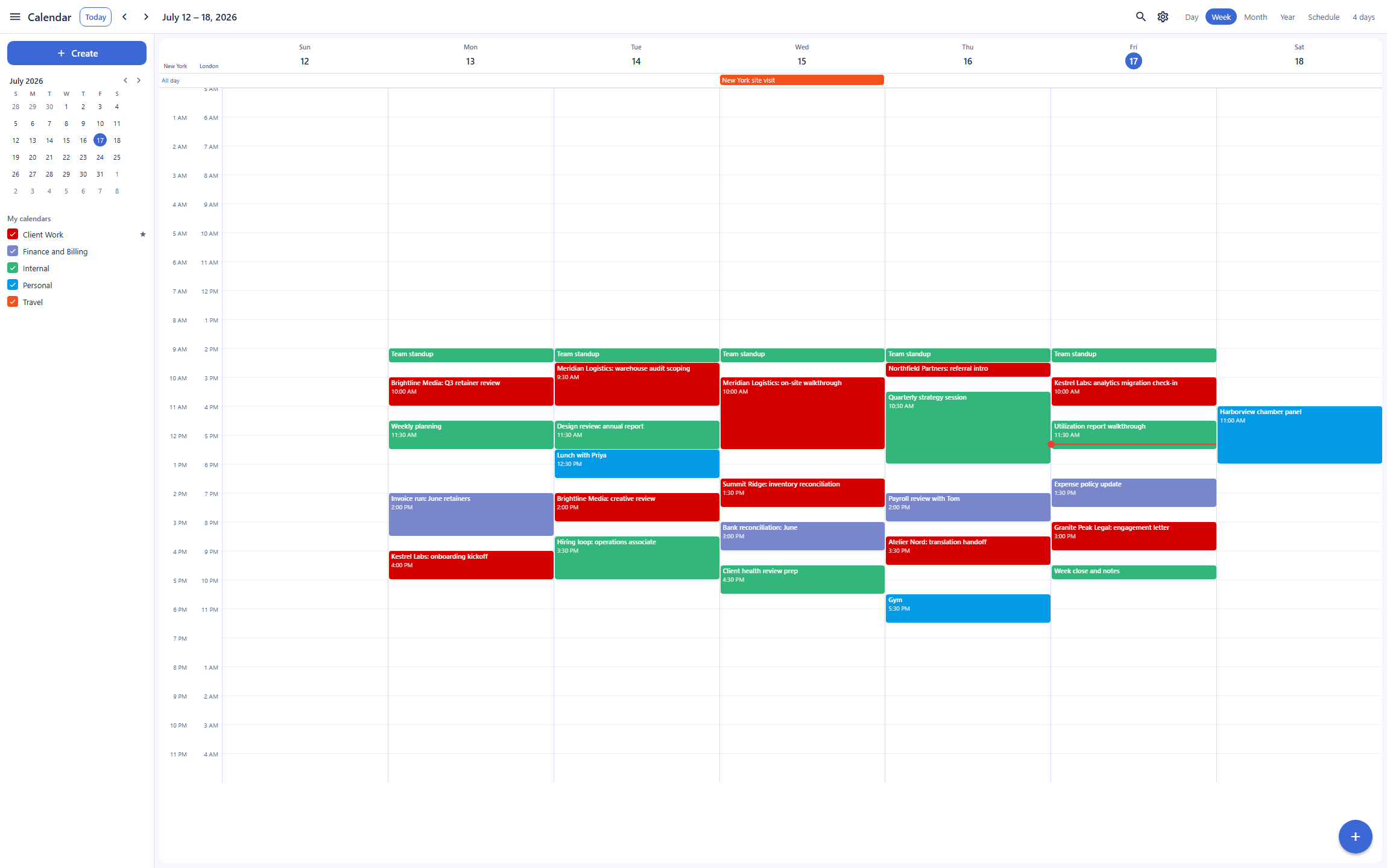
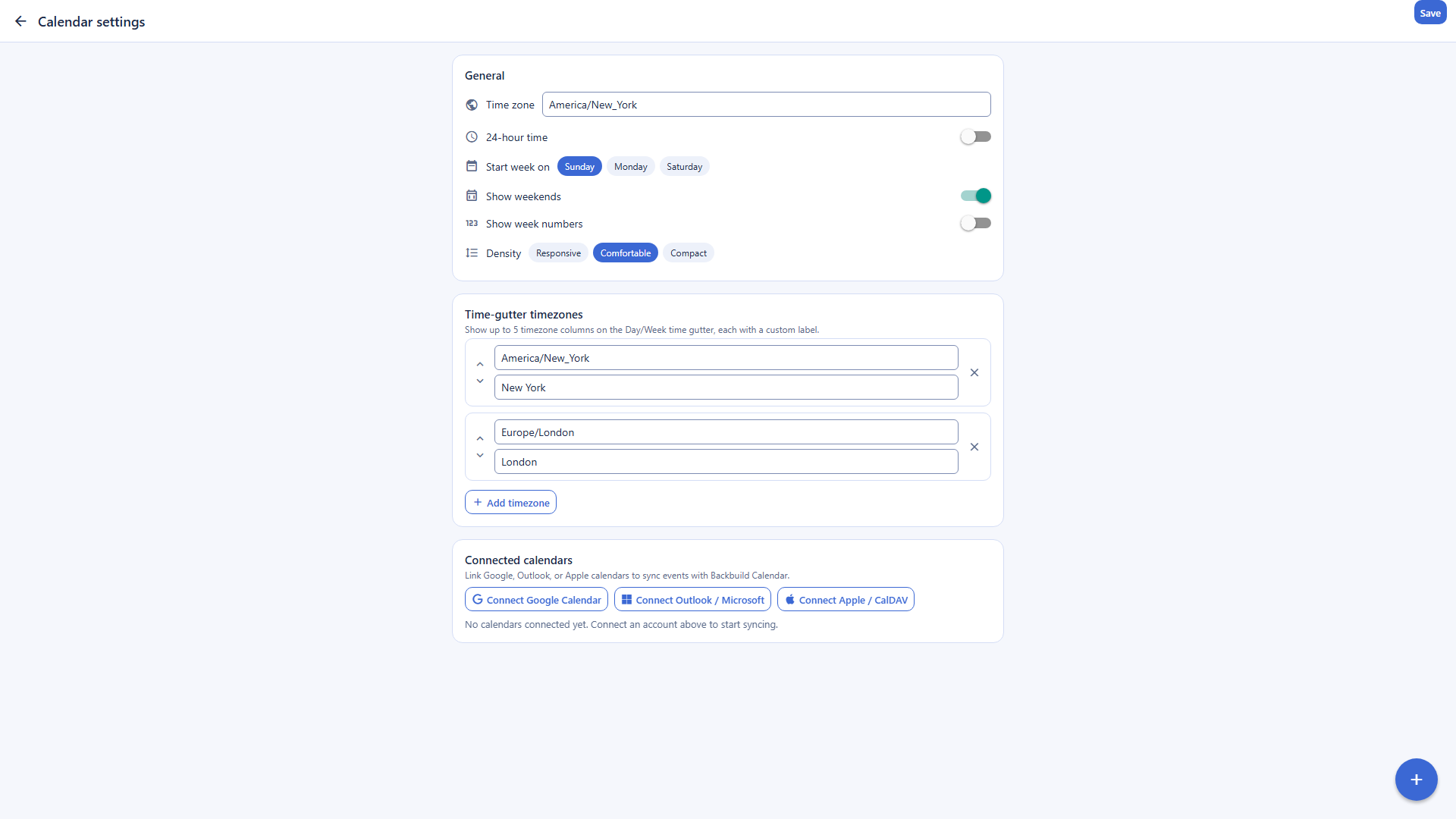
| Secondary time zones and a world clock on the gutter | Primary plus one secondary | |
| Focus time, out-of-office, and working-location event types | Paid Workspace | |
| Scheduling and meetings | ||
| Find a time / free-busy scheduling | ||
| Public appointment booking page Soon | On the roadmap | 1 free, richer on Workspace |
| Built-in video meetings Soon | Backbuild Meetings on the roadmap | Google Meet, bundled |
| Conferencing join link on an event | ||
| Sync and portability | ||
| Two-way sync with an external calendar you already use (Google and Apple or CalDAV today; Microsoft 365 connector rolling out) | Google and CalDAV; Microsoft 365 soon | Google accounts; external read-only |
| iCalendar (.ics) import and export Soon | On the roadmap | |
| Subscribable read-only feed by URL Soon | Feed URL issued; events populating soon | Public calendars |
| API, agents, and automation | ||
| Public REST API across the whole calendar surface (events, calendars, sharing, free-busy, reminders, sync links) | ||
| Native MCP tools an AI agent can call for the calendar | Calendar MCP server, Developer Preview | |
| AI assistant included on every plan | Gemini, on paid Workspace | |
| Bring your own AI provider and model | Gemini models only | |
| Entities, views, and workspace automations (schedule-adjacent data next to the calendar) | ||
| Identity, governance, and administration | ||
| Single sign-on | Free, every plan | Paid Workspace |
| SCIM user provisioning | Free, every plan | Workspace, app count by tier |
| Role-based access control and per-organization isolation | Admin roles, paid Workspace | |
| Tamper-evident audit log on every plan | Admin log, paid Workspace | |
| Clients and platform | ||
| Web app | ||
| Desktop app (Windows, macOS) | Free | Web / PWA |
| Native mobile apps (iOS, Android) Soon | Built; store rollout in progress | |
| Offline access | Chrome, view-only | |
| Automatic events from email (flights, hotels) | ||
| Workspace apps around the calendar | ||
| Mail at your own domain (Google’s offering: Gmail in Google Workspace) | Backbuild Mail | Gmail |
| Own-domain mailbox free, without a per-seat subscription | Paid Workspace | |
| Documents, spreadsheets, and slides (Google’s offering: Google Docs, Sheets, Slides) | Backbuild Docs, Sheets, Slides | Google Docs, Sheets, Slides |
| Native LaTeX documents with live math and an editable source view | ||
| Decades of format maturity and third-party add-ons | ||
| Diagrams Soon | Backbuild Diagrams on the roadmap | |
| Team chat (Google’s offering: Google Chat) Soon | Backbuild Chat on the roadmap | Google Chat |
| Video meetings (Google’s offering: Google Meet, bundled) Soon | Backbuild Meetings on the roadmap | Google Meet |
| Photos (Google’s offering: Google Photos) | Backbuild Photos | Google Photos |
| Non-destructive layer photo editor | ||
| Automatic phone photo backup | ||
| Cloud file storage (Google’s offering: Google Drive) | Backbuild Files | Google Drive |
| Contacts | ||
| Double-entry accounting and invoicing (Backbuild Finances) | ||
| Built-in help desk (tickets, workflow states, assignment) | 20 tickets/mo Free; unlimited paid | |
| Training-video editor (Backbuild Studio screen-demo videos from a script) | ||
| Video editor Soon | Authoring preview | |
| Audio editor Soon | Authoring preview | |
| Music editor Soon | Authoring preview | |
| Zero-knowledge post-quantum secrets vault | ||
| Data and privacy | ||
| No advertising use of your data | Workspace commitment | |
| All your work at your own domain, in one workspace, free | Paid Workspace | |
A cross means the product does not offer the feature today. Soon means the feature is on the Backbuild roadmap and not shipped yet. Google Calendar and Google Workspace prices, plans, and feature availability are quoted from Google's Workspace pricing page, the Google Calendar product page, and Google Calendar Help, observed 2026-07-17. In the workspace apps group, each row where Google has a similar offering names it, the indented rows beneath list the features that differ in both directions, and a cross marks a workspace app Google Workspace does not offer.
Two-way sync: running Backbuild Calendar alongside Google Calendar
Backbuild Calendar is built to run alongside an incumbent calendar rather than replace it in one jump. You connect a Google account or a CalDAV server, such as Apple iCloud, and Backbuild Calendar keeps that calendar in two-way sync: an event created or changed on either side flows to the other, and a loop guard tags each synced event so a change is not echoed back and forth. A Microsoft 365 connector built on the same engine is rolling out. That means a team can adopt the Backbuild workspace, get mail at its own domain, contacts, documents, and the rest of its tools next to the schedule, and still show up correctly on the Google invites colleagues send. Google Calendar itself syncs across Google accounts and can subscribe to an external calendar read-only by URL, but for Exchange and Microsoft 365 its own documentation is explicit that Calendar Interop does not sync events: it exchanges free-busy availability, not the events themselves. For anyone evaluating a move, live two-way sync is what removes most of the switching risk.
The REST API, AI agents, and MCP
Both products expose the calendar to software, and this is one place the comparison splits in each direction. The whole Backbuild Calendar surface is drivable over the public REST API: create and change events, manage calendars and sharing, run free-busy queries, set reminders and tasks, and connect and manage external sync links, with every call authenticated, organization-scoped, and gated by the same roles and permissions as the app and recorded in the tamper-evident audit log. The assistant that drives it runs on your own AI provider and model, or on Backbuild usage credits, so calendar automation runs under your own provider agreement rather than a single bundled model. Google Calendar has a full Calendar REST API as well, and it goes one step further for agents: Google ships a Calendar MCP server, currently in Developer Preview, that exposes calendar actions as tools an AI agent can call directly, where Backbuild does not yet publish calendar-specific MCP tools. For a business that wants its calendar under organization governance over an API, both qualify; for a drop-in agent tool surface aimed specifically at the calendar, Google is ahead today, and that gap is on the Backbuild roadmap.
Where Google Calendar leads today
Google Calendar is mature and ubiquitous, and several of its strengths are things Backbuild Calendar does not match today. Being straight about them matters more than winning every row.
Appointment booking pages
Google Calendar offers appointment schedules: a single public booking page free on a personal account, with payments, multiple pages, and automated reminders on Google Workspace Business Standard and above. Backbuild Calendar's booking page is on the roadmap and marked as coming soon. If you need clients to book time with you today, Google leads.
Bundled video and a calendar MCP surface
Every Google Calendar event can create a Google Meet call with one click, and Google ships a Calendar MCP server for AI agents. Backbuild Calendar carries a conferencing join link, but Backbuild Meetings is coming soon, and it does not yet expose calendar MCP tools. For bundled video or a drop-in agent tool surface, Google leads today.
Native mobile apps
Google Calendar has mature native iOS and Android apps that most people use as their primary calendar. Backbuild Calendar's native mobile apps are built and their store distribution is still rolling out, so today it runs in the web app and the free Windows and macOS desktop app, and reaches your phone through two-way sync. For a phone-first user, Google leads today.
Offline access and email auto-events
Google Calendar has a view-only offline mode in Chrome and adds flights and reservations to your calendar automatically from Gmail. Backbuild Calendar needs a connection today and does not create events from mail. If you plan on the move without reliable data, Google leads.
Common Google Calendar frustrations and how Backbuild Calendar addresses them
Paying for Workspace just to get your own domain and admin
A calendar next to mail at your own domain, with an admin console and audit trail, means a paid Google Workspace subscription from about $7 per user a month; a free personal Google account has neither. Backbuild Calendar sits in a free workspace that already includes mail at your own domain, contacts, docs, and sheets, with single sign-on, role-based access control, and audit logging on every plan.
No live sync with a non-Google calendar
Google Calendar subscribes to an outside calendar read-only, and for Microsoft 365 Calendar Interop exchanges free-busy availability, not events. Backbuild Calendar keeps Google and CalDAV calendars, such as Apple iCloud, in live two-way sync, with a Microsoft 365 connector rolling out, so a team sees real events, not just busy blocks.
The calendar is one more separate app
A free Google Calendar sits apart from your documents unless you buy Workspace. Backbuild Calendar is one part of a workspace that spans mail, chat, meetings, contacts, real-time collaborative Docs and Sheets, slides, diagrams, photos, the photo, video, training video, audio, and music editors, files, accounting, a help desk, and a secrets vault, so an event, a document, and a mailbox share one identity and one set of roles.
One bundled AI model, on a paid tier
Google's assistant in Calendar is Gemini on paid Workspace, tied to Google's own models. Backbuild's AI assistant is on every plan and brings your own provider and model, so calendar automation runs on the AI vendor you already use, at your own rate or on usage credits.
Which tool wins, by use case
Individuals and personal scheduling
For a person who runs their life from their phone, Google Calendar is hard to beat: mature native mobile apps, one-click Meet calls, and offline access, all free. Backbuild Calendar is a strong choice for a desktop-first individual who wants their calendar in one place with the rest of their work, including mail, docs, and sheets, and can keep it on their phone through two-way sync with the phone's calendar. But with the native mobile apps still rolling out, it is not yet the pick for a phone-first user.
Small business teams
A small team wants a shared calendar next to email at its own domain, with some governance. With Google that means a paid Google Workspace plan from about $7 per user a month, because a free personal account has no own-domain mail and no admin console. Backbuild Calendar gives the team shared calendars, granular sharing, and find-a-time inside a free workspace that includes mail at your own domain and single sign-on, role-based access control, and audit logging on every plan, and it can keep anyone's existing Google calendar in two-way sync during the move. The counterweight is that a team that leans on Meet or on staff using the mobile app will feel Backbuild Calendar's gaps.
Teams already on Google or Microsoft who want to consolidate
This is the clearest Backbuild Calendar win. A team that already lives in Google Calendar does not have to choose between staying and switching: Backbuild Calendar keeps that calendar, and any Apple or CalDAV calendar, in two-way sync, so people keep receiving and sending invites on the system everyone knows while the organization consolidates its mail, contacts, docs, sheets, and the rest of its tools into one workspace. For a team on Microsoft 365, the connector is built on the same engine and rolling out; until it is live, a Microsoft calendar can be brought in over CalDAV where the server supports it, or through a Google account. Google Calendar can subscribe to an outside calendar read-only, and for Microsoft 365 Calendar Interop only exchanges free-busy availability, so a mixed-suite team on Google sees busy blocks rather than the actual events.
Freelancers and consultants who take bookings
A freelancer who needs clients to book time relies on a public booking page. Google Calendar offers appointment schedules, free for a single page on a personal account and richer on Workspace. Backbuild Calendar's booking page is on the roadmap, coming soon, so it cannot fill this need yet. Where Backbuild Calendar helps a freelancer is the rest of the business: a free mailbox at their own domain and a workspace including docs, sheets, and invoicing and accounting.
All-in-one workspace seekers
For someone who wants their calendar to sit next to their mail, contacts, documents, and files at their own domain rather than in a separate silo, Backbuild Calendar is part of one free workspace spanning mail at your own domain, chat, meetings, contacts, real-time collaborative Docs and Sheets, slides, diagrams, photos, the photo, video, training video, audio, and music editors, files, accounting, a help desk, and a secrets vault. Google offers comparable breadth in Google Workspace, with a decade of format maturity behind Docs, Sheets, and Slides, but its all-in-one story at your own domain is a paid Workspace subscription, and a free Google Calendar sits apart from that suite.
Organizations that need governance and data ownership
Here the two defend different flanks. Google is explicit that it does not use Workspace customer data for advertising and that the customer owns their data, a genuine commitment, and its admin console, roles, and audit log are deep. Backbuild's angle is that the governance surface is on every plan, including Free: single sign-on, SCIM provisioning, role-based access control, per-organization isolation, and a tamper-evident audit log, plus a zero-knowledge post-quantum secrets vault in the same workspace, where Google's admin depth begins at a paid Workspace subscription and a free personal account has no admin console at all.
The daily calendar experience
A person evaluating these two products for daily use is comparing the same loop: reading the week, creating and moving events, and handling invitations. On reading the week, the products are close: both offer day, week, month, year, and schedule views, and Backbuild Calendar adds a world-clock gutter with several secondary time zones, where Google Calendar shows the primary plus one secondary zone. On creating and moving events, both cover recurring series with this, this-and-following, and whole-series edits, reminders, and color-coded calendars; a long-running Google Calendar complaint is that choosing between editing one instance and the whole series is easy to get wrong, and Backbuild Calendar surfaces the same choice explicitly on each recurring edit.
On invitations, both send email invites with yes, no, and maybe replies and guest permissions. Where Google's daily experience is stronger is the phone and the plane: its native mobile apps are mature and shipped while Backbuild's mobile apps are built and still rolling out to the stores, and its Chrome offline mode reads the calendar without a connection, which Backbuild Calendar does not do yet. The daily bottom line: the two are near-parity on the desktop calendaring loop, Backbuild Calendar edges ahead on multi-zone scheduling, and Google is ahead the moment the calendar has to live on a phone or work offline.
Rolling it out across a team
The person who moves a team onto a calendar answers for adoption, sharing, and the mixed-suite reality that some people will stay on Google or Outlook. On adoption, the decisive Backbuild Calendar property is that it does not force a cutover: two-way sync keeps each member's existing Google or Apple or CalDAV calendar in step, with a Microsoft 365 connector rolling out, so the team can consolidate mail, contacts, and documents into one workspace while everyone keeps sending and receiving invites on the system they know. On sharing, Backbuild Calendar offers multiple calendars with granular sharing tiers and access requests, and the free desktop app covers members who want an installed client.
The Google path is different in shape. Inside a single Google Workspace tenant, sharing and resource calendars are strong and familiar, but the own-domain and admin story requires a paid subscription per user, and across tenants the interoperability is thin: Calendar Interop returns free-busy availability for Exchange and Microsoft 365, not the events themselves. The rollout bottom line: for a team that is homogeneously on Google and willing to pay per seat, Google Calendar's in-tenant sharing is excellent; for a team that wants own-domain calendaring and governance without a per-seat bill, or that is consolidating away from Google onto one workspace, Backbuild Calendar's two-way Google, Apple, and CalDAV sync and free governance do the structural work, with the Microsoft 365 connector rolling out.
Security, identity, and data governance evaluation
A security review of a calendar platform turns on identity controls, isolation, and evidence, and on what the vendor does with the data. On identity, Backbuild ships single sign-on and SCIM user provisioning on every plan, including Free, where Google gates single sign-on, SCIM, and the admin console to a paid Workspace subscription; a free personal Google account has no administrative controls at all. On isolation and evidence, every calendar read and write is authorized against organization-scoped roles, each organization's calendars are isolated, and every change is recorded in a tamper-evident audit log written in the same transaction as the operation, free on every plan. Google's admin audit log and investigation tooling are strong, but they live inside a paid Workspace tenant.
On what the vendor does with the data, the products land in a similar place with different emphasis. Google is explicit that it does not use Workspace customer data for advertising and that the customer owns their data. Backbuild takes the same no-advertising stance and adds a zero-knowledge post-quantum secrets vault in the same workspace, so credentials, rather than calendar content, sit beyond provider reach. On AI governance, Backbuild lets the organization bring its own AI provider, so any agent working the calendar runs inference under the organization's own provider agreement, where Google's assistant is bundled Gemini on paid Workspace. One caveat for a compliance reviewer: Backbuild is built to the common frameworks but is not yet third-party audited, where Google Workspace carries a long record of external attestations. A reviewer who must present vendor certificates today leans Google; a reviewer building least-privilege access with provisioning and attribution on every plan leans Backbuild.
The economics for a finance and procurement review
The cost comparison has three parts: what the calendar costs, what forces an upgrade, and what the choice displaces. On the calendar itself, both are free for personal use. The divergence is the business case: the moment a team needs mail at its own domain, an admin console, single sign-on, and an audit log, Google requires a paid Workspace subscription from about $7 per user a month, scaling to $14 and $22 per user on higher tiers. Backbuild Calendar includes the calendar, own-domain mail, and that whole governance surface free on every plan, with paid workspace plans, when a team wants the wider tooling, starting at $19 per seat.
On upgrade pressure, the items that move a Google user onto a paid tier are the custom domain, the admin console, appointment booking, focus time and working-location events, and more Meet capacity; on Backbuild several of those are free, and the surfaces still on the roadmap, booking pages and Backbuild Meetings, are marked Soon rather than sold as an upsell. On displacement, Backbuild's same free workspace folds in accounting and invoicing, a secrets manager, and a help desk that a team would otherwise buy separately, while Google's per-seat Workspace bill buys a mature, deeply integrated suite. Procurement can price the difference concretely: Backbuild trades away some maturity and a few not-yet-shipped features for zero per-seat cost on the calendar, mail, and governance; Google trades a per-seat bill for a decade of polish and ubiquity.
Strategic fit and vendor considerations
The strategic question is which platform bet each product represents. Google Calendar is one app in Google Workspace, a mature, ubiquitous suite whose network effect is itself the asset: nearly everyone a team schedules with already has a Google account, the mobile apps are the default on billions of phones, and the ecosystem of integrations is vast. An organization whose priority is friction-free scheduling with the outside world, on any device, is squarely in Google's center of gravity. Backbuild Calendar is one surface in a younger workspace platform whose bet is consolidation and programmability: calendar, mail, chat, meetings, contacts, docs, sheets, slides, diagrams, photos, the photo, video, training video, audio, and music editors, files, accounting, a help desk, and a secrets vault in one subscription, at your own domain, with a public REST API and bring-your-own-AI automation across every surface, and governance on every plan.
Lock-in and continuity run differently on each side. Google's suite is deeply integrated and subscription-bound, and moving off it is a project, but its data exports and standards support are well established. Backbuild's bet is younger: several surfaces, including Backbuild Meetings, appointment booking, iCalendar import and export, the Microsoft 365 sync connector, and native mobile distribution, are marked Soon, and third-party audits are not yet in hand, but the two-way sync design means adopting Backbuild Calendar does not require leaving the Google, Apple, or CalDAV calendar a team already runs. An organization betting on consolidation, own-domain ownership, and agent-operated work on its own AI provider is betting with Backbuild's roadmap; an organization betting on the most mature, most universally connected calendar is betting with Google.
Frequently asked questions
Is there a free alternative to Google Calendar?
Yes. Backbuild Calendar is the calendar app in the free Backbuild workspace, and it is included on every plan, including Free, alongside Backbuild Mail at your own domain, Chat, Meetings, Contacts, Docs, Sheets, Slides, Diagrams, Photos, the photo, video, training video, audio, and music editors, Files, Backbuild Finances, a built-in help desk, and a secrets vault. Google Calendar is also free for a personal Google account, so the difference is not the calendar price. It is that Backbuild Calendar comes inside a free all-in-one workspace at your own domain, with single sign-on, role-based access control, and a tamper-evident audit log on every plan, and that it keeps your existing Google Calendar in two-way sync so you do not have to abandon it to try Backbuild.
Can Backbuild Calendar sync with my Google Calendar?
Yes, in both directions. You connect your Google account through a standard consent flow, and Backbuild Calendar keeps that calendar in two-way sync: events you create or change on either side flow to the other, with loop protection so a change is not echoed back and forth. It also two-way syncs CalDAV calendars, including Apple iCloud, and a Microsoft 365 connector built on the same engine is rolling out. Google Calendar itself syncs across Google accounts and can subscribe to an external calendar read-only by URL, but it does not keep a separate non-Google calendar in live two-way sync, which is what lets you adopt Backbuild Calendar gradually while everyone still invites you on Google.
Is Backbuild Calendar cheaper than Google Calendar?
For a personal calendar, both are free. The cost difference shows up for a business that wants a calendar next to mail at its own domain, with admin controls. With Google that means a paid Google Workspace subscription from about 7 US dollars per user a month, because a free personal Google account has no custom-domain mail and no admin console at all. Backbuild Calendar sits in the free Backbuild workspace that already includes mail at your own domain, contacts, docs, and sheets, plus single sign-on, role-based access control, and audit logging. The wider paid Backbuild workspace is optional and starts at 19 US dollars per seat.
Does Backbuild Calendar have appointment booking pages like Google Calendar?
Not yet. Google Calendar offers appointment schedules: a single public booking page free on a personal account, with payments, multiple pages, and automated reminders on Google Workspace Business Standard and above. Backbuild Calendar does not offer a public booking page today. It is on the roadmap and marked as coming soon on the pricing page. If a public booking page is a hard requirement right now, Google Calendar is the better choice.
Does Backbuild Calendar have a mobile app and offline access?
The native mobile apps are built and their app-store distribution is still rolling out, so today you reach Backbuild Calendar through the web app, the free Windows and macOS desktop app, and on your phone through two-way sync with your phone’s calendar. Offline access is not available yet: Backbuild Calendar needs a connection. Google Calendar has mature native iOS and Android apps and a view-only offline mode in Chrome, so if you live in your calendar on your phone or need it offline, Google Calendar leads on those points today.
Can Backbuild Calendar be driven by software or an AI agent?
The whole calendar surface is available over the public REST API: create and change events, manage calendars and sharing, run free-busy queries, set reminders, and connect and manage external sync links, all under your organization’s roles and audit log. Google Calendar also has a full REST API, and Google additionally ships a Calendar MCP server, currently in Developer Preview, that exposes calendar actions as tools an AI agent can call directly. Backbuild does not yet expose calendar-specific MCP tools, so for a drop-in agent tool surface aimed at the calendar, Google is ahead today; for programmatic access under organization governance, both offer a REST API.
Try Backbuild Calendar free
A full calendar, recurring events, guests and replies, reminders, tasks, multiple calendars and sharing, find-a-time, and world-clock time zones, inside a free all-in-one workspace that includes mail at your own domain, a public REST API, and single sign-on with audit logging, plus two-way sync with the Google or Apple calendar you already use. If your first requirement is a booking page, bundled video, a calendar MCP surface, a mature mobile app, or offline access, Google Calendar is the stronger choice today.
Get started with Backbuild Calendar