

HeyGen alternative: Backbuild Studio vs HeyGen
HeyGen is a leading AI avatar video platform: it turns a script into a video fronted by a realistic synthetic presenter, with custom avatars, voice cloning, video translation, and a developer API. On the Backbuild side a narrower but different job is done by Backbuild Studio, which makes training videos that drive your real product interface step by step with word-synced highlights, plus narrated audio and audiobooks, together with the surrounding workspace: the training course system, the AI assistant and Model Context Protocol tools, a public REST API, and per-organization roles and audit on every plan. HeyGen leads on AI avatars, voice cloning, multi-language dubbing with lip-sync, its developer API, and its maturity; Backbuild Studio does not generate avatars at all.
The short answer
These two tools aim at different jobs. HeyGen is a deep, mature AI avatar video platform, and Backbuild Studio does not make avatar videos at all. Choose HeyGen if you want a presenter-led video with a realistic AI avatar, custom avatars and voice cloning, one-click video translation and dubbing with per-language lip-sync, a large avatar and template library, or a developer API with interactive and streaming avatars. Choose Backbuild Studio if you want software training videos of your real product, driven step by step, or narrated audio like audiobooks and voiceover, delivered and tracked in your own training course system, with no monthly video-minute cap and no per-minute avatar credit meter, inside an all-in-one workspace with single sign-on and audit logging on every plan. HeyGen does not carry a course platform, a workspace, or real-product-driven walkthroughs; Backbuild does not carry avatars, voice cloning, or lip-synced translation.
Backbuild Studio vs HeyGen: feature by feature
HeyGen is free with a watermark and a small monthly video allowance; paid plans start at $24 a month billed annually, and premium Avatar IV and Avatar V video, translation, and the Video Agent each spend credits per minute. Prices below are from HeyGen’s own pricing page and dated third-party analyses, observed 2026-07-20. The highlighted column is Backbuild Studio.
| Backbuild Studio Real-product training videos, narrated audio, and a course system in the workspace In the workspace on every plan; each render uses usage credits for speech and compute, with no monthly video-minute cap and no per-minute avatar meter Get Started Free | HeyGen An AI avatar video platform: talking-head presenters, voice cloning, translation, and an API Free with watermark and a small monthly allowance; Creator $29/mo ($24 annual); paid tiers up to Business $149 plus per-seat pricing; Enterprise custom. Avatar IV and V, translation, and Video Agent spend credits per minute | |
|---|---|---|
| Price and cost model | ||
| Free tier | In the workspace, render on credits | Watermark, small monthly allowance |
| Monthly video-minute cap | No fixed cap | Credit allowance limits minutes |
| Per-minute avatar credit meter | None | Avatar IV and V spend more per minute |
| Credits roll over between cycles | Usage credits, no per-minute expiry | Credits do not roll over |
| Priority processing and credit packs as add-ons | No separate processing or pack fees | Add-ons on top of the plan |
| Starting paid price | Included, then usage credits | $24/mo billed annually |
| AI avatars and synthetic presenters | ||
| Stock AI avatar presenters | Large avatar library | |
| Custom avatar and digital twin from a video | ||
| Photo avatar from a single image | ||
| Avatar engine with gestures and expressions | Avatar IV and Avatar V | |
| Voice cloning | ||
| Avatar and template library | ||
| Software training and product walkthroughs | ||
| Drives your real product interface step by step | ||
| Scripted cursor, clicks, typing, and drag | ||
| Word-synced highlights on the control in use | ||
| Record a screen behind a login, credential masked Soon | Designed, rolling out | |
| Manual screen recorder | Driven, not manual | With an avatar |
| 4K output | Higher tiers | |
| Vertical 9:16 and 16:9 output | ||
| Voices, languages, translation, and dubbing | ||
| AI voice library | Voice catalog plus your own via bring your own key | Large multi-language voice library |
| One-click video translation and dubbing | Many languages | |
| Per-language lip-sync re-render | ||
| Narration word-aligned to on-screen action | ||
| Delivery control (pauses, emphasis) | ||
| Beyond video: other media | ||
| Illustrated, narrated storybooks | ||
| Long-form audiobooks and voiceover | Chapters, M4B and MP3 | |
| Video, audio, and music editors Soon | Authoring preview | |
| Background music, sound effects, overlays | ||
| Authoring and AI generation | ||
| Script to narrated video | ||
| One-prompt video from a brief | Video Agent | |
| Ready-made template gallery | ||
| AI agent authors and generates through MCP | ||
| Bring your own AI voice provider and key | ||
| Training courses and learning delivery | ||
| Build courses (chapters, lessons, steps) | ||
| Quizzes, timed exams, and grading | ||
| Enroll and assign learners, required training | ||
| Progress tracking and completion rollups | Video analytics | |
| Certificates you issue, verify, and revoke | ||
| Publish and sell courses in a marketplace | Free, one time, or subscription | |
| SCORM export into a third-party LMS | Enterprise | |
| Publishing, hosting, and collaboration | ||
| Hosted video pages with view analytics | ||
| Direct publishing to social platforms | ||
| Brand kit and team collaboration | Workspace projects and sharing | Business |
| Developer API and interactive avatars | ||
| Public REST API across the product | Studio and training surface | Avatar video and translation API |
| Programmatic avatar-video generation | ||
| Interactive and streaming avatars in real time | ||
| Native MCP tools for AI agents | ||
| Platform, identity, and governance | ||
| Single sign-on | Every plan | Business and up |
| SCIM user provisioning Soon | Enterprise | |
| Per-organization roles and audit logging | Every plan | Higher tiers |
| Secrets vault for narration and login credentials | ||
| Bring your own AI provider under your own agreement | Bundled models | |
| Published certifications and long track record | Built to meet, not yet audited | SOC 2, established |
| Workspace apps | ||
| Media studio (Backbuild Studio) (HeyGen is a video product) | Avatar video | |
| Real-product-driven walkthrough vs avatar talking head | Drives your app | Avatar presenter |
| Audiobooks and narrated storybooks in the same editor | ||
| AI avatars, voice cloning, and lip-synced translation | ||
| Email at your own domain (Backbuild Mail) | ||
| Team chat (Backbuild Chat) Soon | ||
| Meetings (Backbuild Meetings) Soon | ||
| Calendar (Backbuild Calendar) | ||
| Contacts (Backbuild Contacts) | ||
| Documents (Backbuild Docs) | ||
| Spreadsheets (Backbuild Sheets) | ||
| Presentations (Backbuild Slides) | ||
| Diagrams (Backbuild Diagrams) Soon | ||
| Photos (Backbuild Photos) | ||
| Photo editor | ||
| Files | ||
| Accounting and invoicing (Backbuild Finances) | ||
| Password and secrets manager (Backbuild Secrets) | ||
| Help desk and support tickets | ||
A cross means the tool does not offer the feature today. Soon marks a capability on the Backbuild roadmap. HeyGen prices, plans, credit costs, and features are quoted from HeyGen pricing, its features page, its API coverage, and dated third-party analyses, observed 2026-07-20. Backbuild capabilities are cited to the Backbuild Studio documentation and the training course system documentation.
Different kinds of video tool
HeyGen is an AI avatar video platform, and it is a strong one. Its model is to stand a realistic synthetic presenter in front of your script, in many languages, with custom avatars, voice cloning, and one-click dubbing, and it backs that with a developer API and interactive avatars. Backbuild Studio is a media studio built for a different job: it teaches software by driving your real product on screen with a voiceover, and it narrates long-form audio like audiobooks. Around Studio, the workspace adds a training course system to deliver, track, and sell what you make. The two overlap on the words software training video, but the output and the surround are not the same. Where you want a presenter, or avatar video localized into many languages, HeyGen leads and Backbuild does not compete. Where you want a genuine walkthrough of your real product, narrated audio, or a course platform of your own, Backbuild is the stronger fit, and it renders without a monthly minute cap.
Where HeyGen leads
HeyGen is a category leader in avatar video, deep and mature, and several of its strengths are things Backbuild Studio does not do at all today.
Realistic AI avatar presenters
HeyGen generates realistic AI avatars, custom avatars and digital twins from a short video, and photo avatars from a single image, and reviewers rate its Avatar IV and Avatar V engines among the most lifelike, with face dynamics and hand gestures. Backbuild Studio has no avatars of any kind. For a presenter-led video, HeyGen leads outright.
Voice cloning, languages, and dubbing
HeyGen ships a large multi-language voice library, voice cloning, and one-click video translation and dubbing that re-voices a finished video with per-language lip-sync. Backbuild speaks with text-to-speech voices and lets you bring your own, but it has no voice cloning, no avatar dubbing, and does not match that language breadth. For a global, many-language library, HeyGen leads.
Templates and one-prompt generation
HeyGen has a large avatar and template library and a Video Agent that turns a single prompt into a finished video. Backbuild is script-and-action driven, with a small set of themes and no template gallery. For a fast first draft, HeyGen is quicker.
A developer API, hosting, and a track record
HeyGen offers a mature developer API with programmatic avatar-video generation and interactive, streaming avatars for real-time use, plus hosted video pages with analytics, a published SOC 2 attestation, and large adoption. Backbuild answers the studio and training surface with its own REST API and MCP tools, but it does not offer avatar-video APIs, streaming avatars, or hosted public video pages, and it is the younger, pre-launch product.
Common HeyGen frustrations and how Backbuild Studio addresses them
The credit system and add-on creep
The most common HeyGen complaint is the credit system: premium Avatar IV and Avatar V video spends far more credits per minute, credits do not roll over, and priority processing and premium credit packs are billed on top of the plan. Backbuild sets no fixed monthly minute cap and no per-minute avatar meter: you pay usage credits for the compute a render uses, and unchanged re-renders cost nothing.
Avatars feel synthetic on longer content
Reviewers note the avatars can feel synthetic on longer or more complex videos, with full-body motion and hand gestures still imperfect. Backbuild sidesteps this for training by showing your real product instead of a synthetic person, so there is no presenter on screen, only the interface the learner will actually use.
An avatar cannot show your real app
A presenter reading a script cannot demonstrate a live click path through your product. Backbuild drives your real interface step by step, so the walkthrough matches exactly what the user will do, screen for screen and click for click.
No course platform, and a standalone seat
HeyGen is a video generator, so an L and D team still bridges to a separate learning system, and it is a standalone subscription. Backbuild Studio is part of the workspace on every plan, alongside Mail, Chat, Meetings, Calendar, Contacts, Docs, Sheets, Slides, Diagrams, Photos with a dedicated photo editor, Files, Backbuild Finances, a built-in help desk, the training course system, and the secrets vault, so it is not another seat to buy on its own.
Two ways to make a training video
Both tools start from a script and produce a narrated video, but the picture on the screen is fundamentally different. HeyGen renders a synthetic presenter who reads the script to camera. Backbuild Studio renders your actual product, driven through the exact steps a learner will take, with the narration word-synced to each click. For teaching software, that is a categorical difference, not a style choice.
Which tool wins, by use case
Marketing, social, and presenter-led explainer videos
This is the largest reason people reach for HeyGen, and it is exactly what it is built for. When the video is a person talking to camera, a spokesperson explaining a policy, a social ad, a short marketing explainer, HeyGen turns your script into a polished avatar presentation without a studio, a camera, or a presenter, and it can localize that presenter into many languages with dubbing and lip-sync. Backbuild Studio makes no avatar videos at all, so for high-volume presenter-led and UGC-style video it does not compete.
Software training and product walkthroughs
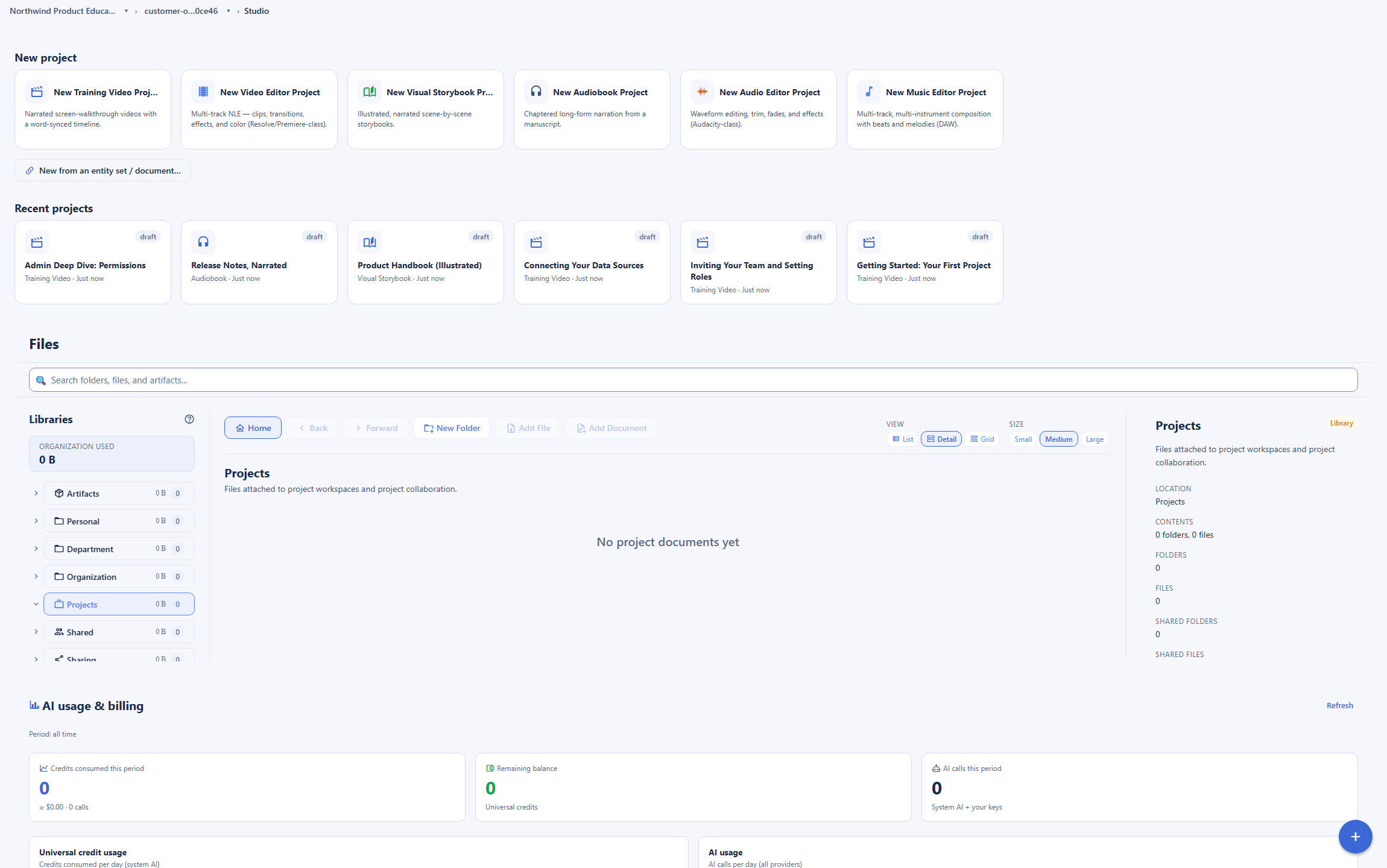
This is where Backbuild Studio is strongest. To teach someone to use an application, the most useful video shows the application itself: the real screens, the real click path, the fields they will fill. Backbuild Studio drives your live product through a scripted sequence of clicks, typing, and drags, and highlights each control as the narration names it. HeyGen can pair an avatar with a manual screen recording, which shows the screen but does not script and drive the product for you, and a talking head adds little to a pure software demo. For product onboarding, help-center walkthroughs, and feature tours, Backbuild fits the job better, and the same recording can be wrapped in a tracked course without leaving the workspace.
Corporate learning and onboarding, delivered and tracked
For a learning and development team, the two tools split the work. HeyGen is stronger on the media itself for a global audience: its avatars, voice library, one-click dubbing, and template gallery localize a presenter-led video into many languages, and it exports SCORM into an external learning system. Backbuild answers the delivery side with its own training course system: courses with quizzes and exams, enrollment and required-training assignment, completion rollups, and verifiable certificates, and it makes true real-product walkthroughs that an avatar cannot. What Backbuild does not do is match HeyGen’s language breadth, voice cloning, or SCORM export to a separate system. So a team standardizing on an existing external learning system in many languages leans HeyGen, while a team that wants real-product training and its own course platform in one place leans Backbuild.
Product and customer-education teams
For a product, support, or customer-education team making help-center videos, feature tours, and release walkthroughs, the video needs to show the product, not a presenter. Backbuild Studio drives the real interface step by step with word-synced highlights, so the walkthrough matches the screens a customer will actually see, and the same production can be published as a lesson in a tracked course. HeyGen keeps the advantage where a customer-education program also wants a branded spokesperson or localized presenter video, and its hosted video pages with view analytics give a team engagement data on each video that Backbuild does not host today.
Developers generating video programmatically
For a developer generating video at scale or embedding a real-time presenter in an app, HeyGen is the stronger choice. Its developer API generates avatar videos programmatically, translates them, and drives interactive, streaming avatars that speak from a live text stream, which is a capability Backbuild does not have. Backbuild exposes its studio and training surface over a public REST API and native MCP tools, so an agent can create and render productions and build courses programmatically, but it does not generate avatar video or stream a real-time presenter. If the integration is personalized avatar video or a live avatar in a product, HeyGen leads; if it is scripted real-product training rendered by an agent, Backbuild answers.
Audiobooks, voiceover, and narrated media
HeyGen is a video tool. If what you need is audio, a long-form audiobook from a manuscript, a voiceover track, an illustrated narrated storybook, Backbuild Studio is built for it and HeyGen is not. Backbuild produces chaptered audiobooks with embedded metadata and cover art, voiceover, and storybooks that render to both a video and an audiobook in one run, all in the same studio. For narrated audio, this is a category HeyGen does not serve.
Teams who want media without another subscription
For a team already choosing an all-in-one workspace, the cost model matters. Backbuild Studio and the training course system are part of the workspace on every plan, so a document, a spreadsheet, a secrets vault, a media studio, and a course platform are one product, and a render draws on usage credits rather than a separate per-seat video subscription with a per-minute avatar credit meter and non-rolling credits. Any AI agent can author and generate a production or a course through the Model Context Protocol. HeyGen is a strong standalone product, but it is a standalone product, priced and metered on its own.
Security, identity, and governance evaluation
A security review of a video tool that handles scripts, brand assets, and sometimes cloned voices turns on who can get in, what each user can do, what record survives a change, and where the AI inference runs. On identity, Backbuild Studio ships single sign-on on every plan, including Free, and per-organization roles and a tamper-evident audit log on every plan, with SCIM user provisioning on the roadmap. HeyGen provides single sign-on and enterprise controls as well, though it gates single sign-on to its Business tier and SCIM and the deeper controls to Enterprise, so a small team on a lower tier does not have the same identity floor or audit trail.
On AI governance, Backbuild lets an organization bring its own AI voice provider and key, so inference runs under its own agreement, and credentials for recording a screen behind a login are held in an encrypted secrets vault that masks the value in use. HeyGen runs on its own bundled models. Voice cloning is where the review sharpens: HeyGen ships it and gates misuse behind consent controls, and a security team weighing cloned-likeness risk should read those controls carefully; Backbuild does not clone voices at all, which removes that class of risk but also that capability.
The tradeoffs run both ways. HeyGen is the older product, with a published SOC 2 attestation and a long operating history that Backbuild, pre-launch and in early adopter alpha, does not match today. The bottom line: if the review demands single sign-on, per-organization roles, a tamper-evident audit trail, and AI that runs under your own provider agreement without an upgrade, Backbuild sets that floor higher on every plan; if it demands years of attested operating history and a published certification today, HeyGen has more of it.
The economics for a finance and procurement review
The HeyGen line item is a per-seat subscription plus credits, and the total often exceeds the sticker. The Creator plan starts around $24 a month billed annually, and Business runs to $149 plus per-seat pricing, but capability and volume are metered in credits: premium Avatar IV and Avatar V video spend far more credits per minute, and credits do not roll over, priority processing and premium credit packs are add-ons, and translation and the Video Agent spend credits per minute as well. The result is a bill that is hard to predict as usage, teams, and languages grow.
Backbuild Studio changes the shape of the bill. It is part of the workspace on every plan with no separate per-seat video subscription: rendering uses usage credits for the speech and compute a render actually consumes, there is no fixed monthly minute cap and no per-minute avatar meter, and unchanged re-renders cost nothing. AI runs on usage credits or an AI provider you bring yourself rather than a bundled model, and governance is included on every plan rather than reserved for a higher tier. The counterweight is scope: HeyGen buys avatars, voice cloning, multi-language dubbing, and a developer API that Backbuild does not include. The bottom line: for a real-product training and narrated-audio program, Backbuild removes the per-seat video fee, the per-minute avatar meter, and the add-on packs, and folds media into a workspace subscription; for a presenter-led avatar-video program in many languages, HeyGen’s price buys capability Backbuild does not have.
Rolling it out across a team
Adoption risk on a media tool is concentrated in production throughput and who can safely make what. HeyGen’s advantage here is ease and speed: reviewers praise its clean interface, fast script-to-video flow, and quick custom-avatar setup, so a first video ships in minutes, and its template gallery lowers the starting effort. Backbuild reduces the switch cost differently: Studio is already inside a workspace a team may use for mail, documents, and a calendar, so producers work next to the rest of their day, and any AI agent can author and generate a production or a course over the Model Context Protocol, which suits a scripted, repeatable training library.
On governance during rollout, the structural difference is that Backbuild keeps role-based access and an audit trail from the first seat, so a lead can bring producers in without widening what each can publish, and narration or login credentials stay in the vault. The unavoidable caveat is scope: because Backbuild has no avatars, voice cloning, or lip-synced translation, a program that depends on those should keep HeyGen for the avatar and localization work and use Backbuild for real-product training and narrated audio. The bottom line: pilot both against the real production mix. If it is presenter-led and multi-language, HeyGen is the smoother path; if it is scripted real-product training and audio inside a workspace a team already uses, Backbuild rolls out at no separate cost with governance from the first seat.
Data ownership, migration, and lock-in
The exit question deserves as much scrutiny as the entrance. Both tools let you download finished media, but the reusable source differs. A HeyGen production is bound to its avatars, cloned voices, and template choices, so a video re-created elsewhere is a re-shoot, not a copy, and its API and credits pace any bulk export against the plan. Backbuild productions are script-and-action definitions plus rendered output: the REST API returns each production, its script, actions, scenes, and outputs, and there is no per-minute meter on reading them back.
Migration into Backbuild has one main lane: a production is authored through the public REST API, or a script is handed to an AI agent over MCP, which can build the production and wrap it in a course end to end. The bottom line: both tools let you leave with your finished videos, but a HeyGen avatar production does not carry over as editable source the way a Backbuild script-driven production does, and Backbuild’s uncapped API makes agent-driven loading cheaper to execute, while HeyGen’s advantage is the maturity of its export and the breadth of its finished formats.
Strategic fit and vendor risk
HeyGen is a category leader in a fast-growing space, and the strategic case for it is capability and momentum: a large avatar and voice library, voice cloning, translation, and interactive avatars, a mature developer API, a published SOC 2 attestation, and large adoption. Its ratings split tells the story of the tradeoff: business reviewers rate its capability highly on G2, while Trustpilot carries more complaints about billing, credits, and support, and the credit model is what sends many teams looking for an alternative.
Backbuild’s strategic case is consolidation and governance: a real software-training studio and a narrated-audio studio, inside a workspace that adds a course system, accounting, and governed AI over MCP, with security included rather than tiered and an OpenAPI-documented surface. The real risks: it is the younger vendor and pre-launch, in early adopter alpha, it makes no avatar videos, it has no voice cloning, translation, or hosted video pages, and its Video, Audio, and Music editors are still coming. The bottom line: choose HeyGen when realistic avatars, voice cloning, multi-language dubbing, a developer API, and a published track record are the controlling criteria; choose Backbuild Studio when real-product training, narrated audio, and a course platform inside a consolidated workspace, with a security floor on every plan and no per-minute avatar meter, matter more, and avatar video is not required.
Frequently asked questions
Is there a free alternative to HeyGen?
Yes, with one caveat about the cost model. Backbuild Studio is part of the Backbuild workspace on every plan, including the Free plan, so there is no separate video-tool subscription. Rendering a production does consume usage credits for the text-to-speech and the compute a render uses, so it is not unlimited free video, but there is no fixed monthly video-minute cap and no per-minute avatar credit meter the way HeyGen sets one, and re-rendering a production you have not changed costs nothing because Studio caches the narration, the alignment, and the video. HeyGen has a free tier too, but it watermarks output, limits you to a small number of short videos a month, and its premium avatars spend credits quickly. If your goal is software training videos of your real product, narrated audio, or a course library, Backbuild is a strong fit. If your goal is a presenter-led video with a realistic AI avatar, HeyGen is the right tool and Backbuild does not do that.
Does Backbuild Studio have AI avatars like HeyGen?
No, and this is the most important difference to understand. Backbuild Studio does not generate an AI avatar, a synthetic presenter, a talking head, a custom avatar of a person, a photo avatar, or a voice clone. HeyGen is built around exactly that: a large library of stock avatars, custom avatars and digital twins made from a short video, photo avatars from a single image, its Avatar IV and Avatar V engines with face dynamics and hand gestures, and voice cloning. Backbuild takes a different approach for training: instead of a synthetic person, it shows your actual product on screen and drives it step by step with a voiceover. If your video needs a human-like presenter on camera, HeyGen wins outright and Backbuild is not a substitute.
Can Backbuild make a training video of my real software?
Yes, and this is what it does best. You write a narration script, mark where each on-screen action should happen, and list the actions to perform against your product: navigate to a screen, click a control, type into a field, drag one element onto another, highlight an area. Backbuild Studio then drives a real browser through your product, records the screen with a synthetic cursor and a spotlight, and places each action at the exact moment its cue is spoken, so the narration and the on-screen action stay in sync. Recording screens that sit behind a login, using a masked credential from the Secrets vault, is a designed capability that is rolling out. HeyGen has a screen recorder you can pair with an avatar, but it does not script and drive your product interface for you.
Can Backbuild make videos in many languages the way HeyGen does?
Not to the same breadth, and this is a genuine HeyGen strength. HeyGen offers a very large voice library across many languages, voice cloning, and one-click video translation and dubbing that re-voices an existing video into many languages with per-language lip-sync. Backbuild Studio speaks your script with text-to-speech voices from its voice catalog, and you can add your own voice from a supported provider by bringing your own key, but it does not offer HeyGen scale of localized voices, it has no voice cloning, and it has no avatar dubbing or one-click video translation with lip-sync. For a global video library localized into dozens of languages, HeyGen is stronger today.
Why is HeyGen expensive, and what do the credits actually cost?
HeyGen bills by credits, and reviewers consistently name the credit system as the most confusing part of the product. A minute of premium Avatar IV or Avatar V video spends far more credits than a minute of a standard avatar, so a monthly credit allowance that sounds generous can cover only a modest amount of premium avatar video. Credits do not roll over at the end of a cycle, and several capabilities are add-ons on top of the plan price: a priority-processing option and premium credit packs are billed separately, and video translation and the one-prompt Video Agent spend credits per minute as well. The result is that the headline plan price is often not the final bill. Backbuild meters AI on usage credits or lets a team bring its own AI provider and model, so inference runs at the provider rate under its own agreement, and there is no fixed video-minute cap and no per-minute avatar meter.
Does Backbuild have a learning management system or course platform?
Yes. Backbuild ships a training course system in the workspace. You build a course from chapters, lessons, and steps, add quizzes and timed exams, enroll learners or assign them in bulk, mark training required, track progress and organization-wide completions, issue certificates that anyone can verify by serial and revoke when needed, and export transcripts. A course can also be published to the marketplace as free, one time, or a subscription, so you can sell it. HeyGen is a video generator: it produces the video lessons, but it has no course structure, enrollment, certificates, or marketplace, so a team building courses on HeyGen still needs a separate course platform.
What can Backbuild Studio do that HeyGen cannot?
Three things stand out. First, it drives your real product interface to make a genuine software walkthrough, the real screens and the real click path, rather than pairing an avatar with a manual screen recording. Second, it makes more than video: illustrated narrated storybooks, long-form audiobooks and voiceover with chapters, all in one studio, where HeyGen is a video tool. Third, it lives inside an all-in-one workspace alongside Mail, Chat, Meetings, Calendar, Contacts, Docs, Sheets, Slides, Diagrams, Photos with a dedicated photo editor, Files, Backbuild Finances, a built-in help desk, and an encrypted secrets vault, with its own training course system for delivering and selling courses, single sign-on and audit logging on every plan, and any AI agent can author and generate a production or a course through the Model Context Protocol. HeyGen is the deeper and more mature avatar-video product; Backbuild is the better fit for real-product training, narrated audio, and a course platform inside a wider workspace.
What does HeyGen do better than Backbuild?
Several things, and they are real. HeyGen generates realistic AI avatar presenters, including custom avatars and digital twins from a short video, photo avatars from one image, and its Avatar IV and Avatar V engines with face dynamics and hand gestures, none of which Backbuild does at all. It has a large avatar and template library and a one-prompt Video Agent that turns a brief into a finished video. It ships voice cloning, a very large multi-language voice library, and one-click video translation and dubbing with per-language lip-sync. It has a mature developer API with interactive and streaming avatars for real-time use in apps, hosted video pages with analytics, and a published SOC 2 attestation with a long track record and large adoption. Backbuild is newer and pre-launch, in early adopter alpha, and answers the training slice with real-product walkthroughs rather than a synthetic presenter.
Try Backbuild Studio free
Software training videos that drive your real product step by step, plus narrated audiobooks and storybooks, delivered and tracked in your own training course system, inside a workspace that adds a relational data platform, governed AI over the Model Context Protocol, a full REST API, and single sign-on and audit logging on every plan, with no monthly video-minute cap. If the deciding factors are AI avatars, voice cloning, multi-language dubbing with lip-sync, or a developer API for interactive avatars, HeyGen is the stronger choice today.
Get started free