

PowerPoint alternative: Backbuild Slides vs Microsoft PowerPoint
Microsoft PowerPoint is the deepest, most widely adopted presentation application in the Microsoft 365 suite, with the Morph transition, the Designer layout engine, and a vast template ecosystem. Backbuild Slides is a native LaTeX slide editor built on the Backbuild Docs editor in the free Backbuild workspace, with real-time collaboration, an AI agent surface over the Model Context Protocol, and single sign-on, role-based access control, and audit logging on every plan. PowerPoint leads on design and animation depth; Backbuild Slides leads on free collaboration, governance, native math, and the all-in-one workspace around the deck.
The short answer
Microsoft PowerPoint is the mature, universally adopted desktop presentation application in the Microsoft 365 suite; Backbuild Slides is a native LaTeX slide editor built on the Backbuild Docs editor inside the all-in-one Backbuild workspace, with real-time collaboration, an AI agent surface over the Model Context Protocol, a public REST API, and single sign-on, SCIM, role-based access control, and audit logging on every plan. Choose Microsoft PowerPoint when presentation-design depth is the deciding factor: it has the Morph transition and a large animation catalog, the Designer layout engine, SmartArt and a deep shape and chart library, an enormous template ecosystem, Speaker Coach for AI rehearsal, Copilot one-step deck generation, and the near-universal .pptx format. Choose Backbuild Slides for decks you control down to the pixel with native PowerPoint and OpenDocument export, live LaTeX math, offline continuity, and version history, real-time co-editing free for teams of up to 50, single sign-on, role-based access control, and audit logging on every plan, and AI on your own provider key or usage credits instead of a separate Copilot license. On AI deck building the mechanisms differ: Copilot generates a finished draft in one step, while an agent drives Backbuild’s Model Context Protocol deck tools to create, structure, and style a deck, with finished body text authored in the editor.
Backbuild Slides vs Microsoft PowerPoint: feature by feature
Prices and limits below are quoted from each vendor’s own pages, observed 2026-07-19. The highlighted column is Backbuild Slides.
| Backbuild Slides Native LaTeX deck editor in the free workspace Free on every plan; workspace plans from $19/seat Get Started Free | Microsoft PowerPoint Desktop presentation app in the Microsoft 365 suite Free web app; Microsoft 365 from $9.99/mo, or Office Home 2024 one-time; Copilot add-on $30/user/mo | |
|---|---|---|
| Price and access | ||
| Starting price | Free | Free web; desktop from $9.99/mo |
| Full editor on the free tier | Web app is feature-limited | |
| One-time perpetual purchase option | Free, no purchase | Office Home 2024 |
| Bring your own AI provider and model | Copilot bundled models | |
| Native desktop app for Windows and macOS | Yes, deeper offline | |
| AI and agents | ||
| One-step AI deck generation (prompt or document to finished draft) | Agent builds structure and styling, not finished text | Copilot, license required |
| AI image generation in the deck | ||
| AI-written speaker notes | ||
| AI-assisted design layout suggestions | Curated themes and layouts | Designer |
| AI agent edits a deck over MCP (create, add, delete, reorder, restyle, read) | Copilot chat; no open MCP tool surface | |
| In-app AI assistant | Every plan, on credits or your key | Copilot add-on, $30/user/mo |
| Design and editing | ||
| Editing model | Fixed 16:9 slides, positioned layers, native LaTeX | Fixed slides, positioned objects |
| Fine-grained, pixel-level element control | ||
| Template and theme ecosystem | 10 themes, 8 layouts | Enormous template and theme ecosystem |
| SmartArt and deep shape, icon, and 3D library | 4 shapes, 4 diagram scenes | SmartArt and a deep library |
| Chart types | 4 types | Dozens, Excel-linked |
| Math and equations on a slide | Native LaTeX typesetting, live | Equation editor with LaTeX input |
| Video and audio embeds on a slide | YouTube, Vimeo, Spotify | Local and online media |
| WordArt | ||
| Animations and transitions | ||
| Slide transitions | 9 transitions | Dozens, including Morph |
| Morph transition | ||
| Object animation catalog | 10 effects, 3 triggers, motion path | 100-plus effects, Animation Painter |
| Presenting | ||
| Fullscreen present mode | ||
| Two-screen presenter view with private speaker notes and timer | ||
| AI rehearsal coaching | Speaker Coach | |
| Record narration and export to video | Backbuild Studio, separate pipeline | |
| Collaboration | ||
| Real-time co-editing | Free, up to 50 seats, no OneDrive dependency | Requires OneDrive or SharePoint and Microsoft 365 |
| Comments in place | ||
| Version history | Via OneDrive or SharePoint | |
| Offline continuity | Strong desktop offline | |
| Export and interop | ||
| PowerPoint (PPTX) export | Real slide objects | Native format |
| OpenDocument (ODP) export | ||
| PDF export | ||
| PPTX and ODP import | ||
| Universal .pptx format ubiquity | Interoperates via PPTX | The .pptx standard |
| Extensibility and platform | ||
| Public REST API for decks | Every plan, including Free | Microsoft Graph, enterprise |
| Macros and add-in marketplace | REST API and MCP instead | VBA and Office Add-ins |
| Zapier, Make, and n8n connectors | Via the REST API and MCP | Via Power Automate and Graph |
| Security, identity, and governance | ||
| Single sign-on (SSO) | Every plan, including Free | Microsoft Entra, enterprise plans |
| SCIM user provisioning | SCIM 2.0 for users; groups managed in the workspace | Microsoft Entra, enterprise plans |
| Role-based access control and audit logging | Every plan, including Free | Microsoft 365 admin and Purview, enterprise |
| SOC 2 Type II attestation | Built to the control bar; not yet attested | |
| Post-quantum secrets vault in the workspace | ||
| Workspace apps in the same subscription | ||
| Backbuild Mail (email at your own domain) | Outlook, separate app in the suite | |
| Backbuild Chat (team chat) Soon | On the roadmap for every plan | Microsoft Teams, separate app |
| Backbuild Meetings (secure video meetings) Soon | On the roadmap for paid plans | Microsoft Teams, separate app |
| Backbuild Calendar (two-way Google, Microsoft 365, and CalDAV sync) | Outlook Calendar, separate app | |
| Backbuild Contacts (shared address book) | Outlook contacts, separate app | |
| Backbuild Docs (PowerPoint’s similar offering: Microsoft Word, a separate app in the suite) | Microsoft Word, separate app | |
| Native LaTeX and live math with tracked changes and version history | Equation editor, no LaTeX document surface | |
| One-step AI document generation | Via an AI agent over MCP | Copilot in Word |
| Backbuild Sheets (PowerPoint’s similar offering: Microsoft Excel, a separate app in the suite) | Microsoft Excel, separate app | |
| Backbuild Slides (Microsoft PowerPoint, compared row by row in the groups above) | ||
| Backbuild Diagrams Soon | On the roadmap for every plan | Microsoft Visio, separate product |
| Backbuild Photos (photo library with albums and governed sharing) | ||
| Photo editor (non-destructive layer editing in Backbuild Photos) | ||
| Video editor (in Backbuild Studio) Soon | Authoring preview today; rendering on the roadmap | Clipchamp, separate app |
| Training video editor (Backbuild Studio screen-demo videos narrated from a script) | Every plan; cloud rendering on paid plans | |
| Audio editor (in Backbuild Studio) Soon | Authoring preview today; rendering on the roadmap | |
| Music editor (in Backbuild Studio) Soon | Authoring preview today; rendering on the roadmap | |
| Backbuild Files (a file explorer with folders and per-audience libraries) | OneDrive and SharePoint, separate apps | |
| Backbuild Finances (double-entry accounting, invoicing, bills, and bank reconciliation) | ||
| Help desk (tickets, workflow states, assignment, and replies) | 20 tickets/mo Free; unlimited paid | |
A cross means the product does not offer the capability today. Soon marks a Backbuild roadmap item. In the workspace apps group, each row is one app in the Backbuild subscription; where Microsoft has a similar app it is named as a separate app in the broader Microsoft 365 suite, which this page references in prose but does not compare in full. Microsoft PowerPoint prices and tier gating are quoted from Microsoft 365 pricing and Copilot pricing, observed 2026-07-19.
AI presentation maker: two mechanisms for an AI-built deck
Both products build decks with AI, through different machinery, and the difference decides who each one suits. Copilot in PowerPoint is a built-in generator: a prompt or a Word document goes into Copilot, which drafts a finished deck with body text, generated images, and speaker notes, and further chat instructions refine it. That capability requires a Microsoft 365 Copilot license at 30 US dollars per user per month on top of the Microsoft 365 subscription, and the models are Microsoft’s own.
Backbuild Slides exposes its deck surface to AI agents through the Model Context Protocol. An AI tool the customer links, or the built-in workspace assistant, calls named deck tools: create a deck, add, delete, and reorder slides, set the slide size, apply a design template, add shapes, and read every slide layout and speaker note. The agent works through the same access checks as a person, every action lands in the audit log, and the inference runs on your own AI provider key or on Backbuild usage credits. The boundary today: those tools place structure and styling, and the agent surface does not write finished body text, generate images, or write speaker notes, so an agent delivers a structured, styled skeleton and the words are finished in the editor. Copilot sits on the other side of the same trade: it delivers finished draft content in one step, on Microsoft’s models under a paid license, and does not expose an open tool surface a third-party agent can drive.
Inside the Backbuild Slides editor
Backbuild Slides builds fixed 16:9 decks on the same editing engine as Backbuild Docs, so a slide carries the full document toolbox: positioned layers with rulers, guides, and pixel-level placement, ten built-in themes and eight slide layouts, shapes and WordArt, four chart types, and four diagram scenes, video and audio embeds, and live LaTeX math, the same math engine technical and academic authors use in Backbuild Docs. A slide browser rail manages the deck, every slide holds speaker notes, and the deck presents from a fullscreen present mode or a two-screen presenter view with the notes, a timer, and a next-slide preview on the presenter console. The collaboration fabric underneath is the workspace’s real-time layer: co-editing with live presence, comments on the deck, version history with restore, offline continuity that reloads local work and replays it on reconnect, and sharing scoped to users, groups, or the whole organization. Where Backbuild Slides does not match PowerPoint is design and animation breadth: it has no Morph transition, no Designer layout engine, no SmartArt, and a smaller catalog of transitions, animation effects, chart types, and templates.
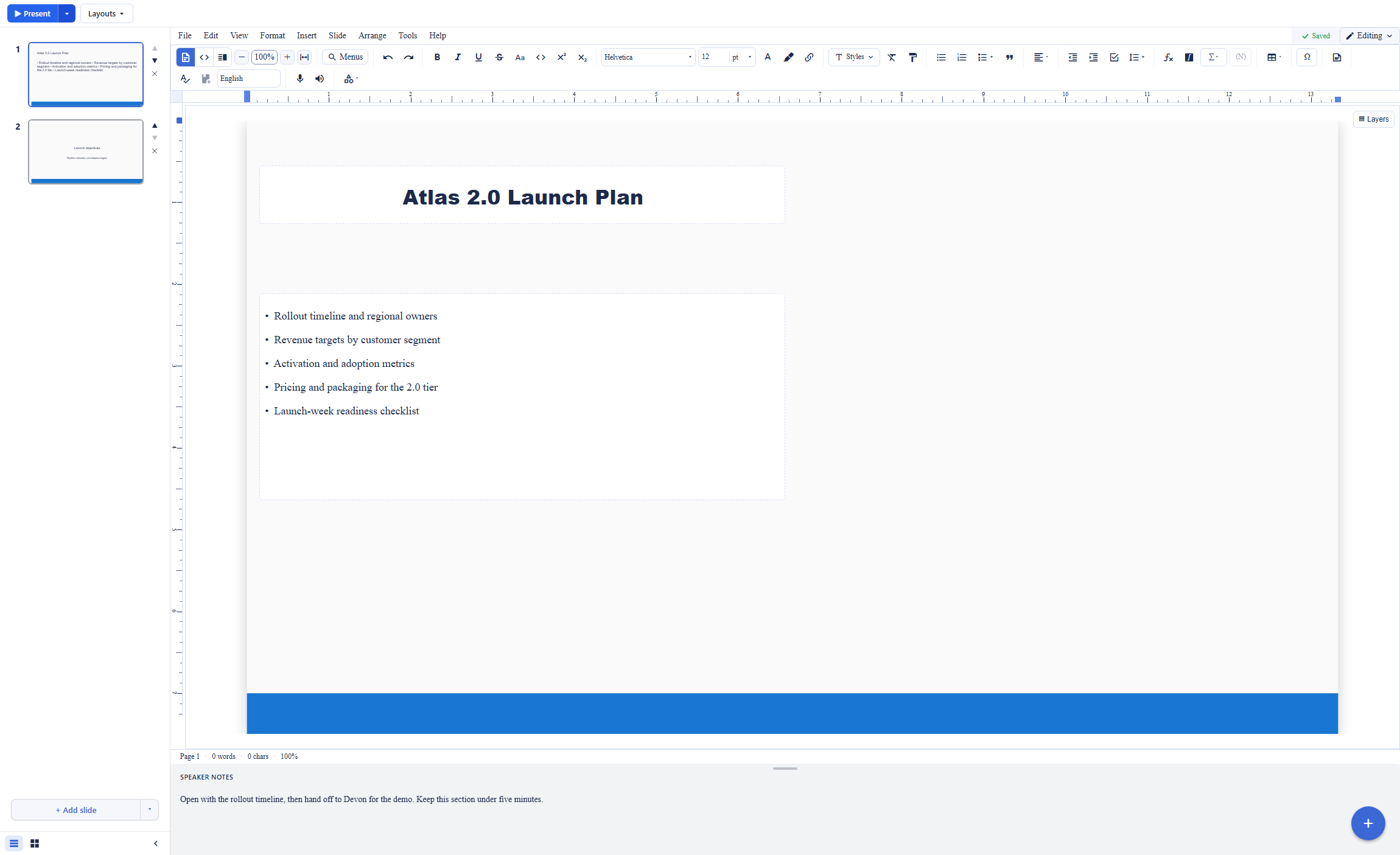
The export path is deck-native. PowerPoint (PPTX) and OpenDocument (ODP) files are assembled by dedicated builders that write real slide objects, text, shapes, and layout preserved as editable slide content, and both formats import back in, so a deck round-trips between Backbuild Slides and Microsoft PowerPoint. Because Backbuild Slides does not carry Morph, SmartArt, or the full PowerPoint animation catalog, a deck built around those features in PowerPoint will keep its text, shapes, and layout on import but will need review where those specific effects were used.
Where Microsoft PowerPoint wins today
Animation and transition depth
PowerPoint has the Morph transition for smooth movement across slides, plus more than a hundred animation effects, motion paths, and the Animation Painter. Backbuild Slides ships nine transitions and ten animation effects, with no Morph equivalent.
Design automation and a template ecosystem
Designer suggests professional layouts automatically, SmartArt turns lists into diagrams, and PowerPoint carries a deep shape, icon, and chart library and an enormous template catalog. Backbuild Slides offers ten curated themes, eight layouts, four shapes, and four diagram scenes.
Copilot one-step generation and rehearsal
Copilot generates a finished deck with body text, images, and speaker notes from a prompt or a Word document, and Speaker Coach rehearses your delivery with AI feedback. Backbuild’s agent builds deck structure and styling but not finished text, and it has no rehearsal coach.
Ubiquity, offline performance, and extensibility
The .pptx format is the presentation standard, the desktop app is fast on very large decks offline, and VBA macros and the Office Add-ins store extend it. Backbuild Slides answers extensibility with a REST API and MCP rather than a macro language and add-in marketplace.
Common Microsoft PowerPoint frustrations and how Backbuild Slides addresses them
Co-authoring tied to OneDrive and SharePoint
PowerPoint real-time co-authoring requires the file to live in OneDrive or SharePoint and everyone to be on Microsoft 365. Backbuild Slides co-edits in real time on a shared workspace document, free for up to 50 people, with no separate file-storage dependency.
Subscription cost and price increases
Full desktop PowerPoint needs a Microsoft 365 subscription, Copilot deck generation is a separate 30 US dollar per user per month add-on, and Microsoft 365 commercial prices rose on 1 July 2026. Backbuild Slides is free on every plan, with AI on usage credits or your own provider key.
A feature-limited free web version
PowerPoint for the web omits desktop features and limits embedded media, and the full app requires a subscription or a one-time Office purchase. Backbuild Slides is a full editor on the free tier, with a native desktop app for Windows and macOS.
SSO and governance behind enterprise tiers
PowerPoint’s single sign-on, provisioning, and audit controls come through Microsoft Entra and Purview on enterprise plans. Backbuild ships single sign-on, SCIM 2.0, role-based access control, and tamper-evident audit logging on every plan, including Free.
No LaTeX-native document surface
PowerPoint has an equation editor that accepts LaTeX input, but it is not a LaTeX authoring surface. Backbuild Slides is native LaTeX built on the Backbuild Docs editor, with live math the same engine renders in technical documents, which suits equation-heavy academic and technical decks.
Locked to Microsoft’s AI models
Copilot runs on Microsoft’s bundled models under a paid license. Backbuild lets you bring your own AI provider and model or run on usage credits, so inference runs under your own provider agreement, a point governance reviews care about.
Which tool wins, by use case
Business and corporate decks
For polished sales, board, and campaign decks, PowerPoint is the deeper design tool: the Designer layout engine, the Morph transition, a vast template ecosystem, and Copilot generation make it the standard for design-heavy corporate work. Backbuild Slides answers a different constraint set: a free editor with real-time co-editing for up to 50 people, governance on every plan for confidential decks, and clean PowerPoint round-trip so a deck moves between the two. For a team that wants brand-heavy visual polish and the full animation catalog, PowerPoint leads; for a team that wants free collaboration and governance around an exportable deck, Backbuild Slides fits.
Educators and technical decks
A lecture or seminar deck carries structure a design tool does not: equations, worked examples, stepwise reveals, and notes to teach from. Backbuild Slides renders live LaTeX math on the slide with the same engine as Backbuild Docs, advances content with step animations, keeps the script in speaker notes on a presenter console, and is free for a whole class or department, up to 50 seats per workspace. PowerPoint presents well and has an equation editor that accepts LaTeX input, plus deeper animation, but its full desktop features and Copilot generation sit behind a subscription, and it is not a native LaTeX authoring surface.
Consultants and client decks
Client work runs on two constraints: the deck must match the client’s brand system, and it usually must arrive as an editable PowerPoint. PowerPoint is the native tool for both, with the deepest layout and animation control in the category. Where Backbuild Slides earns a place in the same workflow is collaboration and governance: import the client’s PPTX, edit with pixel-level control, and export real slide objects back out, with version history covering revision rounds and role-based access and audit logging on every plan covering confidentiality obligations without an enterprise upgrade. Very design-intensive client decks that lean on Morph and SmartArt stay in PowerPoint.
Startups and cost-sensitive teams
A small team balances consolidation and cost. Standardizing on PowerPoint means a Microsoft 365 subscription per person and a separate Copilot add-on for AI generation. Backbuild Slides is free on every plan and sits inside a single workspace that also carries Mail at your own domain, Calendar, Docs, Sheets, and double-entry Finances, so the deck tool is one part of a consolidated stack rather than a separate subscription. The trade is design depth: a team that needs the full PowerPoint feature set still pays for it.
Cross-platform, Linux, and Chromebook users
PowerPoint’s full desktop app runs on Windows and macOS; on Linux and Chromebook the option is the feature-limited web version. Backbuild Slides is web-native and runs in any modern browser, with a native desktop app for Windows and macOS on top, so the full editor is available regardless of operating system, with offline continuity for dropped connections. For teams that are not all on Windows or macOS, this removes the platform constraint entirely.
Developers and technical teams automating decks
Both products expose programmatic surfaces, shaped differently. PowerPoint automates through the Microsoft Graph API and Copilot, plus VBA macros and Office Add-ins, and is the shortest path to a finished deck from a Microsoft-centric pipeline, though Graph access is an enterprise surface. Backbuild’s REST API and MCP tools are the editor’s own control surface: create a deck in a project, then have an agent add, delete, and reorder slides, apply design templates, add shapes, and read every layout and note, on any plan, including Free, with inference on your own provider or usage credits. Finished body text is authored in the editor rather than by the agent.
Security, identity, and governance evaluation
The identity story separates these products at the plan level. Backbuild ships single sign-on, role-based access control, per-organization isolation, and tamper-evident audit logging on every plan, including Free, and SCIM 2.0 provisioning so the identity provider creates, updates, and deactivates users automatically; group membership is managed inside Backbuild rather than pushed over SCIM. Microsoft delivers the same controls through Microsoft Entra and Purview, which are mature and deep, but single sign-on, SCIM provisioning, and administrative audit sit on the business and enterprise tiers rather than the free web app. An organization that requires single sign-on before any tool touches company content provisions it in Entra on a paid plan; on Backbuild both single sign-on and SCIM arrive with the free plan.
On attestations the positions reverse. Microsoft holds SOC 2, ISO 27001, and FedRAMP attestations and publishes them through its Service Trust Portal, one of the most comprehensively audited estates in software. Backbuild documents its controls as built to the requirements of SOC 2 and the related frameworks, with attestations pending rather than published; an evaluation that requires the certificate today records that difference directly.
On data handling, Backbuild’s bring-your-own-provider AI model matters to governance reviews: AI runs under the organization’s own provider agreement and data-processing terms rather than through a vendor’s bundled models, and the workspace includes a zero-knowledge, post-quantum secrets vault for the credentials around the content. Microsoft’s data-handling posture is governed by its own enterprise agreements and Purview data controls, a well-understood estate for organizations already standardized on Microsoft 365.
The economics for a finance and procurement review
The two cost models bill different things. Microsoft bills a subscription and meters AI separately: Microsoft 365 for individuals starts at 9.99 US dollars a month, business plans are per user per month, a one-time Office Home 2024 purchase covers the desktop apps without new features, and Copilot deck generation is a separate 30 US dollar per user per month add-on. Commercial prices rose across most Microsoft 365 plans on 1 July 2026, so the renewal number moves upward for many organizations.
Backbuild prices the workspace, not the deck tool: Backbuild Slides is included on every plan, including Free, which covers teams of up to 50 seats; paid workspace plans start at 19 US dollars per seat per month. AI is metered on monthly usage credits available on every tier, or costs nothing to Backbuild when the organization links its own AI provider key, in which case inference is billed by the provider at the provider’s rate.
For a team whose deck volume is high but whose AI usage is moderate, the Backbuild number is zero; for a team that needs PowerPoint’s full design and animation depth, the comparison is the Microsoft 365 subscription plus the optional Copilot add-on against a free editor with provider-rate inference. The procurement file should model both against actual usage and set the consolidation of the wider Backbuild workspace against the maturity and breadth of the Microsoft 365 estate.
Rolling it out across a team
Adoption friction runs in PowerPoint’s favor for most teams: it is the format the rest of the world sends and receives, the interface is familiar, and Copilot produces a presentable draft immediately for licensed users. The friction that a switch to Backbuild Slides removes is the collaboration and licensing model: co-authoring requires OneDrive or SharePoint and Microsoft 365 seats, and the full feature set requires a subscription per person.
Backbuild’s rollout is browser-first and license-light: co-editing runs free for up to 50 people, PowerPoint users find familiar geometry (fixed slides, layouts, notes, and a presenter view), version history covers the review trail, and offline continuity plus the desktop app keep travel and conference-room work moving. The design ceiling is the honest cost of the switch: a team that depends on Morph, Designer, SmartArt, or the deep animation catalog keeps that work in PowerPoint.
Migration is file-based: existing PPTX and ODP decks import as editable slides, and decks leave the same way, so neither direction locks the archive in. The rollout that fits both products is sequential rather than exclusive: teams standardize collaborative and technical decks in Backbuild Slides and keep design-intensive decks in PowerPoint, moving files across as PPTX because the import path reads them into editable slides.
Strategic fit and vendor risk
Microsoft is the incumbent, and PowerPoint is the most established presentation tool in existence, with decades of ecosystem, the universal .pptx format, and a comprehensively attested cloud estate. The strategic question is not viability but shape and cost: PowerPoint is one app in a per-seat subscription suite, AI generation is a further paid add-on, and the deepest features assume users are on Windows or macOS with a Microsoft 365 license.
Backbuild is earlier-stage and pre-launch in its public posture, a fact an evaluation sets against what ships in the product: the deck editor sits inside an all-in-one workspace of Mail, Chat, Meetings, Calendar, Contacts, Docs, Sheets, Slides, Diagrams, Photos, the Photo Editor, Video Editor, Training Video Editor, Audio Editor, Music Editor, Files, Finances, and the Helpdesk, with the Secrets vault beside them, decks are project objects under the same roles, audit trail, and identity as everything else in that workspace, and the archive round-trips through open, editable formats.
The decision cuts two ways: an organization that needs the deepest presentation design, the largest template ecosystem, and a fully attested estate buys Microsoft PowerPoint; an organization placing decks inside a governed, all-in-one workspace it already intends to run gets the deck editor free and keeps a clean PowerPoint round-trip for the decks that need it.
Frequently asked questions
Is there a free alternative to Microsoft PowerPoint?
Yes. Backbuild Slides is a native LaTeX presentation editor in the free Backbuild workspace, on every plan, with real-time co-editing for teams of up to 50, native PowerPoint and OpenDocument export, live math, and no watermark. Microsoft offers PowerPoint for the web free with a Microsoft account, but the web version omits desktop features such as the Slide Master, custom animation timing, and Speaker Coach, and the full desktop PowerPoint requires a Microsoft 365 subscription from 9.99 US dollars a month for individuals or a one-time Office Home 2024 purchase.
Can Backbuild Slides open and save PowerPoint files?
Yes. Backbuild Slides imports existing PowerPoint (PPTX) and OpenDocument (ODP) decks into editable slides, and exports native PPTX and ODP files plus PDF. The export is assembled by a dedicated builder that writes real slide objects rather than flattening the deck into images, so a deck round-trips between Backbuild Slides and PowerPoint. Very deep PowerPoint features such as Morph transitions, SmartArt, and the full animation catalog do not have a Backbuild equivalent, so a deck built around those will need review after import.
Does Backbuild Slides have the Morph transition and Designer?
No. Microsoft PowerPoint leads on presentation design depth. Its Morph transition animates smooth movement between slides, its Designer suggests professional layouts automatically, and it carries SmartArt, a large shape, icon, and 3D library, dozens of chart types, and an enormous template ecosystem. Backbuild Slides ships nine transitions without a Morph equivalent, ten animation effects, four chart types, and four diagram scenes, with ten curated themes and eight layouts. For freeform visual design and animation, PowerPoint is the deeper tool.
Is Backbuild Slides cheaper than Microsoft PowerPoint?
For editing and presenting, yes: Backbuild Slides is included in the free Backbuild workspace on every plan, with no watermark and real-time co-editing for up to 50 people, and paid workspace plans start at 19 US dollars per seat per month. Microsoft PowerPoint on the desktop requires Microsoft 365, from 9.99 US dollars a month for individuals or business plans per user per month, and Copilot deck generation is a separate add-on at 30 US dollars per user per month. Microsoft 365 commercial prices also rose on 1 July 2026.
Can I use PowerPoint without a subscription?
Partly. PowerPoint for the web is free with a Microsoft account but is feature-limited. For the full desktop app without a subscription, Microsoft sells Office Home 2024 as a one-time perpetual purchase that includes Word, Excel, and PowerPoint and receives security updates but no new features. There is no standalone retail perpetual license for PowerPoint by itself. Backbuild Slides is free on every plan with no card required, and the workspace ships a native desktop app for Windows and macOS.
Can Backbuild Slides generate a deck with AI like Copilot?
The two products use different mechanisms. Copilot in PowerPoint is a built-in generator that turns a prompt or a Word document into a finished draft deck with body text, images, and speaker notes, and it requires a Microsoft 365 Copilot license. Backbuild Slides exposes its deck surface to AI agents over the Model Context Protocol: an AI tool you link, running on your own AI provider or on Backbuild usage credits, can create a deck, add, delete, and reorder slides, set the slide size, apply design templates, add shapes, and read every slide and speaker note. Writing finished body text, generating images, and writing speaker notes through that agent surface are not available today, so an agent delivers a structured, styled deck skeleton and you finish the words in the editor, where Copilot delivers finished draft content in one step.
What does Backbuild Slides do that Microsoft PowerPoint does not?
Real-time co-editing free for up to 50 people with no OneDrive or SharePoint dependency, native LaTeX typesetting built on the same editor as Backbuild Docs, an agent surface that edits an existing deck over the Model Context Protocol on your own AI model, a public REST API for decks on every plan including Free, single sign-on, SCIM provisioning, role-based access control, and tamper-evident audit logging on every plan including Free, and a post-quantum zero-knowledge secrets vault. It is also one editor inside the all-in-one Backbuild workspace, whose apps span Mail, Chat, Meetings, Calendar, Contacts, Docs, Sheets, Slides, Diagrams, Photos, the Photo Editor, Video Editor, Training Video Editor, Audio Editor, Music Editor, Files, Finances, and the Helpdesk, with the Secrets vault beside them.
What does Microsoft PowerPoint do better than Backbuild Slides?
Presentation design depth and ecosystem. PowerPoint has the Morph transition, more than a hundred animation effects with motion paths and the Animation Painter, the Designer layout engine, SmartArt, a deep shape, icon, and 3D library, dozens of chart types, an enormous template and theme ecosystem, Speaker Coach for AI-assisted rehearsal, VBA macros and the Office Add-ins store, Copilot one-step deck generation with image generation and AI speaker notes, strong offline desktop performance on very large decks, and the near-universal .pptx format. Backbuild Slides is a capable deck editor but is not a freeform visual-design equal to PowerPoint on these dimensions.
How do I move my PowerPoint decks to Backbuild Slides?
Import each PPTX file into Backbuild Slides, which reads PowerPoint and OpenDocument files into editable slides. Review the result: decks that rely on Morph, SmartArt, or the deeper PowerPoint animation catalog will need cleanup because Backbuild Slides does not carry those features. Decks that are mostly text, shapes, charts, images, and standard transitions transfer cleanly, and from then on the deck round-trips between Backbuild Slides and PowerPoint through native PPTX export.
Try Backbuild Slides free
A native LaTeX presentation editor with pixel-level control, live math, native PowerPoint and OpenDocument export, real-time co-editing for the whole team, offline continuity, and an AI agent surface over the Model Context Protocol, free on every plan, with no watermark and no per-seat subscription.
Get started with Backbuild Slides