

Apple Photos alternative: Backbuild Photos vs Apple Photos
Backbuild Photos is a private, cross-platform photo library and a professional, non-destructive layer editor, inside a free all-in-one workspace, with governed sharing, images that drop straight into documents and slides, and a public REST API. Your originals stay private, location metadata is stripped on upload, and your stored library is not scanned in the background. Apple Photos is the photo app inside Apple's device and iCloud ecosystem, and it leads on deep integration and iCloud sync across iPhone, iPad, and Mac, on-device machine learning for faces, Memories, and search, Live Photos, native mobile maturity, low-cost bulk storage, and optional end-to-end encryption.
The short answer
Apple Photos is the photo library, editor, and sharing surface inside Apple's device and iCloud ecosystem, alongside iCloud Mail, iCloud Drive, Calendar, and Contacts and the Pages, Numbers, and Keynote apps; on the Backbuild side that job is done by Backbuild Photos with its non-destructive layer editor, governed sharing, and a public REST API, inside the all-in-one Backbuild workspace alongside Mail, Calendar, Docs, Sheets, Slides, and Files. Choose Apple Photos if you live on Apple hardware and your first need is automatic camera-roll backup and iCloud sync across your devices, on-device face grouping, Memories, and search by content, Live Photos, a mature native mobile app, cheap storage for tens of thousands of photos, or end-to-end encryption of your library through Advanced Data Protection, all of which Apple ships today and Backbuild Photos does not. Choose Backbuild Photos if you want a cross-platform, private library with a real, layer-based editor that opens on Windows, macOS, Linux, and the web with no ecosystem lock-in and no monthly cap on edits, governed sharing with roles and audit logging, images that drop straight into your documents and slides, a REST API over the whole library, and a data stance where your stored pictures are not scanned in the background and their location is stripped on upload.
Backbuild Photos vs Apple Photos: feature by feature
Apple Photos is free with 5 GB of iCloud storage shared across your Apple ID, with more storage sold through iCloud+ and its governed, organization use handled by device management rather than a photo admin console. Prices and plan gating below are quoted from Apple's own plans and support pages, observed 2026-07-20. The highlighted column is Backbuild Photos.
| Backbuild Photos A cross-platform private photo library and pro editor in the free workspace Free on every plan; file-storage allowance plus credits, wider workspace from $19/seat Get Started Free | Apple Photos The photo app in Apple's device and iCloud ecosystem 5 GB free with an Apple ID; iCloud+ 50 GB $0.99/mo, 200 GB $2.99/mo, 2 TB $9.99/mo | |
|---|---|---|
| Storage and price | ||
| Free storage included | Allowance plus credits | 5 GB, shared across iCloud |
| Low-cost bulk storage for a large library | Metered in credits | 2 TB for $9.99/mo |
| Very large storage tiers for an archive | Scales with credits | Up to 12 TB, $59.99/mo |
| Library and organization | ||
| Upload from a computer, with full-resolution download | ||
| Albums | ||
| Manual slideshow builder with Ken Burns motion | Auto slideshows and Memories | |
| Perceptual-hash duplicate finder and batch processor | Duplicates detection and merge | |
| Favorites and a Favorites view Soon | On the roadmap | |
| Recoverable trash or bin with restore Soon | Soft delete today; restore soon | Recently Deleted, 30 days |
| The image editor | ||
| Crop, filters, and one-tap fixes | ||
| Camera RAW and ProRAW develop | ||
| Layer stack with groups, masks, and blend modes | ||
| Selection engine (marquee, lasso, magic wand, subject select) | ||
| Healing brush, content-aware fill, and object removal | Clean Up removal | |
| Curves, channels, color balance, and selective color | ||
| Non-destructive edits that never overwrite the original | Revert to original | |
| Version lineage you can branch from | ||
| Monthly cap on advanced or AI edit saves | No cap | No cap |
| AI image tools | ||
| Generate an image from a text prompt in the library | ||
| Generative fill inside the editor | Clean Up infill only | |
| AI runs only on the request you make, not over your stored library | On-device analysis of the library | |
| Search and intelligence | ||
| Search by file name and camera details | ||
| On-device machine-learning search by content (places, objects, text) | ||
| Natural-language semantic search | ||
| Face and pet grouping with a People and Pets view | ||
| Automatic Memories and highlight resurfacing | ||
| Backup, mobile, and cross-platform reach | ||
| Automatic phone camera-roll backup and cross-device sync | ||
| Live Photos and motion photos | ||
| Native mobile app Soon | Built; store rollout in progress | Mature on iOS and iPadOS |
| Native desktop app | Windows and macOS | macOS, plus iCloud for Windows |
| Web app in any browser | iCloud.com, limited editing | |
| Native Android access | Web app on any device | |
| Cross-platform, not locked to one hardware ecosystem | Apple devices, plus Windows and web | |
| Sharing and governance | ||
| Shareable link | iCloud Link | |
| Expiring and revocable public link | Remove access | |
| Shared library that fills from several people's phones | iCloud Shared Photo Library | |
| Eight granular share scopes (person, role, group, department, project, organization, everyone signed in, public link) | ||
| Role-based access control and audit logging on every plan | Free, every plan | |
| Single sign-on and SCIM provisioning | Free, every plan | |
| Per-organization data isolation | ||
| API, agents, and automation | ||
| Public REST API across the whole photo library (upload, albums, slideshows, shares, generate) | ||
| Drivable by an AI agent over the platform's tool surface | ||
| AI assistant included on every plan, bring your own model | Apple Intelligence, no model choice | |
| Privacy and data | ||
| Photo-library end-to-end encryption | Advanced Data Protection, opt-in | |
| Encrypted at rest and in transit | ||
| Location metadata stripped on upload | ||
| No passive machine-learning analysis of your stored library | On-device analysis, private | |
| Immutable, content-addressed originals | ||
| No advertising use of your data | Stated by Apple | |
| Workspace apps around Photos | ||
| Photos app (Apple's offering: Apple Photos) | Backbuild Photos | Apple Photos |
| On-device face grouping, Memories, and content search | ||
| Live Photos and automatic camera-roll backup | ||
| Photo-library end-to-end encryption via Advanced Data Protection | ||
| Non-destructive layer editor with masks and no monthly cap | ||
| Eight granular share scopes with role-based access and audit | ||
| Public REST API over the whole library | ||
| Cross-platform web-native access on any device | ||
| Mail at your own domain (Apple's offering: iCloud Mail) | Backbuild Mail | iCloud Mail |
| Own-domain mailbox with governed team access and audit | Custom domain via iCloud+, no org roles | |
| Documents, spreadsheets, and slides (Apple's offering: Pages, Numbers, Keynote) | Backbuild Docs, Sheets, Slides | Pages, Numbers, Keynote |
| Native LaTeX documents and decks with live math | ||
| Polished, widely-used consumer document apps | ||
| Calendar (Apple's offering: iCloud Calendar) | Backbuild Calendar | iCloud Calendar |
| Cloud file storage (Apple's offering: iCloud Drive) | Backbuild Files | iCloud Drive |
| Contacts | ||
| Team chat (Apple's offering: Messages) Soon | Backbuild Chat on the roadmap | Messages |
| Video meetings (Apple's offering: FaceTime) Soon | Backbuild Meetings on the roadmap | FaceTime |
| Diagrams and whiteboard (Apple's offering: Freeform) Soon | Backbuild Diagrams on the roadmap | Freeform |
| Training-video editor (Backbuild Studio screen-demo videos from a script) | iMovie, general video | |
| Video, audio, and music editors Soon | Authoring preview | iMovie and GarageBand |
| Double-entry accounting and invoicing (Backbuild Finances) | ||
| Built-in help desk (tickets, workflow states, assignment) | 20 tickets/mo Free; unlimited paid | |
| Password and secrets manager | Zero-knowledge post-quantum vault | iCloud Keychain and Passwords |
| Remote desktop and cloud desktops | ||
| Autonomous AI workers on real containers | ||
A cross means the product does not offer the feature today. Soon means the feature is on the Backbuild roadmap and not shipped yet. Apple Photos, iCloud storage, and iCloud+ prices and feature availability are quoted from the iCloud+ plans page, Apple Photos support, and the Apple Intelligence page, observed 2026-07-20. In the workspace apps group, each row where Apple has a similar offering names it, the indented rows beneath list the features that differ in both directions, and a cross marks a workspace app one product does not offer.
What happens to a photo when you upload it
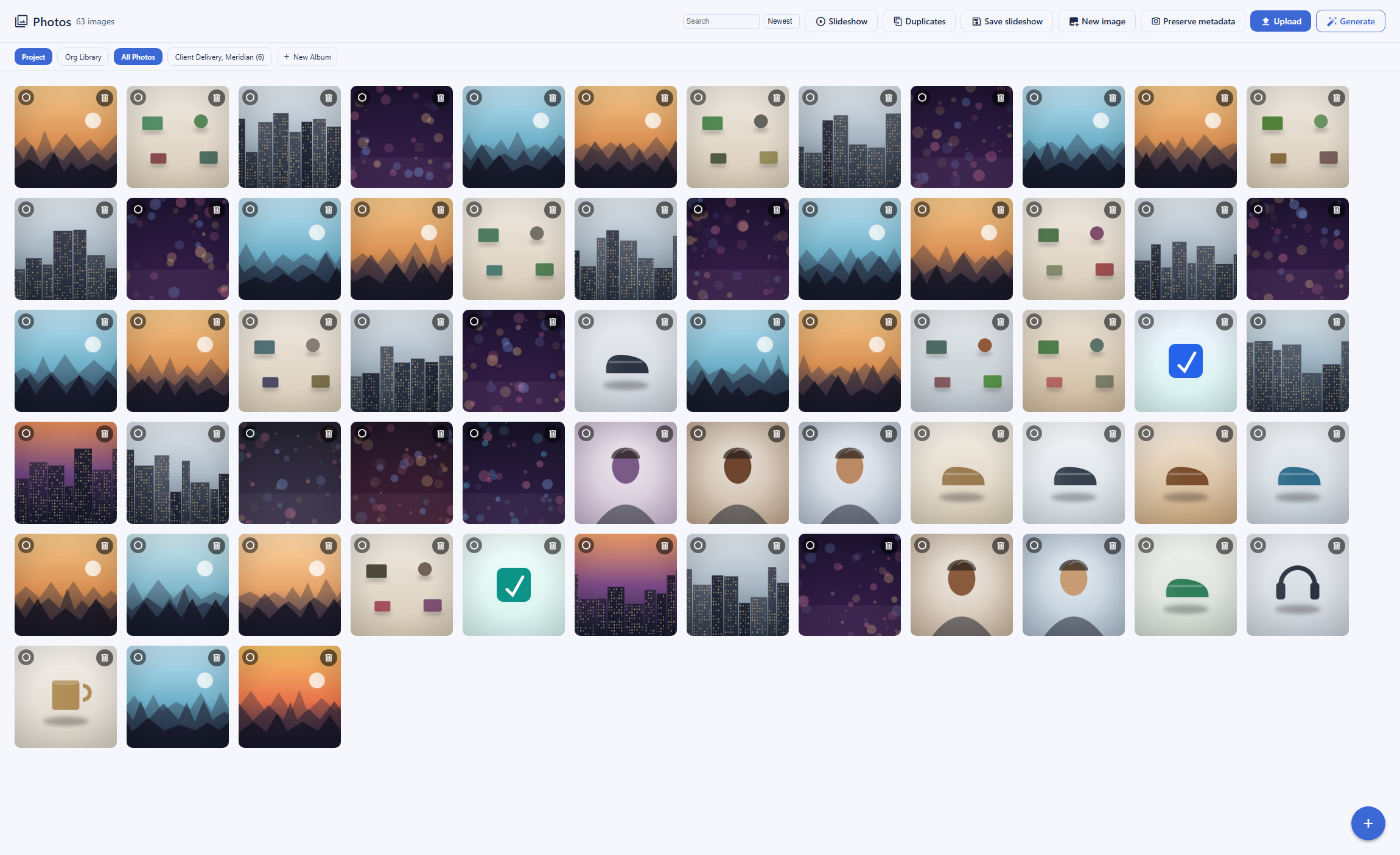
One clear difference between the two products is what each does with the image after it lands. In Backbuild Photos the upload path is fail-closed on privacy: before an image is stored, its EXIF, XMP, and IPTC metadata is scrubbed, GPS coordinates and other location fields are removed, and a file whose metadata cannot be scrubbed is rejected rather than stored with location intact. The safe details, such as dimensions and capture time, are kept for display and search. The stored original is then content-addressed and immutable, and every later edit produces a new render above it rather than overwriting it. Nothing scans, indexes, or face-groups the library in the background. Apple Photos, by design, does something different with the same file: it keeps the photo as captured, including Live Photo motion, and runs on-device machine learning over it to group faces, recognize objects and text, and build Memories, all processed privately on the device rather than on a server. That on-device analysis is what makes searching your library by face or place work, and Apple can additionally protect the stored library with end-to-end encryption through Advanced Data Protection, which is optional and off by default. The two products sit at different points: Apple offers powerful, private, on-device intelligence plus optional end-to-end encryption, and Backbuild Photos offers a library that is held rather than analyzed, with location stripped on upload.
Apple runs its intelligence privately on the device and can end-to-end-encrypt the library with Advanced Data Protection. Backbuild Photos trades that on-device intelligence for a library that is stored, not scanned, with location stripped on upload.
Editing inside the library, not around it
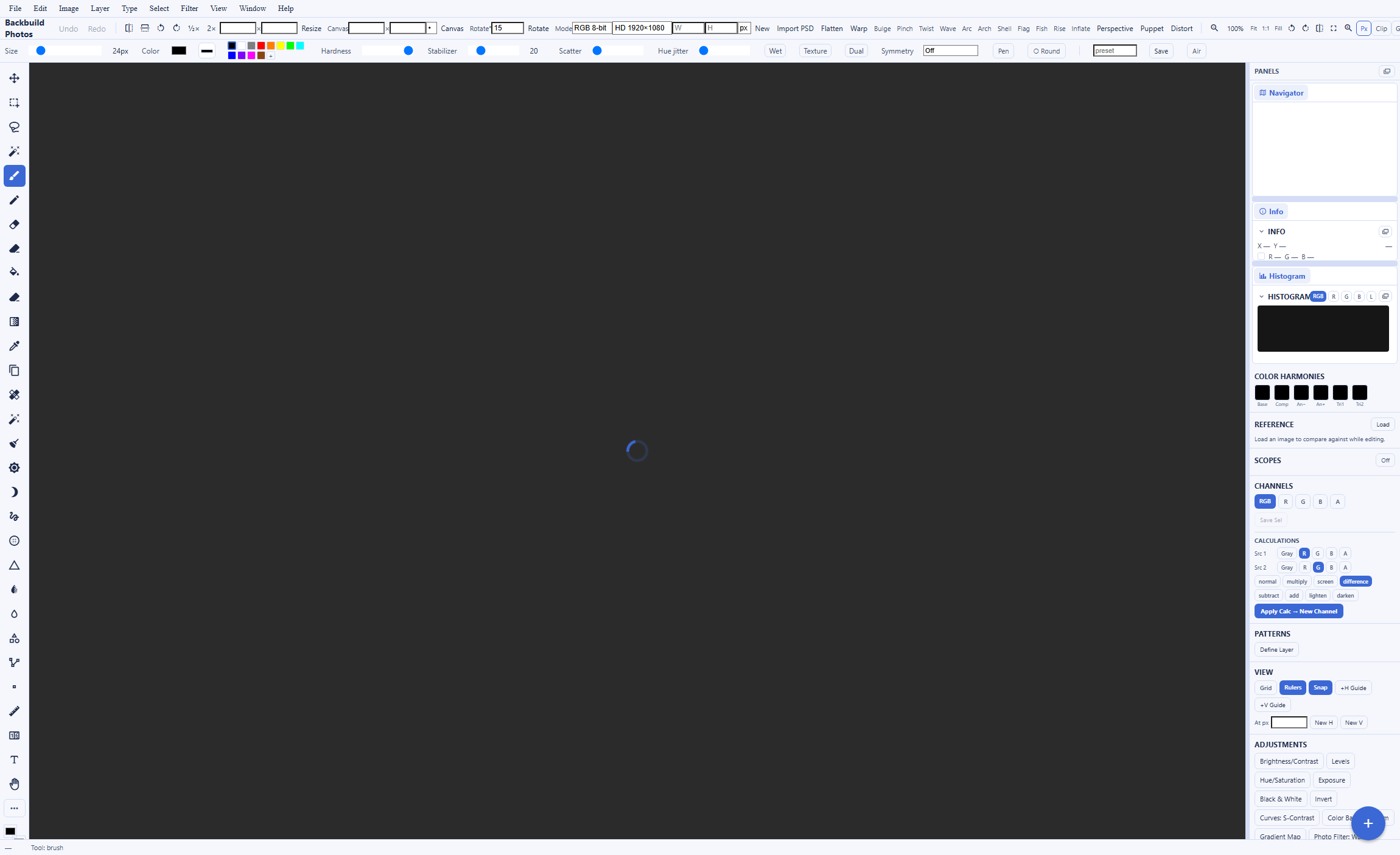
A second large difference is the editor. Backbuild Photos includes a non-destructive, layer-based image editor with a layer stack, groups, masks, and blend modes; a selection engine with marquee, lasso, magic wand, one-click subject select, and background removal; retouching with a healing brush and content-aware fill; curves, channels, color balance, and selective color; and a camera RAW develop panel. Every change lives above the untouched original, saving records a version lineage you can branch from, and there is no monthly cap on how many edits you can make. That means a photo is edited inside the same tool that stores it, on any device, rather than in a download, edit elsewhere, and re-upload loop. Apple Photos also has a capable non-destructive editor with light and color adjustments, filters, portrait and depth edits, camera RAW and ProRAW develop, and Clean Up object removal, and it does not cap edits, but it offers no layer stack, masks, selections, or curves. Its editor is a polished set of adjustments, filters, and AI fixes; it is not a layer-based editor.
Governed sharing across eight scopes
Apple Photos sharing is built for people: an iCloud Link, Shared Albums that others can view and comment on, and an iCloud Shared Photo Library that a small group can add to and edit equally from their phones. That is a mature consumer sharing model, and for a family it is excellent. Backbuild Photos shares with a different job in mind, the same access model as the rest of the workspace: a photo can be granted to a specific person, a role, a group, a department, a project, the whole organization, everyone signed in, or a public link that you can set to expire and revoke, and the person re-sharing can never grant more than they hold, bounded by the organization's sharing ceiling. Read access confers viewing and copying, write access confers re-sharing, every image is delivered through an authorized, streamed URL rather than a public path, and every grant is recorded in a tamper-evident audit log on every plan. This is the model a team storing brand and product assets needs, and Apple Photos, built for personal and family use, has no roles, no organization scopes, and no audit trail.
Where Apple Photos leads today
Apple Photos is mature, deeply integrated, and widely loved, and on the jobs it was built for it is excellent. Several of its strengths are things Backbuild Photos does not match today.
Deep Apple-device integration and iCloud sync
On iPhone, iPad, and Mac, Apple Photos is the default and it syncs your whole library across every Apple device automatically, with camera-roll backup in the background. Backbuild Photos expects a deliberate upload from a computer and has no automatic phone backup today. For a household on Apple hardware, Apple leads outright.
On-device machine learning, faces, and Memories
Apple Photos groups People and Pets, builds automatic Memories, and lets you search by face, place, object, text, and natural language, all processed privately on the device. Backbuild Photos searches file names and camera details, not image contents, and does not group faces. For finding one photo in tens of thousands, Apple leads.
End-to-end encryption of the library
With Advanced Data Protection, which is optional and off by default, Apple end-to-end encrypts iCloud Photos so that Apple cannot read your images. Backbuild Photos is encrypted at rest and in transit but is not end-to-end encrypted; its zero-knowledge encryption is the separate Secrets vault. For a library the provider cannot read, Apple leads.
Live Photos, native mobile, and cheap storage
Apple Photos keeps Live Photos, ships mature native mobile apps that most people use as their primary photo app, and sells storage cheaply, from 50 GB at $0.99 a month up to 12 TB. Backbuild Photos stores raster stills, its native mobile app is still rolling out, and its storage is metered in credits. For a phone-first user with a big library, Apple leads today.
Common Apple Photos frustrations and how Backbuild Photos addresses them
Locked to one hardware ecosystem
iCloud Photos is native only on Apple devices, with an iCloud for Windows app and a limited web view, and no native Android app. Backbuild Photos runs in any browser and in a Windows and macOS desktop app, so the same library opens on Windows, macOS, Linux, and Android without a per-device ecosystem.
Photos siloed away from your work
Apple Photos sits apart from your documents and decks. Backbuild Photos is part of the workspace, so you insert a project's images straight into a document or a slide from a picker, with no re-upload and no external link, and the whole library is drivable over the REST API.
No real controls for shared or brand assets
Apple Photos sharing is built for people and families, without roles or an audit trail. Backbuild Photos shares with eight granular scopes, expiring links, role-based access control, and audit logging on every plan, which is what a team storing brand and marketing assets needs.
Your library analyzed to make search work
Apple's finding power comes from on-device models that read your pictures to group faces and index content. That analysis is private and on the device, but it is still analysis of your whole library. Backbuild Photos does no passive machine-learning analysis of your stored library and strips location metadata on upload, so your pictures are held, not scanned; the AI it does ship runs only on a generate or fill request you make. The trade is real: you give up content search and faces to get it.
Which tool wins, by use case
A mixed-device or cross-platform household
For someone whose devices are not all Apple, a Windows PC, an Android phone, a Linux laptop, iCloud Photos is a poor fit: it is native only on Apple devices, with a limited iCloud for Windows app and no native Android app. Backbuild Photos runs in any browser and in a Windows and macOS desktop app, so the same library, albums, editor, and shares open on every platform. The counterweight is that Backbuild Photos does not do automatic phone backup and its free storage allowance is smaller, so a mixed-device household gains reach but manages uploads deliberately.
Backing up a personal iPhone library
For someone who wants every photo off their iPhone and safe on every Apple device, with nothing to manage, Apple Photos is hard to beat: automatic camera-roll backup and iCloud sync, a mature native app, search by face and content, Live Photos, and cheap storage at scale. Backbuild Photos does not do automatic phone backup and its free storage allowance is smaller, so it is not the tool for this job today.
Editing photos seriously
For anyone who edits rather than just stores, Backbuild Photos is the stronger tool. It is a non-destructive, layer-based editor with masks, selections, a healing brush and content-aware fill, background removal, curves and color grading, camera RAW develop, and generative fill, with no monthly cap on edits and a version lineage on every save, so the photo is edited inside the tool that stores it rather than in an external download and re-upload loop. Apple Photos has a capable, polished editor with light and color adjustments, filters, ProRAW develop, and Clean Up removal, but it offers no layer stack, masks, selections, or curves. The counterweight is that Apple's library, with its backup and search, is where most people keep the photos they then edit.
Privacy-conscious people leaving the Apple ecosystem
Privacy is the one area where the honest answer is nuanced, because Apple is genuinely strong here. With Advanced Data Protection turned on, Apple end-to-end encrypts iCloud Photos so that even Apple cannot read the library, and its intelligence runs privately on the device. Backbuild Photos is not end-to-end encrypted, so on that specific axis Apple leads. What Backbuild Photos offers instead is a different privacy posture: no passive machine-learning analysis of your stored library, location metadata stripped on upload, immutable originals, and per-organization isolation, in a cross-platform workspace you control at your own domain, with governed sharing and an audit trail. For a reader whose priority is that the provider be unable to read the library, Apple with Advanced Data Protection is the right choice; for a reader who wants a library that is never profiled or analyzed and is not tied to one ecosystem, Backbuild Photos fits.
Teams managing brand and marketing image assets
A team storing logos, product shots, and campaign images needs controlled sharing and a real editor, not a personal camera roll. Backbuild Photos gives them a project library with albums, a professional editor, and full-resolution download, shared with eight granular scopes, expiring links, role-based access control, and audit logging on every plan, images that drop straight into the team's docs and slides, and a REST API to wire the library into other systems. Apple Photos is a consumer and family product: it has no roles, no organization scopes, no audit trail, and no photo REST API, and Apple Business Manager is device management rather than a photo governance surface.
All-in-one workspace seekers
For someone who wants their images next to their mail, documents, sheets, and calendar in one governed place, Backbuild Photos is part of one free workspace spanning Mail at your own domain, Chat, Meetings, Calendar, Contacts, real-time Docs, Sheets, and Slides, and Diagrams, with dedicated photo, video, training video, audio, and music editors, Files, Backbuild Finances, a built-in help desk, and a secrets vault, and its photos insert straight into those documents and slides. Apple offers real breadth too, with Pages, Numbers, and Keynote, iCloud Mail, iCloud Drive, Calendar, and Freeform, and long-standing polish, but its suite is oriented to individuals on Apple hardware rather than to an organization: it lacks double-entry accounting, a help desk, a public REST API across the suite, and single sign-on, SCIM, roles, and audit for governed team use.
The daily photo experience
A person evaluating these two products for daily use is comparing the same loop: getting photos in, finding them again, and editing them. On getting photos in, Apple is stronger for the phone-first case on Apple hardware: automatic camera-roll backup and iCloud sync mean the library fills itself and appears on every Apple device, where Backbuild Photos expects a deliberate upload from a computer and its native mobile app is still rolling out. On finding photos again, Apple is clearly ahead: on-device search by face, place, object, and text, natural-language queries, and automatic Memories against Backbuild Photos's search over file names and kept camera details. The trade a buyer accepts is intelligence for a privacy stance: Apple's finding power comes from analyzing the library on the device, and Backbuild Photos deliberately does not analyze it at all.
On editing, the order reverses for anyone who wants depth. Backbuild Photos is a layer-based editor with masks, selections, curves, RAW develop, and no monthly cap, where Apple Photos offers polished adjustments, filters, ProRAW develop, and Clean Up removal without a layer stack. The daily bottom line: Apple owns the capture-and-find half of the loop for an Apple user, Backbuild Photos owns the deep-edit half and the cross-platform reach, and which one wins a given person's day depends on whether their photos are mostly memories to archive and search on Apple devices, or images to work on across platforms.
Rolling it out across a team
The person who standardizes a team on a photo tool answers for shared access, control, and the reality that Apple Photos was built for people and families rather than for an organization. On shared access, Backbuild Photos gives a team eight granular share scopes, expiring links, and re-sharing bounded by the organization's sharing ceiling, where Apple Photos offers an iCloud Link, Shared Albums, and a small equal-edit Shared Photo Library with no roles. On control and evidence, Backbuild Photos records every grant in a tamper-evident audit log and isolates each organization's library, free on every plan, and the whole library is reachable over the REST API for inventory and automation, where Apple has no photo REST API and Apple Business Manager governs devices rather than a photo library.
The Apple path has real advantages the rollout owner should note. If the team is already on Apple hardware, the library, sync, and editing are already there with nothing to deploy, and staff know the app. But for governed image storage, an audit trail, and API access without depending on everyone owning an Apple device, Apple Photos was not designed for the job. The rollout bottom line: for a team that wants governed, cross-platform image storage, a real editor, and API access on every plan, Backbuild Photos does the structural work; for a team standardized on Apple hardware that mainly wants each person's photos captured and searchable, Apple Photos fits the existing habit.
Security, identity, and data governance evaluation
A security review of a photo platform turns on identity controls, isolation, evidence, and what the vendor does with the pictures. On identity, Backbuild ships single sign-on and SCIM user provisioning on every plan, including Free, with organization-scoped roles, where Apple Photos has no organization identity model at all: an Apple ID is a personal account, and Managed Apple IDs through Apple Business Manager govern devices, not a shared photo library. On isolation and evidence, every photo read and write in Backbuild Photos is authorized against organization-scoped roles, each organization's library is isolated, and every share is recorded in a tamper-evident audit log, free on every plan, none of which a consumer photo product provides.
On what the vendor does with the pictures, the two land in genuinely different places, and here Apple is strong. Apple runs its intelligence privately on the device rather than on a server, states that Photos data is not used for advertising, and can end-to-end encrypt the whole library with Advanced Data Protection so that Apple itself cannot read it. That is a leading privacy position, and Backbuild Photos does not offer end-to-end encryption of the library; its zero-knowledge, post-quantum encryption is the separate Secrets vault. What Backbuild Photos offers instead is a library that is not analyzed at all: it strips GPS and location metadata on upload, rejecting a file it cannot scrub, keeps immutable originals, and runs no passive machine-learning analysis over the stored library. One caveat cuts across both: Backbuild is built to the common frameworks but is not yet third-party audited, where Apple carries a long record of published security documentation. A reviewer whose first requirement is a library the provider cannot read leans Apple with Advanced Data Protection; a reviewer who wants organization identity, least-privilege access with attribution on every plan, and a library that is never analyzed leans Backbuild.
The economics for a finance and procurement review
The cost comparison has three parts: what the library costs, what forces an upgrade, and what the choice displaces. On storage cost, Apple is the better value for a large personal library: 5 GB free, then 50 GB for $0.99, 200 GB for $2.99, and 2 TB for $9.99 a month, against a Backbuild Free allowance that is smaller with overage metered in usage credits. On governance cost, the comparison changes shape: Apple Photos has no organization tier to buy because it is a consumer product, so a team needing roles, single sign-on, and an audit trail over its images cannot get them from Apple Photos at any price, while Backbuild Photos includes that whole surface free on every plan.
On displacement, Backbuild Photos folds the editor, governed sharing, the REST API, and the wider workspace, including accounting and invoicing and a secrets manager, into one free plan across every platform, where the Apple equivalent depends on the team owning Apple hardware and still leaves accounting, a help desk, and governed API access to separate tools. Procurement can price the difference concretely: for cheap bulk storage of memories on Apple devices, Apple is the lower cost; for governed, cross-platform image storage with a real editor and an API, Backbuild Photos removes an ecosystem dependency and consolidates several tools, trading away some storage economics and a few not-yet-shipped conveniences for it.
Strategic fit and vendor considerations
The strategic question is which bet each product represents. Apple Photos is one app in Apple's device and iCloud ecosystem, a mature, beloved, deeply integrated environment whose scale and hardware integration are the asset: the mobile apps are the default on more than a billion devices, the on-device intelligence is best in class, storage is cheap, and Advanced Data Protection offers real end-to-end encryption. An individual or family living on Apple hardware whose priority is capturing, finding, and privately keeping a lifetime of photos is squarely in Apple's center of gravity. Backbuild Photos is one surface in a younger workspace platform whose bet is cross-platform reach, consolidation, in-place editing, and programmability: a photo library, a layer editor, mail, calendar, docs, sheets, slides, files, accounting, a help desk, and a secrets vault in one subscription, on any device, at your own domain, with a public REST API and bring-your-own-AI automation across every surface, and governance on every plan.
Lock-in and continuity run differently on each side. Apple's ecosystem is deeply integrated and its value grows the more Apple hardware you own, which is also the dependency a cross-platform buyer wants to avoid; exports are available but the library is happiest inside Apple. Backbuild's bet is younger: several surfaces, including native mobile distribution, favorites, and a restore-from-trash view, are marked Soon, and third-party audits are not yet in hand, but its immutable, content-addressed originals and full-resolution export over the app and the API keep your files portable across platforms. An organization betting on cross-platform reach, consolidation, in-place creative work, and governed image assets at its own domain is betting with Backbuild's roadmap; an individual or family betting on the most mature, most deeply integrated, privately intelligent photo library on Apple hardware is betting with Apple.
Frequently asked questions
Is there a free alternative to Apple Photos?
Yes. Backbuild Photos is the photo library and image editor in the free Backbuild workspace, included on every plan alongside Mail at your own domain, Chat, Meetings, Calendar, Contacts, Docs, Sheets, Slides, and Diagrams, with dedicated photo, video, training video, audio, and music editors, Files, Backbuild Finances, and a built-in help desk. It reaches your library from any device on the web rather than tying it to one hardware ecosystem. The difference is what free covers. Apple gives every Apple ID 5 GB of iCloud storage shared across Mail, Drive, backups, and Photos, while the Backbuild Free plan includes a file-storage allowance plus usage credits, with storage beyond the allowance metered in credits. Backbuild Photos is the better fit when you want a private, cross-platform, in-workspace library, a real editor, and governed sharing, rather than the deepest integration with Apple hardware.
Can I use Apple Photos on Windows or Android?
Only partially. Apple Photos and iCloud Photos are native on iPhone, iPad, and Mac, and Apple ships an iCloud for Windows app plus a web view at iCloud.com, but there is no native Android app, so Android access is web-only with reduced editing. That single-ecosystem design is why many people search for an alternative. Backbuild Photos runs in any modern web browser and in a native Windows and macOS desktop app, so the same library opens on Windows, macOS, Linux, and Android without a per-device ecosystem, which is the main reason a mixed-device household would choose it.
Is Apple Photos end-to-end encrypted, and is Backbuild Photos?
Apple Photos can be end-to-end encrypted. iCloud Photos is encrypted at rest and in transit by default with Apple holding the keys, and Advanced Data Protection, which is optional and off by default, upgrades iCloud Photos to end-to-end encryption so that Apple cannot read the images. On a photo-library end-to-end-encryption axis, Apple leads. Backbuild Photos is not end-to-end encrypted. It is encrypted at rest and in transit and it strips location metadata on upload, but the zero-knowledge, post-quantum encryption in Backbuild is the separate Secrets vault, not Photos. If your first requirement is that the provider be unable to read your photo library, turn on Advanced Data Protection in Apple Photos.
Does Backbuild Photos back up my iPhone automatically?
Not today. Backbuild Photos is not a phone backup service. You upload images from a computer with a file picker or drag and drop, and there is no background auto-upload from a phone camera roll yet. Automatic camera-roll backup and sync across Apple devices is a core reason people use Apple Photos, and Apple leads on that point outright. If your first requirement is that photos leave your phone by themselves and appear on every Apple device, Apple Photos is the right tool.
Does Backbuild Photos have face recognition, Memories, and semantic search like Apple Photos?
No. Apple Photos runs on-device machine learning that groups People and Pets, builds automatic Memories, recognizes objects, scenes, and text, and answers natural-language searches, all processed privately on the device. Backbuild Photos does none of that today: its search matches the file name and the camera details that were kept, not the contents of the image, and it does not detect or cluster faces. That is a real capability gap, and it is also a deliberate data stance, because Backbuild Photos does not run passive machine-learning analysis over your stored library and strips location metadata on upload. The AI image tools it does ship, generating an image from a prompt and filling a selection, run only when you invoke them, not in the background over everything you have uploaded.
Is Backbuild Photos cheaper than Apple Photos for storage?
For bulk storage, Apple is the better value. Apple gives 5 GB of iCloud storage free and sells iCloud+ storage inexpensively, about 0.99 US dollars a month for 50 GB, 2.99 US dollars a month for 200 GB, and 9.99 US dollars a month for 2 TB. Backbuild Photos is part of a free workspace, but its free file-storage allowance is smaller and storage beyond the allowance is metered in credits. For storing a large phone library cheaply, Apple is the better value. Backbuild Photos earns its place on the editor, the cross-platform reach, the governed sharing, the REST API, and the workspace it lives in, not on cost per gigabyte.
Can I really edit photos in Backbuild Photos, and is there a monthly limit?
Yes, and there is no monthly limit on edits. Backbuild Photos includes a professional, non-destructive, layer-based editor with masks, selections, a healing brush and content-aware fill, curves and color grading, camera RAW develop, and transforms, plus AI generative fill you invoke inside the editor. Your original file is never overwritten, and saving records a version lineage you can branch from. Apple Photos has a capable non-destructive editor with light and color adjustments, filters, camera RAW and ProRAW develop, and Clean Up object removal, and it does not cap edits either, but it has no layer stack, masks, or curves. For layer-based editing, Backbuild Photos is the stronger tool; for a quick, polished edit on an Apple device, Apple Photos is excellent.
Try Backbuild Photos free
A cross-platform, private photo library, albums and slideshows, and a professional, non-destructive layer editor with no monthly cap on edits, inside a free all-in-one workspace, with governed sharing, a public REST API, images that drop straight into your documents and slides, and a data stance where your stored library is not scanned and its location is stripped on upload. If your first requirement is automatic backup and sync across Apple devices, on-device search and faces, Live Photos, or end-to-end encryption of your library, Apple Photos is the stronger choice today.
Get started with Backbuild Photos