

Microsoft Word alternative: Backbuild Docs vs Microsoft Word
Microsoft Word is the deepest and most widely adopted desktop word processor, part of Microsoft 365 with Copilot and the Microsoft identity and compliance estate. On the Backbuild side that job is done by Backbuild Docs, a WYSIWYG editor whose stored format is LaTeX, with live math and an optional machine-checked proof surface, together with the platform around it: AI on your own provider with no training on your content, an MCP and REST API surface, single sign-on with audit on every plan, a zero-knowledge secrets vault, and the full Backbuild workspace. Microsoft Word is deeper on most raw word-processing dimensions, and the sections below say where.
The short answer
Microsoft Word is the most mature and most universally adopted word processor, with decades of formatting and styles depth, a mature track changes and review workflow, a built-in citation and bibliography manager, mail merge, VBA macros, a very large template ecosystem, strong desktop performance on large documents, the universal .docx format, native offline, mature mobile apps, a deeper accessibility checker, and the Microsoft 365 and Copilot ecosystem. Backbuild Docs is a WYSIWYG word processor whose stored format is LaTeX, with live math and an optional proof surface, carried by the Backbuild platform: real-time co-authoring, the AI assistant on your own AI provider or usage credits, the MCP and REST API surfaces, single sign-on with SCIM and audit on every plan, the zero-knowledge Secrets vault, and the full Backbuild workspace. Microsoft Word is the stronger choice for the deepest formatting, the mature citation manager, the template ecosystem, very large documents, mobile, accessibility maturity, and exact .docx fidelity. Backbuild Docs fits teams that need native LaTeX and mathematics, machine-checked proofs, AI that runs under their own provider agreement and does not train on their content, and identity controls on every plan.
Backbuild Docs vs Microsoft Word: feature by feature
Prices and limits below are quoted from each vendor's own pages, observed 2026-07-20. The highlighted column is Backbuild Docs. In the workspace apps group, the Microsoft Word column reflects the Microsoft 365 suite it ships inside.
| Backbuild Docs WYSIWYG LaTeX editor in the free workspace Free on every plan; workspace from $19/seat Get Started Free | Microsoft Word Desktop word processor in Microsoft 365 Free on the web; Microsoft 365 from about $7/user/mo | |
|---|---|---|
| Price and access | ||
| Starting price | Free, up to 50 team members | Free web; Microsoft 365 from about $7/user/mo |
| Free tier | Full app, free for up to 50 | Word for the web, reduced features |
| Installed desktop application | Windows and macOS | Windows and macOS, with Microsoft 365 |
| Perpetual, non-subscription option | Office one-time purchase | |
| AI included with the base plan | Your own AI keys, or usage credits | Copilot, metered or an add-on |
| Editing and formatting | ||
| WYSIWYG editing surface | ||
| Depth of styles and formatting | Strong, LaTeX-backed | Deepest in the category |
| Page setup, live rulers, columns, headers and footers | ||
| Tables, shapes, and WordArt | ||
| In-document structured diagrams | Diagram picker: process, hierarchy, cycle, grid | SmartArt, larger library |
| Performance on very large documents | Live render from a local copy | Mature desktop engine |
| Native .docx as the stored format | Import and export; native format is LaTeX | Native, universally ubiquitous |
| Mathematics and typesetting | ||
| Native LaTeX as the stored format | ||
| Editable LaTeX source and split view | ||
| Math renders as you type | Live, native | Equation editor, LaTeX-style input |
| Visual equation builder and symbol palette | Equation toolbar | |
| Export submission-ready LaTeX | ||
| Collaboration and review | ||
| Real-time co-authoring with presence | Co-authoring on OneDrive and the web | |
| Comments and mentions | ||
| Tracked changes | Free; deletion marking maturing | Mature track changes and compare |
| Version history and named versions | Version history on OneDrive | |
| Offline editing | Offline-first web, plus desktop apps | Mature native desktop offline |
| Productivity and automation | ||
| Mail merge from a data source | Mature mail merge | |
| Macro record and replay | ||
| Full macro programming language | Via MCP tools, Tool Builder, and the REST API | VBA, in the document |
| Voice typing and dictation | Browser speech recognition | Dictate, mature |
| Read aloud | Read Aloud | |
| References and citations | ||
| Built-in citation and bibliography manager | Reference library, rolling out per organization | Mature, many styles |
| Citation styles: APA, MLA, Chicago, IEEE | APA, MLA, Chicago | APA, MLA, Chicago, IEEE, ISO 690, and more |
| Cross-references, footnotes, endnotes, index, table of authorities | ||
| Formal proof checking | ||
| Proof blocks in the document, checked by a higher-order-logic kernel | With Backbuild Science or Backbuild Prove | |
| Whole-document check of theorem environments | With Backbuild Science or Backbuild Prove | |
| Lean 4 cross-check of verified results | With Backbuild Science; on Prove, Business and Enterprise | |
| AI and agents | ||
| Inline AI assistant in the editor | Copilot in Word | |
| Bring your own AI provider and model | Microsoft bundled models | |
| No training on your document content | Not used for training | Microsoft data commitments |
| Draft a whole document from one prompt | Any agent, over the MCP document tools | Copilot Draft, in-editor |
| MCP tool surface over documents | ||
| Public REST API for creating and editing documents | Microsoft Graph API | |
| Import, export, and templates | ||
| Import Word, ODT, RTF, HTML, and Markdown | Word, ODT, RTF, and more | |
| Export Word, ODT, HTML, Markdown, RTF, EPUB, LaTeX | Word, PDF, ODT, RTF, HTML, and more | |
| Template ecosystem | Starter templates | Thousands, via Microsoft Create |
| Accessibility | ||
| Accessibility checker | Scans for alt text, headings, and link text | Deeper, with AI recommendations |
| Immersive reading and focus mode | Read aloud | Immersive Reader |
| Security, identity, and administration | ||
| Single sign-on | Free, every plan | Microsoft Entra, paid plans |
| SCIM provisioning | User provisioning today | Microsoft Entra, higher tiers |
| Role-based access control | Admin center roles, paid plans | |
| Tamper-evident audit log | Free, every plan | Microsoft Purview, higher tiers |
| Zero-knowledge, post-quantum secrets vault alongside | ||
| Native mobile apps in the app stores today | In development; coming soon | Mature iOS and Android apps |
| Workspace apps in the same subscription | ||
| Backbuild Docs (Microsoft’s similar offering: Microsoft Word, compared throughout this table) | Microsoft Word | |
| Backbuild Mail (Microsoft 365 has Outlook) | Outlook | |
| Backbuild Calendar (Microsoft 365 has Outlook Calendar) | Outlook Calendar | |
| Backbuild Sheets (Microsoft 365 has Excel) | Excel | |
| In-cell LaTeX and KaTeX math | ||
| Power Query, Power Pivot, and PivotTables | Excel analytical stack | |
| Backbuild Slides (Microsoft 365 has PowerPoint) | PowerPoint | |
| Native LaTeX slide decks with live math | ||
| Backbuild Photos and photo editor (no in-suite Microsoft 365 equivalent) | ||
| Backbuild Files (Microsoft 365 has OneDrive and SharePoint) | OneDrive and SharePoint | |
| Backbuild Finances (double-entry accounting; no in-suite Microsoft 365 equivalent) | ||
| Helpdesk (tickets and workflow states; no in-suite Microsoft 365 equivalent) | 20 tickets/mo Free; unlimited paid | |
| Secrets vault (zero-knowledge, post-quantum; no in-suite Microsoft 365 equivalent) | ||
A cross means the product does not offer the feature today. Soon means the feature is on the Backbuild roadmap and not shipped yet. Microsoft Word ships inside Microsoft 365, so the workspace apps group shows the suite apps Microsoft provides against the Backbuild workspace, and names the surfaces each suite does not carry in the other. The formal proof rows unlock with either of two standalone products: Backbuild Science, available now and free for verified students and faculty, or Backbuild Prove, launching soon with pre-order plans from $10 per seat per month billed yearly.
Two ways to write mathematics
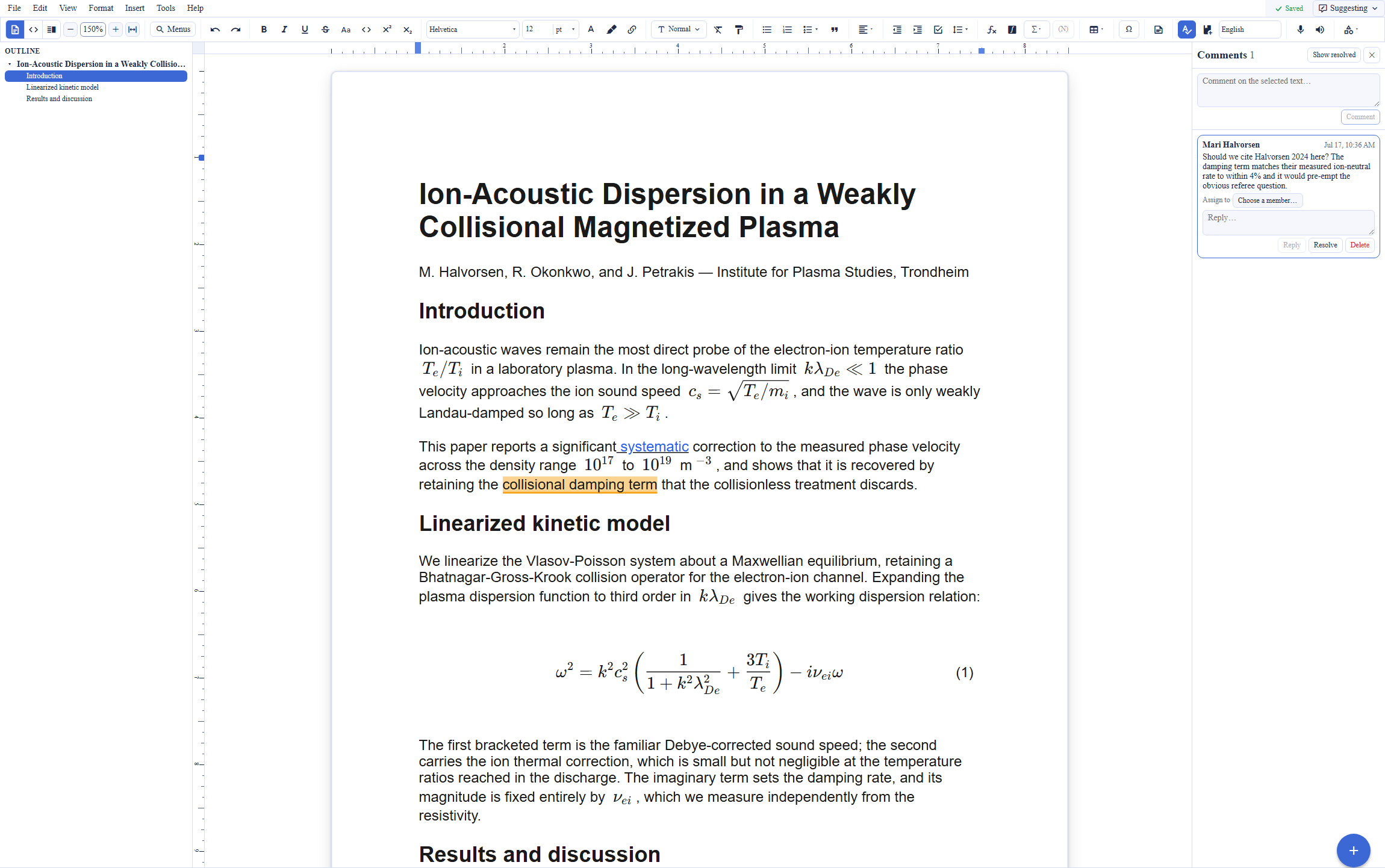
The clearest structural difference between the two editors is how each handles mathematics. Microsoft Word is a word processor first: its equation editor accepts a LaTeX-style input syntax and a Unicode math syntax through a toolbar and an insert dialog, and it typesets equations cleanly, but the document itself is stored as .docx and the mathematics is an equation object placed on the page. Backbuild Docs stores the document in a native LaTeX format and renders the mathematics live as it is typed, with a visual equation builder and a symbol palette, and the LaTeX source is one menu away. For a memo or a report the two feel similar; for a document dense with equations, the native LaTeX surface is the reason a technical author would choose Backbuild Docs, and it exports submission-ready LaTeX for a build pipeline when one is needed.
Where Microsoft Word leads today
Microsoft Word is a deep, mature, and near-universally adopted product, and several of its strengths are real advantages that a technical author should weigh honestly. Its track changes and compare workflow is the most polished in the category after decades of refinement, its built-in citation and bibliography manager covers a wide set of styles including APA, MLA, Chicago, IEEE, and ISO 690, and its VBA macro language is a full programming environment inside the document rather than a record-and-replay recorder. It carries a very large template ecosystem through Microsoft Create, a mature desktop engine that stays responsive on very large documents, mature iOS and Android apps, a deeper Accessibility Checker with AI recommendations and the Immersive Reader, native offline on the desktop, and the Microsoft 365 and Copilot ecosystem. Its .docx format is the universal interchange standard for word processing. Teams whose priority is the deepest, most familiar word processor with the mature review and citation stack have a concrete reason to stay with Microsoft Word.
Mail merge, macros, and voice typing: what carries over
A common assumption is that a newer editor drops the everyday productivity features a Word user relies on. Backbuild Docs keeps the built-in ones. It offers mail merge that inserts merge fields and generates documents from a data source, macro recording and replay, and voice typing and voice commands through the browser speech recognition, each built for parity with the equivalent Microsoft Word and LibreOffice features. The honest difference is depth in one place: Microsoft Word adds VBA, a full macro programming language embedded in the document, where Backbuild Docs stops at record and replay. On the Backbuild side, programmable automation moves to the platform instead of the document: the Model Context Protocol tool surface, the Tool Builder, and the public REST API let an agent or a script drive documents end to end. The structured-diagram feature also carries over: Backbuild Docs includes an in-document diagram picker with process, hierarchy, cycle, and grid layouts, against the larger SmartArt library in Word.
AI assistance: Copilot and agent-driven authoring
Both editors put AI in the writing surface. Copilot in Microsoft Word drafts, rewrites, summarizes, and can manage comment threads and turn on track changes, running on Microsoft bundled models and metered by plan or sold as an add-on. Backbuild differs in two structural ways. First, the model is the customer's choice: link your own AI provider keys, or run on Backbuild usage credits, so inference runs under your own provider agreement at your own rates, and the content is not used for training. Second, the AI is not confined to in-editor assists. Backbuild exposes its document tools over the Model Context Protocol, so an agent can create a document, write and revise the content section by section, read the result back, manage versions, and export the finished document, end to end. One prompt to a connected AI tool can produce a complete draft in Backbuild Docs, and the same tool surface is available to automations and agent workflows and through the public REST API. Microsoft Word is drivable through the Microsoft Graph API; the difference is that a Backbuild document is one surface on a platform an agent can drive end to end rather than a single product reached through a suite-wide API.
Machine-checked proofs inside the document
For theorem-dense writing, Backbuild Docs connects to a capability a word processor does not offer: formal verification of the mathematics in the document. Proof blocks sit in the document, and each block carries an obligation checked by a small higher-order-logic kernel; a result is either established from the foundational axioms or it is not. Theorem environments across a whole document can be walked and checked together, a verified result can be referenced from the prose so the claim and its machine-checked certificate travel together, and an optional cross-check replays a verified result through Lean 4, an independent proof assistant, so two unrelated kernels must both accept it. Either of two standalone products unlocks this proof surface in Backbuild Docs: Backbuild Science, which is available now and free for current students and faculty with a valid academic ID, or Backbuild Prove, available for pre-order with plans from $10 per seat per month billed yearly; on Prove, the Lean 4 cross-check sits on the Business and Enterprise plans, while Backbuild Science includes it. Microsoft Word typesets a proof exactly as written and takes no position on whether it is correct.
Which tool wins, by use case
Business and office documents
For everyday letters, proposals, reports, and contracts, Microsoft Word is the deep default: its track changes and compare workflow, citation manager, and mail merge are mature and familiar to nearly everyone a team hires, and .docx is the format the rest of the business world sends and expects. Backbuild Docs matches the core loop, with real-time co-authoring, comments, tracked changes, and full history free, and its own mail merge and macro recording, and it adds two things a business often values: AI under the company's own provider agreement with no training on content, and single sign-on and a tamper-evident audit log on every plan rather than on the Microsoft Entra and Purview tiers. A team standardized on .docx interchange, deep review, and the citation manager will find Microsoft Word the safer default; a team that wants governed AI and identity controls without an enterprise upgrade will find Backbuild Docs the better fit.
Mathematical and technical writing
For papers, theses, and technical documents dense with mathematics, the native format decides. Microsoft Word stores documents as .docx and treats mathematics as equation objects entered through a toolbar with a LaTeX-style or Unicode syntax, which typesets well but is not a LaTeX manuscript. Backbuild Docs stores the document in native LaTeX, renders math live as you type, and offers a visual equation builder, and for theorem-dense work it adds machine-checked proof blocks with Backbuild Science or Backbuild Prove, which no word processor offers at any tier. Students and faculty get the proof surface free through Backbuild Science. The one point that cuts the other way is reach: a co-author or committee member who lives in Microsoft Word and does not need LaTeX will be more comfortable receiving a .docx.
Academic writing with citations and references
For a dissertation, a journal article, or a literature review, two things dominate: the mathematics and the reference workflow. On mathematics Backbuild Docs leads clearly with native LaTeX and live math, and it exports the submission-ready LaTeX a journal or arXiv expects. On references the balance is the other way today: Microsoft Word ships a mature built-in citation manager with APA, MLA, Chicago, IEEE, and ISO 690, while Backbuild is rolling out its reference library with BibTeX import, DOI lookup, and APA, MLA, and Chicago styles per organization, and it does not connect to Mendeley. A thesis writer who needs a fully mature reference manager today, with a broad style set, should weigh Microsoft Word or a dedicated LaTeX toolchain; a writer whose priority is native mathematics and machine-checked results will prefer Backbuild Docs and manage references in the rolling-out library or an external tool.
Standardizing a team on one workspace
For a team choosing one suite, the evaluation comes down to what is included and what is gated. Backbuild Docs is free for the whole team with single sign-on, role-based access, and a tamper-evident audit log on every plan including Free, and SCIM user provisioning, and the surrounding workspace adds surfaces the Microsoft 365 suite does not carry in a business subscription: double-entry Finances, a secrets vault, a helpdesk, Remote Desktop, and Virtual Workers. Microsoft 365 is a mature, deeply integrated suite in its own right, with Word, Excel, PowerPoint, Outlook, Teams, and OneDrive, the installed desktop apps, mature mobile apps, and large bulk storage, though its single sign-on, admin, and audit controls sit on the paid Microsoft Entra and Purview estate. A team that already runs on .docx, Excel, and Teams will keep Microsoft 365 in the loop; the question is which tool is the default surface the group writes in every day.
Escaping the subscription for everyday writing
For an individual or a small team that writes letters, essays, and simple documents, the deciding factor is often cost and lock-in. Microsoft Word is free on the web, and the full installed desktop app requires a Microsoft 365 subscription or a one-time Office purchase. Backbuild Docs is free on every plan for up to 50 people, runs in the browser with Windows and macOS desktop apps, and imports and exports Word .docx so existing files open and finished work goes back out. What Microsoft Word still holds here is the installed desktop performance, native offline maturity, the mobile apps, and the certainty that a .docx opens identically for the recipient. For plain writing without heavy formatting, either free tier does the job.
The daily writing experience for a knowledge worker
An author evaluating these tools spends the evaluation on four things: the editing loop, the mathematics, the review workflow, and what happens to their data. On the editing loop both are WYSIWYG word processors with deep formatting; Microsoft Word has the more polished and familiar surface after decades of refinement, and Backbuild Docs adds an editable LaTeX source and split view for authors who want the markup underneath. On mathematics the gap is real: Microsoft Word typesets equations through a toolbar and stores them in a .docx, while Backbuild Docs stores native LaTeX and renders math live with a visual equation builder. For a document without mathematics the two feel similar; for one with it, they diverge sharply.
On review, Microsoft Word leads on maturity: its track changes, compare, and combine tools are the most refined in the category, while Backbuild Docs offers tracked changes, comments, and full history free, with deletion marking still maturing. On data, the architectures differ: Microsoft runs Copilot on its bundled models, while Backbuild runs AI on the author's own provider with no training on content. The bottom line for a working author: Microsoft Word gives the most polished and universally compatible editing and review surface, and Backbuild Docs gives native mathematics and AI under the author's own agreement; which dominates depends on whether the writing is math-heavy and how much the data governance matters.
Rolling it out across a team
The person who standardizes a group on a tool answers for onboarding, seats, and roster churn. On seats, the arithmetic is short: Backbuild's free plan covers up to 50 team members with collaboration features included, while the installed Microsoft Word desktop app comes with a Microsoft 365 subscription from about 7 US dollars per user per month for the business plans most teams adopt it for. On onboarding, both are familiar; Backbuild Docs additionally imports the Word .docx and Markdown documents a new member arrives with, and desktop apps for Windows and macOS cover members who prefer an installed client, though Microsoft Word has the more mature native mobile apps and the broader installed base.
On churn, the questions are access and continuity. Backbuild handles both structurally: document shares are scoped to a person, role, group, department, project, or the organization, so a departing member's access ends with their membership rather than by hunting down per-document invitations, and every grant and revocation lands in the audit log on every plan. Microsoft centralizes the same management in the Microsoft 365 admin center and the Microsoft Entra and Purview estate on its paid tiers. A team deeply invested in .docx, Excel, and Teams will keep Microsoft in the loop regardless; the rollout question is which tool is the default surface the group writes in every day.
Security, identity, and data governance evaluation
An IT or security review of a document platform turns on identity, access control, auditability, and where the AI inference runs. On identity, Backbuild ships single sign-on on every plan including Free and SCIM 2.0 user provisioning with per-organization bearer tokens; Microsoft offers single sign-on and directory provisioning through Microsoft Entra on its paid plans. On access control, Backbuild's model is organization-wide: roles and permissions govern every surface, and document sharing carries four capability levels across audience scopes from a single person to the whole organization, including grants to a named outside organization, a policy ceiling no grant can exceed, and an audit record for every grant and revocation; Microsoft Word shares run through OneDrive and SharePoint permissions with admin, audit, and compliance controls on the higher Microsoft 365 tiers.
On data and AI governance the architectures differ. Microsoft runs Copilot on its bundled models under its enterprise data commitments; Backbuild lets the organization bring its own AI provider and keys so document content flows to a model under the organization's own agreement and is not used for training, and the workspace includes a zero-knowledge, post-quantum secrets vault. In the other direction, Microsoft's advantage is scale and certification: it operates one of the most audited infrastructures in the industry, with the Microsoft Entra and Purview estate and a broad set of published compliance attestations, whereas Backbuild does not present the same breadth of third-party audit certificates today. A team whose priorities are granular access control, provisioning and audit on every plan, and AI under its own agreement will find Backbuild the stronger posture on those axes; a team that requires the scale, the enterprise identity estate, and the published certifications of Microsoft has a concrete reason to stay.
The economics for a finance and procurement review
The cost comparison has three components: the editor seats, the features that force upgrades, and the adjacent subscriptions the choice displaces. On seats, Backbuild Docs is free on every plan, with the workspace's paid tiers at $19, $49, and $149 per seat per month for teams that want the wider platform; the full Microsoft Word desktop app comes with a Microsoft 365 subscription, with Business Basic starting around 7 US dollars per user per month and the higher plans adding the installed apps and admin controls. On upgrade pressure, the items that push a Microsoft team to a higher plan are the installed desktop apps, single sign-on, audit, and the Copilot allowance; single sign-on, audit, and role-based access are free on every Backbuild plan.
On displacement, the subscriptions worth counting sit next to the editor: Backbuild's same subscription includes email at the organization's own domain, a full calendar, double-entry accounting with invoicing, a secrets manager, and a helpdesk, line items a Microsoft team otherwise buys separately since Microsoft 365 does not include accounting, a secrets vault, or a helpdesk in a standard subscription. AI cost is structural rather than a line item: Microsoft meters Copilot by plan or sells it as a per-user add-on, while Backbuild passes AI through at the customer's own provider rates or usage credits, which procurement can price directly against its existing AI vendor agreement. Microsoft's countervailing advantage is that many organizations already pay for Microsoft 365, so the marginal cost of using Microsoft Word is effectively zero for them, and it offers a perpetual one-time Office purchase for teams that reject subscriptions.
Strategic fit and vendor considerations
The strategic question is what each product is positioned to be. Microsoft Word is a mature, near-universal word processor inside a deeply integrated suite: the default document editor for a large share of the world, with the Microsoft Create template ecosystem, Copilot AI, mature mobile apps, and the .docx format as the interchange standard that anchor its longevity. Backbuild is a workspace platform in Early Adopter Alpha whose document editor is one surface among Backbuild Mail, Chat, Meetings, Calendar, Contacts, Docs, Sheets, Slides, Diagrams, and Photos, the photo, video, training video, audio, and music editors, Files, Backbuild Finances, and the helpdesk, with Backbuild Prove and Backbuild Science extending the editor toward machine-checked science and a public REST API plus an MCP tool surface positioning every document as programmable infrastructure.
Lock-in risk runs in both directions and is answerable in both. Microsoft Word stores in .docx, the universal word-processing format, so the content is portable and every recipient can open it, though the Copilot allowance, the templates, and the admin estate are tied to the Microsoft account. Backbuild's native format is LaTeX, and every document exports to Word .docx, ODT, HTML, Markdown, RTF, EPUB, and LaTeX at any time, so neither adoption stakes the manuscript archive on the vendor, but a team that must preserve exact .docx fidelity and every Word-specific construct is better served editing in Microsoft Word directly. An organization betting on native mathematics, formal verification, agent-driven authoring, AI under its own agreement, or workspace consolidation is betting with Backbuild's roadmap, parts of which are marked Soon or available for pre-order rather than shipped; an organization whose priority is the deepest, most compatible, most widely adopted word processor with the mature review and citation stack is squarely in Microsoft Word's center of gravity.
Frequently asked questions
Is there a free alternative to Microsoft Word?
Yes. Backbuild Docs is a WYSIWYG word processor in the free Backbuild workspace, for teams of up to 50, with real-time co-authoring, comments, tracked changes, version history, mail merge, and offline editing included on the free plan. Microsoft also offers Word for the web free with a Microsoft account, though the free web version has a reduced feature set compared with the installed desktop app that a paid Microsoft 365 subscription provides.
Is Backbuild Docs cheaper than Microsoft Word?
Backbuild Docs is free on every Backbuild plan, and the wider Backbuild workspace is optional at 19, 49, or 149 US dollars per seat per month. Microsoft Word is free on the web, and the installed desktop app comes with a Microsoft 365 subscription: Microsoft 365 Personal is 9.99 US dollars per month or 99.99 per year, and Microsoft 365 Business Basic starts around 7 US dollars per user per month, with Word on the web and the desktop apps on the higher business plans.
Does Microsoft Word support LaTeX?
Microsoft Word does not use LaTeX as its format. Its equation editor accepts a LaTeX-style input syntax and a Unicode math syntax through a toolbar and dialog, and it typesets equations well, but the document itself is stored as .docx rather than LaTeX. Backbuild Docs stores documents in a native LaTeX format, renders math live as you type, offers a visual equation builder and a symbol palette, and exports submission-ready LaTeX.
What does Microsoft Word do that Backbuild Docs does not?
Microsoft Word leads on several dimensions. Its built-in citation and bibliography manager supports many styles including APA, MLA, Chicago, IEEE, and ISO 690, where Backbuild is rolling out its reference library per organization. Word carries a very large template ecosystem, a mature desktop engine that handles very large documents, mature iOS and Android apps in the stores, a deeper Accessibility Checker with AI recommendations and the Immersive Reader, native offline on the desktop, VBA as a full macro programming language, the universal .docx format, and the Microsoft 365 and Copilot ecosystem. Backbuild Docs concedes these plainly, while noting that it does ship its own accessibility checker and read-aloud.
What does Backbuild Docs do that Microsoft Word does not?
Backbuild Docs stores documents in native LaTeX with live math and a visual equation builder, runs its AI on your own provider keys with no training on your content, drafts whole documents through an MCP tool surface and the public REST API, and adds machine-checked proof blocks with Backbuild Science or Backbuild Prove. It ships single sign-on, SCIM, role-based access, and a tamper-evident audit log on every plan including Free where Microsoft gates the equivalents to paid Microsoft 365 and the Entra and Purview estate, and it lives in one workspace alongside Backbuild Mail, Calendar, Contacts, Sheets, Slides, Photos, Files, double-entry Finances, a helpdesk, and a post-quantum secrets vault.
Does Backbuild Docs have mail merge and macros like Microsoft Word?
Yes, at the level of the built-in features. Backbuild Docs offers mail merge from a data source, macro recording and replay, and voice typing, each built for parity with the equivalent Word and LibreOffice features. Microsoft Word goes deeper on automation with VBA, a full macro programming language that Backbuild Docs does not include in the document; on the Backbuild platform, programmable automation is instead available through the Model Context Protocol tool surface, the Tool Builder, and the public REST API.
Can Backbuild Docs open and save Word documents?
Yes. Backbuild Docs imports Microsoft Word .docx files along with ODT, RTF, HTML, and Markdown, and exports to Word .docx, ODT, HTML, Markdown, RTF, EPUB, plain text, and LaTeX. Because the native stored format is LaTeX rather than .docx, a round trip through Backbuild Docs is a conversion rather than an edit of the original .docx, so teams that must preserve exact .docx fidelity and every Word-specific construct are better served editing in Microsoft Word.
Try Backbuild Docs free
Real-time co-authoring, comments, tracked changes, version history, mail merge, macros, native LaTeX with live math, offline editing, and an AI assistant on your own keys, free on every plan. If your team depends on the deepest formatting, the mature citation manager, exact .docx fidelity, or the Microsoft 365 estate, keep Microsoft Word for that; for native mathematics, governed AI, and machine-checked proofs, write in Backbuild Docs.
Get started with Backbuild Docs